
Maven多模块开发SpringBoot项目自定义第三方依赖版本
参考:官方文档 - Build System of Maven
https://blog.didispace.com/books/spring-boot-reference/IX. ‘How-to’ guides/80.3 Customize dependency versions.html
对于 SpringBoot 使用 Maven 构建项目做依赖管理大致分下面两种情况,一种是以 spring-boot-starter-parent 作为父模块,属于默认的方式;另一种是不用 Parent POM 来构建项目,本文着重介绍第二种方式来修改依赖版本的方法。
spring-boot-starter-parent 分析
<!-- Inherit defaults from Spring Boot -->

<parent>

    <groupId>org.springframework.boot</groupId>

    <artifactId>spring-boot-starter-parent</artifactId>

    <version>2.2.5.RELEASE</version>

</parent>
- 进入
spring-boot-starter-parent,可以看到 spring-boot-dependencies 做父依赖管理;
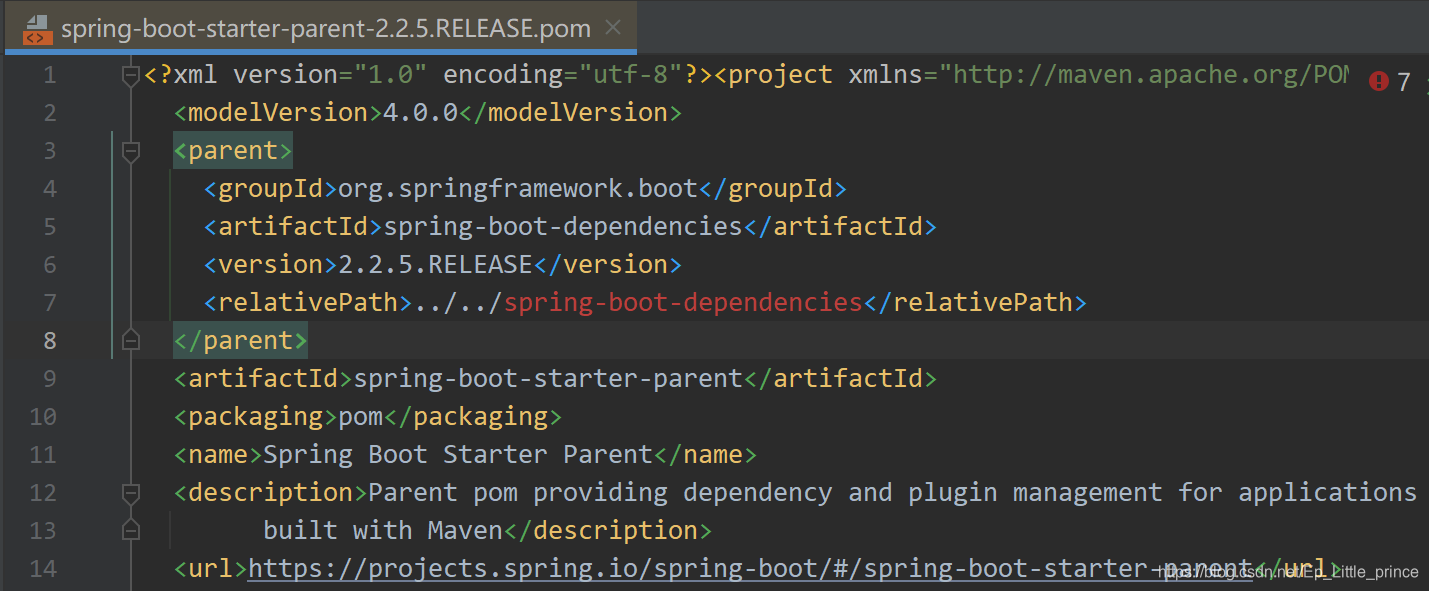
- 进入
spring-boot-dependencies, 这里有 SpringBoot 以及常用第三方依赖的版本信息,默认引入其他依赖会使用这里的版本定义。
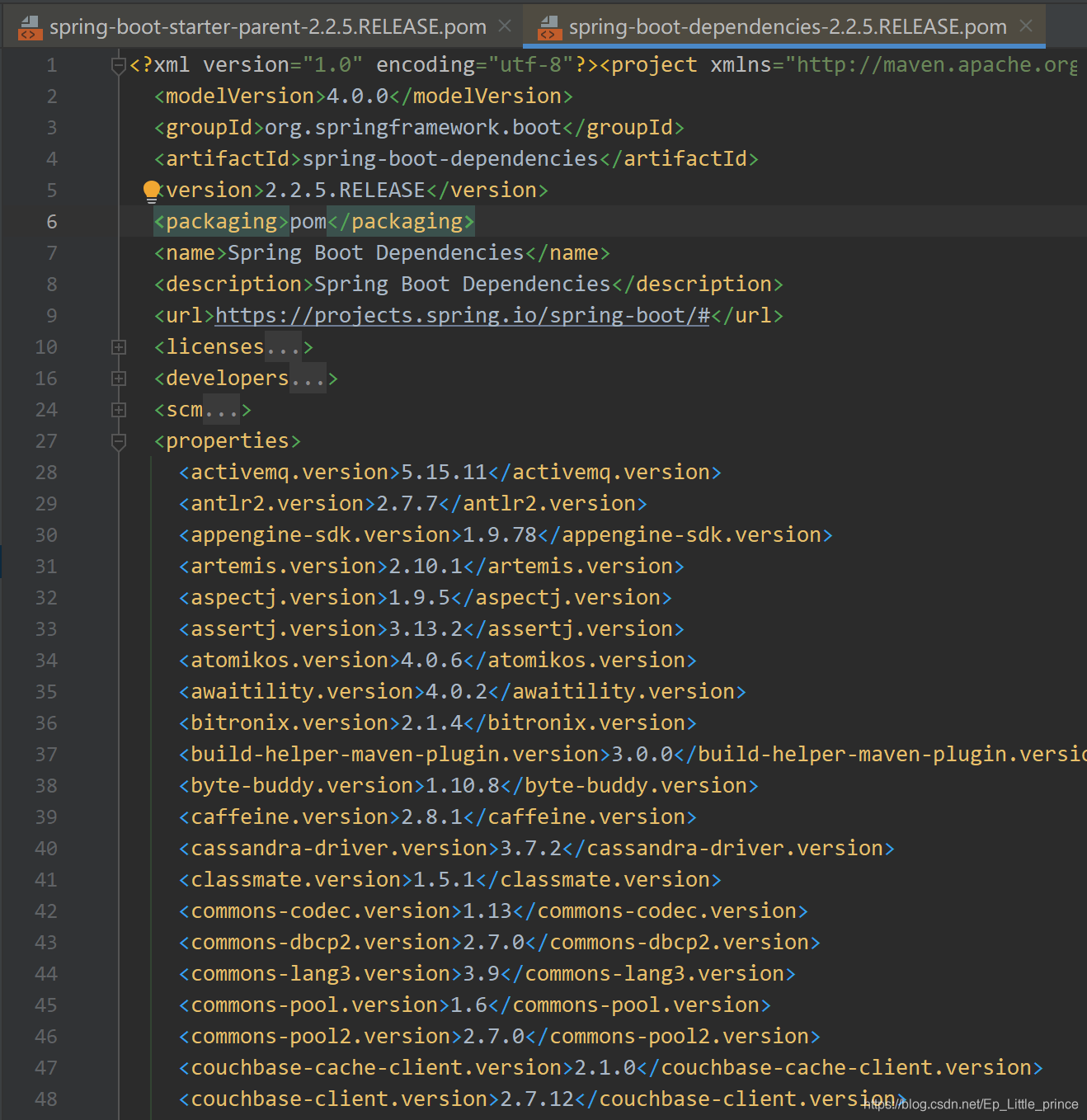
第三方依赖版本修改
现在我们可以看到 spring-boot-dependencies 中定义了很多第三方依赖有版本,下面介绍如何修改这些版本。
- 注意:每个Spring Boot发布都是基于一些特定的第三方依赖集进行设计和测试的,覆盖版本可能导致兼容性问题。
- Gradle中为了覆盖依赖版本,你需要指定如下所示的version:ext['slf4j.version'] = '1.7.5'
1. 继承自 spring-boot-dependencies
也就是说在pom 定义时的父模块必须直接或间接继承自 spring-boot-dependencies
如 pom.xml 定义了:(当前版本的Elasticsearch版本为6.8.6)
	<parent>

	    <groupId>org.springframework.boot</groupId>

	    <artifactId>spring-boot-starter-parent</artifactId>

	    <version>2.2.5.RELEASE</version>

	</parent>
当我们需要修改版本信息时,只需要在 pom 文件中重写 properties 属性
	<properties>

	    <elasticsearch.version>7.4.2</elasticsearch.version>

	</properties>
注意:
- 这里
<properties>这种定义属性名要和spring-boot-dependencies中属性名一样。 - 这里是 Maven 项目继承(直接或间接)自
spring-boot-starter-dependencies才有效。
2. dependencyManagement 引用 spring-boot-dependencies
也就是说,项目中使用了 <scope>import</scope>,将 spring-boot-dependencies 添加到自己的 dependencyManagement 片段。
如 pom.xml 定义了:
<dependencyManagement>

	<dependencies>

		<dependency>

		   <groupId>org.springframework.boot</groupId>

		   <artifactId>spring-boot-dependencies</artifactId>

		   <version>${spring.boot.version}</version>

		   <type>pom</type>

		   <scope>import</scope>

		</dependency>

	</dependencies>

</dependencyManagement>
这种情况下修改版本,则需要在 pom 文件中重新定义要修改版本依赖的 artifact 而不是覆盖属性版本信息。
<dependency>

	<groupId>org.elasticsearch</groupId>

	<artifactId>elasticsearch</artifactId>

	<version>${elasticsearch.version}</version>

</dependency>

<dependency>

	<groupId>org.elasticsearch.client</groupId>

	<artifactId>elasticsearch-rest-client</artifactId>

	<version>${elasticsearch.version}</version>

</dependency>
问题来源:尚硅谷-谷粒商城 Elasticsearch 项目文档
spring-boot-starter-parent 补充
参考官方文档 :
Maven users can inherit from the spring-boot-starter-parent project to
obtain sensible defaults. The parent project provides the following
features:
Java 1.8 as the default compiler level.
UTF-8 source encoding.
A Dependency Management section, inherited from the
spring-boot-dependencies pom, that manages the versions of common
dependencies. This dependency management lets you omit tags
for those dependencies when used in your own pom.An execution of the repackage goal with a repackage execution id.
Sensible resource filtering.
Sensible plugin configuration (exec plugin, Git commit ID, and shade).
Sensible resource filtering for application.properties and
application.yml including profile-specific files (for example,
application-dev.properties and application-dev.yml)Note that, since the application.properties and application.yml files
accept Spring style placeholders (${…}), the Maven filtering is
changed to use @..@ placeholders. (You can override that by setting a
Maven property called resource.delimiter.)最后一段例子:Maven filtering 使用
spring-boot-starter-parent 默认使用 jdk 1.8、UTF-8 编码和一些依赖的版本控制,所以在项目中的 dependencyManagement 中不要重复引用 已有的依赖,否则会导致子模块不能继承父模块依赖的情况出现。
Maven多模块开发SpringBoot项目自定义第三方依赖版本的更多相关文章
- Spring Boot 的Maven多模块开发web项目使用外部容器进行部署
Spring Boot中自带有Tomcat容器,因此Spring Boot项目只需要运行main函数,就可以运行,但是以往的web项目,我们习惯于使用自己安装的Tomcat运行或者使用Tomcat.J ...
- spring+springmvc+hibernate架构、maven分模块开发样例小项目案例
maven分模块开发样例小项目案例 spring+springmvc+hibernate架构 以用户管理做測试,分dao,sevices,web层,分模块开发測试!因时间关系.仅仅測查询成功.其它的准 ...
- 如何构建多模块的SpringBoot项目
通过阅读本文你将了解到:如何将已有SpringBoot项目改成多模块 & 如何新构建多模块SpringBoot项目 以下示例基于我正在使用的order(订单服务)进行演示,无论你用的是什么项目 ...
- Kotlin开发springboot项目(三)
Kotlin开发springboot项目(三) 在线工具 https://www.sojson.com IDEA中Kotlin生成可执行文件1,项目使用Gradle构建2,在model的build.g ...
- Kotlin开发springboot项目(二)
Kotlin开发springboot项目(二) 中文学习网站: https://www.kotlincn.net/ 研究一下kotlin的demo: https://github.com/JetBra ...
- Kotlin开发springboot项目(一)
Kotlin开发springboot项目(一) Kotlin语言与Xtend语言有很多相似之处 为什么会存在这么多JVM语言? 现存的语言提供了太过受限制的功能,要不就是功能太过繁杂,导致语言的臃肿和 ...
- 分享vs低版本开发的项目到VS高版本时遇到的4个小问题解决之记录
分享vs低版本开发的项目到VS高版本时遇到的4个小问题解决之记录 原文首发: http://anforen.com/wp/2017/08/extensionattribute_compilerserv ...
- SpringBoot01 InteliJ IDEA安装、Maven配置、创建SpringBoot项目、yml属性配置、多环境配置、自定义properties配置
1 IntelliJ IDEA 安装 下载地址:点击前往 注意:需要下载专业版本的,注册码在网上随便搜一个就行啦 2 MAVEN工具的安装 2.1 获取安装包 下载地址:点击前往 2.2 安装过程 到 ...
- SpringBoot01 InteliJ IDEA安装、Maven配置、创建SpringBoot项目、属性配置、多环境配置
1 InteliJ IDEA 安装 下载地址:点击前往 注意:需要下载专业版本的,注册码在网上随便搜一个就行啦 2 MAVEN工具的安装 2.1 获取安装包 下载地址:点击前往 2.2 安装过程 到官 ...
随机推荐
- NVIDIA Jarvis:一个GPU加速对话人工智能应用的框架
NVIDIA Jarvis:一个GPU加速对话人工智能应用的框架 Introducing NVIDIA Jarvis: A Framework for GPU-Accelerated Conversa ...
- Git与GitHub入门
一.git起步https://www.runoob.com/git/git-install-setup.html1.下载git(Windows)2.安装GUI(TortoiseGit)3.查看git配 ...
- 我的QT学习路线(目前)
qt基础->qt事件->qt绘图->qt文件IO->qt网络通信->qt多线程->qt数据库操作.
- 「Spring Boot架构」集成Mybatis-Plus的实例详解
MyBatis-Plus(简称 MP)是一个 MyBatis 的增强工具,在 MyBatis 的基础上只做增强不做改变,为简化开发.提高效率而生. 特性 无侵入:只做增强不做改变,引入它不会对现有工程 ...
- 【模拟8.11】星空(差分转化,状压DP,最短路)
一道很好的题,综合很多知识点. 首先复习差分: 将原来的每个点a[i]转化为b[i]=a[i]^a[i+1],(如果是求和形式就是b[i]=a[i+1]-a[i]) 我们发现这样的方便在于我 ...
- JAVA并行程序基础一
JAVA并行程序基础一 线程的状态 初始线程:线程的基本操作 1. 新建线程 新建线程只需要使用new关键字创建一个线程对象,并且用start() ,线程start()之后会执行run()方法 不要直 ...
- docker创建和使用mysql
container和image是两种不同的概念,image即指存在的镜像,container指docker运行起来后image的实例. 当使用docker kill 把某个正在运行的实例kill掉之后 ...
- 关于MySql数据库误操作数据找回的办法
先讲个事,前段时间,系统长时间不用的一个功能被开放出来了,想当然的我没有在测试平台上测试,直接操作了正式系统(的确是我不严谨),导致好多数据异常,页面展示错乱了.于是我想到的第一个就是进行备份还原.项 ...
- SVN分支的创建与使用
首先放出右键菜单点击Branch/tag... 所示位置输入想新建分支的路径 然后ok就完成了 之后就是切换分支上传代码了 点击Switch... 在里面就可以切换分支了To path
- 测试开发:推荐一款阿里最新 Python 自动化开源工具!
大家好,我是麦小米,是狂师老师全栈测开训练营中的一名学员. 如果之前做过iOS自动化的同学相信都知道,一直以来,iOS自动化的实现&执行都必须依赖 Mac 系统,其主要原因是因为需要通过 xc ...