
DevExpress GridView.CustomSummaryCalculate 实现自定义Group Summary
--首发于博客园, 转载请保留链接 博客原文
DevExpress Documentation官方地址:GridView.CustomSummaryCalculate Event
1. 概要
界面上 GridView 显示的数据里某些字段在读出来的时候已经 SUM By FieldA ,在界面上统计时就不能简单累计总和,条件是 FieldA 相同不能重复相加。
2. 问题
view SalesOrderLineList 中,RealTimeStockTotalQuantity 与 RealTimeProductionTotalQuantity 分别是每个 ItemID 的总库存量 与 正在生产的总量
那么在 SalesOrderLineList 的 GridControl 中
(1) 当 Group By Item 时, Group Footer 只须取其中一行
(2) Grid Footer 中,应该是所有 ItemID 对应的 库存量总和
(3) 当 Group By 不是 Item 时,Group Footer 可不显示
一般来说,页脚统计多为 Sum, Count, Average 这样的 SummaryType, 用于直接在 GridColumn SummaryItem.SummaryType 选择相应的选择,无须特殊处理。
对于 RealTimeStockTotalQuantity 与 RealTimeProductionTotalQuantity 这样特殊的统计字段只能在代码实现计算逻辑。
3. 效果图
如下:
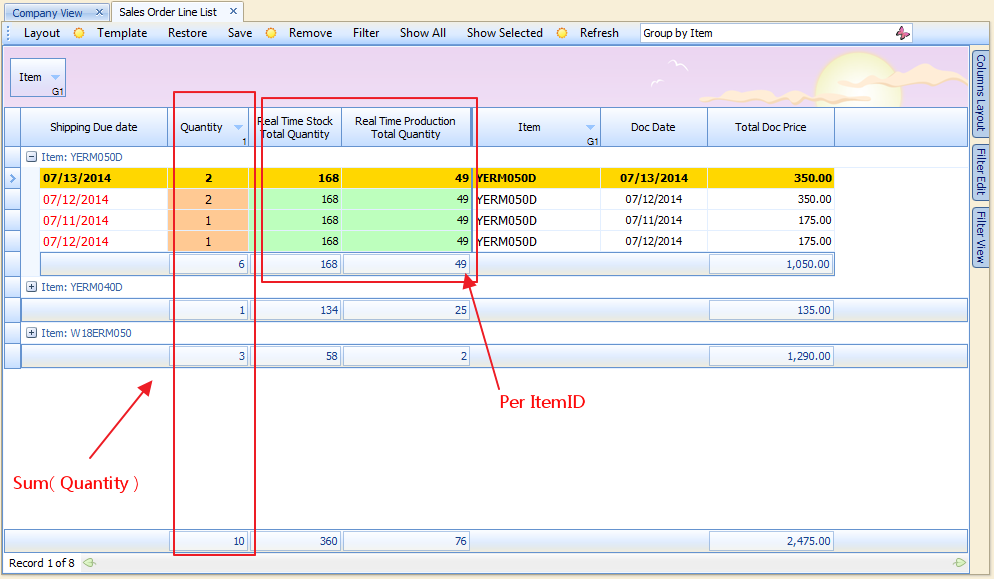
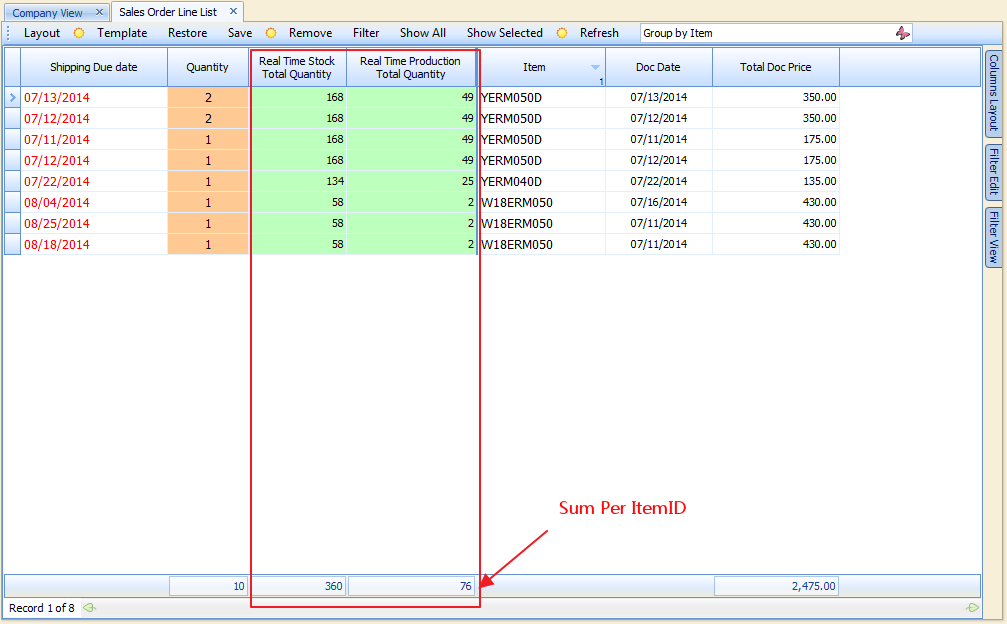

4. 思路
把 ItemID 相关的统计字段保存到本地的 Dictionary 里面,key 为 ItemID, value 为 相关字段数据,
然后在 GridView.CustomSummaryCalculate 事件中取累计值 赋给 TotalSummary,取对应 ItemID 的值赋给 GroupSummary 。
由于字段较多(实际中不止2个统计字段),定义一个类 ItemSummaryInfo,如下:
private class ItemSummaryInfo

{

    public int ItemID { get; set; }


    public int RealTimeProductionTotalQuantity { get; set; }

    public int RealTimeStockTotalQuantity { get; set; }


    public decimal RealTimeProductionTotalWeight { get; set; }

    public decimal RealTimeStockTotalWeight { get; set; }

    public int RTProductionInProcessQuantity { get; set; }

    public int RTProductionActiveQuantity { get; set; }

    public int RTProductionPParcelsQuantity { get; set; }


    public object this[string propertyName]

    {

        get { return Prop(propertyName).GetValue(this, null); }

        set { Prop(propertyName).SetValue(this, value, null); }

    }


    System.Reflection.PropertyInfo Prop(string propertyName)

    {

        return this.GetType().GetProperty(propertyName);

    }

}
5. 实现过程
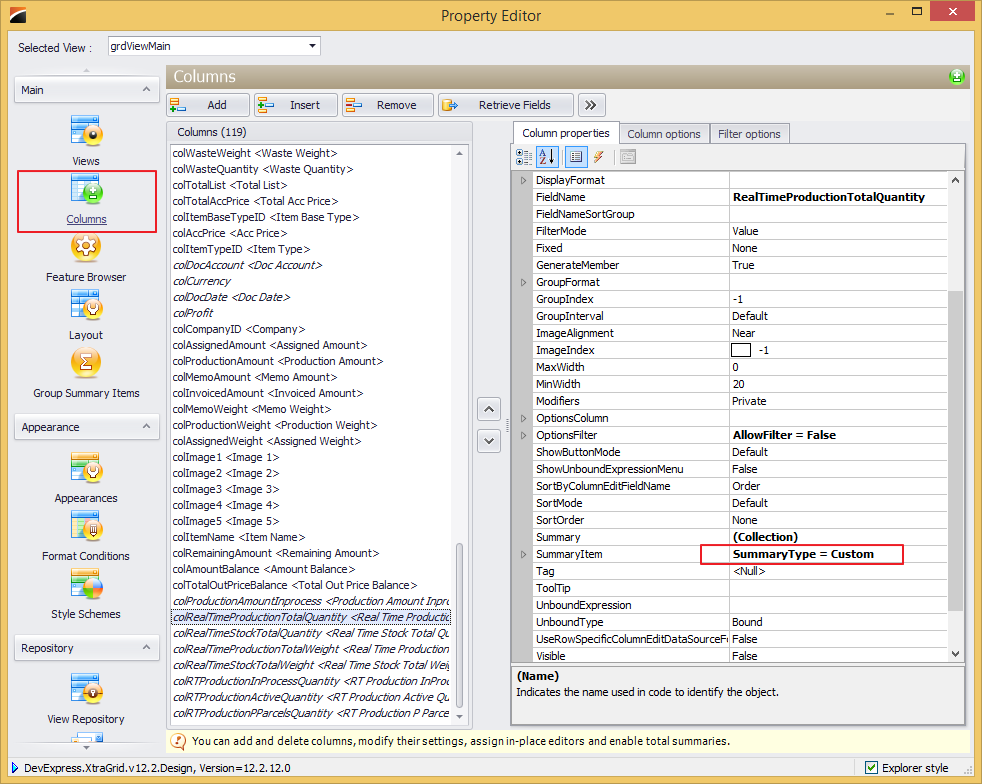
5.1 GridView 中添加 字段 RealTimeProductionTotalQuantity , RealTimeStockTotalQuantity
字段属性 SummaryItem.SummaryType = Custome,否则 Grid 页脚无法显示
5.2 在 GridView 的 Group Summary Items 里添加 相关的 Group Summary
主要 ShowInGroupColumnFooter 是 Step 1 中添加的对应字段, SummaryType 仍为 Custom

5.3 GridView.DataSourceChanged 之类的事件里提取最新据保存到本地变量 _itemSums
void SalesOrderLineListManager_DataSourceChanged(object sender, EventArgs e)

{

    RetreiveItemSummary();

}

private void RetreiveItemSummary()

{

    var gridvisibleColumnNames =

        from GridColumn column in grdViewMain.Columns

        where column.UnboundType == DevExpress.Data.UnboundColumnType.Bound && column.Visible

        select column.FieldName;

    // 隐藏字段不作处理,只处理显示字段

    processNeededGroupFields = groupByItemFields.Intersect(gridvisibleColumnNames).ToArray();

    _itemSums = new Dictionary<int, ItemSummaryInfo>();

    DataTable dt = Manager.DataSource as DataTable;

    if (dt == null)

        return;

    #region retreive Item Group fields

    var groupByItem =

        from row in dt.AsEnumerable()

        group row by new { Item = row["ItemID"] } into grp

        select new

        {

            ItemID = (int)grp.Key.Item,

            Rows = grp

        };

    foreach (var item in groupByItem)

    {

        if (_itemSums.ContainsKey(item.ItemID))

            continue;

        ItemSummaryInfo newItem = new ItemSummaryInfo() { ItemID = item.ItemID };

        // 保存到 Dictionary<int, ItemSummaryInfo>

        foreach (var groupfield in processNeededGroupFields)

        {

            if (groupByItemWeightFields.Contains(groupfield))

                newItem[groupfield] = (decimal)item.Rows.First()[groupfield];

            else

                newItem[groupfield] = (int)item.Rows.First()[groupfield];

        }

        _itemSums.Add(item.ItemID, newItem);

    }

    #endregion

    grdViewMain.RefreshData();

}
5.4 添加 GridView.CustomSummaryCalculate 事件,在 CustomSummaryProcess.Finalize 中显示相关数据
void grdViewMain_CustomSummaryCalculate(object sender, DevExpress.Data.CustomSummaryEventArgs e)

{

    if (IDEHelper.DesignTime)

        return;

    GridView view = sender as GridView;

    string fieldName = (e.Item as GridSummaryItem).FieldName;

    int rowHandle = e.RowHandle;

    if (processNeededGroupFields == null || !processNeededGroupFields.Contains(fieldName) || rowHandle < )

        return;

    ResetItemGroupSummary();

    int itemId = ;

    switch (e.SummaryProcess)

    {

        case CustomSummaryProcess.Start:

            break;

        case CustomSummaryProcess.Calculate:

            break;

        case CustomSummaryProcess.Finalize:

            if (e.IsTotalSummary)

            {

                if (groupByItemWeightFields.Contains(fieldName ))

                {

                    e.TotalValue = _itemSums.Sum(x => (decimal)x.Value[fieldName]);

                }

                else

                {

                    e.TotalValue = _itemSums.Sum(x => (int)x.Value[fieldName]);

                }

            }

            else if (e.IsGroupSummary)

            {

                if (isGroupByItemOnly)

                {

                    object id = view.GetRowCellValue(e.RowHandle, colItemID);

                    if (id == null) return;

                    itemId = (int)id;

                    if (!_itemSums.ContainsKey(itemId)) return;

                    e.TotalValue = _itemSums[itemId][fieldName];

                }

            }

            break;

        default:

            break;

    }

}

private void ResetItemGroupSummary()

{

    if (isPreviousGroupByItemOnly == isGroupByItemOnly)

        return;

    grdViewMain.GroupSummary.BeginUpdate();

    isPreviousGroupByItemOnly = isGroupByItemOnly;

    if (isGroupByItemOnly)

    {

        // add item group summary

        ItemGroupSummaryItem.ForEach(x =>

        {

            if (grdViewMain.GroupSummary.IndexOf(x) >= )

                return;

            grdViewMain.GroupSummary.Add(x);

        });

    }

    else

    {

        // remove item group summary

        ItemGroupSummaryItem.ForEach(x =>

        {

            if (grdViewMain.GroupSummary.IndexOf(x) >= )

                grdViewMain.GroupSummary.Remove(x);

        });

    }

    grdViewMain.GroupSummary.EndUpdate();

}
5. 5 补充相关变量定义
// 保存 ItemID Group 数据

private Dictionary<int, ItemSummaryInfo> _itemSums = null;

// 当前需要处理字段

string[] processNeededGroupFields = null;

// 备份前一次 Group ItemID, 用于判断是否需要移除/添加 Group SummaryID

bool isPreviousGroupByItemOnly {get;set;}

// GridView 是否 Group ItemID

bool isGroupByItemOnly { get { return grdViewMain.GroupCount ==  && grdViewMain.GroupedColumns[] == colItemID; } }

string[] groupByItemFields = new string[]{

    "RealTimeProductionTotalQuantity",

    "RealTimeStockTotalQuantity",

    "RealTimeProductionTotalWeight",

    "RealTimeStockTotalWeight",

    "RTProductionInProcessQuantity",

    "RTProductionActiveQuantity",

    "RTProductionPParcelsQuantity",

};

string[] groupByItemWeightFields = new string[] {

    "RealTimeProductionTotalWeight",

    "RealTimeStockTotalWeight",

};

List<GridGroupSummaryItem> _itemGroupSummaryItems = null;

// 要处理的 Group Summary Item ,用于格式化以及GridView 添加/移除 的访问

public List<GridGroupSummaryItem> ItemGroupSummaryItem

{

    get

    {

        if (_itemGroupSummaryItems == null)

        {

            _itemGroupSummaryItems = new List<GridGroupSummaryItem>();

            foreach (GridGroupSummaryItem summaryItem in grdViewMain.GroupSummary)

            {

                if (!groupByItemFields.Contains(summaryItem.FieldName))

                    continue;

                // synchronize displayformat

                summaryItem.DisplayFormat = summaryItem.ShowInGroupColumnFooter.DisplayFormat.GetFormatString();

                _itemGroupSummaryItems.Add(summaryItem);

            }

        }

        return _itemGroupSummaryItems;

    }

    set { _itemGroupSummaryItems = value; }

}
6. 总结
(1) 每次数据源发生变化时必须重新取值,否则显示的数据有可能不准确
(2) 当 GroupBy 发生变化时,需要 移除/添加 GroupSummaryItem, 假设 GroupBy ItemID 不成立而没有移除GroupSummaryItem,那么 GroupFooter 会显示一个空白方框,影响美观
(3) ItemSummaryInfo 类中属性 this[string propertyName] 根据属性名访问属性,避免逐个属性 Get / Set, 实现了简化代码
(4) 开始时在 CustomSummaryCalculate 事件中更新本地数据,CustomSummaryProcess.Start 时清空数据,CustomSummaryProcess.Calculate 时保存数据,官方文档也倾向于这种方法,但是有一个局限是每一个 Field 都会分别跑 Start, Calculate, Finalize, 当要处理的字段比较多时,特别是数据记录行较多,重复做 清除/保存 同样的数据,重复读写,效率低下,因此选择在数据源发生变化时读写一次,有利于提高效率,缺点是 数据源 限于 DataTable ,如果 是 Linq 或其他数据源类型显然是要另外处理的。
DevExpress GridView.CustomSummaryCalculate 实现自定义Group Summary的更多相关文章
- Devexpress Gridview 自定义汇总CustomSummaryCalculate(加权平均)
Devexpress Gridview 提供了简单的求和,平均等方法,复杂的汇总方法则需要自定义,使用gridview 的CustomSummaryCalculate 事件,根据官网的文档及各论坛案例 ...
- DevExpress GridView 整理(转)
DevExpress GridView 那些事儿 1:去除 GridView 头上的 "Drag a column header here to group by that column&q ...
- DevExpress GridView 那些事儿
1:去除 GridView 头上的 "Drag a column header here to group by that column" --> 点击 Run Desig ...
- DevExpress GridView 整理
1:去除 GridView 头上的 "Drag a column header here to group by that column" --> 点击 Run Desig ...
- DevExpress gridview下拉框的再次研究
原文:DevExpress gridview下拉框的再次研究 前几天写了一篇关于研究DevExpress gridview下拉框的随笔(DevExpress gridview下拉框repository ...
- DevExpress GridView 自定义搜索按钮改为中文内容
首先将 GridControl 控件的搜索功能显示出来. http://www.cnblogs.com/DeepLearing/p/3887601.html 显示效果如下: 可以通过 GridLoca ...
- DevExpress.XtraGrid.GridControl 实现自定义tooltip
DevExpress.XtraGrid.GridControl 控件默认的tooltip显示的每一个单元格的文本值,但是实际工作中会出现各种需求.我这里就有一个列是折扣率显示的值是0-1之间的两位小数 ...
- 关于怎样获取DevExpress GridView过滤后或排序后的数据集问题(转)
GridView用自带的过滤功能过滤数据后,想要获取过滤后的数据集,有两种方式: 一.笨办法就是循环遍历GridView,根据gridView.GetRow()或者gridView.GetDataRo ...
- DevExpress GridView自动滚动
引言 最新有一个winform项目使用的是DevExpress的控件,所以最近都在摸索使用这套控件,实在是佩服整套控件的强大,同时代码写起来也简洁.客户有一个需求,希望报表结果能在外接的大屏幕上定时滚 ...
随机推荐
- Linux中 pid_t 类型的定义.
说明:涉及到的头文件(.h),目录默认都是基于 /usr/include/ 目录. 1.在 "/sys/types.h"中,有下列内容: #include <bits/typ ...
- char * 和 void *
POSIX.1 将 read函数的原型做了修改,经典的定义为 int read(int filedes, char *buf, unsigned nbytes); 修改为 ssize_t read(i ...
- 关于华为交换机bpdu enable. ntdp enable. ndp enable解析
华为5300初始状态下每个口子都有,bpdu enable. ntdp enable. ndp enable.不是很明白什么意思,有什么样的用途. BPDU是网桥协议数据单元(Bridge Proto ...
- Ubuntu桌面版与服务器版有什么不同?
提到安装Linux,Ubuntu可谓是最受欢迎的.为了满足每个人的需求,出现了不少版本或风格的Ubuntu;其中两项便是桌面版与服务器版.只要发布版本号一致,这两者从核心来说也就是相同的,唯 ...
- HashMap的扩容机制, ConcurrentHashMap和Hashtable主要区别
源代码查看,有三个常量, static final int DEFAULT_INITIAL_CAPACITY = 16; static final int MAXIMUM_CAPACITY = 1 & ...
- JAVA classpath, 纠正我一直以来错误的认知
如何调在CLI中使用java tool(JDK中的java命令)调用一个打包在jar中的类,我想大多数人都能给出笼统的方案: java -classpath xxxxx com.test.classA ...
- redis数据结构HyperLogLog
如果我们要实现记录网站每天访问的独立IP数量这样的一个功能 集合实现: 使用集合来储存每个访客的 IP ,通过集合性质(集合中的每个元素都各不相同)来得到多个独立 IP ,然后通过调用 SCARD 命 ...
- Ubuntu 12.04更换显示器后显示“显示不支援”,只能进恢复模式工作
以前用的一台14寸液晶,换成17寸后,进入系统显示器上“显示不支援” .仔细观查,电脑硬盘自检能显示后,后面都是黑屏. 解决过程. 因为grub 启动菜单不能显示.盲按方向键,发现菜单里的其它项目可 ...
- 【学习笔记】【oc】Block
块(block):类似于定义一个匿名的函数.至于其他什么用处我就不知道了 块的定义: ^[块返回值类型](形参类型1 形参1, 形参类型2 形参2,...) { //块执行体 } 跟函数语法格式的差别 ...
- .NET MVC 插件化框架源码
本来想把源码整理了放github上,但最近一直忙,就直接在这里放出来了,还写得不太完整,里面有几个例子,插件上传也没写,只写了插件zip包解压,如果大家在使用中有什么疑问,可以加QQ群:1429391 ...