
C:\Program Files (x86)\Common Files\microsoft shared\TextTemplating\11.0
Generating Files with the TextTransform Utility
\Program Files\Common Files\Microsoft Shared\TextTemplating\11.0
C:\Program Files (x86)\Common Files\microsoft shared\TextTemplating\11.0
T4 (Text Template Transformation Toolkit) Code Generation - Best Kept Visual Studio Secret
十月 14, '08 Comments [30] Posted in ASP.NET | Programming | Tools Rob beat me to it. Blogging about T4 (the Text Template Transformation Toolkit) had been on my list literally for a year. He and I were singing its praises last night. Hopefully I can add something small to the conversation.
What's the story? Well, T4 is a code generator built right into Visual Studio. To be clear, you HAVE THIS NOW on your system…go play. Now's the time to introduce code generation to your company. If you're doing something twice or more, manually, in your company, generate it.
However, it's not deep-deep built in, because there's no item templates in File | New Item and there's no intellisense or syntax highlighting.
You don't need this, but if you want really get the most out of T4, first, head over to Clarius Consulting and get their "T4 Editor Community Edition." That'll get you some basic coloring. They have a pay version that gets you more if you want.
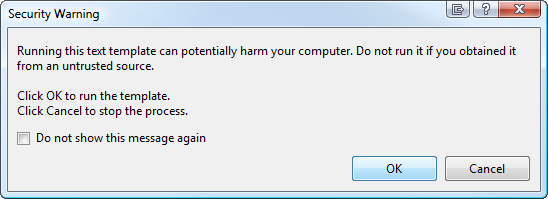
Now, go into Visual Studio and make a Console App (or any app) and add a Text File, but name it something with a .tt extension. You'll get a warning since it's a generator, that someone could generate evil. Click OK if you are cool with potential evil. ;)
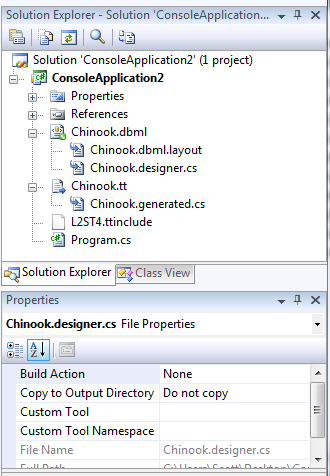
Now, look in Solution Explorer at the .tt file. If you're using C#, you'll have a sub .cs file, or if you're using VB, a sub .vb file. That's the file that will hold the result of the generation. This is the same visual metaphor used to the express the template/generated file relationship with .designer files you've seen elsewhere in Visual Studio.
If you look in the Properties for the .tt file, you'll see it's using a CustomTool listed as the "TextTemplatingFileGenerator." This custom tool extensibility point is how things like XSD and WSDL code generators hook in to generate their artifacts.
T4 can generate any kind of text file, not just code. Whatever you like. You can use it in your projects, as above, or you can call T4 from the command-line.
Aside from Kzu and the folks at Clarius, Rob notes that Oleg Sych has a great collection of T4 resources. He's got some great Tutorials:
- Creating your first code generator
- Troubleshooting code generation errors
- Debugging code generation files
- Creating reusable code generation templates
- Creating complex code generators
- Reusing code generators on multiple projects
Here's some of the links from Oleg's blog.
- How to create a simple T4 template
- How to use T4 to generate .config files
- How to use T4 to generate Decorator classes
- How to use T4 to generate CRUD stored procedures
- How to use T4 to generate strongly-typed navigation class in ASP.NET (by Kirill Chilingarashvili)
- How to use T4 to generate strongly-typed AzMan wrapper
- How to generate multiple outputs from single T4 template
- T4 template for generating ADO.NET Entity Framework Stored Procedures (by David DeWinter)
- T4 script for generating ADO.NET Entity Framework Views (by ADO.NET team)
- T4 template for generating LINQ to SQL Data Context (by Damien Guard)
- T4 template for generating WiX source files (by New Age Solutions)
- T4 template for generating SQL view from C# enumeration
- MSBuild task for transforming T4 templates (by Elton Stoneman)
- T4 template for generating state machines in C# (by Andrew Matthews)
Oleg also has a CodePlex project called T4 Toolbox that is a library of T4 templates that get added to File | New Item.
Also, check out Damien Guard's T4 templates that are a wholesale replacement of code that LINQ to SQL generates. Here's an example, where I use Damien's T4 templates against the sample Chinook Database.
Notice that I've named the .tt file the same as the .dbml, so Damian's code can find it. I also continue to let original LINQ to SQL generate it's .designer.cs file, but make that file's Build Action "None" so it's not ever compiled. That effectively puts Damian's code in charge.
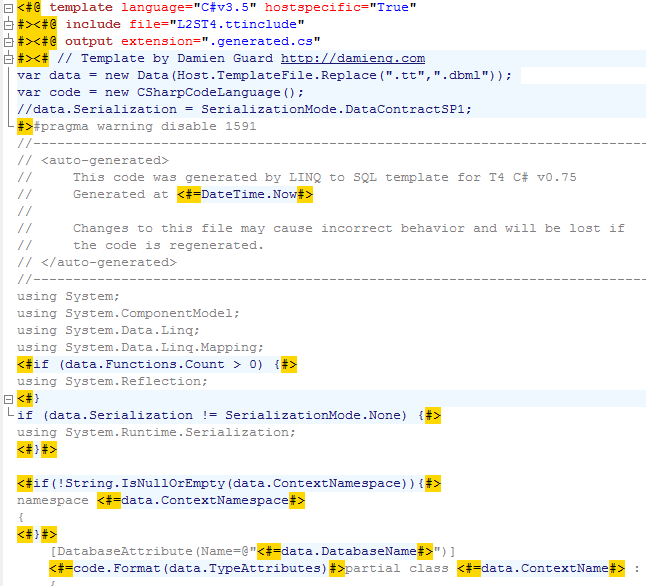
Here's a screenshot showing a bit of Damian's T4 template using the syntax highlighting from the Clairus T4 Visual Studio free download. If I'd pay them, I'd get intellisense and syntax highlighting inside the code blocks also. It looks like a lot like ASP.NET Web Forms, or Velocity, or any templating language really. The code blocks are where your logic is and outside the codeblocks is the template for whatever you want to generate. Notice how Damien gets input and sets output. You have full control, you can read files off the file system, from with your project, etc. He sets the output extension also. I like to use .g.cs or .g.vb, myself. In this example his generated file is Chinook.generated.cs.
I particularly like Damien's example because he's swapping out parts of LINQ to SQL that he didn't like (the generated code) while keeping the part he did (the general mode, the designer, the dbml file.) If you don't like something, fix it.
Plus, it all works in Visual Studio without installing anything.
If you're doing Code Gen, or thinking about it, check out T4 as it's a great place to start. Also, search my blog for "Code Generation" as I was livign and breathing it with CodeSmith for the many years I worked at Corillian. Have fun!
C:\Program Files (x86)\Common Files\microsoft shared\TextTemplating\11.0的更多相关文章
- C:\Program Files (x86)\Common Files\microsoft shared\DevServer\10.0
C:\Program Files (x86)\Common Files\microsoft shared\DevServer\10.0
- 删除C:\Program Files (x86)\Common Files\baidu 等误装软件且正常模式删不掉的文件夹
---------方法一-------- C:\Program Files\Common Files\Baidu\BaiduProtect\1.1.0.26打开以上路径找到反注册程序uninst.ex ...
- warning MSB3162: 所选的“Microsoft Report Viewer 2012 Runtime”项需要“Microsoft.SqlServer.SQLSysClrTypes.11.0”。在“系统必备”对话框中选择缺少的系统必备组件,或者为缺少的系统必备组件创建引导程序包。
warning MSB3162: 所选的“Microsoft Report Viewer 2012 Runtime”项需要“Microsoft.SqlServer.SQLSysClrTypes.11. ...
- 微软 microsoft calendar control 11.0 控件下载
微软 microsoft calendar control 11.0 控件下载 https://files.cnblogs.com/files/mqingqing123/csccal2.rar
- Failed to execute command: ""C:\Program Files (x86)\Microsoft SDKs\Windows\v7.0A\Bin\ResGen.exe" 的一个解决办法
最近在做wpf项目,期间下了一些源码参考,但是在build时经常遇到下面这种bug: Error 2 Failed to execute command: ""C:\Program ...
- Local IIS 7.0 - CS0016: Could not write to output file / Microsoft.Net > Framework > v4.0.30319 > Temporary ASP.NET Files
This week I went nuts over my local IIS. I have never swore to a machine that much in my whole life. ...
- 未能加载文件或程序集 Microsoft.ReportViewer.Common, Version=11.0.0.0
原文:未能加载文件或程序集 Microsoft.ReportViewer.Common, Version=11.0.0.0 System.IO.FileNotFoundException: 未能加载文 ...
- RDLC报表 在WinForm里运行出现 未能加载文件或程序集 Microsoft.ReportViewer.WinForms, Version=11.0.0.0 System.IO.FileNotFoundException
原文:RDLC报表 在WinForm里运行出现 未能加载文件或程序集microsoft.reportviewer.winforms 推荐以下方案二 做一下记录顺便帮助一下遇到问题的朋友. 做RDLC报 ...
- C:\Program Files (x86)\MSBuild\Microsoft.Cpp\v4.0\V120\Microsoft.CppBuild.targets(388,5): warning MSB8028: The intermediate directory (Debug) contains files shared from another project (GU.vcxproj). T
1>C:\Program Files (x86)\MSBuild\Microsoft.Cpp\v4.0\V120\Microsoft.CppBuild.targets(388,5): warni ...
随机推荐
- Colorful Lecture Note(手工栈)
题目1 : Colorful Lecture Note 时间限制:10000ms 单点时限:1000ms 内存限制:256MB 描述 Little Hi is writing an algorithm ...
- 【HDU1102】Constructing Roads(MST基础题)
最小生成树水题.prim一次AC #include <iostream> #include <cstring> #include <cstdlib> #includ ...
- 类linux 系统iptables 系统初始化配置
#!/bin/bash iptables -F iptables -X /etc/rc.d/init.d/iptables save service iptables restart iptables ...
- Linux下Samba的配置
前言: 为了实现windows 和 Linux以及其它操作系统之间的资源共享,软件商推出nfs 和samba两种解决方案.因为市场上缺乏象pc-nfs那样的client工具,使得Linux和windo ...
- ThinkPHP整合百度Ueditor图文教程
ThinkPHP整合百度Ueditor图文教程 ThinkPHP整合百度Ueditor,基于黄永成老师的视频说明的申明:最好大家都能写绝对路径的都写好绝对路径比如:window.UEDITOR_HOM ...
- 线程:Exchanger同步工具
可以在对中对元素进行配对和交换的线程的同步点,类似于交易,A拿着钱到达指定地点,B拿着物品到达指定地点,相互交换,然后各自忙各自的事去了. package ch03; import java.util ...
- SQL常用分页
top式 string sqltext = string.Format(" SELECT TOP {0} * FROM '表' WHERE ('字段' NOT IN (SELECT TOP ...
- 使用HttpClient发送GET请求
HttpRequestMessage http_req_msg = new HttpRequestMessage(); http_req_msg.Method = HttpMethod.Get; ht ...
- Spark RDD设计学习笔记
本文档是学习RDD经典论文<Resilient Distributed Datasets: A Fault-Tolerant Abstraction for In-Memory Cluster ...
- Delphi 接口托管实现
unit Unit1; interface uses Windows, Messages, SysUtils, Variants, Classes, Graphics, Controls, Forms ...