
SQL Server的NTEXT类型不支持等号"="操作(转载)
SQL SERVER – Fix: Error : 402 The data types ntext and varchar are incompatible in the equal to operator
Some errors are very simple to understand but the solution of the same is not easy to figure out. Here is one of the similar errors where it clearly suggests where the problem is but does not tell what is the solution. Additionally, there are multiple solutions so developers often get confused with which one is correct and which one is not correct.
Let us first recreate scenario and understand where the problem is. Let us run following
CREATE TABLE TestTable (ID INT, MyText NTEXT)

GO

SELECT ID, MyText

FROM TestTable

WHERE MyText = 'AnyText'

GO

DROP TABLE TestTable

GO
When you run above script it will give you following error.
Msg 402, Level 16, State 1, Line 1

The data types ntext and varchar are incompatible in the equal to operator.
One of the questions I often receive is that voucher is for sure compatible to equal to operator, then why does this error show up. Well, the answer is much simpler I think we have not understood the error message properly. Please see the image below. The next and varchar are not compatible when compared with each other using equal sign.
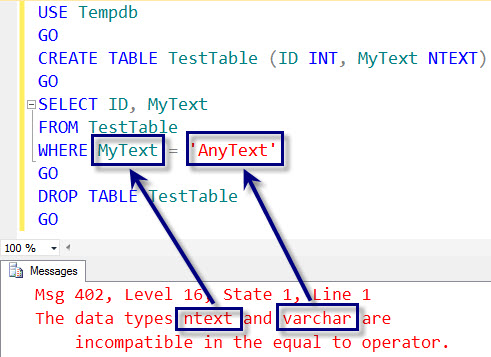
Now let us change the data type on the right side of the string to nvarchar from varchar. To do that we will put N’ before the string.
CREATE TABLE TestTable (ID INT, MyText NTEXT)

GO

SELECT ID, MyText

FROM TestTable

WHERE MyText = N'AnyText'

GO

DROP TABLE TestTable

GO
When you run above script it will give following error.
Msg 402, Level 16, State 1, Line 1

The data types ntext and nvarchar are incompatible in the equal to operator.
You can see that error message also suggests that now we are comparing next to nvarchar. Now as we have understood the error properly, let us see various solutions to the above problem.
Solution 1: Convert the data types to match with each other using CONVERT function.
Change the datatype of the MyText to nvarchar.
SELECT ID, MyText

FROM TestTable

WHERE CONVERT(NVARCHAR(MAX), MyText) = N'AnyText'

GO
Solution 2: Convert the data type of columns from NTEXT to NVARCHAR(MAX) (TEXT to VARCHAR(MAX))
ALTER TABLE TestTable

ALTER COLUMN MyText NVARCHAR(MAX)

GO
Now you can run the original query again and it will work fine.
Solution 3: Using LIKE command instead of Equal to command.
SELECT ID, MyText

FROM TestTable

WHERE MyText LIKE 'AnyText'

GO
Well, any of the three of the solutions will work. Here is my suggestion if you can change the column data type from ntext or text to nvarchar or varchar, you should follow that path as text and ntext datatypes are marked as deprecated(弃用了). All developers any way to change the deprecated data types in future, it will be a good idea to change them right early.
If due to any reason you can not convert the original column use Solution 1 for temporary fix. Solution 3 is the not the best solution and use it as a last option. Did I miss any other method? If yes, please let me know and I will add the solution to original blog post with due credit.
微软官方ntext, text, image类型弃用声明:
IMPORTANT! ntext, text, and image data types will be removed in a future version of SQL Server. Avoid using these data types in new development work, and plan to modify applications that currently use them. Use nvarchar(max), varchar(max), and varbinary(max) instead.
SQL Server的NTEXT类型不支持等号"="操作(转载)的更多相关文章
- .SQL Server中 image类型数据的比较
原文:.SQL Server中 image类型数据的比较 在SQL Server中如果你对text.ntext或者image数据类型的数据进行比较.将会提示:不能比较或排序 text.ntext 和 ...
- SQL Server数据库字段类型说明
SQL Server数据库字段类型说明 目前Sql Server 数据库一共有X个字段类型,大体分为9类,分别是字符串类型.二进制码字符串数据类型.Unincode字符串数据.整数类型.精确数据类型. ...
- SQL Server存储ntext截断问题
SQL Server存储ntext截断问题 最近遇到一个问题:将大文本存储到数据库的时候,查询出来的文本却被截断了. 最后百度发现,作者提出 sql server management studi ...
- SQL Server返回DATETIME类型,年、月、日、时、分、秒、毫秒
SQL Server返回DATETIME类型的年.月.日,有两种方法,如下所示: DECLARE @now DATETIME=GETDATE() --第一种方法 SELECT @now,YEAR(@n ...
- SQL Server 磁盘空间告急(磁盘扩容)转载
一.背景 在线上系统中,如果我们发现存放数据库文件的磁盘空间不够,我们应该怎么办呢?新买一个硬盘挂载上去可以嘛?(linux下可以直接挂载硬盘进行扩容),但是我们的SQL Server是运行在Wind ...
- 如何对SQL Server 2005进行设置以允许远程连接(转载)
如何对SQL Server 2005进行设置以允许远程连接(转载) 在尝试从远程计算机连接到 Microsoft SQL Server 2005 实例时,可能会接收到错误消息.在使用任何程序连接到 S ...
- SQL Server Log文件对磁盘的写操作大小是多少
原文:SQL Server Log文件对磁盘的写操作大小是多少 SQL Server 数据库有三种文件类型,分别是数据文件.次要数据文件和日志文件,其中日志文件包含着用于恢复数据库的所有日志信息,SQ ...
- XEvent – SQL Server Log文件对磁盘的写操作大小是多少
原文:XEvent – SQL Server Log文件对磁盘的写操作大小是多少 本篇是上一篇SQL Server Log文件对磁盘的写操作大小是多少的续,使用XEvent收集SQL Server D ...
- SQL Server 表的管理_关于事务操作的详解(案例代码)
SQL Server 表的管理_关于事务操作的详解(案例代码) 1.概念 事务(transaction): 是将多个修改语句组合在一起的方法,这个方法中的所有语句只有全部执行才能正确完成功能.即要么全 ...
随机推荐
- Bash Shell中的特殊位置变量及其应用
Bash Shell中的特殊位置变量及其应用 众所周知bash shell中有许多特殊的位置变量,灵活使用它们可以更好地发挥Shell脚本的功用. 即位置变量:$1,$2,...来表示,用于让脚本在脚 ...
- 回顾Python装饰器
函数装饰器(function decorator)可以对函数进行“标注”,给函数提供更多的特性. 在理解装饰器之前需要理解闭包(closure).Python3.0 引入了保留关键字 nonlocal ...
- 201671010456-张琼 实验十四 团队项目评审&课程学习总结
博文简要信息表 项目 内容 这个作业属于哪个课程 http://www.cnblogs.com/nwnu-daizh/ 这个作业的要求在哪里 https://www.cnblogs.com/nwnu- ...
- vue文件夹上传组件选哪个好?
一. 功能性需求与非功能性需求 要求操作便利,一次选择多个文件和文件夹进行上传:支持PC端全平台操作系统,Windows,Linux,Mac 支持文件和文件夹的批量下载,断点续传.刷新页面后继续传输. ...
- Pandas | 22 时间差
时间差(Timedelta)是时间上的差异,以不同的单位来表示.例如:日,小时,分钟,秒.它们可以是正值,也可以是负值.可以使用各种参数创建Timedelta对象,如下所示 - 字符串 通过传递字符串 ...
- ubuntu命令总结 持续更新 补充
总结一下Ubuntu常用命令 top sudo apt-get install 软件名 安装软件命令 sudo nautilus 打开文件(有root权限) su root 切换到“root” l ...
- mysql 包含查找
#从表iot_company选择,company_name字段包含10091015的项SELECT id FROM iot_company WHERE company_name LIKE " ...
- MybatisPlus使用代码生成器遇到的小问题
MyBatisPlus 在3.0.3版本之前使用代码生成器因为存在默认依赖,所以不需要其他的依赖,项目中使用的是3.0.1的版本,所以不用添加其他依赖,添加之后反倒是会报错,实际上MP官网上已经说明了 ...
- Apache的安装部署 2(加密认证 ,网页重写 ,搭建论坛)
一.http和https的基本理论知识1. 关于https: HTTPS(全称:Hypertext Transfer Protocol Secure,超文本传输安全协议),是以安全为目标的HTTP通道 ...
- [C#]AdvPropertyGrid的使用示例(第三方控件:DevComponents.DotNetBar2.dll)
开发环境:Visual Studio 2019 .NET版本:4.5.2 效果如下: 1.初始化界面: 2.属性“人物”-自定义控件显示: 3.属性“地址”-自定义窗体显示: 4.属性“性别”-枚举显 ...