
git提示Please enter a commit message to explain why this merge is necessary
Please enter a commit message to explain why this merge is necessary.
请输入提交消息来解释为什么这种合并是必要的(提交信息)
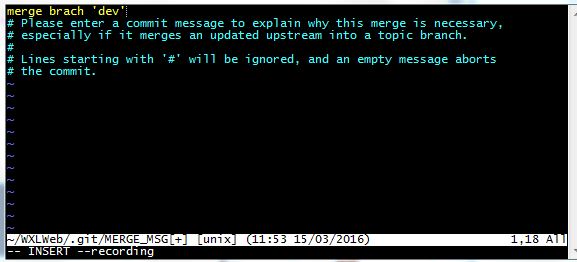
git 在pull或者合并分支的时候有时会遇到这个界面。可以不管(直接下面3,4步),如果要输入解释的话就需要:
1.按键盘字母 i 进入insert模式
2.修改最上面那行黄色合并信息,可以不修改
3.按键盘左上角"Esc"
4.输入":wq",注意是冒号+wq,按回车键即可
git提示Please enter a commit message to explain why this merge is necessary的更多相关文章
- git中Please enter a commit message to explain why this merge is necessary.
Please enter a commit message to explain why this merge is necessary. 请输入提交消息来解释为什么这种合并是必要的 git 在pul ...
- Please enter a commit message to explain why this merge is necessary.
Please enter a commit message to explain why this merge is necessary. 请输入提交消息来解释为什么这种合并是必要的 git 在pul ...
- Please enter a commit message to explain why this merge is necessary, # especially if it merges an updated upstream into a topic branch. # # Lines starting with '#' will be ignored, and an empty messa
1.git提交的时候遇到: # Please enter the commit message for your changes. Lines starting with '#' will be ig ...
- git commit 时出现:please enter the commit message for your changes
每次准备提交前,先用 git status 看下,是不是都已暂存起来了,然后再运行提交命令 git commit: $ git commit 这种方式会启动文本编辑器以便输入本次提交的说明.(默认会启 ...
- git修改已经push的commit message
git中修改上一次提交的commit的message git commit --amend -m "你的新的注释" git push -f 多个commit https://www ...
- Git 修改历史提交信息 commit message
修改最近一条提交的消息 git commit --amend 进入vim模式 按字母 o 或者 insert键 开始修改内容 按 esc 推出编辑,最常用的是输入":q"直接退出, ...
- iOS 提交代码出现提示弹出框显示 “A commit message is required to perform this operation.Enter a commit message and try again.“
需要你写一下你确认提交的信息,就是你这次提交上去修改了什么功能,简单描述一下
- git 提示 Please move or remove them before you can merge 解决办法
解决Git冲突造成的Please move or remove them before you can merge git clean -d -fx其中x -----删除忽略文件已经对git来说不识别 ...
- 通过git rebase修改commit message
今天发现一个项目的git commit message中的单词拼错了,需要修改一下.但这样简单的修改,需要通过git rebase才能完成. 首先要git rebase到需要修改message的那个c ...
随机推荐
- vsftp软件安装部署
1.安装vsftp yum install -y vsftpd db4-utils2.默认可以支持系统用户账号远程登录.不安全,建立虚拟账号体系为好.或者在服务器端对vsftpd.conf配置文件进行 ...
- 阶段3 2.Spring_03.Spring的 IOC 和 DI_5 BeanFactory和ApplicationContext的区别
核心容器的两个接口.ApplicationContext和BeanFactory 怎么知道对象被创建了呢 我们只需要在实现类里面构造函数内打印输出一段话 然后再这里加上一个断点 运行程序,光标停在这个 ...
- Linux监控命令之==>ps
一.命令说明 ps 命令是最基本同时也是非常强大的进程查看命令.使用该命令可以确定有哪些进程正在运行和运行的状态.进程是否结束.进程有没有僵死.哪些进程占用了过多的资源等等.总之大部分信息都是可以通过 ...
- Word2007—如何快速取消自动编号
有时候自动编号很麻烦,有没有好的办法可以快速取消呢. 1.禁止自动编号.在Word为其自动加上编号时,只要按下Ctrl+Z键撤销操作,此时自动编号会消失,而且每次键入数字时,该功能就会被禁止了. 2. ...
- SVN的使用和问题解决方法总结
添加仓库之类的很简单,这里就不说了哈...不会的可以问问我,当然百度再快了..嘿嘿 1.从服务器Check Out代码: 2.提交代码: 3.你是不是今天和我一样纠结如何删除已经上传SVN的内容,其实 ...
- RTX和谐说明
1.下载安装原版RTX20152.打开“服务”,停止RTX开头的服务.3.替换C:\Program Files\Tencent\RTXServer\License目录下的License.ini文件:替 ...
- WebSocket-Node
WebSocket Client & Server Implementation for Node 参考资料:[https://github.com/theturtle32/WebSocket ...
- jmeter监控服务器性能(windows系统)
一.jmeter安装插件 前两个是jmeter插件,安装到本地的jmeter文件夹下第三个是放到服务器里的 jmeter插件官网地址:https://jmeter-plugins.org/ [我分享的 ...
- break和continue关键字的使用
一,break和continue关键字的使用 public class BreakContinueTest { public static void main(String args[]) { for ...
- Virtual DOM和snabbdom.js
Virtual DOM和snabbdom.js:https://www.jianshu.com/p/1f1ef915e83e