
Java图片加水印
采用Java自带的Image IO
废话不多说,上菜
1. 文字水印
 1 import sun.font.FontDesignMetrics;

 2

 3 import javax.imageio.ImageIO;

 4 import java.awt.*;

 5 import java.awt.image.BufferedImage;

 6 import java.io.File;

 7 import java.io.FileOutputStream;

 8 import java.io.IOException;

 9

10 /**

11  * @Author ChengJianSheng

12  * @Date 2021/6/10

13  */

14 public class WatermarkUtil {

15

16     public static void main(String[] args) throws IOException {

17         addText("F:/1.jpeg", "我的梦想是成为火影");

18     }

19

20     /**

21      * 加文字水印

22      * @param srcPath   原文件路径

23      * @param content   文字内容

24      * @throws IOException

25      */

26     public static void addText(String srcPath, String content) throws IOException {

27         //  读取原图片信息

28         BufferedImage srcImage = ImageIO.read(new File(srcPath));

29         int width = srcImage.getWidth();

30         int height = srcImage.getHeight();

31

32         //  创建画笔,设置绘图区域

33         BufferedImage bufferedImage = new BufferedImage(width, height, BufferedImage.TYPE_INT_RGB);

34         Graphics2D g = bufferedImage.createGraphics();

35         g.drawImage(srcImage, 0, 0, width, height, null);

36 //        g.drawImage(srcImage.getScaledInstance(width, height, Image.SCALE_SMOOTH), 0, 0, null);

37

38         g.setFont(new Font("宋体", Font.PLAIN, 32));

39         g.setColor(Color.RED);

40

41         //  计算文字长度

42         int len = g.getFontMetrics(g.getFont()).charsWidth(content.toCharArray(), 0, content.length());

43         FontDesignMetrics metrics = FontDesignMetrics.getMetrics(g.getFont());

44         int len2 = metrics.stringWidth(content);

45         System.out.println(len);

46         System.out.println(len2);

47

48         //  计算文字坐标

49         int x = width - len - 10;

50         int y = height - 20;

51 //        int x = width - 2 * len;

52 //        int y = height - 1 * len;

53

54         g.drawString(content, x, y);

55

56         g.dispose();

57

58         //  输出文件

59         FileOutputStream fos = new FileOutputStream("F:/2.png");

60         ImageIO.write(bufferedImage, "png", fos);

61         fos.flush();

62         fos.close();

63     }

64

65 }
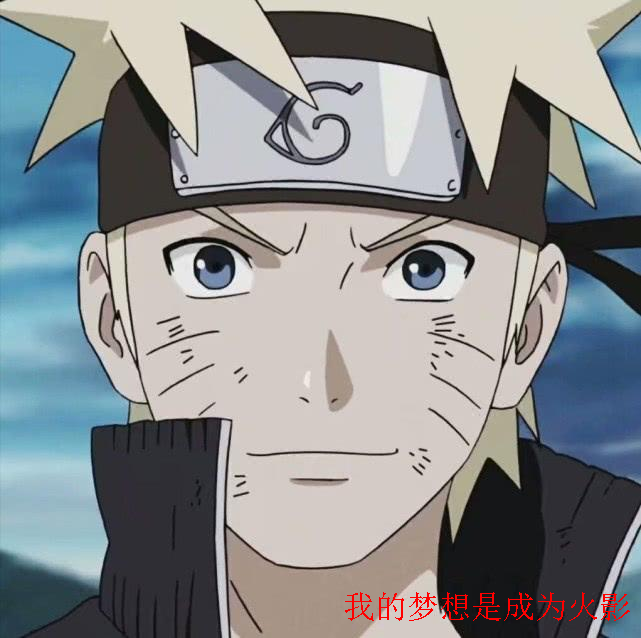
可以设置文字透明度
g.setComposite(AlphaComposite.getInstance(AlphaComposite.SRC_ATOP, 0.8f));
2. 旋转文字
 1 import sun.font.FontDesignMetrics;

 2

 3 import javax.imageio.ImageIO;

 4 import java.awt.*;

 5 import java.awt.geom.AffineTransform;

 6 import java.awt.image.BufferedImage;

 7 import java.io.File;

 8 import java.io.FileOutputStream;

 9 import java.io.IOException;

10

11 /**

12  * @Author ChengJianSheng

13  * @Date 2021/6/10

14  */

15 public class WatermarkUtil {

16

17     // 水印透明度

18     private static final float alpha = 0.5f;

19     // 水印文字字体

20     private static final Font font = new Font("宋体", Font.BOLD, 30);

21     // 水印文字颜色

22     private static final Color color = Color.RED;

23

24

25     public static void main(String[] args) throws IOException {

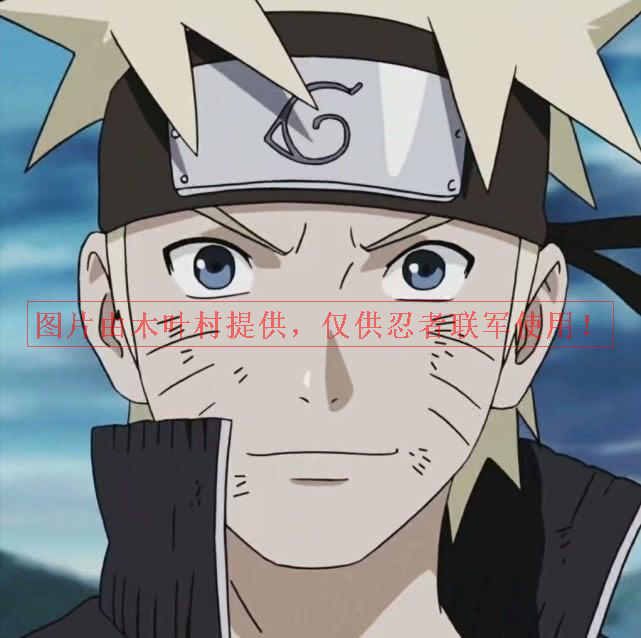
26         addText("F:/1.jpeg", "图片由木叶村提供,仅供忍者联军使用!");

27     }

28

29     /**

30      * 加文字水印

31      * @param srcPath   原文件路径

32      * @param content   文字内容

33      * @throws IOException

34      */

35     public static void addText(String srcPath, String content) throws IOException {

36         //  读取原图片信息

37         BufferedImage srcImage = ImageIO.read(new File(srcPath));

38         int width = srcImage.getWidth();

39         int height = srcImage.getHeight();

40

41         //  创建画笔,设置绘图区域

42         BufferedImage bufferedImage = new BufferedImage(width, height, BufferedImage.TYPE_INT_RGB);

43         Graphics2D g = bufferedImage.createGraphics();

44         g.drawImage(srcImage, 0, 0, width, height, null);

45 //        g.drawImage(srcImage.getScaledInstance(width, height, Image.SCALE_SMOOTH), 0, 0, null);

46

47         //  旋转文字

48         AffineTransform affineTransform = g.getTransform();

49         affineTransform.rotate(Math.toRadians(-30), 0, 0);

50         Font rotatedFont = font.deriveFont(affineTransform);

51

52         g.setFont(rotatedFont); // 字体

53         g.setColor(color);      // 颜色

54         g.setComposite(AlphaComposite.getInstance(AlphaComposite.SRC_ATOP, alpha)); // 透明度

55

56         //  计算文字长度

57         int len = g.getFontMetrics(g.getFont()).charsWidth(content.toCharArray(), 0, content.length());

58         FontDesignMetrics metrics = FontDesignMetrics.getMetrics(g.getFont());

59         int len2 = metrics.stringWidth(content);

60         System.out.println(len);

61         System.out.println(len2);

62

63         //  计算水印文字坐标

64         int x = width/5;

65         int y = height/3*2;

66

67         g.drawString(content, x, y);

68

69         g.dispose();

70

71         //  输出文件

72         FileOutputStream fos = new FileOutputStream("F:/2.png");

73         ImageIO.write(bufferedImage, "png", fos);

74         fos.flush();

75         fos.close();

76     }

77

78 }

画矩形框
 1 import sun.font.FontDesignMetrics;

 2

 3 import javax.imageio.ImageIO;

 4 import java.awt.*;

 5 import java.awt.image.BufferedImage;

 6 import java.io.File;

 7 import java.io.FileOutputStream;

 8 import java.io.IOException;

 9

10 /**

11  * @Author ChengJianSheng

12  * @Date 2021/6/10

13  */

14 public class WatermarkUtil {

15

16     // 水印透明度

17     private static final float alpha = 0.5f;

18     // 水印文字字体

19     private static final Font font = new Font("宋体", Font.BOLD, 30);

20     // 水印文字颜色

21     private static final Color color = Color.RED;

22

23

24     public static void main(String[] args) throws IOException {

25         addText("F:/1.jpeg", "图片由木叶村提供,仅供忍者联军使用!");

26     }

27

28     /**

29      * 加文字水印

30      * @param srcPath   原文件路径

31      * @param content   文字内容

32      * @throws IOException

33      */

34     public static void addText(String srcPath, String content) throws IOException {

35         //  读取原图片信息

36         BufferedImage srcImage = ImageIO.read(new File(srcPath));

37         int width = srcImage.getWidth();

38         int height = srcImage.getHeight();

39

40         //  创建画笔,设置绘图区域

41         BufferedImage bufferedImage = new BufferedImage(width, height, BufferedImage.TYPE_INT_RGB);

42         Graphics2D g = bufferedImage.createGraphics();

43         g.drawImage(srcImage, 0, 0, width, height, null);

44

45         g.setFont(font); // 字体

46         g.setColor(color);  // 颜色

47         g.setComposite(AlphaComposite.getInstance(AlphaComposite.SRC_ATOP, alpha)); // 透明度

48

49         //  计算文字宽高度

50         FontDesignMetrics metrics = FontDesignMetrics.getMetrics(font);

51         int textWidth = metrics.stringWidth(content);   //  文字宽度

52         int textHeight = metrics.getHeight();   //  文字高度

53

54         //  计算文字坐标

55         int x = (width - textWidth) / 2;

56         int y = (height + textHeight) / 2;

57         //  写文字

58         g.drawString(content, x, y);

59

60         //  画矩形

61         int padding = 10; // 内边距

62         g.drawRect(x - padding/2, y - textHeight, textWidth + padding, textHeight + padding);

63

64         g.dispose();

65

66         //  输出文件

67         FileOutputStream fos = new FileOutputStream("F:/2.png");

68         ImageIO.write(bufferedImage, "png", fos);

69         fos.flush();

70         fos.close();

71     }

72

73 }
3. 旋转坐标轴
 1 import sun.font.FontDesignMetrics;

 2

 3 import javax.imageio.ImageIO;

 4 import java.awt.*;

 5 import java.awt.image.BufferedImage;

 6 import java.io.File;

 7 import java.io.FileOutputStream;

 8 import java.io.IOException;

 9

10 /**

11  * @Author ChengJianSheng

12  * @Date 2021/6/10

13  */

14 public class WatermarkUtil {

15

16     // 水印透明度

17     private static final float alpha = 0.5f;

18     // 水印文字字体

19     private static final Font font = new Font("宋体", Font.BOLD, 30);

20     // 水印文字颜色

21     private static final Color color = Color.RED;

22

23

24     public static void main(String[] args) throws IOException {

25         addText("F:/1.jpeg", "图片由木叶村提供,仅供忍者联军使用!");

26     }

27

28     /**

29      * 加文字水印

30      * @param srcPath   原文件路径

31      * @param content   文字内容

32      * @throws IOException

33      */

34     public static void addText(String srcPath, String content) throws IOException {

35         //  读取原图片信息

36         BufferedImage srcImage = ImageIO.read(new File(srcPath));

37         int width = srcImage.getWidth();

38         int height = srcImage.getHeight();

39

40         //  创建画笔,设置绘图区域

41         BufferedImage bufferedImage = new BufferedImage(width, height, BufferedImage.TYPE_INT_RGB);

42         Graphics2D g = bufferedImage.createGraphics();

43         g.drawImage(srcImage, 0, 0, width, height, null);

44

45         g.setFont(font); // 字体

46         g.setColor(color);  // 颜色

47         g.setComposite(AlphaComposite.getInstance(AlphaComposite.SRC_ATOP, alpha)); // 透明度

48

49         //  计算文字宽高度

50         FontDesignMetrics metrics = FontDesignMetrics.getMetrics(font);

51         int textWidth = metrics.stringWidth(content);   //  文字宽度

52         int textHeight = metrics.getHeight();   //  文字高度

53

54         //  旋转坐标轴

55         g.translate(-width/5, height/4);

56         g.rotate(-30*Math.PI/180);

57

58         //  计算文字坐标

59         int x = (width - textWidth) / 2;

60         int y = (height + textHeight) / 2;

61         //  写文字

62         g.drawString(content, x, y);

63

64         //  画矩形

65         int padding = 10; // 内边距

66         g.drawRect(x - padding/2, y - textHeight, textWidth + padding, textHeight + padding);

67

68         g.dispose();

69

70         //  输出文件

71         FileOutputStream fos = new FileOutputStream("F:/2.png");

72         ImageIO.write(bufferedImage, "png", fos);

73         fos.flush();

74         fos.close();

75     }

76

77 }

结合下载功能,完整的代码如下:
 1 /**

 2  * 下载

 3  */

 4 @GetMapping("/download")

 5 public void download(@RequestParam("mediaId") String mediaId, HttpServletRequest request, HttpServletResponse response) throws IOException {

 6     SysFile sysFile = sysFileService.getByMediaId(mediaId);

 7     if (null == sysFile) {

 8         throw new IllegalArgumentException("文件不存在");

 9     }

10     String mimeType = request.getServletContext().getMimeType(sysFile.getPath());

11     System.out.println(mimeType);

12     response.setContentType(sysFile.getContentType());

13     response.setHeader(HttpHeaders.CONTENT_DISPOSITION,"attachment;filename=" + URLEncoder.encode(sysFile.getOriginalFilename(), "UTF-8"));

14 //        FileInputStream fis = new FileInputStream(sysFile.getPath());

15     ServletOutputStream sos = response.getOutputStream();

16     WatermarkUtil.addText(sysFile.getPath(), "哈哈哈哈", sos);

17 //        IOUtils.copy(fis, sos);

18 //        IOUtils.closeQuietly(fis);

19     IOUtils.closeQuietly(sos);

20 }
 1

 3 import sun.font.FontDesignMetrics;

 4

 5 import javax.imageio.ImageIO;

 6 import java.awt.*;

 7 import java.awt.image.BufferedImage;

 8 import java.io.File;

 9 import java.io.IOException;

10 import java.io.OutputStream;

11

12 /**

13  * @Author ChengJianSheng

14  * @Date 2021/6/10

15  */

16 public class WatermarkUtil {

17

18     // 水印透明度

19     private static final float alpha = 0.5f;

20     // 水印文字字体

21     private static final Font font = new Font("宋体", Font.BOLD, 30);

22     // 水印文字颜色

23     private static final Color color = Color.RED;

24

25     /**

26      * 加文字水印

27      * @param srcPath   原文件路径

28      * @param content   文字内容

29      * @throws IOException

30      */

31     public static void addText(String srcPath, String content, OutputStream outputStream) throws IOException {

32         //  读取原图片信息

33         BufferedImage srcImage = ImageIO.read(new File(srcPath));

34         int width = srcImage.getWidth();

35         int height = srcImage.getHeight();

36

37         //  画板

38         BufferedImage bufferedImage = new BufferedImage(width, height, BufferedImage.TYPE_INT_RGB);

39         //  画笔

40         Graphics2D g = bufferedImage.createGraphics();

41         g.drawImage(srcImage, 0, 0, width, height, null);

42

43         g.setFont(font); // 字体

44         g.setColor(color);  // 颜色

45         g.setComposite(AlphaComposite.getInstance(AlphaComposite.SRC_ATOP, alpha)); // 透明度

46

47         //  计算文字宽高度

48         FontDesignMetrics metrics = FontDesignMetrics.getMetrics(font);

49         int textWidth = metrics.stringWidth(content);   //  文字宽度

50         int textHeight = metrics.getHeight();   //  文字高度

51

52         //  旋转坐标轴

53         g.translate(-width/5, height/4);

54         g.rotate(-30*Math.PI/180);

55

56         //  计算文字坐标

57         int x = (width - textWidth) / 2;

58         int y = (height + textHeight) / 2;

59         //  写文字

60         g.drawString(content, x, y);

61

62         //  画矩形

63         int padding = 10; // 内边距

64         g.drawRect(x - padding/2, y - textHeight, textWidth + padding, textHeight + padding);

65

66         g.dispose();

67

68         //  输出

69         ImageIO.write(bufferedImage, "png", outputStream);

70     }

71

72 }
Java图片加水印的更多相关文章
- java 图片加水印,设置透明度。说明非常具体
package com.yidao.common; import java.awt.AlphaComposite; import java.awt.Graphics2D; import java.aw ...
- Java图片加文字水印
Java图片加文字水印 import java.awt.Color; import java.awt.Font; import java.awt.Graphics; import java.awt.I ...
- Java图片处理(二)图片加水印
图片加水印,是通过图片重叠绘制实现的.实现代码如下: public static void press(String pressImg, String pressText, String target ...
- 火车头dede采集接口,图片加水印,远程图片本地化,远程无后缀的无图片本地化
<?php /* [LocoySpider] (C)2005-2010 Lewell Inc. 火车采集器 DedeCMS 5.7 UTF8 文章发布接口 Update content: 图片加 ...
- thinkphp 3.2.3整合ueditor 1.4,给上传的图片加水印
今天分享一下thinkphp 3.2.3整合ueditor 1.4,给上传的图片加水印.博主是新手,在这里卡住了很久(>_<) thinkphp 3.2.3整合ueditor 1.4 下载 ...
- PHPThumb处理图片,生成缩略图,图片尺寸调整,图片截取,图片加水印,图片旋转
[强烈推荐]下载地址(github.com/masterexploder/PHPThumb). 注意这个类库有一个重名的叫phpThumb,只是大小写的差别,所以查找文档的时候千万注意. 在网站建设过 ...
- php 分享两种给图片加水印的方法
本文章向码农们介绍 php 给图片加水印的两种方法,感兴趣的码农可以参考一下本文章的源代码. 方法一:PHP最简单的加水印方法 <?php // http://www.manongjc.com ...
- PHP给图片加水印
<?php /** *图片加水印 *@param $srcImg 原图 *@param $waterImg 水印图片 *@param $savepath 保存路径 *@param $savena ...
- 如何用node.js批量给图片加水印
上一篇我们讲了如何用node.js给图片加水印,但是只是给某一张图片加,并没有涉及到批量处理.这一篇,我们学习如果批量进行图片加水印处理. 一.准备工作: 首先,你要阅读完这篇文章:http://ww ...
- 使用 ImageEnView 给图片加水印,及建缩略图
摘要: 使用 ImageEnView 给图片加水印,及建缩略图 {Power by hzqghost@21cn.com}unit CutWater; interface uses Math,imag ...
随机推荐
- 针对docker中的mongo容器增加鉴权
1. 背景 业务方的服务器经安全检查,发现以docker容器启动的mongo未增加鉴权的漏洞,随优化之 2. 配置 mongo以docker compose方式启动,镜像的版本号为4.2.6,dock ...
- vscode - Prettier插件 统一代码风格规范,保存自动格式化代码
安装 Prettier - Code formatter prettier安装完毕,使用shift+alt+f就可格式化代码. 如果需要自动保存,要在系统设置中增加"editor.forma ...
- vue3 路由页面返回时,恢复滚动条位置
首先,路由必须是KeepAlive模式 <script setup lang="ts"> import { onActivated } from "vue&q ...
- Go-单元测试-Test
单元测试 文件名以 _test.go 结尾 函数名以 Test 开头 函数参数固定 t *testing.T 运行单元测试 go test Demo 源文件 package unit import & ...
- [转帖]【linux命令学习】— sar 命令学习
https://blog.csdn.net/u013332124/article/details/101075521 一.命令使用介绍 sar命令全称 System Activity Report,它 ...
- Kubeadm 安装支持IPV6 K8S1.28.x的简单过程
Kubeadm 安装支持IPV6 K8S的简单过程 背景 手贱 找了一个晚上想尝试安装一个K8S集群 并且可以支持IPV6 协议栈的 然后就开始各种百度. 各种处理 找到了一堆歪门邪道. 但是还不知道 ...
- [转帖]经典的 Fork 炸弹解析
https://linux.cn/article-5685-1.html Jaromil 在 2002 年设计了最为精简的一个 Linux Fork 炸弹,整行代码只有 13 个字符(包括空格在内,空 ...
- [转帖]018、数据库管理之TiDB升级
升级 使用TiUP进行补丁升级(HotFix) 版本升级流程 升级准备-更新TiUP 升级准备- 编辑TiUP Cluster 升级准备- 集群监控状态检查 升级TiDB 集群 验证TiDB集群升级结 ...
- [转帖]Day63_Kafka(一)
第一讲 Kafka基础操作 课程大纲 课程内容 学习效果 掌握目标 Kafka简介 消息队列 掌握 Kafka简介 Kafka分布式环境 Kafka操作 Kafka shell 掌握 Kafka ap ...
- Python学习之六_同时访问Oracle和Mysql的方法
Python学习之六_同时访问Oracle和Mysql的方法 背景 jaydebeapi 可以访问大部分数据库. 但是他有一个问题是仅能够访问一种类型的数据库. 如果同事连接两种数据库,那么就会出现问 ...