
VScode 1.13 gocode提示dial tcp 216.239.37.1:443: connectex: A connection attempt failed because the connected..
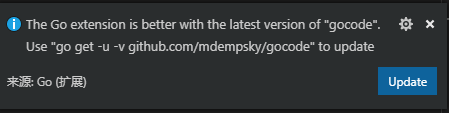
在将VScode升级至 1.13后让升级gocode,在升级时报出如下错误
D:\go_work\src>go get -u -v github.com/mdempsky/gocode

github.com/mdempsky/gocode (download)

Fetching https://golang.org/x/tools/go/gcexportdata?go-get=1

https fetch failed: Get https://golang.org/x/tools/go/gcexportdata?go-get=1: dial tcp 216.239.37.1:443: connectex: A connection attempt failed because the connected party did not properly respond after a period of time, or established connection failed because connected host has failed to respond.

package golang.org/x/tools/go/gcexportdata: unrecognized import path "golang.org/x/tools/go/gcexportdata" (https fetch: Get https://golang.org/x/tools/go/gcexportdata?go-get=1: dial tcp 216.239.37.1:443: connectex: A connection attempt failed because the connected party did not properly respond after a period of time, or established connection failed because connected host has failed to respond.)
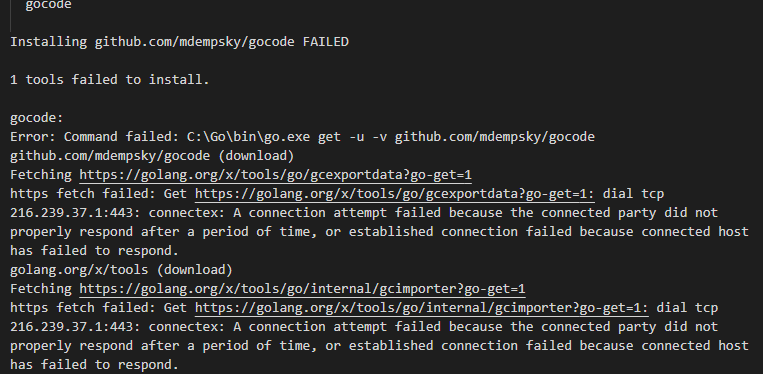
失败原因,发现是从github/golang中下载的tools不包含gocode
解决方法:
根据提示图片信息进行查找,(github/golang下载详见:http://lc161616.cnblogs.com/p/10132518.html)。提示图片如下:

根据vscode提示去github.com/mdempsky/gocode clone下来代码。然后放置到提示图片的路径下:为了保险我又放置在%GOPATH%\src\golang.org\x\tools下一份。
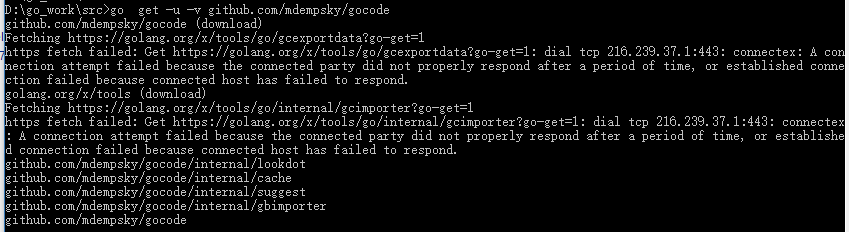
最后手动执行go get,安装成功
D:\go_work\src>go  get -u -v github.com/mdempsky/gocode

github.com/mdempsky/gocode (download)

Fetching https://golang.org/x/tools/go/gcexportdata?go-get=1

https fetch failed: Get https://golang.org/x/tools/go/gcexportdata?go-get=1: dial tcp 216.239.37.1:443: connectex: A connection attempt failed because the connected party did not properly respond after a period of time, or established connection failed because connected host has failed to respond.

golang.org/x/tools (download)

Fetching https://golang.org/x/tools/go/internal/gcimporter?go-get=1

https fetch failed: Get https://golang.org/x/tools/go/internal/gcimporter?go-get=1: dial tcp 216.239.37.1:443: connectex: A connection attempt failed because the connected party did not properly respond after a period of time, or established connection failed because connected host has failed to respond.

github.com/mdempsky/gocode/internal/lookdot

github.com/mdempsky/gocode/internal/cache

github.com/mdempsky/gocode/internal/suggest

github.com/mdempsky/gocode/internal/gbimporter

github.com/mdempsky/gocode
VScode 1.13 gocode提示dial tcp 216.239.37.1:443: connectex: A connection attempt failed because the connected..的更多相关文章
- vs code解决golang开发环境问题 dial tcp 216.239.37.1:443: connectex: A connection attempt failed
安装插件是出现 如下错误提示, https fetch failed: Get https://golang.org/x/tools/cmd/gorename?go-get=1: dial tcp 2 ...
- Go丨语言对数据库操作报错 panic: dial tcp 127.0.0.1:3306: connectex: No connection could be made because the target machine actively refused it.
panic: dial tcp 127.0.0.1:3306: connectex: No connection could be made because the target machine ac ...
- Get https://192.168.2.119/v2/: dial tcp 192.168.2.119:443: getsockopt: connection refused
Get https://192.168.2.119/v2/: dial tcp 192.168.2.119:443: getsockopt: connection refused
- http: server gave HTTP response to HTTPS client & Get https://192.168.2.119/v2/: dial tcp 192.168.2.119:443: getsockopt: connection refused
http: server gave HTTP response to HTTPS client 出现这问题的原因是:Docker自从1.3.X之后docker registry交互默认使用的是HTTP ...
- 私有Docker仓库login Error response from daemon: Get https://x.x.x.x/v2/: dial tcp x.x.x.x:443: connect: connection refused
一.登陆私有仓库错误: docker login --username=evan 192.168.0.203 Error response from daemon: Get https://192.1 ...
- docker login harbor出现的报错Error response from daemon: Get https://172.16.1.99/v1/users/: dial tcp 172.16.1.99:443: getsockopt: connection refused解决方法
出现的问题 [root@master01 ~]# docker login 172.16.1.99 Username: admin Password: Error response from daem ...
- dial tcp 10.96.0.1:443: getsockopt: no route to host --- kubernetes(k8s)DNS 服务反复重启
kubernetes(k8s)DNS 服务反复重启解决: k8s.io/dns/pkg/dns/dns.go:150: Failed to list *v1.Service: Get https:// ...
- docker登录报错Error response from daemon: Get https://192.168.30.10/v1/users/: dial tcp 192.168.30.10:443: connect: connection refused
背景描述: 登录docker报错: [root@localhost sysconfig]# docker login 192.168.30.10 Username (newcs06): newcs06 ...
- (转)dial tcp 10.96.0.1:443: getsockopt: no route to host --- kubernetes(k8s)DNS 服务反复重启
转:https://blog.csdn.net/shida_csdn/article/details/80028905 kubernetes(k8s)DNS 服务反复重启解决: k8s.io/dns/ ...
随机推荐
- codeforces553C Love Triangles
题目链接:codeforces553C Love Triangles 我们来看一下对于一个合法三角形可能出现的边 我们发现,在确定了两边之后,第三条边是什么也就随之确定了 我们用\(1\)表示\(lo ...
- power designer 一般常用快捷键(转)
一般快捷键 快捷键 说明 F4 打开检查模型窗口,检查模型 F5 如果图窗口内的图改变过大小,恢复为原有大小即正常大小 F6 放大图窗口内的图 F7 缩小图窗口内的图 F8 在图窗口内中查看全部图内容 ...
- 【CodeForces 717C】Potions Homework
BUPT 2017 summer training (for 16) #1G 题意 每个人有一个懒惰值,每个任务有个难度,一开始每个人的任务和懒惰值都为\(a_i\),完成任务时间是懒惰值乘以难度,现 ...
- How to intall and configure Haproxy on Centos
Install Haproxy CentOS/RHEL 5 , 32 bit:# rpm -Uvh http://dl.fedoraproject.org/pub/epel/5/i386/epel-r ...
- Redhat上为java Maven项目构建基于Jenkins + Github的持续集成环境
在Redhat enterprise 6.5 的服务器上,为在gutub 上的 java mvaen项目构建一个持续集成环境,用到了Jenkins.因公司的服务器在内网,访问外网时要通过代理,所以为m ...
- 关于一些没做出来的SBCF题
这里是一些我SB没做出来的CF水题. 其实这些题思维量还不错,所以写在这里常来看看…… 不一定每题代码都会写. CF1143C Queen 其实只要注意到如果一个点开始能被删,那一直就能被删:一个点开 ...
- java锁——wait,notify,synchronized
背景:这篇博客用来总结java锁相关的知识点,平时还是要自己多加练习 wait 和 notify以及notifyAll (1).方法介绍1.wait.notify以及notifyAll都是Object ...
- SetCapture() & ReleaseCapture() 捕获窗口外的【松开左键事件】: WM_LBUTTONUP
今天在窗口上绘图的时候,遇到一个问题:在特殊情况下,当用户在窗口中按下鼠标左键,然后移动到窗口外松开鼠标左键,这时程序中只能捕获到 WM_LBUTTONDOWN(按下) 和 WM_MOUSEMOVE( ...
- MSXML2.ServerXMLHTTP responseText 获取的内容不完整,解决方案
今天无意发现一个问题, 有个别几个网页使用 MSXML2.ServerXMLHTTP 获取网页源代码的时候,.responseText 总是返回一部分内容,无法获取完整的内容. 经过搜索,找到解决方案 ...
- 在html页面通过js实现复制粘贴功能
前言:要实现这个功能,常用的方式大概分为两类,第一种就是上插件,这个网上有大把,第二种就是直接用几行JS来实现. 这次说第二种实现方式,这方式有很大的局限性,只能用表单元素,并且不能设置disable ...