
Android Material Design控件使用(二)——FloatButton TextInputEditText TextInputLayout 按钮和输入框
FloatingActionButton
1. 使用FloatingActionButton的情形
FAB代表一个App或一个页面中最主要的操作,如果一个App的每个页面都有FAB,则通常表示该App最主要的功能是通过该FAB操作的。
为了突出FAB的重要性,一个页面最好只有一个FAB
使用的时候需要导入desgin包,Android Studio 新版本都已经自动导入了,这里就不多说
compile 'com.android.support:design:25.1.0'
2. FloatingActionButton的大小一般有两种大小(官方)
- 56 * 56dp :默认的大小,最常用的尺寸。
- 40 * 40 dp :Mini版。
当然也是可以改变大小,不过一般使用
按钮中间图标大小官方推荐为 24*24dp
3.FloatingActionButton的属性
FloatingActionButton是继承ImageView,包含了ImageView的所有属性,除此之外,还有几个新增加的特殊属性,需要使用命名空间来使用。
引入命名空间:xmlns:app="http://schemas.android.com/apk/res-auto"
| 属性名 | 说明 |
|---|---|
| elevation | 阴影的高度 |
| fabSize | FAB的大小,为normal时,大小为:56 * 56dp ,为mini时,大小为: 40 * 40 dp |
| backgroundTint | FAB的背景颜色 |
| rippleColor | 点击FAB时,形成的波纹颜色 |
TextInputEditText
介绍
TextInputEditText是EditText的子类,相当于完善了有些EditText的缺点
当我们的界面处于全屏时,点击一个
EditText,默认情况下不是在它下面弹出键盘,而是进入到输入法的一个全屏的输入界面(通过配置android:imeOptions=”flagNoExtractUi”可以设为直接在当前界面显示)
如果我们给
EditText套上了一个TextInputLayout时,TextInputLayout会拿到EditText的hint显示出来并把EditText本身的hint设为空.这样我们在全屏的输入界面上,就显示不出来我们设置hint,因此TextInputEditText重写了EditText
TextInputLayout
介绍
这个布局其实是与EditText连用,可以实现密码框的显示与隐藏,和点击输入的时候,会将提示文字浮现在上方
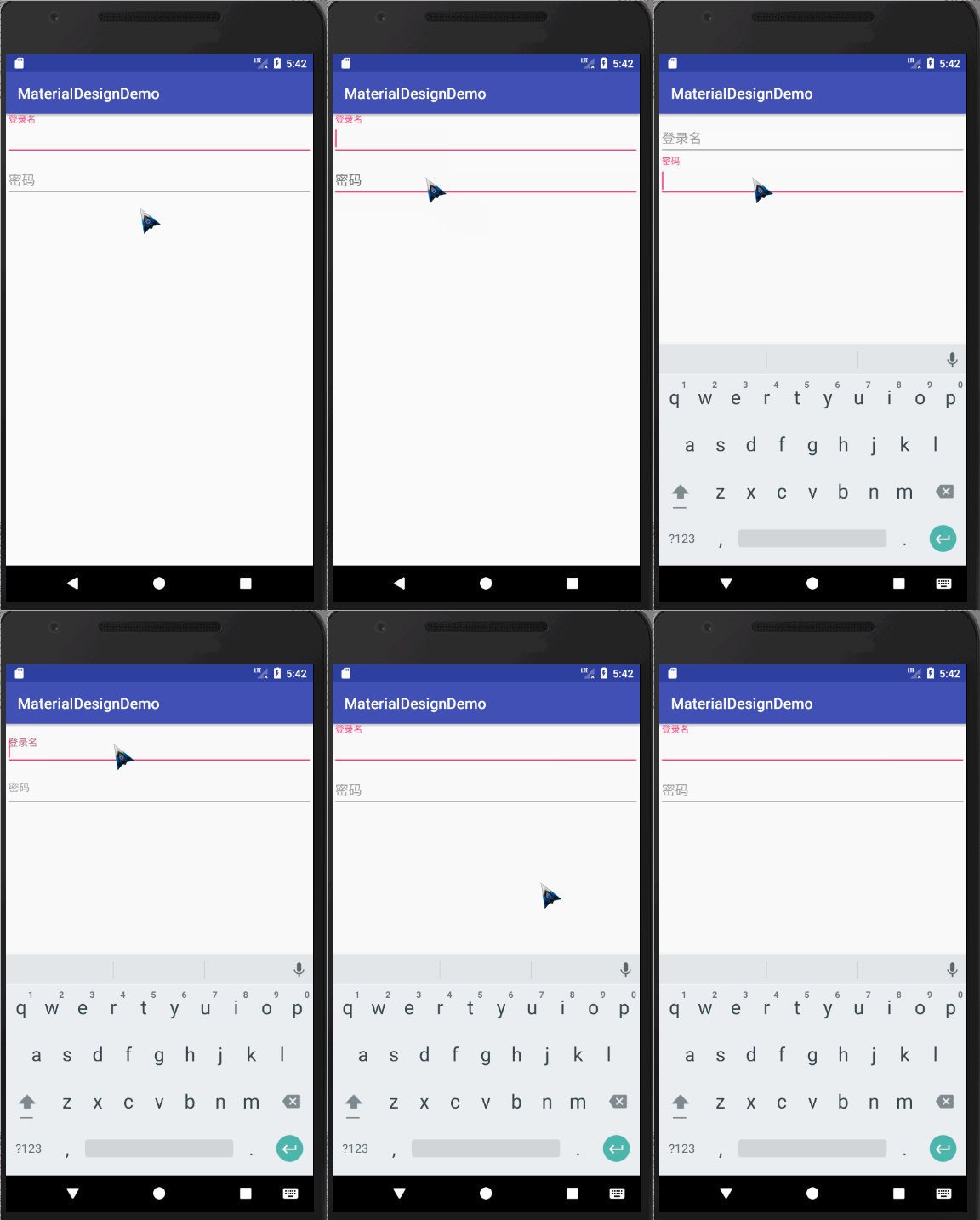
代码如下:
<?xml version="1.0" encoding="utf-8"?>

<LinearLayout

    xmlns:android="http://schemas.android.com/apk/res/android"

    xmlns:app="http://schemas.android.com/apk/res-auto"

    xmlns:tools="http://schemas.android.com/tools"

    android:layout_width="match_parent"

    android:orientation="vertical"

    android:layout_height="match_parent"

    tools:context="com.wan.homework.activity.Homework1Activity">

    <android.support.design.widget.TextInputLayout

        android:layout_width="match_parent"

        android:layout_height="wrap_content">

            <android.support.design.widget.TextInputEditText

                android:id="@+id/username"

                android:layout_width="match_parent"

                android:layout_height="wrap_content"

                android:hint="用户名"/>

    </android.support.design.widget.TextInputLayout>

    <android.support.design.widget.TextInputLayout

        android:layout_width="match_parent"

        android:layout_height="wrap_content">

        <EditText

            android:inputType="textPassword"

            android:id="@+id/password"

            android:layout_width="match_parent"

            android:layout_height="wrap_content"

            android:hint="密码"/>

    </android.support.design.widget.TextInputLayout>

</LinearLayout>
错误提示
TextInputLayout其实内置了一个用来显示错误提示的方法,方法名为setError,效果如下
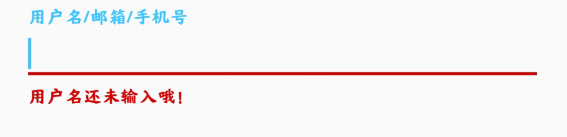
我们可以按钮的点击事件中,对用户的输入进行判断,从而显示错误信息
val userName = input_login_name.editText?.text.toString()

//验证用户输入

if (userName.isBlank()) {

	input_login_name.error = "用户名还未输入哦!"

}
PS:如果想要清空错误信息,将错误信息设置为""即可
input_login_name.error = ""
密码的显示与隐藏

如果想要实现此效果,只需要在将TextInputLayout的EditText的inputType属性设置为textpassword,将TextInputLayout的自定义属性passwordToggleEnabled设置为true即可
<android.support.design.widget.TextInputLayout

	android:id="@+id/input_password"

	android:layout_width="match_parent"

	android:layout_height="wrap_content"

	app:passwordToggleEnabled="true">

	<android.support.design.widget.TextInputEditText

		android:layout_width="match_parent"

		android:layout_height="wrap_content"

		android:hint="密码"

		android:inputType="textPassword"/>

</android.support.design.widget.TextInputLayout>
属性
| 属性名 | 说明 |
|---|---|
| app:Theme | 设置下划线或其他的颜色属性 |
| android.support.design:counterEnabled | 是否显示计数器 |
| android.support.design:counterMaxLength | 设置计数器的最大值,与counterEnabled同时使用 |
| android.support.design:counterTextAppearance | 计数器的字体样式 |
| android.support.design:counterOverflowTextAppearance | 输入字符大于我们限定个数字符时的字体样式 |
| android.support.design:errorEnabled | 是否显示错误信息 |
| android.support.design:errorTextAppearance | 错误信息的字体样式 |
| android.support.design:hintAnimationEnabled | 是否显示hint的动画,默认true |
| android.support.design:hintEnabled | 是否使用hint属性,默认true |
| android.support.design:hintTextAppearance | 设置hint的文字样式(指运行动画效果之后的样式) |
| android.support.design:passwordToggleDrawable | 设置密码开关Drawable图片,于passwordToggleEnabled同时使用 |
| android.support.design:passwordToggleEnabled | 是否显示密码开关图片,需要EditText设置inputType |
| android.support.design:passwordToggleTint | 设置密码开关图片颜色 |
| android.support.design:passwordToggleTintMode | 设置密码开关图片(混合颜色模式),与passwordToggleTint同时使用 |
Android Material Design控件使用(二)——FloatButton TextInputEditText TextInputLayout 按钮和输入框的更多相关文章
- Android Material Design控件学习(三)——使用TextInputLayout实现酷市场登录效果
前言 前两次,我们学习了 Android Material Design控件学习(一)--TabLayout的用法 Android Material Design控件学习(二)--Navigation ...
- Android Material Design控件学习(二)——NavigationView的学习和使用
前言 上次我们学习了TabLayout的用法,今天我们继续学习MaterialDesign(简称MD)控件--NavigationView. 正如其名,NavigationView,导航View.一般 ...
- Android Material Design控件学习(一)——TabLayout的用法
前言 Google官方在14年Google I/O上推出了全新的设计语言--Material Design.一并推出了一系列实现Material Design效果的控件库--Android Desig ...
- Android Material Design控件使用(四)——下拉刷新 SwipeRefreshLayout
使用下拉刷新SwipeRefreshLayout 说明 SwipeRefreshLayout是Android官方的一个下拉刷新控件,一般我们使用此布局和一个RecyclerView嵌套使用 使用 xm ...
- Android Material Design控件使用(一)——ConstraintLayout 约束布局
参考文章: 约束布局ConstraintLayout看这一篇就够了 ConstraintLayout - 属性篇 介绍 Android ConstraintLayout是谷歌推出替代PrecentLa ...
- Android Material Design 控件常用的属性
android:fitsSystemWindows="true" 是一个boolean值的内部属性,让view可以根据系统窗口(如status bar)来调整自己的布局,如果值为t ...
- Android Material Design控件使用(三)——CardView 卡片布局和SnackBar使用
cardview 预览图 常用属性 属性名 说明 cardBackgroundColor 设置背景颜色 cardCornerRadius 设置圆角大小 cardElevation 设置z轴的阴影 ca ...
- Android Support Design 控件 FloatingActionButton
经常刚可以看到悬浮控件,比如印象笔记的下面那个绿色的悬浮按钮,这个控件非常简单也是来自Design Support Library中同理需要在android studio中加入依赖库:design库 ...
- Android自己定义控件系列二:自己定义开关button(一)
这一次我们将会实现一个完整纯粹的自己定义控件,而不是像之前的组合控件一样.拿系统的控件来实现.计划分为三部分:自己定义控件的基本部分,自己定义控件的触摸事件的处理和自己定义控件的自己定义属性: 以下就 ...
随机推荐
- Java安全编码:糟糕的在线建议和令人困惑的APIs
对于程序员和软件开发人员来说,网络论坛提供了一个交流知识和寻找具体编码难题答案的好地方.遗憾的是,他们并不总是准确信息的来源. 弗吉尼亚理工大学的一组研究人员分析了数百篇关于Stack Overflo ...
- Chapter 1: Plug-in programing from past to the future
It is the best time. Although the internal API of Android not allowed to be modified by google play, ...
- Java基础巩固——排序
快速排序 基本思想: 通过一趟排序将待排序记录分割成独立的两部分,其中一部分记录的关键字均比另一部分关键字小,则分别对两部分继续进行排序,直到整个序列有序. 实例: 1.一趟排序的过程: 2.排序的全 ...
- python爬虫学习之正则表达式的基本使用
一.正则表达式 1. 正则表达式是字符串处理的有力工具和技术. 2. 正则表达式使用某种预定义的模式去匹配一类具有共同特征的字符串,主要用于处理字符串,可以快速.准确地完成复杂的查找.替换等处理要求, ...
- Drools规则引擎入门指南(二)
本篇博客主要讲解Drools常用的属性以及函数 属性 首先我们在resources\rules文件夹下创建一个Property.drl,还有一个DroolsApplicationPropertyTes ...
- 配置IDM不限速下载百度云的大文件
IDM介绍Internet Download Manager(简称IDM)是一个用于Windows系统的下载管理器,它是共享软件,免费试用期为30天,但是每月均有一段时间优惠. IDM可以让用户自动下 ...
- Spring boot 内置tomcat禁止不安全HTTP方法
Spring boot 内置tomcat禁止不安全HTTP方法 在tomcat的web.xml中可以配置如下内容,让tomcat禁止不安全的HTTP方法 <security-constraint ...
- vsftp搭建文档
vsftpd端口的作用:控制连接:tcp21端口用于发送FTP命令数据连接:tcp20端口用于上传下载数据 传输模式:分为主动模式和被动模式主动模式是当需要传输数据时,客户端以PORT命令告知服务器, ...
- (转)EVMON_FORMAT_UE_TO_TABLES procedure - move an XML document to relational tables
原文:https://www.ibm.com/support/knowledgecenter/zh/SSEPGG_9.8.0/com.ibm.db2.luw.sql.rtn.doc/doc/r0054 ...
- JavaScript几个作用域问题
1. var a = 0 ; function f(){ a = 1; console.log(a); //全局变量a } console.log(a); //全局变量a f(); 输出结果为:1 1 ...