
scrapy 爬取豆瓣互联网图书
- 安装scrapy
-
conda install scrapy
-
- 生成一个scrapy项目
-
scrapy startproject douban
-
- settings文件
-
# -*- coding: utf-8 -*-

# Scrapy settings for douban project

#

# For simplicity, this file contains only settings considered important or

# commonly used. You can find more settings consulting the documentation:

#

#     http://doc.scrapy.org/en/latest/topics/settings.html

#     http://scrapy.readthedocs.org/en/latest/topics/downloader-middleware.html

#     http://scrapy.readthedocs.org/en/latest/topics/spider-middleware.html

BOT_NAME = 'douban'

SPIDER_MODULES = ['douban.spiders']

NEWSPIDER_MODULE = 'douban.spiders'

# Crawl responsibly by identifying yourself (and your website) on the user-agent

#USER_AGENT = 'douban (+http://www.yourdomain.com)'

# USER_AGENT = 'Mozilla/5.0 (Windows NT 6.1; WOW64; rv:52.0) Gecko/20100101 Firefox/52.0'

USER_AGENT='Mozilla/5.0 (Windows NT 10.0; WOW64) AppleWebKit/537.36 (KHTML, like Gecko) Chrome/52.0.2743.116 Safari/537.36'

# Obey robots.txt rules

ROBOTSTXT_OBEY = False

# Configure maximum concurrent requests performed by Scrapy (default: 16)

#CONCURRENT_REQUESTS = 32

# Configure a delay for requests for the same website (default: 0)

# See http://scrapy.readthedocs.org/en/latest/topics/settings.html#download-delay

# See also autothrottle settings and docs

#DOWNLOAD_DELAY = 3

# The download delay setting will honor only one of:

#CONCURRENT_REQUESTS_PER_DOMAIN = 16

#CONCURRENT_REQUESTS_PER_IP = 16

# Disable cookies (enabled by default)

#COOKIES_ENABLED = False

# Disable Telnet Console (enabled by default)

#TELNETCONSOLE_ENABLED = False

# Override the default request headers:

#DEFAULT_REQUEST_HEADERS = {

#   'Accept': 'text/html,application/xhtml+xml,application/xml;q=0.9,*/*;q=0.8',

#   'Accept-Language': 'en',

#}

# Enable or disable spider middlewares

# See http://scrapy.readthedocs.org/en/latest/topics/spider-middleware.html

#SPIDER_MIDDLEWARES = {

#    'douban.middlewares.DoubanSpiderMiddleware': 543,

#}

# Enable or disable downloader middlewares

# See http://scrapy.readthedocs.org/en/latest/topics/downloader-middleware.html

#DOWNLOADER_MIDDLEWARES = {

#    'douban.middlewares.MyCustomDownloaderMiddleware': 543,

#}

# Enable or disable extensions

# See http://scrapy.readthedocs.org/en/latest/topics/extensions.html

#EXTENSIONS = {

#    'scrapy.extensions.telnet.TelnetConsole': None,

#}

# Configure item pipelines

# See http://scrapy.readthedocs.org/en/latest/topics/item-pipeline.html

ITEM_PIPELINES = {

   'douban.pipelines.DoubanPipeline': 300,

}

# Enable and configure the AutoThrottle extension (disabled by default)

# See http://doc.scrapy.org/en/latest/topics/autothrottle.html

#AUTOTHROTTLE_ENABLED = True

# The initial download delay

#AUTOTHROTTLE_START_DELAY = 5

# The maximum download delay to be set in case of high latencies

#AUTOTHROTTLE_MAX_DELAY = 60

# The average number of requests Scrapy should be sending in parallel to

# each remote server

#AUTOTHROTTLE_TARGET_CONCURRENCY = 1.0

# Enable showing throttling stats for every response received:

#AUTOTHROTTLE_DEBUG = False

# Enable and configure HTTP caching (disabled by default)

# See http://scrapy.readthedocs.org/en/latest/topics/downloader-middleware.html#httpcache-middleware-settings

#HTTPCACHE_ENABLED = True

#HTTPCACHE_EXPIRATION_SECS = 0

#HTTPCACHE_DIR = 'httpcache'

#HTTPCACHE_IGNORE_HTTP_CODES = []

#HTTPCACHE_STORAGE = 'scrapy.extensions.httpcache.FilesystemCacheStorage'
-
- 编写爬虫文件,位于spiders下面
-
import scrapy

from douban.items    import  DoubanItem

class MeijuSpider(scrapy.Spider):

    name = 'doubanmovie'

    allowed_domains=['book.douban.com']

    start_urls=['https://book.douban.com/tag/%E4%BA%92%E8%81%94%E7%BD%91']

    number=1;

    def parse(self, response):

        self.number = self.number+1;

        # print(response.text)

        objs=response.xpath('//*[@id="subject_list"]/ul/li')

        # print(objs)

        # print('test',response.xpath('//*[@id="content"]/div/div[1]/div/div/table[1]/tr/td[2]/div/a/text()').extract_first())

        print(len(objs))

        for i in objs :

            item=DoubanItem()

            item['name']=i.xpath('./div[2]/h2/a/text()').extract_first() or ''

            item['score']=i.xpath('./div[2]/div[2]/span[2]/text()').extract_first() or ''

            item['author']=i.xpath('./div[2]/div[1]/text()').extract_first() or ''

            item['describe']=i.xpath('./div[2]/p/text()').extract_first() or ''

            yield item

        next_page = response.xpath('//*[@id="subject_list"]/div[2]/span[4]/a/@href').extract()

        print(self.number);

        if(self.number >11):

            next_page = response.xpath('//*[@id="subject_list"]/div[2]/span[5]/a/@href').extract()

        print(next_page)

        if next_page:

            next_link=next_page[0];

            print("https://book.douban.com"+next_link)

            yield scrapy.Request("https://book.douban.com"+next_link,callback=self.parse)
-
- 编写pipe文件
-
# -*- coding: utf-8 -*-

# Define your item pipelines here

#

# Don't forget to add your pipeline to the ITEM_PIPELINES setting

# See: http://doc.scrapy.org/en/latest/topics/item-pipeline.html

class DoubanPipeline(object):

    def process_item(self, item, spider):

        with open('douban.txt','a',encoding='utf-8') as file:

            file.write(str(item['name'].replace("\n","").replace("\t","").replace(",",",").replace("\r","").strip() )

                       +','+item['score'].replace("\n","").replace("\t","").replace(",",",").replace("\r","").strip()

                       +','+str(item['author']).replace("\n","").replace("\t","").replace(",",",").replace("\r","").strip()

                       +','+item['describe'].replace("\n","").replace("\t","").replace(",",",").replace("\r","").strip()

                       + "\n"

                       )
-
- 执行
- 编写一个start.py文件
from scrapy.cmdline import execute

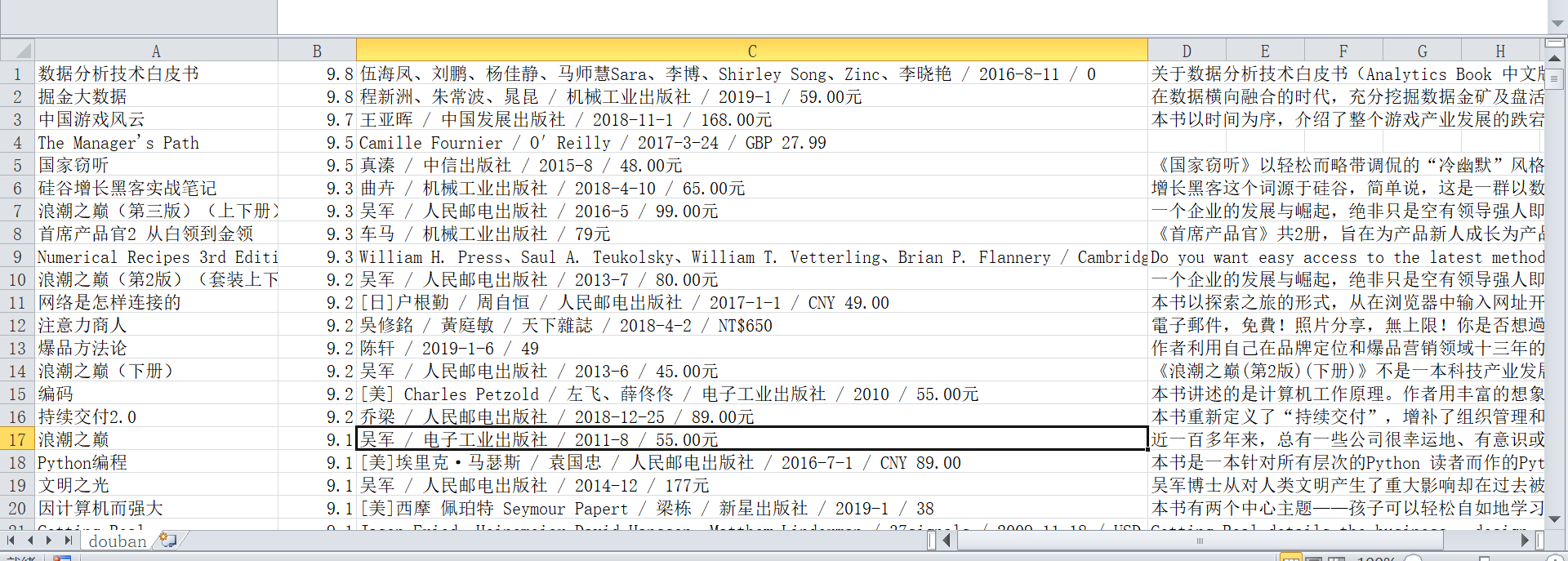
execute("scrapy crawl doubanmovie".split()) - 效果
-
- 编写一个start.py文件
scrapy 爬取豆瓣互联网图书的更多相关文章
- scrapy爬取豆瓣电影top250
# -*- coding: utf-8 -*- # scrapy爬取豆瓣电影top250 import scrapy from douban.items import DoubanItem class ...
- 爬取豆瓣网图书TOP250的信息
爬取豆瓣网图书TOP250的信息,需要爬取的信息包括:书名.书本的链接.作者.出版社和出版时间.书本的价格.评分和评价,并把爬取到的数据存储到本地文件中. 参考网址:https://book.doub ...
- Scrapy爬取豆瓣图书数据并写入MySQL
项目地址 BookSpider 介绍 本篇涉及的内容主要是获取分类下的所有图书数据,并写入MySQL 准备 Python3.6.Scrapy.Twisted.MySQLdb等 演示 代码 一.创建项目 ...
- 使用scrapy爬取豆瓣上面《战狼2》影评
这几天一直在学习scrapy框架,刚好学到了CrawlSpider和Rule的搭配使用,就想着要搞点事情练练手!!! 信息提取 算了,由于爬虫运行了好几次,太过分了,被封IP了,就不具体分析了,附上& ...
- scrapy爬取豆瓣电影信息
最近在学python,对python爬虫框架十分着迷,因此在网上看了许多大佬们的代码,经过反复测试修改,终于大功告成! 原文地址是:https://blog.csdn.net/ljm_9615/art ...
- Scrapy爬取豆瓣电影top250的电影数据、海报,MySQL存储
从GitHub得到完整项目(https://github.com/daleyzou/douban.git) 1.成果展示 数据库 本地海报图片 2.环境 (1)已安装Scrapy的Pycharm (2 ...
- Scrapy中用xpath/css爬取豆瓣电影Top250:解决403HTTP status code is not handled or not allowed
好吧,我又开始折腾豆瓣电影top250了,只是想试试各种方法,看看哪一种的方法效率是最好的,一直进行到这一步才知道 scrapy的强大,尤其是和selector结合之后,速度飞起.... 下面我就采用 ...
- python系列之(3)爬取豆瓣图书数据
上次介绍了beautifulsoup的使用,那就来进行运用下吧.本篇将主要介绍通过爬取豆瓣图书的信息,存储到sqlite数据库进行分析. 1.sqlite SQLite是一个进程内的库,实现了自给自足 ...
- Scrapy 通过登录的方式爬取豆瓣影评数据
Scrapy 通过登录的方式爬取豆瓣影评数据 爬虫 Scrapy 豆瓣 Fly 由于需要爬取影评数据在来做分析,就选择了豆瓣影评来抓取数据,工具使用的是Scrapy工具来实现.scrapy工具使用起来 ...
随机推荐
- 把一个对象转成map对象
import java.lang.reflect.Field;import java.util.HashMap; public class Util { public static HashMap&l ...
- Android手机不插USB,使用adb网络远程调试
最近做项目,需要在手机不插USB的情况下连接设备查看打印的日志,发现可以通过adb connect命令实现: 1.先把手机通过USB与电脑相连 2.使用adb tcpip 5555命令,打开手机的55 ...
- HTML与CSS:结构与表现
在HTML和CSS里存在着部分重复的功能,例如两者都可以设定一段文字的字体属性.既然如此,为啥还要CSS呢(至少,为啥CSS里存在着和HTML标签属性重复的东西呢)? 这是因为,HTML和CSS的用途 ...
- 一些常用的js循环,如for
https://blog.csdn.net/u014399368/article/details/82862444
- 未来-IOT-Aliyun:ICA 联盟
ylbtech-未来-IOT-Aliyun:ICA 联盟 ICA联盟介绍 为解决IoT标准体系不完善,场景复合或者分散,不同领域端云连接.通信组网.数据属性.端到端安全.测试标准缺乏或不统一等痛点问题 ...
- 2016310Exp5 MSF基础应用
1. 实践目标 本实践目标是掌握metasploit的基本应用方式,重点常用的三种攻击方式的思路.具体需要完成: 1.1一个主动攻击实践,如ms08_067; (1分) 1.2 一个针对浏览器的攻击, ...
- 在linux中安装protobuf编译器和运行时环境
为了使用源码编译protobuf,需要下面的工具: autoconf, automake, libtool, make, g++, unzip 如果你使用ubuntu/debian,你可以使用如下方式 ...
- 7.6 chcount.c -- 使用逻辑与运算符
include <stdio.h> #define PERIOD '.' int main(void) { char ch; int charcount = 0; while ((ch = ...
- 修改Linux主机名
如果安装时没有设置,一般默认主机名为localhost.localdomain. 通过以下方式修改成自己设置的主机名: 1. vi /etc/sysconfig/network NETWORKING= ...
- selenium测瀑布流UI页面的Python代码
from selenium import webdriver from selenium.webdriver.common.keys import Keys from selenium.webdri ...