
Unity3D编辑器扩展(二)——定义自己的窗口
上一篇我们讲了如何定义菜单按钮
https://www.cnblogs.com/xiaoyulong/p/10115053.html
这一篇我们讲如何定义自己的窗口。
定义窗口我们需要继承 EditorWindow 类,这个类在 using UnityEditor 命名空间下。
创建窗口有两个方法可以使用:
1、EditorWindow.GetWindow():创建出来的窗口可通过鼠标动态的延伸窗口。
参数:Type t:窗口类型,注意是一定要继承自 EditorWindow。
bool utility:窗口是否浮动,如果是就不能内嵌到unity其他窗口中去,如果不是就能嵌入其他窗口。(可以省略,默认为内嵌入式)
string title:窗口的标题,如果为空的话就采用类的名称来当标题。(可以省略,默认类的名称)
bool focus:是否可以获得焦点,如果再次点击会给窗口一个焦点。
2、EditorWindow.GetWindowWithRect():创建出来的窗口的大小是固定的,无法改变。
参数:Type t:窗口类型,注意是一定要继承自 EditorWindow。
Rect rect:窗口的大小。
bool utility:窗口是否浮动,如果是就不能内嵌到unity其他窗口中去,如果不是就能嵌入其他窗口。(可以省略,默认为内嵌入式)
string title:窗口的标题,如果为空的话就采用类的名称来当标题。(可以省略,默认类的名称)
bool focus:是否可以获得焦点,如果再次点击会给窗口一个焦点。
代码如下:
 using UnityEditor;

 using UnityEngine;

 public class EditorWindowTest : EditorWindow

 {

     [MenuItem("MyWindow/EditorWindowTest1")]

     private static void AddWindow1()

     {

         EditorWindowTest myWindow = (EditorWindowTest)EditorWindow.GetWindow(typeof(EditorWindowTest), false, "Window1 name", true);//创建窗口

         myWindow.Show();

     }

     [MenuItem("MyWindow/EditorWindowTest2")]

     private static void AddWindow2()

     {

         Rect _rect = new Rect(, , , );

         EditorWindowTest window = (EditorWindowTest)EditorWindow.GetWindowWithRect(typeof(EditorWindowTest), _rect, true, "Window2 name");

         window.Show();

     }

 }
效果图:
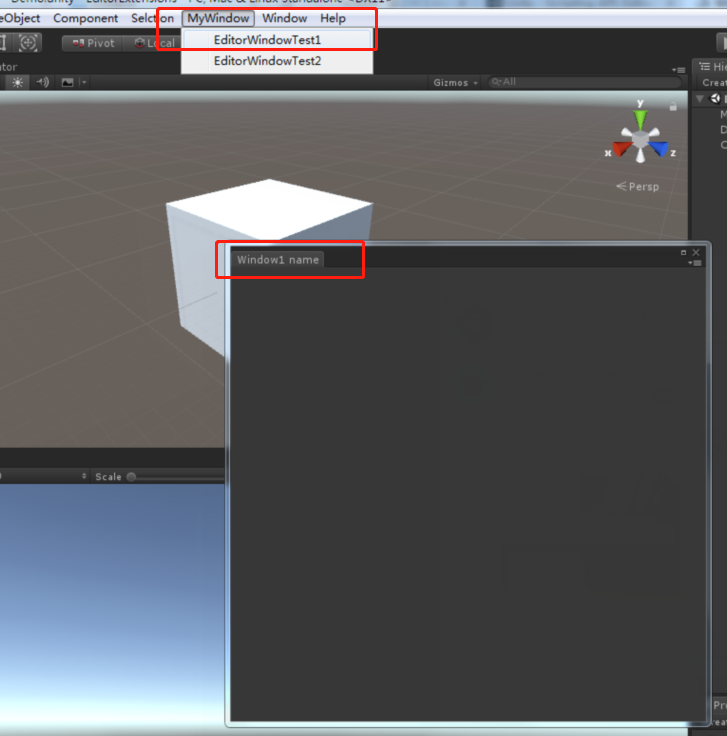

窗口创建出来了,我们可以使用 GUI 和 GUILayout 控件,还可以使用编辑器专用控件 EditorGUI 和 EditorGUILayout 在 OnGUI() 回调函数中给窗口添加内容,下面就用一个小例子给大家演示下,并介绍下窗口支持的回调函数
代码:
using UnityEditor;

using UnityEngine;

public class MyEditor : EditorWindow

{

    [MenuItem("MyWindow/window")]

    private static void AddWindow()

    {

        Rect wr = new Rect(, , , );

        MyEditor window = (MyEditor)EditorWindow.GetWindowWithRect(typeof(MyEditor), wr, true, "widow name");

        window.Show();

    }

    //输入文字的内容

    private string text;

    //选择贴图的对象

    private Texture texture;

    //绘制窗口时调用

    private void OnGUI()

    {

        //输入框控件

        text = EditorGUILayout.TextField("输入文字:", text);

        if (GUILayout.Button("打开通知", GUILayout.Width()))

        {

            //打开一个通知栏

            this.ShowNotification(new GUIContent("This is a Notification"));

        }

        if (GUILayout.Button("关闭通知", GUILayout.Width()))

        {

            //关闭通知栏

            this.RemoveNotification();

        }

        //文本框显示鼠标在窗口的位置

        EditorGUILayout.LabelField("鼠标在窗口的位置", Event.current.mousePosition.ToString());

        //选择贴图

        texture = EditorGUILayout.ObjectField("添加贴图", texture, typeof(Texture), true) as Texture;

        if (GUILayout.Button("关闭窗口", GUILayout.Width()))

        {

            //关闭窗口

            this.Close();

        }

    }

    private void Awake()

    {

        Debug.Log("Awake");

    }

    private void Update()

    {

        Debug.Log("Update");

    }

    private void OnEnable()

    {

        Debug.Log("OnEnable");

    }

    private void OnDisable()

    {

        Debug.Log("OnDisable");

    }

    private void OnFocus()

    {

        Debug.Log("当窗口获得焦点时调用一次");

    }

    private void OnLostFocus()

    {

        Debug.Log("当窗口丢失焦点时调用一次");

    }

    private void OnHierarchyChange()

    {

        Debug.Log("当Hierarchy视图中的任何对象发生改变时调用一次");

    }

    private void OnProjectChange()

    {

        Debug.Log("当Project视图中的资源发生改变时调用一次");

    }

    private void OnInspectorUpdate()

    {

        Debug.Log("窗口面板的更新");

        //这里开启窗口的重绘,不然窗口信息不会刷新

        this.Repaint();

    }

    private void OnSelectionChange()

    {

        //当窗口处于开启状态,并且在Hierarchy视图中选择某游戏对象时调用

        foreach (Transform t in Selection.transforms)

        {

            //有可能是多选,这里开启一个循环打印选中游戏对象的名称

            Debug.Log("OnSelectionChange" + t.name);

        }

    }

    private void OnDestroy()

    {

        Debug.Log("当窗口关闭时调用");

    }

}
效果图:

最后介绍两个API:
fousedWindow(静态属性):键盘操作的窗口的焦点。键盘在对哪个窗口进行输入或者其他操作,这个静态变量就是那个窗口。
mouseOverWindow(静态属性):鼠标操作的窗口的焦点。鼠标悬停在哪个Window,这个静态变量就是那个窗口。
除了上面介绍的方法以外,Unity还提供了向导式的编辑窗口 ScriptableWizard,就是提供了一个简单的窗口模块,支持我们快速开发
创建函数介绍:
public static T DisplayWizard<T>(string title)
public static T DisplayWizard<T>(string title, string createButtonName)
public static T DisplayWizard<T>(string title, string createButtonName, string otherButtonName)
public static ScriptableWizard DisplayWizard(string title, Type klass, string createButtonName)
函数参数详解:
string title:窗口标题名称
string createButtonName:Create按钮名称
string otherButtonName: 其他按钮名称
Type klass:实现类类型
属性介绍:
createButtonName:修改 create button 的名称
otherButtonName: 设置 otherButtonName 的名称
helpString:允许您设置向导的帮助文本。
errorString:允许您设置向导的错误文本。
isValid:允许您启用和禁用向导创建按钮,以便用户不能点击。
回调函数介绍:
OnWizardUpdate:当向导被打开或只要用户在向导改变了某些东西时就会被自动的调用。
OnWizardCreate:当用户在创建按钮上点击是调用。
OnWizardOtherButton:当用户在其他按钮点击时,此函数会被调用
案例:
代码:
 using UnityEditor;

 using UnityEngine;

 public class ScriptableWizardTest : ScriptableWizard

 {

     #region --变量定义

     public float range = ;

     public Color color = Color.red;

     #endregion

     #region --自定义函数

     [MenuItem("MyWindow/Create Light Wizard")]

     static void CreateWizard()

     {

         ScriptableWizard.DisplayWizard<ScriptableWizardTest>("Create Light", "Create", "Apply");

     }

     void OnWizardCreate()

     {

         GameObject go = new GameObject("New Light");

         Light lt = go.AddComponent<Light>();

         lt.range = range;

         lt.color = color;

     }

     void OnWizardUpdate()

     {

         helpString = "Please set the color of the light!";

     }

     void OnWizardOtherButton()

     {

         if (Selection.activeTransform != null)

         {

             Light lt = Selection.activeTransform.GetComponent<Light>();

             if (lt != null)

             {

                 lt.color = Color.red;

             }

         }

     }

     #endregion

 }
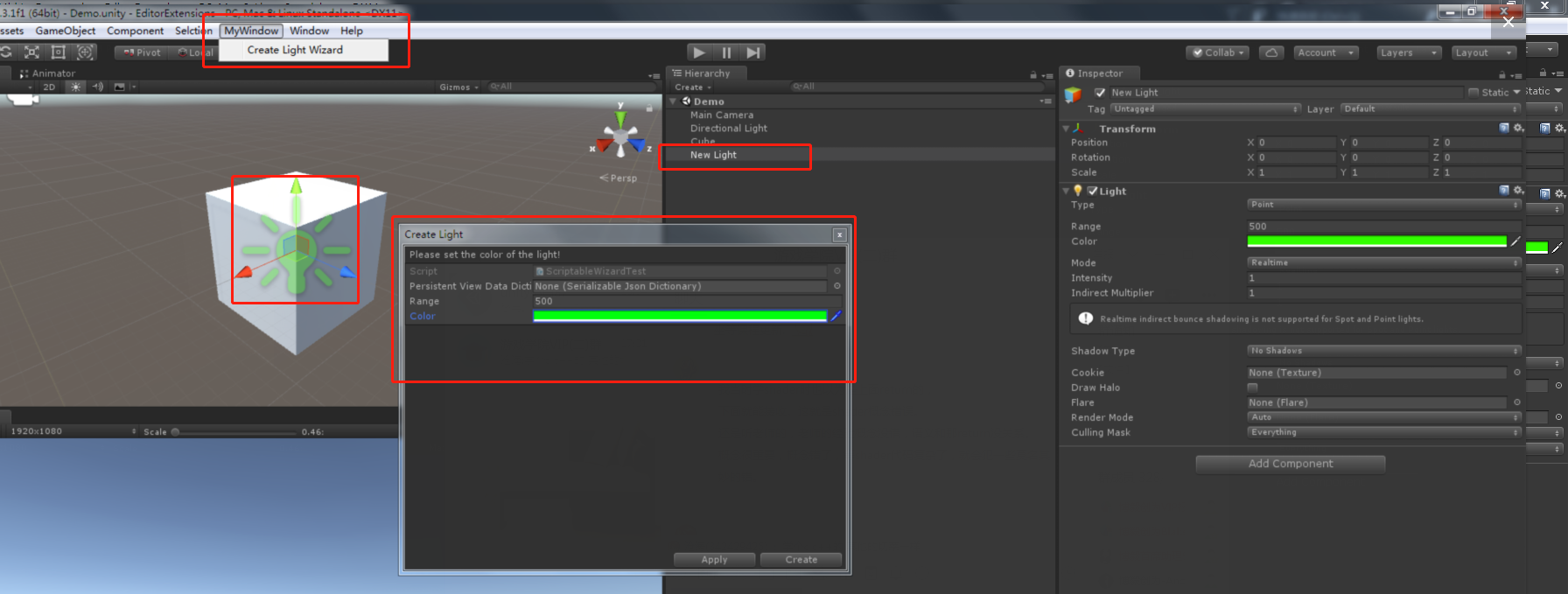
效果图:
Unity3D编辑器扩展(二)——定义自己的窗口的更多相关文章
- Unity3D编辑器扩展(六)——模态窗口
前面我们已经写了5篇关于编辑器的,这是第六篇,也是最后一篇: Unity3D编辑器扩展(一)——定义自己的菜单按钮 Unity3D编辑器扩展(二)——定义自己的窗口 Unity3D编辑器扩展(三)—— ...
- Unity3D编辑器扩展(五)——常用特性(Attribute)以及Selection类
前面写了四篇关于编辑器的: Unity3D编辑器扩展(一)——定义自己的菜单按钮 Unity3D编辑器扩展(二)——定义自己的窗口 Unity3D编辑器扩展(三)——使用GUI绘制窗口 Unity3D ...
- Unity3D编辑器扩展(四)——扩展自己的组件
前面已经写了三篇: Unity3D编辑器扩展(一)——定义自己的菜单按钮 Unity3D编辑器扩展(二)——定义自己的窗口 Unity3D编辑器扩展(三)——使用GUI绘制窗口 今天写第四篇,扩展自己 ...
- Unity3d编辑器扩展学习笔记
编辑器扩展 1.添加菜单栏:把特性应用于静态方法 参数1:菜单名的空格后面是定义快捷键(单符号得用"_"开头,组合键%=Ctrl,#=Shift,&=Alt) 参数2:通过 ...
- unity3D编辑器扩展
编辑器扩展只是在编辑项目中运行,发布出来是不会运行的. 固定创建一个文件夹Editor:所有的资源或者代码都不会被打包进去. 01.使用MenuItem添加菜单栏按钮 脚本不需要作为组件存在,可以不用 ...
- Unity3D编辑器扩展(一)——定义自己的菜单按钮
Unity3D 引擎的编辑器拥有很强的扩展性,用的好可以帮我们省很多事情.在这里记录下如何去扩展 Unity3D 的编辑器,定制属于我们自己的开发环境. 本篇主要讲解在 Unity3D 引擎的各个窗口 ...
- Unity3D编辑器扩展(三)——使用GUI绘制窗口
前两篇分别讲解了创建菜单https://www.cnblogs.com/xiaoyulong/p/10115053.html和创建窗口https://www.cnblogs.com/xiaoyulon ...
- [Unity3D]编辑器扩展之数组或List显示
效果如下: 源码如下: using System.Collections.Generic; using UnityEditor; using UnityEngine; namespace XM.Edi ...
- unity编辑器扩展_08(创建自定义窗口)
代码: using UnityEngine;using UnityEditor; public class MyWidow : EditorWindow{ [MenuItem("Win ...
随机推荐
- Code First 不自动生成数据库
工具--〉程序包管理器控制台 k1. 启用迁移: Enable-Migrations Enable-Migrations -ContextTypeName Mvc4WebSite.Models.Mvc ...
- springboot+maven多模块工程dependency not found
参见:https://blog.csdn.net/m0_37943753/article/details/81031319. 重点是<dependencyManagement>标签的作用, ...
- python之字符串及其方法---整理集
字符串方法 1.capitalize方法:字符串首字母大写 举例: test="alex" v=test.capitalize() print(v) 返回结果: Alex 2.ca ...
- ambiguous
ambiguous - 必应词典 美[æm'bɪɡjuəs]英[æm'bɪɡjuəs] adj.模棱两可的:含混不清的:多义的:不明确的 网络含糊的:模糊的:暧昧的 搭配ambiguous answe ...
- CentOS 7 安装与卸载MySQL 5.7
先介绍卸载 防止重装 yum方式 查看yum是否安装过mysql yum list installed mysql* 如或显示了列表,说明系统中有MySQL yum卸载 根据列表上的名字 yum re ...
- 登录界面,body上有背景图,点击输入框时,弹出的手机键盘会把背景图顶变形,而且会把footer顶上去
js: //防止背景图被手机键盘压缩变形 $(document).ready(function () { $('body').css({'height':$(window).height()}) }) ...
- mysql 多列索引学习-经典实例
索引优化 ,b-tree假设某个表有一个联合索引(c1,c2,c3,c4) 以下 只能使用该联合索引的c1,c2,c3部分A. where c1 = x and c2 = x and c4>x ...
- python使用requests库爬取网页的小实例:爬取京东网页
爬取京东网页的全代码: #爬取京东页面的全代码 import requests url="https://item.jd.com/2967929.html" try: r=requ ...
- Linux下docker报错syntax error:unexpected protocol at end of statement
---恢复内容开始--- [Linux]Shell脚本“syntax error: unexpected end of file”原因及处理 :::https://blog.csdn.net/u013 ...
- bittorrent 学习(四) tracker peer通讯
看看 tracker.c文件 http_encode() 为http发送进行编码转换 int http_encode(unsigned char *in,int len1,char *out,int ...