
python入门22 pymssql模块(python连接sql server查询)
安装
pip install pymssql
连接数据库 pymssql.connect()
# coding:utf-8

import pymssql

server = '192.168.8.1' #服务器ip或名称

user = 'sa' #用户名

password = ''  #密码

database = 'test' #数据库

dbconnect = pymssql.connect(server = server,user = user,password=password,database = database) #连接到数据库
操作数据库 connect.cursor() ,
fetchone() 取一行
fetchall() 取所有结果
dbcursor = dbconnect.cursor() #游标

dbcursor.execute('select top 2 name,major from test_student')
#一行一行的取数

row = dbcursor.fetchone()

print(row)

row = dbcursor.fetchone()

print(row)

row = dbcursor.fetchone() #取完数据,None

print(row)
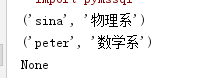
#取出所有查询结果
rows = dbcursor.fetchall()

print(rows) # list
rows = dbcursor.fetchall() #再取空

print(rows) # []

游标加上 as_dict=True。结果显示dict
dbcursor = dbconnect.cursor() #游标

dbcursor.execute('select top 10 name,major from test_student')

print(dbcursor.fetchall())

dbcursor = dbconnect.cursor(as_dict=True) #游标

dbcursor.execute('select top 10 name,major from test_student')

print(dbcursor.fetchall())

最后记得关闭游标和连接
dbcursor.close()

dbconnect.close()
官网: http://pymssql.org/en/stable/
python入门22 pymssql模块(python连接sql server查询)的更多相关文章
- Python基于Pymssql模块实现连接SQL Server数据库的方法
首先,安装pymssql第三方库pip install pymssql 其次,导入pymssql库 最后们就可以连接数据库了 import pymssql server = "10.10.9 ...
- python入门23 pymssql模块(python连接sql server增删改数据 )
增删改数据必须connect.commit()才会生效 回滚函数 connect.rollback() 连接数据库 ''' dinghanhua sql server增删改 ''' import py ...
- python 使用pymssql连接sql server数据库
python 使用pymssql连接sql server数据库 #coding=utf-8 #!/usr/bin/env python#------------------------------ ...
- python 连接sql server
linux 下pymssql模块的安装 所需压缩包:pymssql-2.1.0.tar.bz2freetds-patched.tar.gz 安装: tar -xvf pymssql-2.1.0.tar ...
- python连接sql server数据库实现增删改查
简述 python连接微软的sql server数据库用的第三方模块叫做pymssql(document:http://www.pymssql.org/en/stable/index.html).在官 ...
- python 连接 SQL Server 数据库
#!/usr/bin/python # -*- coding:utf-8 -*- import pymssql import pyodbc host = '127.0.0.1:1433' user = ...
- Python web(Django)连接Sql server
(开开心心每一天~ ---虫瘾师) Python Web(Django) 与SQL SERVRE的连接----Come QQ群:607021567(里面有很多开源代码和资料,并且python的游戏也有 ...
- Python入门之第三方模块安装
Python入门之第三方模块安装 平台:Win10 x64 + Anaconda3-5.3.0 (+Python3.7.0) Issue说明:pip install line_profiler-2.1 ...
- Python 学习 第17篇:从SQL Server数据库读写数据
在Python语言中,从SQL Server数据库读写数据,通常情况下,都是使用sqlalchemy 包和 pymssql 包的组合,这是因为大多数数据处理程序都需要用到DataFrame对象,它内置 ...
随机推荐
- 解决nginx文件服务器访问403
2018-10-24 nginx配置文件目录服务器 修改/etc/nginx/conf.d/default.conf或者在/etc/nginx/conf.d/目录下添加一配置文件,如下 server ...
- 基于WebImage的图片上传工具类
支持缩略图和水印. using System; using System.IO; using System.Linq; using System.Web; using System.Web.Helpe ...
- VUE项目引入微信jssdk
npm i -S weixin-js-sdkimport wx from 'weixin-js-sdk'
- 3.CAS原子操作
什么是原子性操作,按照官方的解析:原子操作不能在一个中间操作中停止,要么全部成功要么全部失败.(An atomic action cannot stop in the middle: it eithe ...
- shell 实现文件改名
修改文件名可以有不同的命令方式,mv 可以实现,但是使用rename 这种专业的改名字很好 对于单个的文件,可以直接使用以上的命令,那如果有大量的类似格式的文件名需要修改成其他格式的,该如何呢? 创建 ...
- (转)开发监控Linux 内存 Shell 脚本
原文:http://blog.csdn.net/timchen525/article/details/76474017 题场景: 开发Shell 脚本判断系统剩余内存的大小,如果低于100MB,就邮件 ...
- webservice 注解介绍
JAX-WS 注释 “基于 XML 的 Web Service 的 Java API”(JAX-WS)通过使用注释来指定与 Web Service 实现相关联的元数据以及简化 Web Service ...
- 15019:Only the instance admin may alter the PermSize attribute
15019:Only the instance admin may alter the PermSize attribute TimesTen提示空间不足,增加空间重启后提示15019:Only th ...
- Nmap原理02 - 编写自己的服务探测脚本
编写自己的服务探测脚本 1. 添加自己的探测脚本 nmap-service-probes文件的格式将在第二节介绍,本节通过一个例子说明如何添加自己的服务探测脚本. AMQP协议,即Advanced M ...
- 第七章--Java基础类库--与用户的互动
1.命令行编译和运行java程序在notepad++中集成java编译运行命令 参考博客:http://blog.sina.com.cn/s/blog_84405af50101q7fn.html2与用 ...