
C# WinForm Webbrowser 强制所有网页链接在同一页面打开或者在TabControl中弹出新窗口(续)
上面那个文写的如同粑粑一样
效果图
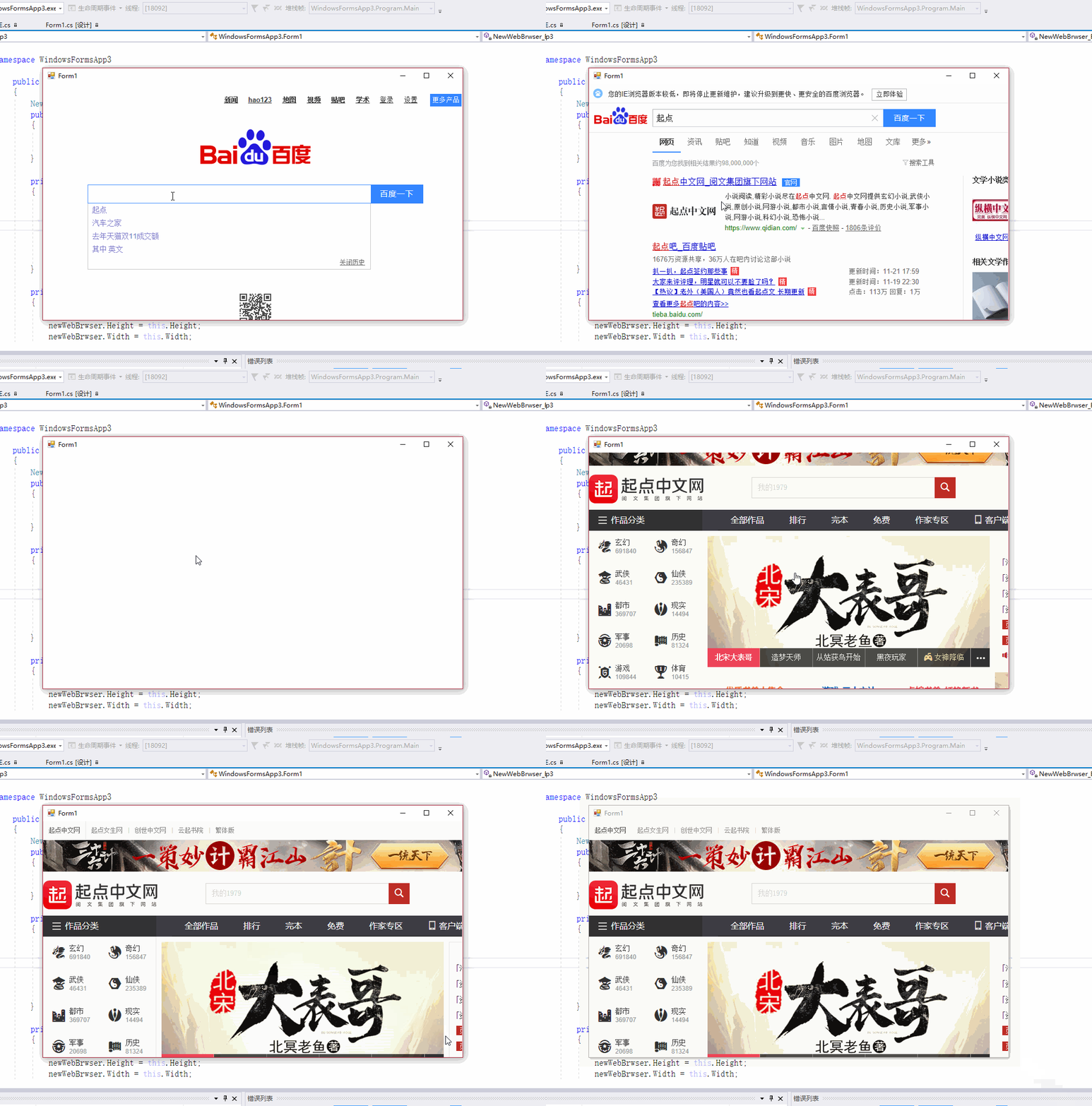
Winfrom 中添加这个类就好了
using System;

using System.Collections.Generic;

using System.ComponentModel;

using System.Linq;

using System.Text;

using System.Threading.Tasks;

using System.Windows.Forms;

namespace IE

{

    public class WebBrowserUrl : CancelEventArgs

    {

        public String Url { get; }

        public String Frame { get; }

        public WebBrowserUrl(String url, String frame) : base()

        {

            this.Url = url;

            this.Frame = frame;

        }

    }

    public class WebBrowserUrl2

    {

        public String Url { get; }

        public String Frame { get; }

        public WebBrowserUrl2(String url, String frame)

        {

            this.Url = url;

            this.Frame = frame;

        }

    }

    public class WebBrowserEvent

    {

        public bool cancel;

    }

    public class NewWebBrwser : WebBrowser

    {

        System.Windows.Forms.AxHost.ConnectionPointCookie cookie;

        NewWebBrowserEvent events;

        public event EventHandler BeforeNavigate;

     //   public event EventHandler BeforeNewWindow;

        public delegate void OnNewWindow2(WebBrowserUrl2 webPra, WebBrowserEvent cancel);

        public event  OnNewWindow2 BeforeNewWindow2;

        protected override void CreateSink()

        {

            base.CreateSink();//还是需要源

            events = new NewWebBrowserEvent(this);

            cookie = new System.Windows.Forms.AxHost.ConnectionPointCookie(this.ActiveXInstance, events, typeof(INewDWWebBrowserEvent));

        }

        protected override void DetachSink()

        {

            if (null != cookie)

            {

                cookie.Disconnect();

                cookie = null;

            }

            base.DetachSink();

        }

        public void OnBeforeNavigate(string url, string frame, out bool cancel)

        {

            var Arg = BeforeNavigate;

            WebBrowserUrl webBrowserUrl = new WebBrowserUrl(url, frame);

            Arg?.Invoke(this, webBrowserUrl);

            cancel = webBrowserUrl.Cancel;

        }

        public void OnBeforeNewWindow(string url, out bool cancel)

        {

            //var Arg = BeforeNewWindow;

            //WebBrowserUrl webBrowserUrl = new WebBrowserUrl(url, null);

            //Arg?.Invoke(this, webBrowserUrl);

            //cancel = webBrowserUrl.Cancel;

            var Arg = BeforeNewWindow2;

            WebBrowserUrl2 webBrowserUrl = new WebBrowserUrl2(url, null);

            WebBrowserEvent webBrowserEvent = new WebBrowserEvent();

            Arg?.Invoke(webBrowserUrl,webBrowserEvent);

            cancel = webBrowserEvent.cancel;

        }

    }

    public class NewWebBrowserEvent : System.Runtime.InteropServices.StandardOleMarshalObject, INewDWWebBrowserEvent

    {

        private NewWebBrwser webBrowser;

        public NewWebBrowserEvent(NewWebBrwser newWebBrowser) => webBrowser = newWebBrowser;

        public void BeforeNavigate2(object pDisp, ref object urlObject, ref object flags, ref object targetFrameName, ref object postData, ref object headers, ref bool cancel)

        {

            webBrowser.OnBeforeNavigate((string)urlObject, (string)targetFrameName, out cancel);

        }

        //官方说明此 事件是低于IE6时会引发

        public void NewWindow2(ref object ppDisp, ref bool cancel)

        {

            webBrowser.OnBeforeNewWindow(((WebBrowser)ppDisp).Url.ToString(), out cancel);

        }

        //当高于IE6时使用

        public void NewWindow3(object pDisp, ref bool cancel, ref object flags, ref object URLContext, ref object URL)

        {

            webBrowser.OnBeforeNewWindow((string)URL, out cancel);

        }

    }

     [System.Runtime.InteropServices.ComImport(), System.Runtime.InteropServices.Guid("34A715A0-6587-11D0-924A-0020AFC7AC4D"),

      System.Runtime.InteropServices.InterfaceTypeAttribute(System.Runtime.InteropServices.ComInterfaceType.InterfaceIsIDispatch),

      System.Runtime.InteropServices.TypeLibType(System.Runtime.InteropServices.TypeLibTypeFlags.FHidden)]

    public interface INewDWWebBrowserEvent

    {

        [System.Runtime.InteropServices.DispId()]

        void BeforeNavigate2(object pDisp, ref object urlObject, ref object flags, ref object targetFrameName, ref object postData, ref object headers, ref bool cancel);

        //官方说明此 事件是低于IE6时会引发

        [System.Runtime.InteropServices.DispId()]

        void NewWindow2(ref object ppDisp, ref bool cancel);

        //当高于IE6时使用

        [System.Runtime.InteropServices.DispId()]

        void NewWindow3(object pDisp, ref bool cancel, ref object flags, ref object URLContext, ref object URL);

    }

}
使用方式

C# WinForm Webbrowser 强制所有网页链接在同一页面打开或者在TabControl中弹出新窗口(续)的更多相关文章
- 强制所有网页链接在同一页面打开或者在TabControl中弹出新窗口
IEwebbrowser中老生常谈的话题. 一般的解决都是通过 // webBrowser.Navigating += WebBrowser_Navigating; 注册转跳前事件 private v ...
- C# WPF Webbrowser 强制所有网页链接在同一页面打开
只要搞懂Winform的 WPF稍微改一改就可以了 主类:负责跳转的 using System; using System.Collections.Generic; using System.Com ...
- C# Winform WebBrowser控件
C# WinForm WebBrowser 1.主要用途:使用户可以在窗体中导航网页. 2.注意:WebBrowser 控件会占用大量资源.使用完该控件后一定要调用 Dispose 方法,以便确保及时 ...
- .NET4.5 WFP中用WebBrowser获取/操作网页html代码
引言 想给自己之前写的网页小说爬虫程序更新换代,之前一直是用winform的形式写的程序,因此这一次更新打算把UI换成WPF(因为听说WPF很漂亮),顺便也以此引入WPF的学习. 那么作为网页爬虫程序 ...
- c# webbrowser 随机点击链接
HtmlElementCollection hec = webBrowser1.Document.All; ; i < hec.Count; i++) { if (hec[i].GetAttri ...
- paip.点击每个网页链接都提示下载的解决。
paip.点击每个网页链接都提示下载的解决. 作者Attilax 艾龙, EMAIL:1466519819@qq.com 来源:attilax的专栏 地址:http://blog.csdn. ...
- JavaScript 网页链接调用Android程序
如何让网页链接实现启动Android的应用,网上有说重写WebView相关的shouldOverrideUrlLoading方法,但是这种理论上能实现,因为你的网页不是仅仅被你自己的webview来浏 ...
- webBrowser中操作网页元素全攻略
原文 webBrowser中操作网页元素全攻略 1.获取非input控件的值: webBrowser1.Document.All["控件ID"].InnerText; 或webBr ...
- Winform WebBrowser引用IE版本问题
做了一个Winform的项目.项目里使用了WebBrowser控件.以前一直都以为WebBrowser是直接调用的系统自带的IE,IE是呈现出什么样的页面WebBrowser就呈现出什么样的页面.其实 ...
随机推荐
- DFT的补0运算
在实际的DFT中,如果需要增加采样的密度.这里的采样是频域的采样.可以等到更加密集的谱. 如对于信号 x = [1, 1, 1, 1]做DFT如下图: 不零后的DFT, N = 8, N= 16, N ...
- 关于学习ios开发的一些笔记
关于方法前的 + - 符号 前置加号(+)的方法为类方法,这类方法是可以直接用类名来调用的,它的作用主要是创建一个实例.相当于是静态的方法. 前置减号(-)的方法为实例方法,必须使用类的实例才可以调用 ...
- 初识 Julia
Ubuntu 下安装 Julia 环境 sch01ar@ubuntu:~$ sudo apt install julia 安装完成后打开 Julia 的交互式会话 sch01ar@ubuntu:~$ ...
- Python时间日期函数讲解
所有日期.时间的api都在datetime模块内. 1. 日期输出格式化 datetime => string import datetime now = datetime.datetime.n ...
- 使用JAVA爬取网页图片
经过之前的HttpURLConnection还有各种流的结束,已经可以开始理解怎么下载网页上的一张图片了. 对各种流不理解的话,可以翻翻前面的随笔,讲得都比较详细.在此就不细讲了. 主要流程: 1.H ...
- BurpSuite—-decoder模块(编码模块)
一.简介 Burp Decoder是Burp Suite中一款编码解码工具,将原始数据转换成各种编码和哈希表的简单工具,它能够智能地识别多种编码格式采用启发式技术. 二.模块说明 通过有请求的任意模块 ...
- 解析Java反射 - invoke方法
最近工作中涉及到获取同程火车票,大概描述为:将本地获取的发出城市,目的城市及出发时间按固定格式封装,调用接口获取可乘坐座席等级最高的火车票,接口返回数据用包含三层类封装的类接受,接受的类总共为四层,倒 ...
- Color the ball (线段树的区间更新问题)
N个气球排成一排,从左到右依次编号为1,2,3....N.每次给定2个整数a b(a <= b),lele便为骑上他的“小飞鸽"牌电动车从气球a开始到气球b依次给每个气球涂一次颜色.但 ...
- scala中存在的问题
2017-12-27 scala学习中存在的问题: 1.表达式的概念要搞清楚 2.八种基本数据类型要搞清楚 Byte\Short\Int\Long\Char\Boolean\Double\Float都 ...
- solr facet查询及solrj 读取facet数据(相当有用)
原文出自:http://www.coin163.com/java/docs/201310/d_3010029802.html 一. Facet 简介 Facet 是 solr 的高级搜索功能之一 ...