
k8s服务网关ambassador部署
1、ambassador是datawire开源的服务网关,很好的支持kubernetes。具体详细介绍参考官网:https://www.getambassador.io/about/why-ambassador
本节主要讲述整个部署过程和简单实用,具体详细的资料抢参考官网。
2、部署
本次主要介绍将ambassador部署到自己的kubernetes集群里面,根据官网介绍部署方式有几种:
1)yaml部署,即定义yaml文件,使用kubectl 直接部署
2) helm部署,如果用helm部署则需要在kubernetes中现安装tiller(helm的server端)
yaml部署:
新版本的k8s集群都开启了rbac认证,所以需要提前创建rbac文件,进行授权:
wget https://getambassador.io/yaml/ambassador/ambassador-rbac.yaml
---

apiVersion: v1

kind: Service

metadata:

  labels:

    service: ambassador-admin

  name: ambassador-admin

  namespace: tiller-world

spec:

  type: NodePort

  ports:

  - name: ambassador-admin

    port:

    targetPort:

  selector:

    service: ambassador---

apiVersion: rbac.authorization.k8s.io/v1beta1

kind: ClusterRole

metadata:

  name: ambassador

rules:

- apiGroups: [""]

  resources:

  - services

  verbs: ["get", "list", "watch"]

- apiGroups: [""]

  resources:

  - configmaps

  verbs: ["create", "update", "patch", "get", "list", "watch"]

- apiGroups: [""]

  resources:

  - secrets

  verbs: ["get", "list", "watch"]

- apiGroups: [""]

  resources:

  - namespaces

  verbs: ["get", "list", "watch"]

---

apiVersion: v1

kind: ServiceAccount

metadata:

  name: ambassador

  namespace: tiller-world

---

apiVersion: rbac.authorization.k8s.io/v1beta1

kind: ClusterRoleBinding

metadata:

  name: ambassador

roleRef:

  apiGroup: rbac.authorization.k8s.io

  kind: ClusterRole

  name: ambassador

subjects:

- kind: ServiceAccount

  name: ambassador

  namespace: tiller-world

---

apiVersion: extensions/v1beta1

kind: Deployment

metadata:

  name: ambassador

  namespace: tiller-world

spec:

  replicas:

  template:

    metadata:

      annotations:

        sidecar.istio.io/inject: "false"

        "consul.hashicorp.com/connect-inject": "false"

      labels:

        service: ambassador

    spec:

      serviceAccountName: ambassador

      containers:

      - name: ambassador

        image: quay.io/datawire/ambassador:0.50.-rc5

        resources:

          limits:

            cpu: 200m

            memory: 200Mi

          requests:

            cpu: 100m

            memory: 100Mi

        env:

        - name: AMBASSADOR_NAMESPACE

          valueFrom:

            fieldRef:

              fieldPath: metadata.namespace

        ports:

        - name: http

          containerPort:

        - name: https

          containerPort:

        - name: admin

          containerPort:

        livenessProbe:

          httpGet:

            path: /ambassador/v0/check_alive

            port:

          initialDelaySeconds:

          periodSeconds:

        readinessProbe:

          httpGet:

            path: /ambassador/v0/check_ready

            port:

          initialDelaySeconds:

          periodSeconds:

      restartPolicy: Always
我只修改了部署的namespace,tiller-world这个namespace是创建用helm部署程序用的。
创建角色及权限

kubectl  apply -f  ambassador-rbac.yaml
接下来创建ambassador的service:
暴漏服务有多种方式:LoadBalancer、NodePort、Ingress
这里我们使用NodePort暴漏服务,k8s默认的服务暴漏端口范围是30000~32767,当然这个端口的范围可以在启动apiserver的时候进行修改,指定--service-node-port-range=1-65535,修改为需要的端口范围,最好是不要将常见服务的端口包含在内,否则容易冲突。
# cat ambassador-svc.yaml

---

apiVersion: v1

kind: Service

metadata:

  labels:

    service: ambassador

  name: ambssador
  namespace: tiller-world

spec:

  type: NodePort

  ports:

  - port:

    targetPort:

    nodePort:

  selector:

    service: ambassador
这里采用NodePort方式暴漏到服务器的30009端口。可以根据需要自己制定。
创建一个测试route:
# cat httpbin.yaml

---

apiVersion: v1

kind: Service

metadata:

  name: httpbin

  annotations:

    getambassador.io/config: |

       ---

       apiVersion: ambassador/v0

       kind: Mapping

       name: httpbin_mapping

       prefix: /httpbin/

       service: httpbin.org:

       host_rewrite: httpbin.org

spec:

  ports:

  - name: httpbin

    port:
# kubectl apply -f httpbin.yaml
查看部署:
# kubectl get pods -n tiller-world

NAME                             READY   STATUS    RESTARTS   AGE

ambassador-5f66f5fd89-b2tqh      /     Running             138m

ambassador-5f66f5fd89-nbrgj      /     Running             138m

ambassador-5f66f5fd89-qxz55      /     Running             138m
# kubectl get  svc -n tiller-world

NAME               TYPE        CLUSTER-IP       EXTERNAL-IP   PORT(S)          AGE

ambassador-admin   NodePort    10.108.245.217   <none>        :/TCP   138m

ambssador          NodePort    10.105.112.156   <none>        :/TCP     104m

httpbin            ClusterIP   10.103.94.31     <none>        /TCP           104m
测试访问:
访问的url:http://ip:30009/httpbin/,ip为kubernetes服务器的ip

部署一个service测试,部署qotm服务:
# cat qotm.yaml

---

apiVersion: v1

kind: Service

metadata:

  name: qotm

  annotations:

    getambassador.io/config: |

      ---

      apiVersion: ambassador/v0

      kind: Mapping

      name: qot_mapping

      prefix: /qotm/

      service: qotm

spec:

  selector:

    app: qotm

  ports:

  - port:

    name: http-qotm

    targetPort: http-api

---

apiVersion: extensions/v1beta1

kind: Deployment

metadata:

  name: qotm

spec:

  replicas:

  strategy:

    type: RollingUpdate

  template:

    metadata:

      labels:

        app: qotm

    spec:

      containers:

      - name: qotm

        image: datawire/qotm:1.1

        ports:

        - name: http-api

          containerPort:

        resources:

          limits:

            cpu: "0.1"

            memory: 100Mi
kubectl apply -f qotm.yaml
service使用ambassador,只需要在service的定义里面添加注解就可以自动识别:
 annotations:

    getambassador.io/config: |

      ---

      apiVersion: ambassador/v0

      kind: Mapping

      name: qot_mapping

      prefix: /qotm/

      service: qotm
这里使用的是Mapping,uri前缀是/qotm/。详细的配置参考官网:https://www.getambassador.io/reference/mappings
先查看一下部署的服务:
# kubectl get svc  -n tiller-world

NAME               TYPE        CLUSTER-IP       EXTERNAL-IP   PORT(S)          AGE

ambassador-admin   NodePort    10.108.245.217   <none>        :/TCP   147m

ambssador          NodePort    10.105.112.156   <none>        :/TCP     113m

httpbin            ClusterIP   10.103.94.31     <none>        /TCP           113m

qotm               ClusterIP   10.108.253.202   <none>        /TCP           72m

tiller-deploy      ClusterIP   10.102.176.214   <none>        /TCP        4h47m

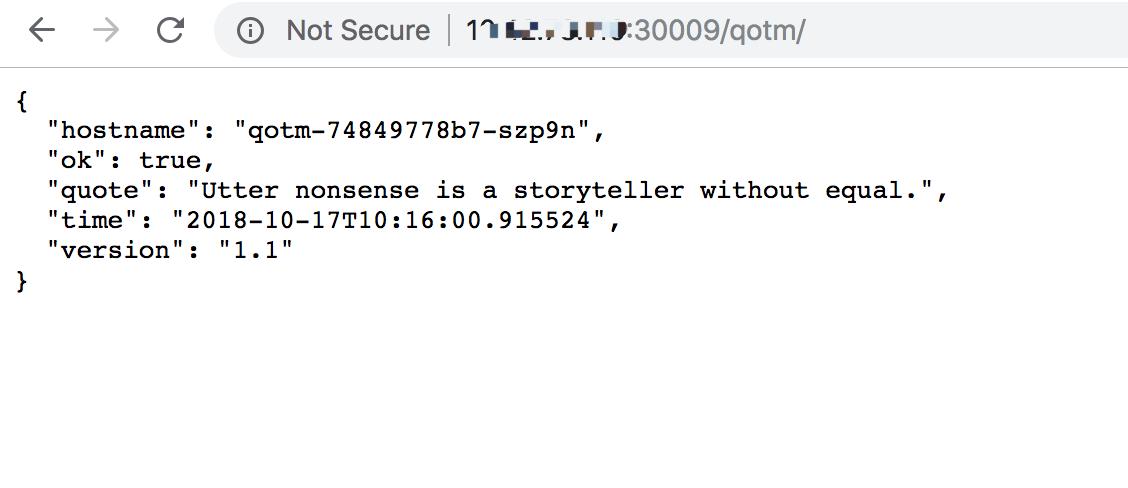
访问地址:http://ip:30009/qotm/
helm部署:
helm repo add datawire https://www.getambassador.io

helm upgrade --install --wait ambassador datawire/ambassador
当然也可以直接将chart fetch到本地,自己根据需求进行定制:
helm fetch --name ambassador datawire/ambassador
k8s服务网关ambassador部署的更多相关文章
- Bumblebee微服务网关的部署和扩展
Bumblebee是.netcore下开源基于BeetleX.FastHttpApi扩展的HTTP微服务网关组件,它的主要作用是针对WebAPI集群服务作一个集中的转发和管理:作为应用网关它提供了应用 ...
- Blazor+Dapr+K8s微服务之基于WSL安装K8s集群并部署微服务
前面文章已经演示过,将我们的示例微服务程序DaprTest1部署到k8s上并运行.当时用的k8s是Docker for desktop 自带的k8s,只要在Docker for deskto ...
- 微服务架构学习与思考(10):微服务网关和开源 API 网关01-以 Nginx 为基础的 API 网关详细介绍
微服务架构学习与思考(10):微服务网关和开源 API 网关01-以 Nginx 为基础的 API 网关详细介绍 一.为什么会有 API Gateway 网关 随着微服务架构的流行,很多公司把原有的单 ...
- api-gateway实践(02)新服务网关 - 运行环境
一.服务网关的运行环境 1.服务配置中心 1.1.服务配置中心前台 前台 http://10.110.17.20/#/login:无源码,德奎部署在10.110.17.20的DockerStatck环 ...
- .net core Ocelot实现API网关并部署在docker中
基于Ocelot(http://ocelot.readthedocs.io)搭建的API网关demo 软件以及系统版本: Asp.Net Core 2.2 Ocelot 13.5.0 CentOS ...
- 微服务-网关-node.js by 大雄daysn
目录 序言 一.node.js入门1.1 下载并安装1.2 从helloworld到一个web应用1.3 Express框架二.node.js搭建网关 三.node.js集群搭建 序言 首先一个问 ...
- 使用 Node.js 搭建微服务网关
目录 Node.js 是什么 安装 node.js Node.js 入门 Node.js 应用场景 npm 镜像 使用 Node.js 搭建微服务网关 什么是微服务架构 使用 Node.js 实现反向 ...
- .NET Core 微服务架构-Docker部署
本文主要介绍通过Docker来部署通过.NET Core开发的微服务架构,部署的微服务主要包括统一网关(使用Ocelot开发).统一认证(IdentityServer4).应用服务(ASP.NET C ...
- ambassador 学习九 多ambassador部署说明
目前官方稳文档没有写,但是demo 里面有,所以就整理出来,其实目前demo里面的 多实例部署用了多个服务的service(使用nodeport 暴露地址,具体使用就是制定ambassador 实例的 ...
随机推荐
- 你真的会Xilinx FPGA的复位吗?
Get Smart About Reset: Think Local, Not Global. 对于复位信号的处理,为了方便我们习惯上采用全局复位,博主在很长一段时间内都是将复位信号作为一个I/O口, ...
- windows 10 下配置安装node.js
环境配置 node.js windows10 25.5k 次阅读 · 读完需要 6 分钟 5 在去年就自己配置安装过node.js,但是使用npm安装模块时安装成功后调用require('mo ...
- [ 9.12 ]CF每日一题系列—— 960B暴力数组
Description: 给你两个数组,顺序一定,问你第一个数组连续的几个值等于下一个数组连续的几个值,然后寻找这个值得最大值,也就是满足就换 Solution: 用两个变量索引,判断即可 #incl ...
- 一些LinuxC的小知识点(一)
以下代码在Federo9上试验成功. 一.格式化输入16进制字符串 printf(); 输入结果: 二.测试各类型的占用的字节数 int main(int argc, char *argv[]) { ...
- mysql rand
在where语句中,rand有时候会出现多条记录
- Windows核心编程:第13章 内存体系结构
Github https://github.com/gongluck/Windows-Core-Program.git //第13章 内存体系结构.cpp: 定义应用程序的入口点. // #inclu ...
- ovs flow 原理及实验
OpenFlow概述 在支持OpenFlow的交换机中包含了若干个Flow table,Flow table可以用来控制数据包的处理,交换机会执行与flow相匹配的表项中所罗列的动作. OpenFlo ...
- 【BZOJ3238】 [Ahoi2013]差异(SAM)
传送门 BZOJ 洛谷 Solution SA版本的 考虑可以建一个SAM? 那么接下来我们就考虑每一对点对之间的贡献了. 把这个式子化简一下就是无序点对之间的那啥(自己意会一下) 然后我们定义边权为 ...
- [Sdoi2013]费用流(最大流,二分答案)
前言 网络流的练习为什么我又排在最后啊!!! Solution 我们先来挖掘一个式子: \[ ab+cd>ad+bc(a<c,b<d) \] 这个的证明很显然对吧. 然后就考虑最优策 ...
- OCP考试062题库出现大量新题-19
choose three Which three statements are true about Oracle Data Pump? A) Oracle Data Pump export and ...