
vs未能正确加载CSharpPackage包,未能正确加载“Microsoft.VisualStudio.Editor.Implementation.EditorPackage”包
VS2017打开项目时提示未能正确加载CSharpPackage包,
可以使用 devenv命令工具来解决,操作如下
打开vs2017开发人员命令提示符(请使用管理员身份运行),如图
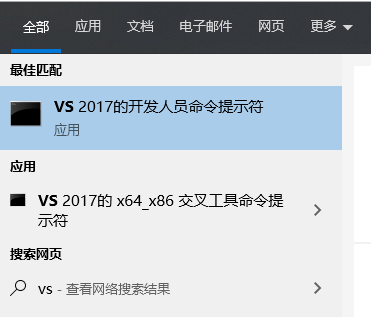
敲入 devenv /setup 回车执行
最后重启vs解决。
有的再重启vs时还会出现 未能正确加载“Microsoft.VisualStudio.Editor.Implementation.EditorPackage”包 的错误
进入 D:\Program Files (x86)\Microsoft Visual Studio\2017\Community\Common7\IDE 目录,
打开cmd窗口,输入 devenv /resetuserdata 执行,然后 键入 devenv /resetsettings 执行
执行完毕后,vs就可以正常使用了
vs未能正确加载CSharpPackage包,未能正确加载“Microsoft.VisualStudio.Editor.Implementation.EditorPackage”包的更多相关文章
- 未能正确加载“Microsoft.VisualStudio.Editor.Implementation.EditorPackage”包。
最近在升级 Visual Studio 2015 Update 3 的过程中,等了很长时间都没一点进展,于是就强行终止了升级程序,但VS也因此出了问题. 后来经过修复,不行,卸载再重装,仍然提示这个错 ...
- Visual studio 2017 未能正确加载“Microsoft.VisualStudio.Editor.Implementation.EditorPackage”包
装完win10更新 发现vs杯具了… 提示 未能正确加载“Microsoft.VisualStudio.Editor.Implementation.EditorPackage”包 可以尝试在vs命令行 ...
- vs2012 怎样解决 未能正确加载“Microsoft.VisualStudio.Editor.Implementation.EditorPackage”包的问题
今天用vs2012打开项目总是报这个错误,在网上找到解决方法 1.问题描述: 未能正确加载“Microsoft.VisualStudio.Editor.Implementation.EditorPac ...
- 未能正确加载“Microsoft.VisualStudio.Editor.Implementation.EditorPackage”包
解决方案: 关掉VS2012... "Microsoft Visual Studio 2012"->"Visual Studio Tools"->& ...
- 未能正确加载“Microsoft.VisualStudio.Editor.Implementation.EditorPackage“提示信息
在安装过vs2015之后出现未能正确加载“Microsoft.VisualStudio.Editor.Implementation.EditorPackage“提示信息在VS的安装目录下,找到 ...
- 未能正确加载 ”Microsoft.VisualStudio.Editor.Implementation.EditorPackate“包错误解决方法
今天新来一个同事,帮他搭建开发环境.发现他的vs2012一打开就报错. 错误提示: 未能正确加载 "Microsoft.VisualStudio.Editor.Implementation. ...
- VS未能正确加载 ”Microsoft.VisualStudio.Editor.Implementation.EditorPackate“包错误解决方法
很久没用VS了,打开后出现未能正确加载 ”Microsoft.VisualStudio.Editor.Implementation.EditorPackate“包的错误,经过一番上网查阅错误得以解决. ...
- 未能正确加载“Microsoft.VisualStudio.Editor.Implementation.EditorPackage,
未能正确加载“Microsoft.VisualStudio.Editor.Implementation.EditorPackage, Microsoft.VisualStudio.Editor.Imp ...
- 未能正确加载“Microsoft.VisualStudio.Editor.Implementation.EditorPackage”
VS2012启动/加载项目出问题 未能正确加载“Microsoft.VisualStudio.Editor.Implementation.EditorPackage, Microsoft.Visual ...
随机推荐
- 使用Castle DynamicProxy (AOP)
在本文中,我将引导您了解.NET环境中的面向方面编程(AOP)概念,以及如何使用Castle DynamicProxy创建和附加方面.在我们开始之前,让我快速介绍AOP和 IoC.如果您已经熟悉这些 ...
- VS出现未加载wntdll.pdb的解决办法
无缘无故出现了未加载wntdll.pdb的的错误,不知道原因是什么,但找到了解决方法.在调试中选择选项,然后选择调试->符号,勾选Microsoft符号服务器,确定.重新生成项目时会有各种加载, ...
- IT兄弟连 HTML5教程 HTML5表单 新增的表单属性1
HTML5 Input表单为<form>和<input>标签添加了几个新属性,属性如表1. 1 autocomplete属性 autocomplete属性规定form或inp ...
- 再次梳理AMD、CMD、CommonJS、ES6 Module的区别
AMD AMD一开始是CommonJS规范中的一个草案,全称是Asynchronous Module Definition,即异步模块加载机制.后来由该草案的作者以RequireJS实现了AMD规范, ...
- css盒子布局,浮动布局以及显影与简单的动画
08.05自我总结 一.盒子布局 1.盒子布局的组成 margin border padding content 2.margin margin是外边距,控制盒子的显示位置相对于他的上一级 left. ...
- 原生js获得八种方式,事件操作
08.17自我总结 关于js 一.原生js获得八种方式 通过ID获取(getElementById) 通过name属性(getElementsByName) 通过标签名(getElementsByTa ...
- python 部署lvs
import paramiko ssh = paramiko.SSHClient() ssh.set_missing_host_key_policy(paramiko.AutoAddPolicy()) ...
- Master Note: Undo 空间使用率高 (Doc ID 1578639.1)
Master Note: High Undo Space Usage (Doc ID 1578639.1) APPLIES TO: Oracle Database Cloud Schema Servi ...
- JSON格式日期的转换
扒来的链接: https://blog.csdn.net/zhang33565417/article/details/99676975 感谢这位哥们儿的分享!
- 古来月Beta阶段博客报告
Scrum会议 第十一周会议 https://www.cnblogs.com/ouc-xxxxxx/p/12014345.html 第十周会议 https://www.cnblogs.com/ouc- ...