
JS之clientWidth、offsetWidth等属性介绍
一、clientXXX 属性
代码演示
// css 部分

<style>

  .test{

     width:100px;

     height:100px;

     border:1px solid red;

     padding:20px;
}

    </style>

// body 和 js 部分

<div class="test">

        hello

</div>

<script>

   var div = document.getElementsByTagName('div')[0];

   console.log(div.clientWidth);

   console.log(div.clientHeight)

   console.log(div.clientTop)

   console.log(div.clientLeft)
  // 注意不含有以下两个属性

   // console.log(div.clientRight)

   // console.log(div.clientBottom)

</script>
控制台打印输出(结果)
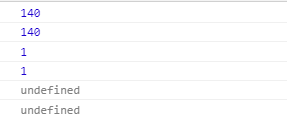
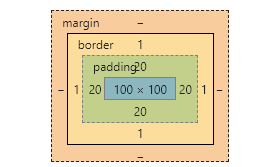
根据答应结果和div盒子模型比较可得:
clientWidth = padding值*2(左右padding值) + width 值;
clientHeight = padding值*2(上下padding值) + height 值;
clientTop = border值(上边框值)
clientLeft = border值(左边框值)
二、offsetXXX 属性
js代码
<script>

    var div = document.getElementsByTagName('div')[0];

    console.log(div.offsetWidth);

    console.log(div.offsetHeight)

    console.log(div.offsetTop)

    console.log(div.offsetLeft)
  //注意: 以下两个属性不存在

    console.log(div.offsetRight)

    console.log(div.offsetBottom)

</script>
打印结果分析
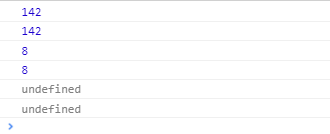
div盒子模型

body 盒子模型
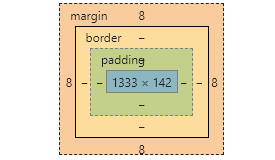
由以上两个模型分析得出
offsetWidth = 左右padding值+width值+左右border值
offsetHeight = 上下padding值+height值+上下border值
offsetTop 表示该元素的边框上边缘与它最近父元素的上边框内边缘的距离,如果没有父元素则把body当做它的父元素,由此知(默认情况下body有个margin值8px)
offsetTop = 8
offsetLeft = 8
JS之clientWidth、offsetWidth等属性介绍的更多相关文章
- js中clientWidth, scrollWidth, innerWidth, outerWidth,offsetWidth的区别
js中clientWidth, scrollWidth, innerWidth, outerWidth,offsetWidth的属性汇总,测试浏览器:ie7~ie11.chrome 和 firefox ...
- JS中关于clientWidth offsetWidth scrollWidth 的区别及意义
网页可见区域宽: document.body.clientWidth;网页可见区域高: document.body.clientHeight;网页可见区域宽: document.body.offset ...
- HTML精确定位:scrollLeft,scrollWidth,clientWidth,offsetWidth
HTML精确定位:scrollLeft,scrollWidth,clientWidth,offsetWidth scrollHeight: 获取对象的滚动高度. scrollLeft:设置或获取位于对 ...
- HTML精确定位:scrollLeft,scrollWidth,clientWidth,offsetWidth之完全详解
HTML:scrollLeft,scrollWidth,clientWidth,offsetWidth到底指的哪到哪的距离之完全详解 scrollHeight: 获取对象的滚动高度. scrollLe ...
- scrollLeft,scrollWidth,clientWidth,offsetWidth 可实现导航栏固定不动(冻结)的效果
HTML精确定位:scrollLeft,scrollWidth,clientWidth,offsetWidth scrollHeight: 获取对象的滚动高度. scrollLeft:设置或获取位 ...
- HTML精确定位:scrollLeft,scrollWidth,clientWidth,offsetWidth之全然具体解释
HTML:scrollLeft,scrollWidth,clientWidth,offsetWidth究竟指的哪到哪的距离之全然具体解释scrollHeight: 获取对象的滚动高度. scrol ...
- clientWidth,offsetWidth,scrollWidth区别
<html> <head> <title>clientWidth,offsetWidth,scrollWidth区别</title> </head ...
- H5,PC网页屏幕尺寸相关整理(scrollLeft,scrollWidth,clientWidth,offsetWidth)
HTML:scrollLeft,scrollWidth,clientWidth,offsetWidth到底指的哪到哪的距离之完全详解scrollHeight: 获取对象的滚动高度. scrollLef ...
- HTML精确定位:scrollLeft,scrollWidth,clientWidth,offsetWidth完全详细的说明
HTML:scrollLeft,scrollWidth,clientWidth,offsetWidth具体指完全解释究竟哪里的距离scrollHeight: 获取对象的高度滚动. scrollLe ...
- 转 HTML精确定位:scrollLeft,scrollWidth,clientWidth,offsetWidth之完全详解
HTML:scrollLeft,scrollWidth,clientWidth,offsetWidth到底指的哪到哪的距离之完全详解 scrollHeight: 获取对象的滚动高度. scrollLe ...
随机推荐
- 恢复在iterm2中当滚动光标时候触发滚动历史记录的问题
在Iterm2中,如果你上下滚动光标(上下滑动触摸板.或者滚动鼠标滚轮),通常情况下是触发了屏幕内容上下滚动. 但是在某些异常情况下,却触发了命令行历史记录的上下滚动,效果和你连续按了多次键盘的上下键 ...
- 利用git 找到应该对问题代码负责的人--代码定责
场景 有时候突然发现 某部分代码存在明显的问题,代码作者的态度需要调整. 或者发现某些代码存在特意留下的bug或漏洞,代码作者需要出来担责. 这时候我们就需要找出来 需要为有问题代码承担责任的同事,或 ...
- 2.2.2python的BeautifulSoup库
from bs4 import BeautifulSoupimport rebroken_html = '<ul class="country"><li>A ...
- 在eclipse中创建Web项目中没有web.xml的解决方法
右键点击项目 → “Java EE Tool” → “Generate Deployment descriptor stub” 即可生成web.xml文件
- java相关的一些资源
http://www.cnblogs.com/best/p/5876559.html#_label1
- 从“n!末尾有多少个0”谈起
在学习循环控制结构的时候,我们经常会看到这样一道例题或习题.问n!末尾有多少个0?POJ 1401就是这样的一道题. [例1]Factorial (POJ 1401). Description The ...
- .Net集合详解
前言 前面几篇文章讲了泛型.讲了数组,都有提到集合,这一节重点对集合进行详细解说.本文主要使用各种集合类型.以至于评估其性能,针对不同的场景选择不同的集合使用. 集合分类详解 一.列表 列表的创建 v ...
- 湫湫系列故事——设计风景线 HDU - 4514
题目链接:https://vjudge.net/problem/HDU-4514 题意:判断没有没有环,如果没有环,通俗的讲就是找出一条最长的路,相当于一笔画能画多长. 思路:dfs判环. 最后就是没 ...
- 让 CXK 来教你实现游戏中的帧动画(上)
一款游戏除了基本功能之外,还需要给玩家更多视觉上的刺激,这个时候就需要用特效来装饰.本文就将介绍 Cocos Creator 的动画系统,除了标准的位移.旋转.缩放动画和序列帧动画以外,这套动画系统还 ...
- Java课堂 动手动脑5
1.了解棋盘打印:利用二维数组输出一个15*15的棋盘,棋盘的原素为“+”,就是输出一个横纵都是15个“+”的二维数组,然后再以坐标形式输入棋子“●”,替换掉原来棋盘里的“+”.再编写代码. 电脑随机 ...