
Dynamics 365 CE Update消息PostOperation阶段Image的尝试
我是微软Dynamics 365 & Power Platform方面的工程师罗勇,也是2015年7月到2018年6月连续三年Dynamics CRM/Business Solutions方面的微软最有价值专家(Microsoft MVP),欢迎关注我的微信公众号 MSFTDynamics365erLuoYong ,回复355或者20190827可方便获取本文,同时可以在第一间得到我发布的最新博文信息,follow me!
前面的文章 Dynamics 365 CE在Pre Delete插件中应用Image 讲了Delete消息PreOperation阶段Image的应用,今天我们来看下Update 消息PostOperation阶段Image的尝试。
我使用如下代码简单注册一个插件:
using Microsoft.Xrm.Sdk;

using Microsoft.Xrm.Sdk.Query;

using System;

using System.ServiceModel;

using System.Text;

namespace CRM.Plugins

{

    public class PostWorkOrderUpdate : IPlugin

    {

        public void Execute(IServiceProvider serviceProvider)

        {

            ITracingService tracingService = (ITracingService)serviceProvider.GetService(typeof(ITracingService));

            IPluginExecutionContext context = (IPluginExecutionContext)serviceProvider.GetService(typeof(IPluginExecutionContext));

            if (context.InputParameters.Contains("Target") && context.InputParameters["Target"] is Entity)

            {

                Entity currentEntity = (Entity)context.InputParameters["Target"];

                IOrganizationServiceFactory serviceFactory = (IOrganizationServiceFactory)serviceProvider.GetService(typeof(IOrganizationServiceFactory));

                IOrganizationService service = serviceFactory.CreateOrganizationService(context.UserId);

                Entity preImgEntity;

                Entity postImgEntity;

                Entity retrieveEntity;

                StringBuilder sb = new StringBuilder();

                try

                {

                    if (context.PreEntityImages.Contains("PreImg"))

                    {

                        preImgEntity = context.PreEntityImages["PreImg"];

                    }

                    else

                    {

                        throw new InvalidPluginExecutionException("Pre Update image - PreImg does not exist!");

                    }

                    if (context.PostEntityImages.Contains("PostImg"))

                    {

                        postImgEntity = context.PostEntityImages["PostImg"];

                    }

                    else

                    {

                        throw new InvalidPluginExecutionException("Post Update image - PostImg does not exist!");

                    }

                    retrieveEntity = service.Retrieve(currentEntity.LogicalName, currentEntity.Id, new ColumnSet("ly_singletext2", "ly_singletext3"));

                    if (retrieveEntity.Contains("ly_singletext2"))

                    {

                        sb.Append("retrieveEntity contains attribute ly_singletext2 = ");

                        sb.Append(retrieveEntity.GetAttributeValue<string>("ly_singletext2"));

                        sb.Append("; ");

                    }

                    else

                    {

                        sb.Append("retrieveEntity does not contain attribute ly_singletext2");

                        sb.Append("; ");

                    }

                    if (currentEntity.Contains("ly_singletext2"))

                    {

                        sb.Append("currentEntity contains attribute ly_singletext2 = ");

                        sb.Append(currentEntity.GetAttributeValue<string>("ly_singletext2"));

                        sb.Append("; ");

                    }

                    else

                    {

                        sb.Append("currentEntity does not contain attribute ly_singletext2");

                        sb.Append("; ");

                    }

                    if (preImgEntity.Contains("ly_singletext2"))

                    {

                        sb.Append("preImgEntity contains attribute ly_singletext2 = ");

                        sb.Append(preImgEntity.GetAttributeValue<string>("ly_singletext2"));

                        sb.Append("; ");

                    }

                    else

                    {

                        sb.Append("preImgEntity does not contain attribute ly_singletext2");

                        sb.Append("; ");

                    }

                    if (postImgEntity.Contains("ly_singletext2"))

                    {

                        sb.Append("postImgEntity contains attribute ly_singletext2 = ");

                        sb.Append(postImgEntity.GetAttributeValue<string>("ly_singletext2"));

                        sb.Append("; ");

                    }

                    else

                    {

                        sb.Append("postImgEntity does not contain attribute ly_singletext2");

                        sb.Append("; ");

                    }

                    if (retrieveEntity.Contains("ly_singletext3"))

                    {

                        sb.Append("retrieveEntity contains attribute ly_singletext3 = ");

                        sb.Append(retrieveEntity.GetAttributeValue<string>("ly_singletext3"));

                        sb.Append("; ");

                    }

                    else

                    {

                        sb.Append("retrieveEntity does not contain attribute ly_singletext3");

                        sb.Append("; ");

                    }

                    if (currentEntity.Contains("ly_singletext3"))

                    {

                        sb.Append("currentEntity contains attribute ly_singletext3 = ");

                        sb.Append(currentEntity.GetAttributeValue<string>("ly_singletext3"));

                        sb.Append("; ");

                    }

                    else

                    {

                        sb.Append("currentEntity does not contain attribute ly_singletext3");

                        sb.Append("; ");

                    }

                    if (preImgEntity.Contains("ly_singletext3"))

                    {

                        sb.Append("preImgEntity contains attribute ly_singletext3 = ");

                        sb.Append(preImgEntity.GetAttributeValue<string>("ly_singletext3"));

                        sb.Append("; ");

                    }

                    else

                    {

                        sb.Append("preImgEntity does not contain attribute ly_singletext3");

                        sb.Append("; ");

                    }

                    if (postImgEntity.Contains("ly_singletext3"))

                    {

                        sb.Append("postImgEntity contains attribute ly_singletext3 = ");

                        sb.Append(postImgEntity.GetAttributeValue<string>("ly_singletext3"));

                        sb.Append("; ");

                    }

                    else

                    {

                        sb.Append("postImgEntity does not contain attribute ly_singletext3");

                        sb.Append("; ");

                    }

                    throw new InvalidPluginExecutionException(sb.ToString());

                }

                catch (FaultException<OrganizationServiceFault> ex)

                {

                    throw new InvalidPluginExecutionException("An error occurred in PostWorkOrderUpdate.", ex);

                }

                catch (Exception ex)

                {

                    tracingService.Trace("PostWorkOrderUpdate unexpected exception: {0}", ex.Message);

                    throw;

                }

            }

        }

    }

}
插件注册信息如下:
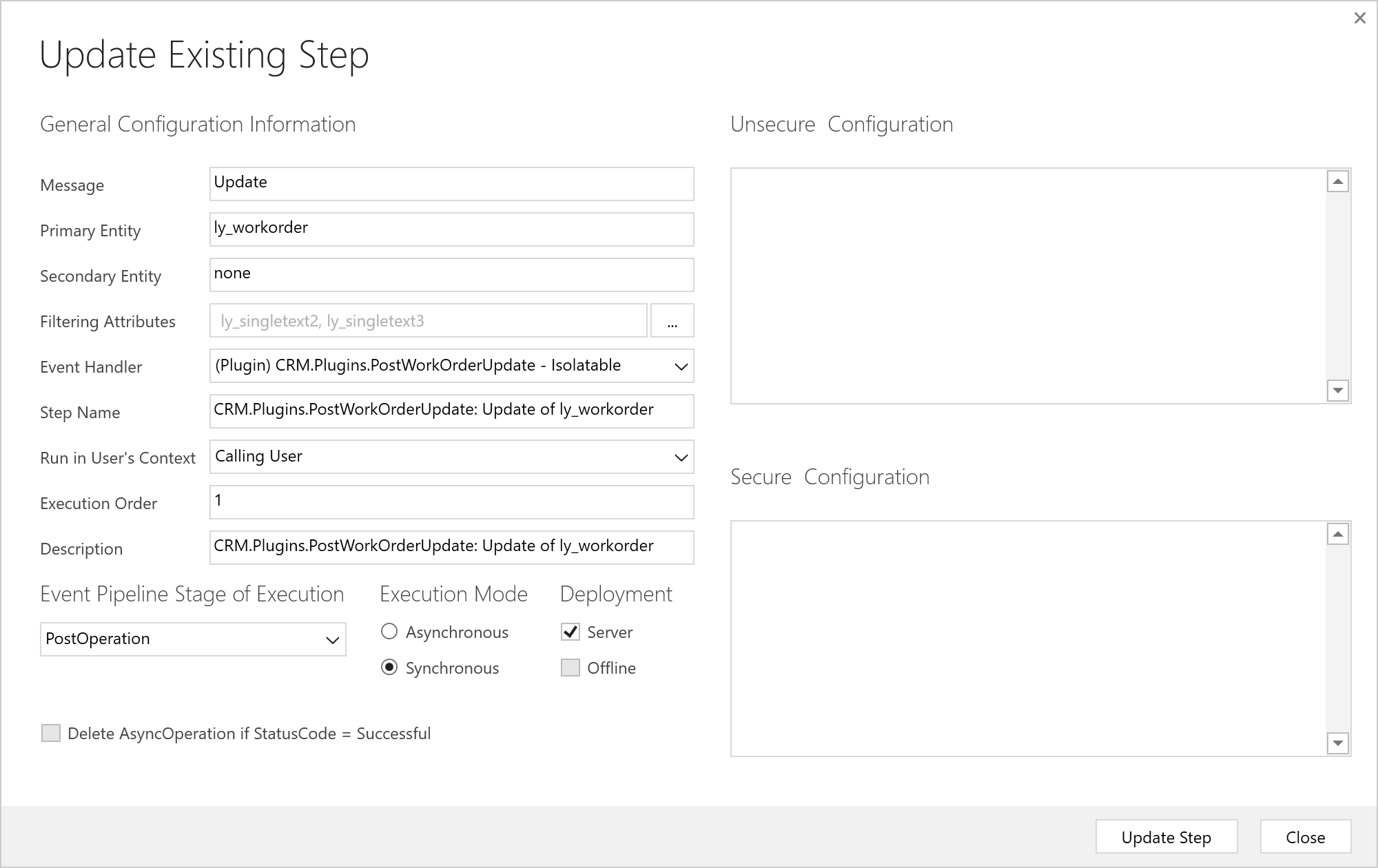
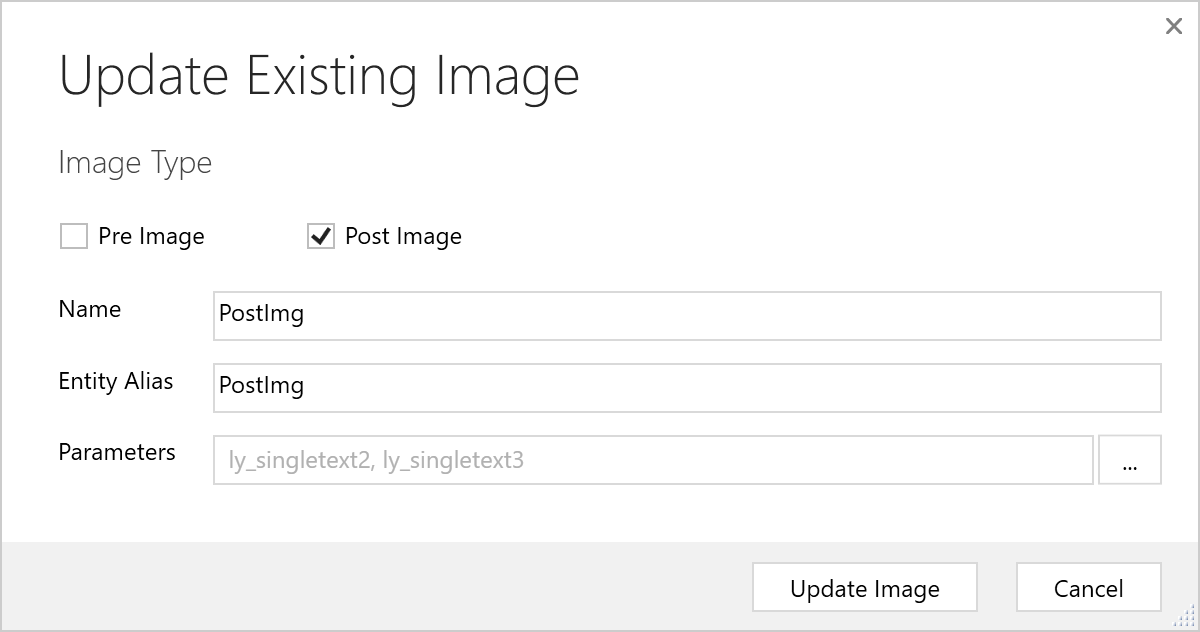
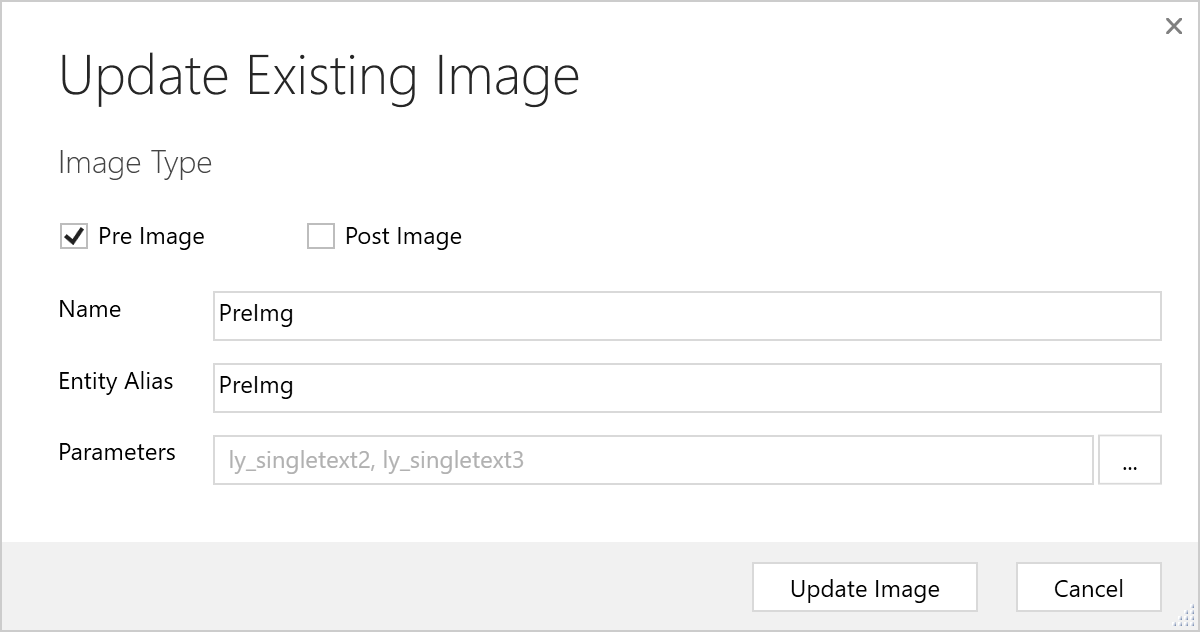
我还为此Step注册了两个Image,一个为Pre阶段的Image,一个为Post阶段的Image,如下:
然后我进行了一系列测试:
如果两个字段都变化,获取到的消息如下:
retrieveEntity contains attribute ly_singletext2 = 5-New;

currentEntity contains attribute ly_singletext2 = 5-New;

preImgEntity contains attribute ly_singletext2 = 5;

postImgEntity contains attribute ly_singletext2 = 5-New;

retrieveEntity contains attribute ly_singletext3 = 总体满意度-New;

currentEntity contains attribute ly_singletext3 = 总体满意度-New;

preImgEntity contains attribute ly_singletext3 = 总体满意度;

postImgEntity contains attribute ly_singletext3 = 总体满意度-New;
如果只更改一个字段ly_singletext2的值,另外一个字段ly_singletext3不变,保存后获取的结果是:
retrieveEntity contains attribute ly_singletext2 = 5-New;

currentEntity contains attribute ly_singletext2 = 5-New;

preImgEntity contains attribute ly_singletext2 = 5;

postImgEntity contains attribute ly_singletext2 = 5-New;

retrieveEntity contains attribute ly_singletext3 = 总体满意度;

currentEntity does not contain attribute ly_singletext3;

preImgEntity contains attribute ly_singletext3 = 总体满意度;

postImgEntity contains attribute ly_singletext3 = 总体满意度;
如果只更改一个字段ly_singletext2的值,这里将其值清空,另外一个字段ly_singletext3不变,保存后获取的结果是:
retrieveEntity does not contain attribute ly_singletext2;

currentEntity contains attribute ly_singletext2 = ;

preImgEntity contains attribute ly_singletext2 = 5;

postImgEntity does not contain attribute ly_singletext2;

retrieveEntity contains attribute ly_singletext3 = 总体满意度;

currentEntity does not contain attribute ly_singletext3;

preImgEntity contains attribute ly_singletext3 = 总体满意度;

postImgEntity contains attribute ly_singletext3 = 总体满意度;
如果只更改一个字段ly_singletext2的值,本来该字段的值为空,这里设置其值为New,另外一个字段ly_singletext3的值一直为空保持不变,保存后获取的结果是:
retrieveEntity contains attribute ly_singletext2 = New;

currentEntity contains attribute ly_singletext2 = New;

preImgEntity does not contain attribute ly_singletext2;

postImgEntity contains attribute ly_singletext2 = New;

retrieveEntity does not contain attribute ly_singletext3;

currentEntity does not contain attribute ly_singletext3;

preImgEntity does not contain attribute ly_singletext3;

postImgEntity does not contain attribute ly_singletext3;
总结下:
- Target参数转换后的实体会包括所有要设置新值的字段(属性),如果要设置的新值为空值,也会包括该字段(属性),只是该字段(属性)的值为空。
- Target参数转换后的实体不会包括不更改的字段(属性)。
- Pre Update Image包括了字段更新之前的值,如果之前该字段的值为空值,则Pre Update Image不会包括这个字段(属性);
- Post Update Image包括了字段(属性)要更新的值,如果字段(属性)是更新为空值则Post Update Image不包括该字段,如果字段(属性)不更新的话,Post Update Image包括的就是这个字段(属性)的原值;
- 在Post Update阶段查询当前实体的字段(属性)值,查询到的是要变更的新值,如果字段(属性)要要更新为空值,查询结果的字段(属性)集中不会包括该字段(属性),所以不用再查询,直接从Target参数转换后的实体的字段(属性)集合中获取。
- 如果要看字段(属性)值在Update消息中是否变化的话,检查Target参数转换后的实体是否包括该字段(属性)即可,新值在Target参数转换后的实体的字段(属性)集合中,旧值可以用Pre Update Image来获取。
- 获取Image之前先检查Image是否存在,分别用类似context.PreEntityImages.Contains("PreImg") 或者 context.PostEntityImages.Contains("PostImg")。
- 获取字段(属性)值之前先检查字段(属性)的确存在,用类似 currentEntity.Contains("ly_singletext2") 的语法。
Dynamics 365 CE Update消息PostOperation阶段Image的尝试的更多相关文章
- Use SQL to Query Data from CDS and Dynamics 365 CE
from : https://powerobjects.com/2020/05/20/use-sql-to-query-data-from-cds-and-dynamics-365-ce/ Have ...
- 使用Dynamics 365 CE Web API查询数据加点料及选项集字段常用查询
微软动态CRM专家罗勇 ,回复336或者20190516可方便获取本文,同时可以在第一间得到我发布的最新博文信息,follow me. 紧接上文:配置Postman通过OAuth 2 implicit ...
- Dynamics 365 CE中AsyncOperationBase表记录太多,影响系统性能怎么办?
微软动态CRM专家罗勇 ,回复311或者20190311可方便获取本文,同时可以在第一间得到我发布的最新博文信息,follow me!我的网站是 www.luoyong.me . 本文主要是根据微软官 ...
- Dynamics 365 CE将自定义工作流活动程序集注册到磁盘并引用其他类库
我是微软Dynamics 365 & Power Platform方面的工程师罗勇,也是2015年7月到2018年6月连续三年Dynamics CRM/Business Solutions方面 ...
- 安装完成Dynamics 365 CE后别忘了更改维护作业的运行时间
摘要: 微软动态CRM专家罗勇 ,回复309或者20190308可方便获取本文,同时可以在第一间得到我发布的最新博文信息,follow me!我的网站是 www.luoyong.me . 安装完毕Dy ...
- Dynamics 365 CE中使用FetchXML进行聚合运算
微软动态CRM专家罗勇 ,回复328或者20190429可方便获取本文,同时可以在第一间得到我发布的最新博文信息,follow me! Dynamics 365 Customer Engagement ...
- Dynamics 365 CE命令栏按钮点击后刷新表单页面方法
微软动态CRM专家罗勇 ,回复326或者20190428可方便获取本文,同时可以在第一间得到我发布的最新博文信息,follow me! Dynamics 365 Customer Engagement ...
- 启用WCF压缩提升Dynamics 365 CE的网络性能
摘要: 微软动态CRM专家罗勇 ,回复307或者20190308可方便获取本文,同时可以在第一间得到我发布的最新博文信息,follow me!我的网站是 www.luoyong.me . 本文系根据微 ...
- 做了面向互联网部署的Dynamics 365 CE更改AD FS的登录页面
摘要: 微软动态CRM专家罗勇 ,回复306或者20190307可方便获取本文,同时可以在第一间得到我发布的最新博文信息,follow me!我的网站是 www.luoyong.me . 默认情况下A ...
随机推荐
- Python 使用中出现错误:ImportError: No module named _sqlite3
解决办法: 1.先安装sqlite3 从sqlite官网:https://www.sqlite.org/download.html 上下载linux环境下的安装包:sqlite-autoconf ...
- Cesium专栏-地形开挖2-任意多边形开挖(附源码下载)
“任意多边形地形开挖” 是“地形开挖”的补充篇,在这节里,我们介绍关于如何使用任意多边形对地形进行开挖,同时,由于有不少小伙伴也咨询了关于“地形开挖”篇后序内容中的填充地形的效果,之前没放出来,是想让 ...
- React组件的属性
组件的三大属性 state props refs 写组件的要求: 1>组件必须大写 2>组件必须只有一个根元素 state是组件的重要对象 值可以是对象 组件被称之为 状态机 通过跟新组件 ...
- idea之常用快捷键
之前一直在使用eclipse,后来工作中慢慢开始使用idea了,这里总结一些idea的快捷键,方便以后查询使用. 一.查找相关快捷键 1.双击shift在项目的所有目录查找,就是你想看到你不想看到的和 ...
- Kubernetes行业调研报告:多集群、多云部署成企业首选策略
新兴的多集群.多云部署成为首选的企业策略,而边缘部署则呈上升趋势 2019年11月5日,业界采用最广泛的Kubernetes管理平台创造者Rancher Labs(以下简称Rancher)发布了首份调 ...
- Asp.net Core3.0 跨域配置
原文:http://www.zilaohu.cn/Jie/Detail_Jie?ID=78840a04-55b8-4988-80b2-f964fd822d63 下面配置后:被拒绝的域请求后,可以进入方 ...
- epub.js的使用
epub.js的使用 npm安装 npm install epubjs epub阅读器开发 ePub电子书解析和渲染 生成Book对象 this.book = new Epub(DOWNLOAD_UR ...
- golang 安装脚本
#!/bin/bash env sudo yum -y install wget curl echo "download golang ..." # 获取最新的golangurl ...
- EXCEPTION_ACCESS_VIOLATION(0xc0000005)
EXCEPTION_ACCESS_VIOLATION(0xc0000005)eclipse.ini中添加:-XX:CompileCommand=exclude,org.eclipse.jdt.inte ...
- redis scan命令使用
以前的项目中有用到redis的keys命令来获取某些key,知道看了这篇文章 https://mp.weixin.qq.com/s/SGOyGGfA6GOzxwD5S91hLw.安全起见,这次打算 ...