
Selenium浏览器自动化测试工具
Selenium浏览器自动化测试工具
Selenium 是一个用于Web应用程序测试的工具。Selenium测试直接运行在浏览器中,就像真正的用户在操作一样。

支持的浏览器包括IE(7, 8, 9, 10, 11),Mozilla Firefox,Safari,Google Chrome,Opera等。这个工具的主要功能包括:

测试与浏览器的兼容性——测试你的应用程序看是否能够很好得工作在不同浏览器和操作系统之上。

测试系统功能——创建回归测试检验软件功能和用户需求。支持自动录制动作和自动生成 .Net、Java、Perl等不同语言的测试脚本。
Selenium模块在爬虫中的使用
- selenium模块在爬虫中的使用

    - 概念:是一个基于浏览器自动化的模块。

    - 爬虫之间的关联:

        - 便捷的捕获到动态加载到的数据。(可见即可得)

        - 实现模拟登陆

    - 环境安装:pip install selenium

    - 基本使用:

        - 准备好某一款浏览器的驱动程序:http://chromedriver.storage.googleapis.com/index.html

            - 版本的映射关系:https://blog.csdn.net/huilan_same/article/details/51896672

        - 实例化某一款浏览器对象

    - 动作链:

        - 一系列连续的动作

        - 在实现标签定位时,如果发现定位的标签是存在于iframe标签之中的,则在定位时必须执行一个

        固定的操作:bro.switch_to.frame('id')

    - 无头浏览器的操作:无可视化界面的浏览器

        - PhantomJs:停止更新

        - 谷歌无头浏览器

    - 让selenium规避检测
Python简单使用Selenium
from time import sleep

from selenium import webdriver

# 后面是你的浏览器驱动位置,记得前面加r'','r'是防止字符转义的

driver = webdriver.Chrome(r'chromedriver.exe')

# 用get打开百度页面

driver.get("http://www.baidu.com")

# 查找页面的“设置”选项,并进行点击

driver.find_elements_by_link_text('设置')[0].click()

sleep(2)

# # 打开设置后找到“搜索设置”选项,设置为每页显示50条

driver.find_elements_by_link_text('搜索设置')[0].click()

sleep(2)

# 选中每页显示50条

m = driver.find_element_by_id('nr')

sleep(2)

m.find_element_by_xpath('//*[@id="nr"]/option[3]').click()

m.find_element_by_xpath('.//option[3]').click()

sleep(2)

# 点击保存设置

driver.find_elements_by_class_name("prefpanelgo")[0].click()

sleep(2)

# 处理弹出的警告页面   确定accept() 和 取消dismiss()

driver.switch_to_alert().accept()

sleep(2)

# 找到百度的输入框,并输入 美女

driver.find_element_by_id('kw').send_keys('美女')

sleep(2)

# 点击搜索按钮

driver.find_element_by_id('su').click()

sleep(2)

# 在打开的页面中找到“Selenium - 开源中国社区”,并打开这个页面

driver.find_elements_by_link_text('美女_百度图片')[0].click()

sleep(3)

# 关闭浏览器

driver.quit()
执行结果
https://img2018.cnblogs.com/blog/1644071/201909/1644071-20190917200511373-329204956.gif
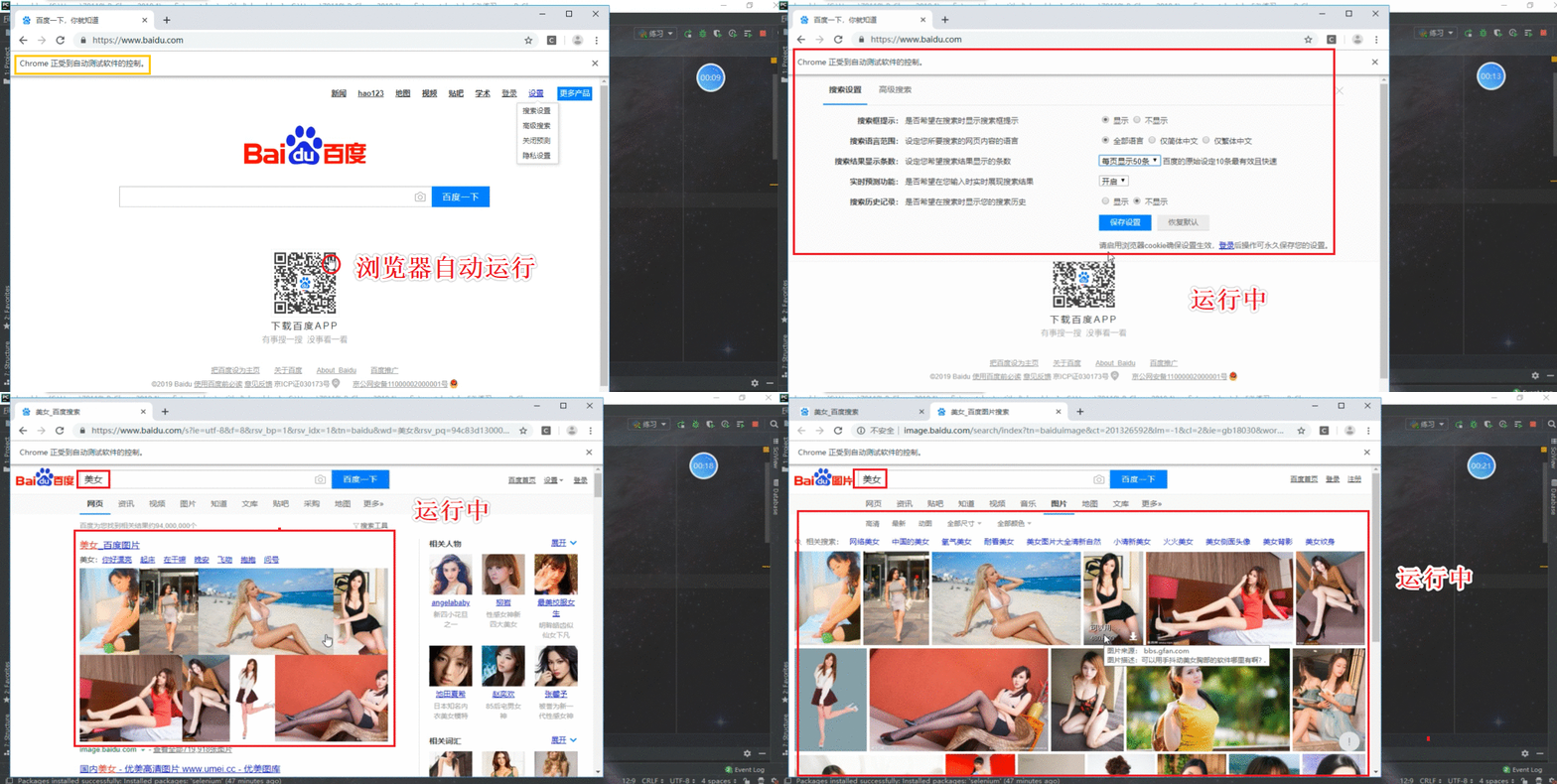
Selenium的基本操作
from selenium import webdriver

from time import sleep

bro = webdriver.Chrome(executable_path='chromedriver.exe')

bro.get('https://www.jd.com/')

sleep(1)

#进行标签定位

search_input = bro.find_element_by_id('key')

search_input.send_keys('mac pro')

btn = bro.find_element_by_xpath('//*[@id="search"]/div/div[2]/button')

btn.click()

sleep(2)

#执行js

bro.execute_script('window.scrollTo(0,document.body.scrollHeight)')

sleep(2)

page_text = bro.page_source

print(page_text)

sleep(2)

bro.quit()
Selenium爬取动态加载的数据
#便捷的捕获到动态加载到的数据。(可见即可得)

from selenium import webdriver

from time import sleep

from lxml import etree

bro = webdriver.Chrome(executable_path='chromedriver.exe')

bro.get('http://125.35.6.84:81/xk/')

sleep(1)

page_text = bro.page_source

page_text_list = [page_text]

for i in range(3):

    bro.find_element_by_id('pageIto_next').click()#点击下一页

    sleep(1)

    page_text_list.append(bro.page_source)

for page_text in page_text_list:

    tree = etree.HTML(page_text)

    li_list = tree.xpath('//ul[@id="gzlist"]/li')

    for li in li_list:

        title = li.xpath('./dl/@title')[0]

        num = li.xpath('./ol/@title')[0]

        print(title+':'+num)

sleep(2)

bro.quit()

#执行结果

江苏正东生物科技有限公司:苏妆20160159

吉林正德药业有限公司:吉妆20160011

湖北潜江制药股份有限公司:鄂妆20190003

深圳市发康堂中医药研究有限公司:粤妆20180101

洞玛生物技术(深圳)有限公司:粤妆20160644

领先(中国)生物科技有限公司:闽妆20170030

普洱联众生物资源开发有限公司:云妆20160023

珠海市富康源旅游用品有限公司:粤妆20180248

广州康又美化妆品有限公司:粤妆20160830

江苏西宏生物医药有限公司:苏妆20190023

广州市大研生物技术有限公司:粤妆20161133

广州玖宫研化生物科技有限公司:粤妆20160438

......省略
Selenium动作链 (实现拖动操作)
"""

动作链:

        - 一系列连续的动作

        - 在实现标签定位时,如果发现定位的标签是存在于iframe标签之中的,则在定位时必须执行一个

"""

from selenium import webdriver

from time import sleep

from selenium.webdriver import ActionChains

bro = webdriver.Chrome(executable_path='chromedriver.exe')

bro.get('https://www.runoob.com/try/try.php?filename=jqueryui-api-droppable')

bro.switch_to.frame('iframeResult')

div_tag = bro.find_element_by_id('draggable')

#拖动= 点击+滑动

action = ActionChains(bro)

action.click_and_hold(div_tag)

for i in range(5):

    #perform让动作链立即执行

    action.move_by_offset(17,5).perform()

    sleep(0.5)

action.release()

sleep(3)

bro.quit()
Selenium使用谷歌无头浏览器 示例
#使用谷歌无头浏览器

from selenium import webdriver

from selenium.webdriver.chrome.options import Options

chrome_options = Options()

chrome_options.add_argument('--headless')

chrome_options.add_argument('--disable-gpu')

driver = webdriver.Chrome(r'chromedriver.exe',chrome_options=chrome_options)

driver.get('https://www.cnblogs.com/')

print(driver.page_source)

#执行结果

<!DOCTYPE html><html xmlns="http://www.w3.org/1999/xhtml" lang="zh-cn">

    <head><script src="https://securepubads.g.doubleclick.net/gpt/pubads_impl_rendering_2019091201.js">

    </script><script async="" src="https://www.google-analytics.com/analytics.js"></script>

    <meta charset="utf-8" />

    <meta name="viewport" content="width=device-width, initial-scale=1" />

    <meta name="referrer" content="always" />

    <title>博客园 - 开发者的网上家园</title>

.......................省略.......................

沪公网安备 31011502001144号</span></a></div>

        </div>

    </div>

</body>

</html>
规避Selenium被检测
#如何规避selenium被检测

from selenium import webdriver

from selenium.webdriver import ChromeOptions

option = ChromeOptions()

option.add_experimental_option('excludeSwitches', ['enable-automation'])

driver = webdriver.Chrome(r'chromedriver.exe',options=option)

driver.get('https://www.taobao.com/')

Selenium浏览器自动化测试工具的更多相关文章
- selenium浏览器自动化测试框架文档(修正版)
写在最前面:目前自动化测试并不属于新鲜的事物,或者说自动化测试的各种方法论已经层出不穷,但是,能够在项目中持之以恒的实践自动化测试的团队,却依旧不是非常多.有的团队知道怎么做,做的还不够好:有的团队还 ...
- 爬虫模块介绍--selenium (浏览器自动化测试工具,模拟可以调用浏览器模拟人操作浏览器)
selenium主要的用途就是控制浏览器,模仿真人操作浏览器的行为 模块安装:pip3 install selenium 需要控制的浏览器 from selenium import webdriver ...
- Selenium浏览器自动化测试使用(1)
Selenium - 介绍 Selenium是一个开源的和便携式的自动化软件测试工具,用于测试Web应用程序有能力在不同的浏览器和操作系统运行.Selenium真的不是一个单一的工具,而是一套工具,帮 ...
- puppeteer:官方出品的chrome浏览器自动化测试工具
puppeteer发布应该有一段时间了,这两天正好基于该工具写了一些自动化解决方案,在这里抛砖引给大家介绍一下. 官方描述: Puppeteer is a Node library which pro ...
- Selenium功能自动化测试工具
Selenium也是一个用于Web应用程序测试的工具.Selenium测试直接运行在浏览器中,就像真正的用户在操作一样.支持的浏览器包括IE.Mozilla Firefox.Mozilla Suite ...
- Selenium浏览器自动化测试框架
selenium简介 介绍 Selenium [1] 是一个用于Web应用程序测试的工具.Selenium测试直接运行在浏览器中,就像真正的用户在操作一样.支持的浏览器包括IE(7, 8, 9, 1 ...
- Selenium浏览器自动化测试使用(2)
Selenium - 环境安装设置 为了开发Selenium RC或webdriver脚本,用户必须确保他们有初始配置完成.有很多关联建立环境的步骤.这里将通过详细的讲解. 下载并安装Java 下载并 ...
- 微软自动化测试工具palywright
前言 我们介绍许多e2e的自动化测试工具 一类是基于 Selenium 的测试框架: robot framework gauge SeleniumBase seldom(我自己维护的) 另一类是基于J ...
- 杂项-自动化测试工具:Selenium(浏览器自动化测试框架)
ylbtech-杂项-自动化测试工具:Selenium(浏览器自动化测试框架) Selenium 是一个用于Web 应用程序测试的工具.Selenium 测试直接运行在浏览器中,就像真正的用户在操作一 ...
随机推荐
- Nginx发布静态图片服务器
vir-hosts.conf内容 server { listen ; server_name _; location ~ .*\.(gif|jpg|jpeg|png)$ { expires 24h; ...
- Dubbo的集群容错与负载均衡策略及自定义(一致性哈希路由的缺点及自定义)
Dubbo的集群容错策略 正常情况下,当我们进行系统设计时候,不仅要考虑正常逻辑下代码该如何走,还要考虑异常情况下代码逻辑应该怎么走.当服务消费方调用服务提供方的服务出现错误时候,Dubbo提供了多种 ...
- docker试水
1.清理旧版本yum remove docker \ docker-common \ docker-selinux \ ...
- c++ 二进制方式读取文件 读取特殊类型数据
#include <iostream> #include <fstream> using namespace std; /* 二进制方式进行读写文件,可以读写 各种各样数据类型 ...
- linux默认的2.7升级到3.7版本
CentOS7中自带的python版本是python-2.7.5,由于新开的虚拟机需要使用python3,于是便升级一下版本. 安装Python3.7.3 官网下载地址:https://www.pyt ...
- LeetCode_482. License Key Formatting
482. License Key Formatting Easy You are given a license key represented as a string S which consist ...
- go 代码玩耍
//小游戏 num := rand.Intn() var input int fmt.Println("请输入数字") fmt.Scanf("%d", & ...
- c++动态链接问题
https://blog.csdn.net/liu0808/article/details/81169173 https://blog.csdn.net/f110300641/article/deta ...
- DDD分层架构的三种模式
引言 在讨论DDD分层架构的模式之前,我们先一起回顾一下DDD和分层架构的相关知识. DDD DDD(Domain Driven Design,领域驱动设计)作为一种软件开发方法,它可以帮助我们设计高 ...
- java字符串截取
import org.apache.commons.lang.StringUtils; public class substr{ public static void main(String[] ar ...