
Vue小案例 之 商品管理------修改商品数量以及增加入库日期属性
实现修改商品的数量:
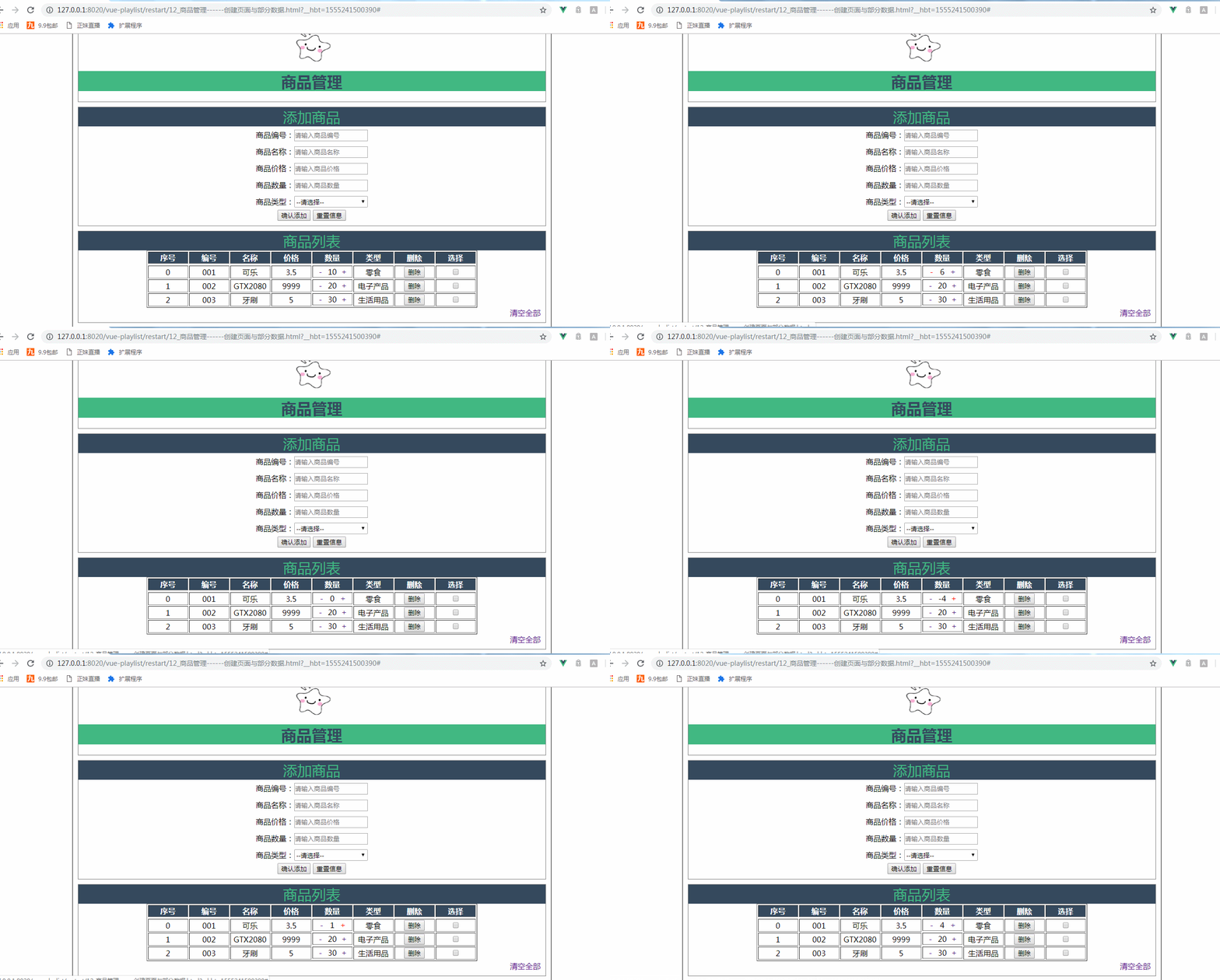
加入的代码:
css:
.clear-btn{

  text-align: right;

  padding-right: 10px;

}

.table-warp a{

 text-decoration: none;

}
HTML:
<td style="display: flex;">

                    <a style="flex: 0.5;"  href="#" @click.prevent="item.num--">-</a><!--style中的flex为了使其点击的范围扩大-->

                    {{item.num}}

                    <a style="flex: 0.5;"  href="#" @click.prevent="item.num++">+</a>

                </td>
由图可知点击商品数量减的时候会减到负数,所以需要做一个判断,如果数量为0,不能减下去:
加入判断之后的效果图:
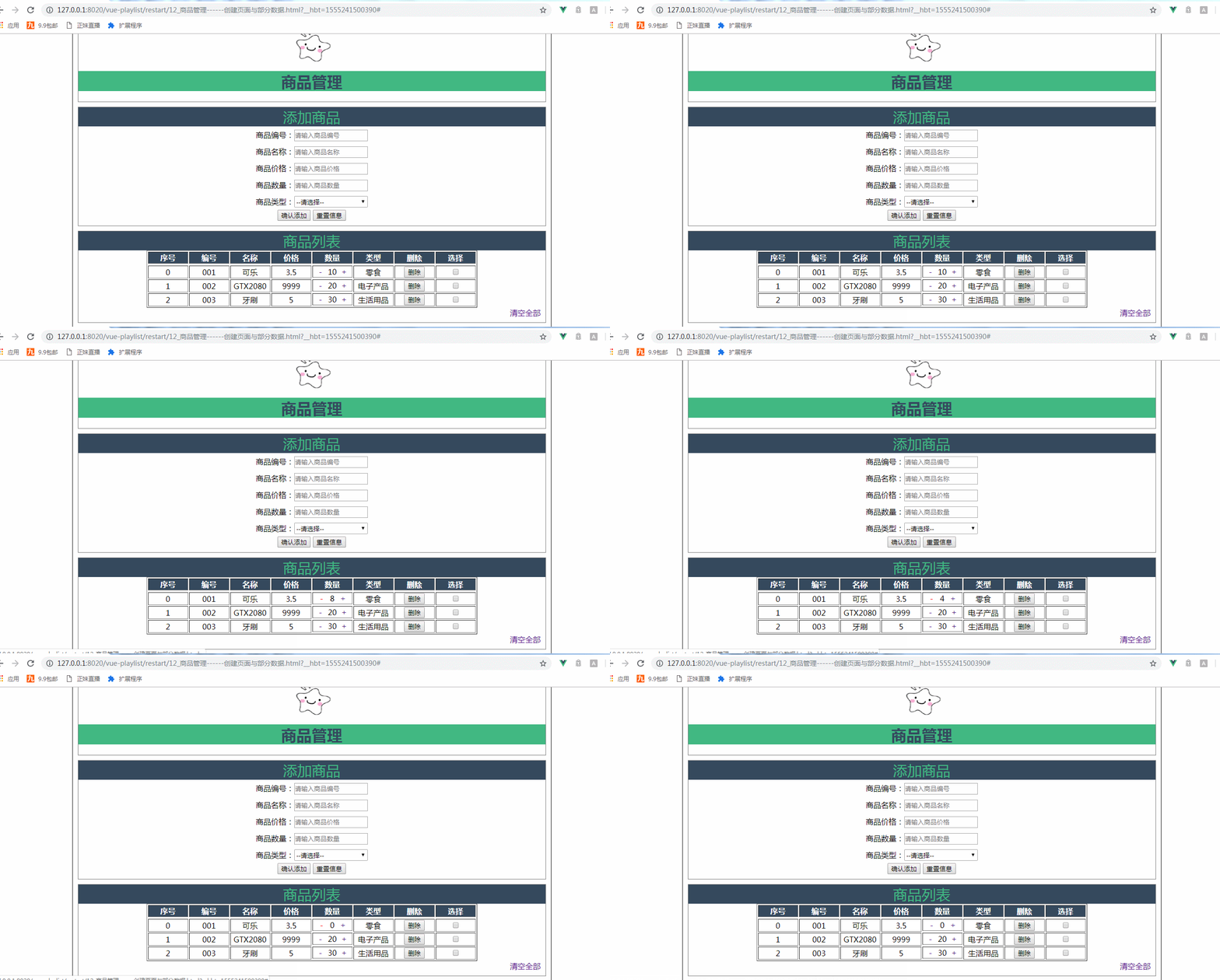
加入判断的代码:
<td style="display: flex;">

                    <a style="flex: 0.5;"  href="#" @click.prevent="item.num=item.num--<=0?0:item.num--">-</a><!--style中的flex为了使其点击的范围扩大-->

                    {{item.num}}

                    <a style="flex: 0.5;"  href="#" @click.prevent="item.num++">+</a>

                </td>
增加入库日期:
最终效果:
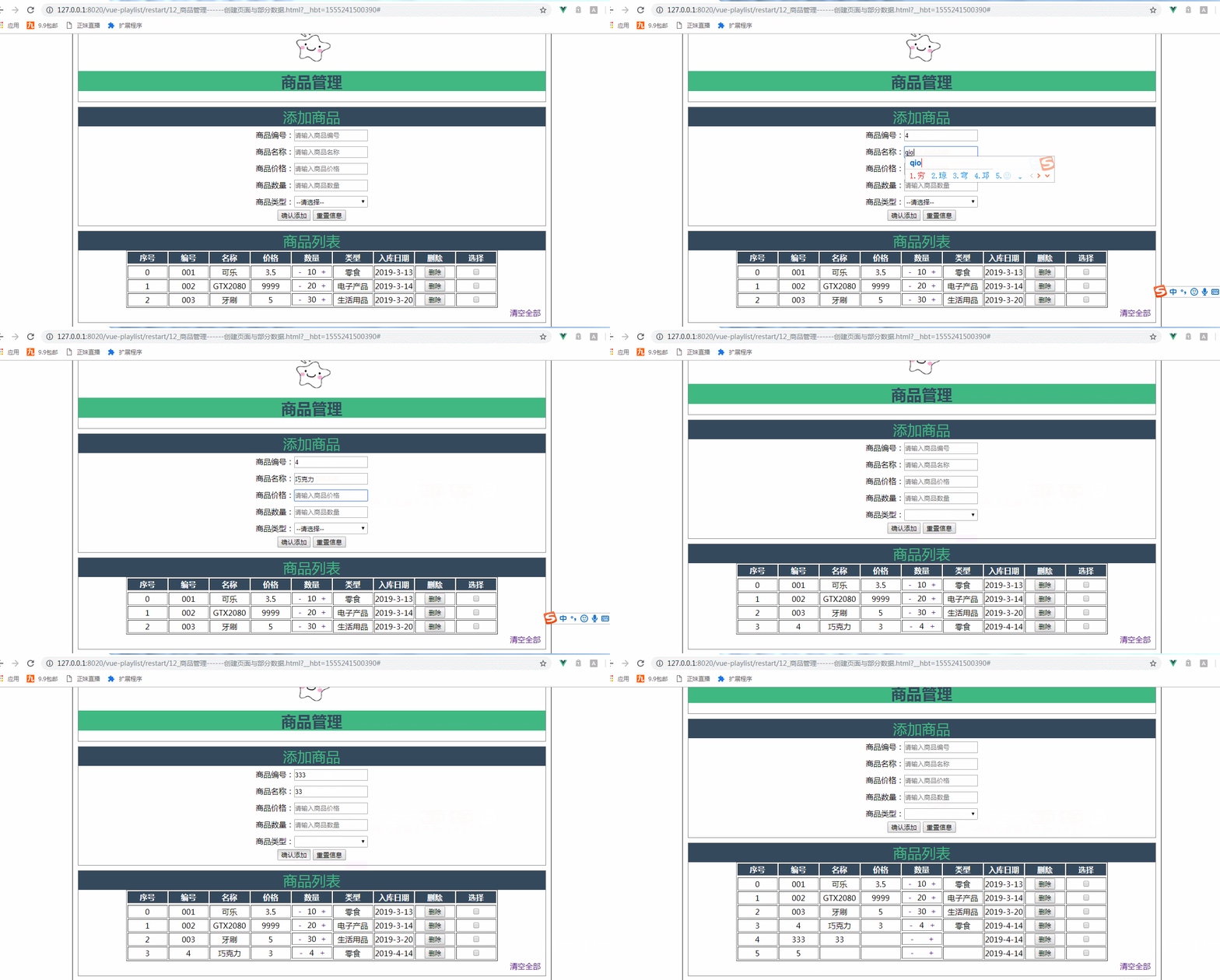
加入的代码:
vue添加了addDate假数据,以及调节获取当前日期的格式:
goodsArry:[

                    {id:'',name:'可乐',price:3.5,num:,type:'零食',addDate:'2019-3-13'},

                    {id:'',name:'GTX2080',price:,num:,type:'电子产品',addDate:'2019-3-14'},

                    {id:'',name:'牙刷',price:,num:,type:'生活用品',addDate:'2019-3-20'}

                    ],

                    colNum:,

                    delArray:[]//删除选中的索引

                },

                methods:{

                    addGoods(){

                               var d = new Date();

                            var y = d.getFullYear();

                            var m = d.getMonth()+;

                            var day =d.getDate()<?''+d.getDate() : d.getDate();

                            var myDate = y+ '-' + m +'-'+day;

                            this.goods.addDate = myDate ;

                        this.goodsArry.push(this.goods);

                        this.goods={};

                    }
添加的HTML代码:
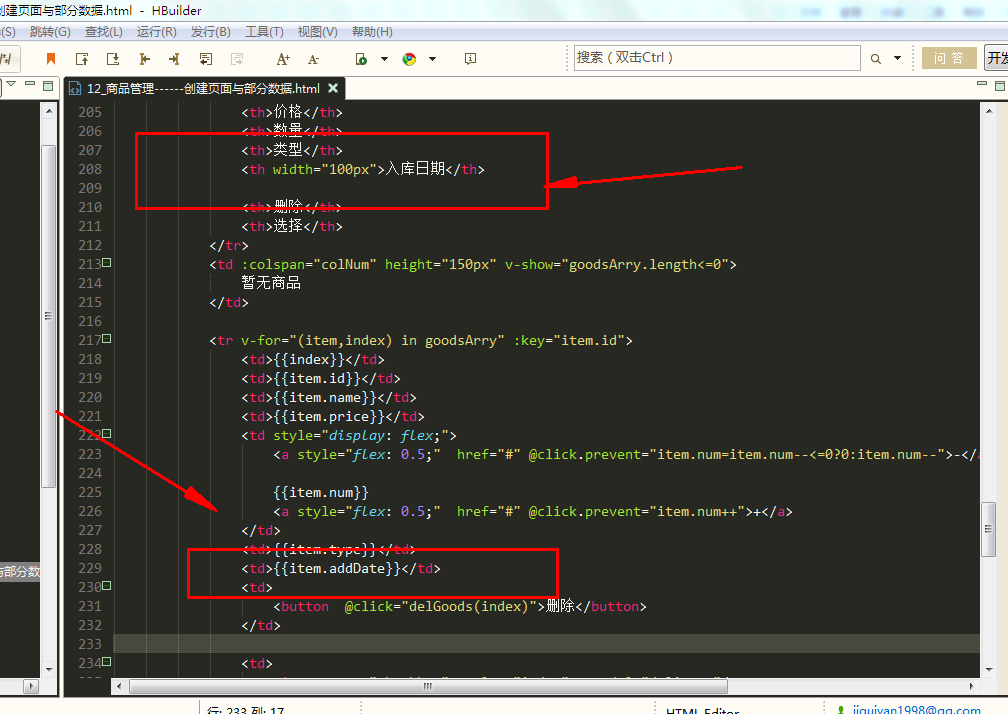
<table border="" align="center">

            <tr>

                <th>序号</th>

                <th>编号</th>

                <th>名称</th>

                <th>价格</th>

                <th>数量</th>

                <th>类型</th>

                <th width="100px">入库日期</th>

                <th>删除</th>

                <th>选择</th>

            </tr>

            <td :colspan="colNum" height="150px" v-show="goodsArry.length<=0">

                暂无商品

            </td>

            <tr v-for="(item,index) in goodsArry" :key="item.id">

                <td>{{index}}</td>

                <td>{{item.id}}</td>

                <td>{{item.name}}</td>

                <td>{{item.price}}</td>

                <td style="display: flex;">

                    <a style="flex: 0.5;"  href="#" @click.prevent="item.num=item.num--<=0?0:item.num--">-</a><!--style中的flex为了使其点击的范围扩大-->

                    {{item.num}}

                    <a style="flex: 0.5;"  href="#" @click.prevent="item.num++">+</a>

                </td>

                <td>{{item.type}}</td>

                <td>{{item.addDate}}</td>

                <td>
实现修改商品数量以及增加入库日期属性总的代码:
 <!DOCTYPE html>

 <html>

     <head>

         <meta charset="UTF-8">

         <title>商品管理------创建页面与部分数据</title>

         <script src="../js/vue.js"></script>

         <script>

             window .onload= () =>{

                 new Vue({

                 el:"#container",

                 data:{

                     imgUrl:'../res/images/',

                     imgName:'lovely.ico',

                     goods:{

                         id:'',

                         name:'',

                         price:'',

                         num:'',

                         type:''

                     },

                     goodsType:['零食','电子产品','生活用品'],

                     goodsArry:[

                     {id:'',name:'可乐',price:3.5,num:,type:'零食',addDate:'2019-3-13'},

                     {id:'',name:'GTX2080',price:,num:,type:'电子产品',addDate:'2019-3-14'},

                     {id:'',name:'牙刷',price:,num:,type:'生活用品',addDate:'2019-3-20'}

                     ],

                     colNum:,

                     delArray:[]//删除选中的索引

                 },

                 methods:{

                     addGoods(){

                                var d = new Date();

                             var y = d.getFullYear();

                             var m = d.getMonth()+;

                             var day =d.getDate()<?''+d.getDate() : d.getDate();

                             var myDate = y+ '-' + m +'-'+day;

                             this.goods.addDate = myDate ;

                         this.goodsArry.push(this.goods);

                         this.goods={};

                     },

                     delGoods(index){

                         this.goodsArry.splice(index,);

                     },

                     clearGoodsArry(){

                      this.goodsArry=[];

                      },

                      delSelected(){

                          this.delArray.sort((a,b)=>{

                              return a-b;

                          });

                          console.log(this.delArray);

                          for(var i=;i<this.delArray.length;i++)

                          {

                              this.goodsArry.splice(this.delArray[i]-i,);

                          }

                          this.delArray=[];

                      }

                 }

             });

             }

         </script>

         <style>

             #container{

                 margin:  auto;

                 text-align: center;

                 width: 1000px;

                 border:2px solid gray;

             }

           .header{

          margin: 10px;

          border: 1px solid gray;

           }

       .header .title{

       color: rgb(,,);

     background: rgb(,,);

        }

      .sub_title{

       background:rgb(,,);

      color: rgb(,,);

      font-size: 30px;

      }

 .form-warp{

    margin: 10px;

    padding-bottom: 10px;

   border: 1px solid gray;

 }

 .form-warp .content{

   line-height: 35px;

 }

 .form-warp input{

   width: 150px;

   height: 18px;

 }

         .form-warp select{

     width: 154px;

     height: 24px;

 }

    .table-warp{

     padding-bottom: 10px;

     margin: 10px;

      border: 1px solid gray;

 }

  .table-warp a{

  text-decoration: none;

 }

 .table-warp th{

   width: 80px;

   color: #ffff;

   background: rgb(,,);

 }

 .logo

 {

   position: relative;

   top: 12px;

 }

 .fontColor{

     color: gray;

     text-align: center;

 }

 .clear-btn{

   text-align: right;

   padding-right: 10px;

 }

         </style>

     </head>

     <body>

         <div id="container">

             <!--logo title-->

             <div class="header">

                 <img :src="imgUrl+imgName" class="logo"  height="80px"  width="100px"   />

                 <h1 class="title">商品管理</h1>

             </div>

             <!--输入部分input-->

             <div  class="form-warp">

                 <div class="sub_title">添加商品</div>

                 <div class="content">

                     商品编号:<input type="text" placeholder="请输入商品编号"  v-model="goods.id"/><br />

                     商品名称:<input type="text" placeholder="请输入商品名称"  v-model="goods.name"/><br />

                     商品价格:<input type="text" placeholder="请输入商品价格"  v-model="goods.price"/><br />

                     商品数量:<input type="text" placeholder="请输入商品数量" v-model="goods.num"/><br />

                     商品类型:<select v-model="goods.type">

                         <option value="" disabled="disabled">--请选择--</option>

                         <option v-for="type in goodsType">{{type}}</option>

                     </select>

             </div>

             <div class="form-btn">

                 <button @click="addGoods">确认添加</button>

                 <button @click="goods= { } ">重置信息</button>

             </div>

     </div>

     <!--显示表格-->

     <div class="table-warp">

         <div :class="{fontColor:goodsArry.length<=0}"   class="sub_title">商品列表</div>

         <table border="" align="center">

             <tr>

                 <th>序号</th>

                 <th>编号</th>

                 <th>名称</th>

                 <th>价格</th>

                 <th>数量</th>

                 <th>类型</th>

                 <th width="100px">入库日期</th>

                 <th>删除</th>

                 <th>选择</th>

             </tr>

             <td :colspan="colNum" height="150px" v-show="goodsArry.length<=0">

                 暂无商品

             </td>

             <tr v-for="(item,index) in goodsArry" :key="item.id">

                 <td>{{index}}</td>

                 <td>{{item.id}}</td>

                 <td>{{item.name}}</td>

                 <td>{{item.price}}</td>

                 <td style="display: flex;">

                     <a style="flex: 0.5;"  href="#" @click.prevent="item.num=item.num--<=0?0:item.num--">-</a><!--style中的flex为了使其点击的范围扩大-->

                     {{item.num}}

                     <a style="flex: 0.5;"  href="#" @click.prevent="item.num++">+</a>

                 </td>

                 <td>{{item.type}}</td>

                 <td>{{item.addDate}}</td>

                 <td>

                     <button  @click="delGoods(index)">删除</button>

                 </td>

                 <td>

                     <input type="checkbox" :value="index" v-model="delArray"/>

                 </td>

             </tr>

     <!--    {{delArray}}-->

         </table>

         <div class="clear-btn">

           <a href="#" @click="delSelected" v-show="delArray.length>0" >删除选中</a>

           <a href="#" @click="clearGoodsArry" v-show="goodsArry.length>0" >清空全部</a>

       </div>

       </div>

             </div>

     </body>

 </html>
实现修改商品数量以及增加入库日期
Vue小案例 之 商品管理------修改商品数量以及增加入库日期属性的更多相关文章
- Cookie小案例-----记住浏览过的商品记录
Cookie小案例------记住浏览过的商品记录 我们知道,这个功能在电商项目中非经常见.这里处理请求和页面显示都是由servlet实现,主要是为了体现cookie的作用, 实现功能例如以下: 1, ...
- Vue小案例 之 商品管理------为之前的页面修改样式
最终修改的页面效果: 修改的css: <style> #container{ margin: auto; text-align: center; width: 1000px; border ...
- Vue小案例 之 商品管理------学习过滤器 使用过滤器处理日期的格式
代码学习过滤器 过滤器介绍:过滤模型数据,在数据显示前做预处理操作: 内置过滤器:在1.x中,Vue提供了内置过滤器,但是在2.x中已经完全废除: 解决办法: (1)使用第三方库来替代1.x中的内置过 ...
- Vue小案例 之 商品管理------批量删除与商品数量的调整
通过索引进行删除,进行测试,是否获取其索引: 测试效果: 测试代码,在vue中定义一个空的数组,以便后面进行数据的绑定: data:{ imgUrl:'../res/images/', imgName ...
- Vue小案例 之 商品管理------删除商品与提示
实现删除商品功能 根据索引来进行删除商品: 实现删除商品的HTML: <!--显示表格--> <div class="table-warp"> <di ...
- Vue小案例 之 商品管理------添加商品
进行添加button,以及商品列表的创建 html: <div class="form-btn"> <button>确认添加</button> ...
- Vue小案例 之 商品管理------创建页面与部分数据
logo的路径: 页面的初始布局: 初始的HTML: <div id="container"> <!--logo title--> <div clas ...
- Vue(小案例_vue+axios仿手机app)_Vuex优化购物车功能
一.前言 1.用vuex实现加入购物车操作 2.购物车详情页面 3.点击删除按钮,删除购物详情页面里的对应商品 二.主要内容 1.用vuex加入购物车 (1)在src ...
- Vue(小案例_vue+axios仿手机app)_购物车(二模拟淘宝购物车页面,点击加减做出相应变化)
一.前言 在上篇购物车中,如果用户刷新了当前的页面,底部导航中的数据又会恢复为原来的: 1.解决刷新,购物车上数值不变 ...
随机推荐
- python-selenium无法调用浏览器的问题
一直有这个问题 问题:selenim不能调用浏览器 File "/Users/ligaijiang/PycharmProjects/Runoob/venv/lib/python3.7/sit ...
- [Java] Header checkBox in Jtable
The reference is from here. 在Jtable里面我们可能会有checkbox, 而有时候我们有很多checkbox需要同时check或者同时uncheck的时候, 如果有一个 ...
- Photobucket不能用了怎么办?推荐10个在线图片储存服务!
近日,图片共享服务网站Photobucket更新了政策,要求用户缴纳399美元的年费,才能使用第三方网站图片储存服务. 由于Photobucket出台这一政策,亚马逊及其他电商平台上相关的产品图片已被 ...
- ERROR [main] zookeeper.RecoverableZooKeeper: ZooKeeper create failed after 4 attempts
ERROR [main] zookeeper.RecoverableZooKeeper: ZooKeeper create failed after 4 attempts ERROR [main] m ...
- js函数中写默认值的几种方式(常见的)
<script> <!--第一种写法,我更喜欢第一种写法直观一些--> function Person(name){ this.name = name || '默认名字乔丹'; ...
- mac系统搭建SVN版本控制
版权声明:本文为博主原创文章,未经博主允许不得转载. SmartSVN 8.6和Keygen for mac(完美破解)http://pan.baidu.com/s/1bnm72qz 一.里面包含Sm ...
- ASP.Net Core 2.2 MVC入门到基本使用系列 (三)(转)
本教程会对基本的.Net Core 进行一个大概的且不会太深入的讲解, 在您看完本系列之后, 能基本甚至熟练的使用.Net Core进行Web开发, 感受到.Net Core的魅力. 本教程知识点大体 ...
- 多表关联查询_resultMap_集合对象
多表关联查询_resultMap_集合对象_N+1方式实现 package com.bjsxt.mapper; import java.util.List; import com.bjsxt.pojo ...
- 47.HTML---frame,iframe,frameset之间的关系与区别
iframe 是在html页面内嵌入框架 框架内可以连接另一个页面, 如 <html> <head></head> <body> <iframe ...
- PHP 函数 ignore_user_abort()详解笔记
定义和用法 ignore_user_abort()函数设置与客户机断开是否会终止脚本的执行 语法 ignore_user_abort(setting) 参数 描述 setting 可选.如果设置为 ...