
Django用户名密码错误提示
 from django.shortcuts import render

 # Create your views here.

 from django.shortcuts import render

 from django.shortcuts import redirect  #重新定向模块

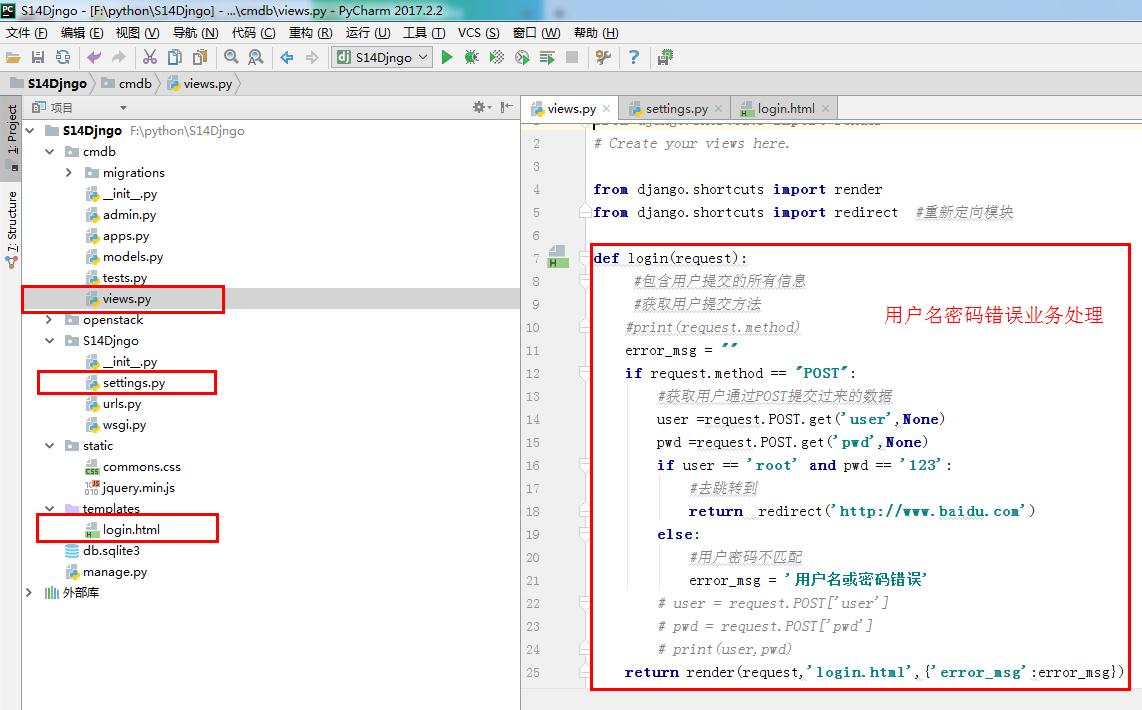
 def login(request):

      #包含用户提交的所有信息

      #获取用户提交方法

     #print(request.method)

     error_msg = ""

     if request.method == "POST":

         #获取用户通过POST提交过来的数据

         user =request.POST.get('user',None)

         pwd =request.POST.get('pwd',None)

         if user == 'root' and pwd == '':

             #去跳转到

             return  redirect('http://www.baidu.com')

         else:

             #用户密码不匹配

             error_msg = '用户名或密码错误'

         # user = request.POST['user']

         # pwd = request.POST['pwd']

         # print(user,pwd)

     return render(request,'login.html',{'error_msg':error_msg})
views.py
 """

 Django settings for S14Djngo project.

 Generated by 'django-admin startproject' using Django 1.11.6.

 For more information on this file, see

 https://docs.djangoproject.com/en/1.11/topics/settings/

 For the full list of settings and their values, see

 https://docs.djangoproject.com/en/1.11/ref/settings/

 """

 import os

 # Build paths inside the project like this: os.path.join(BASE_DIR, ...)

 BASE_DIR = os.path.dirname(os.path.dirname(os.path.abspath(__file__)))

 # Quick-start development settings - unsuitable for production

 # See https://docs.djangoproject.com/en/1.11/howto/deployment/checklist/

 # SECURITY WARNING: keep the secret key used in production secret!

 SECRET_KEY = '^mh@&$v_x+3@+rz$ho$l^t^=tx-=b1a3ylc#nrnuh&mayil-4*'

 # SECURITY WARNING: don't run with debug turned on in production!

 DEBUG = True

 ALLOWED_HOSTS = []

 # Application definition

 INSTALLED_APPS = [

     'django.contrib.admin',

     'django.contrib.auth',

     'django.contrib.contenttypes',

     'django.contrib.sessions',

     'django.contrib.messages',

     'django.contrib.staticfiles',

 ]

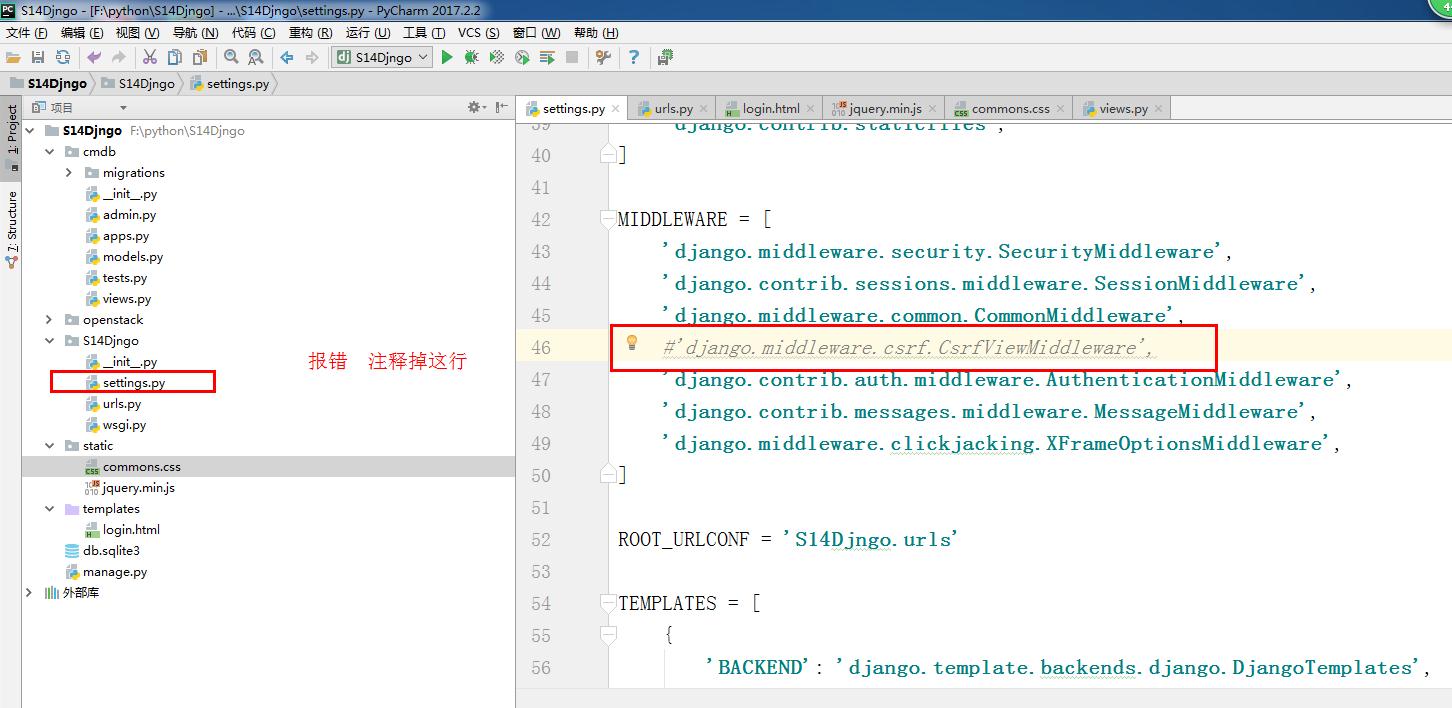
 MIDDLEWARE = [

     'django.middleware.security.SecurityMiddleware',

     'django.contrib.sessions.middleware.SessionMiddleware',

     'django.middleware.common.CommonMiddleware',

     #'django.middleware.csrf.CsrfViewMiddleware',

     'django.contrib.auth.middleware.AuthenticationMiddleware',

     'django.contrib.messages.middleware.MessageMiddleware',

     'django.middleware.clickjacking.XFrameOptionsMiddleware',

 ]

 ROOT_URLCONF = 'S14Djngo.urls'

 TEMPLATES = [

     {

         'BACKEND': 'django.template.backends.django.DjangoTemplates',

         'DIRS': [os.path.join(BASE_DIR, 'templates')],

         'APP_DIRS': True,

         'OPTIONS': {

             'context_processors': [

                 'django.template.context_processors.debug',

                 'django.template.context_processors.request',

                 'django.contrib.auth.context_processors.auth',

                 'django.contrib.messages.context_processors.messages',

             ],

         },

     },

 ]

 WSGI_APPLICATION = 'S14Djngo.wsgi.application'

 # Database

 # https://docs.djangoproject.com/en/1.11/ref/settings/#databases

 DATABASES = {

     'default': {

         'ENGINE': 'django.db.backends.sqlite3',

         'NAME': os.path.join(BASE_DIR, 'db.sqlite3'),

     }

 }

 # Password validation

 # https://docs.djangoproject.com/en/1.11/ref/settings/#auth-password-validators

 AUTH_PASSWORD_VALIDATORS = [

     {

         'NAME': 'django.contrib.auth.password_validation.UserAttributeSimilarityValidator',

     },

     {

         'NAME': 'django.contrib.auth.password_validation.MinimumLengthValidator',

     },

     {

         'NAME': 'django.contrib.auth.password_validation.CommonPasswordValidator',

     },

     {

         'NAME': 'django.contrib.auth.password_validation.NumericPasswordValidator',

     },

 ]

 # Internationalization

 # https://docs.djangoproject.com/en/1.11/topics/i18n/

 LANGUAGE_CODE = 'en-us'

 TIME_ZONE = 'UTC'

 USE_I18N = True

 USE_L10N = True

 USE_TZ = True

 # Static files (CSS, JavaScript, Images)

 # https://docs.djangoproject.com/en/1.11/howto/static-files/

 STATIC_URL = '/static/'

 STATICFILES_DIRS = (

     os.path.join(BASE_DIR, 'static' ),

                     )
settings.py
 <!DOCTYPE html>

 <html lang="en">

 <head>

     <meta charset="UTF-8">

     <title>Title</title>

     <link rel="stylesheet" href="/static/commons.css"/>

     <style>

         label{

             width:80px;

             text-align:right;

             display: inline-block;

         }

     </style>

 </head>

 <body>

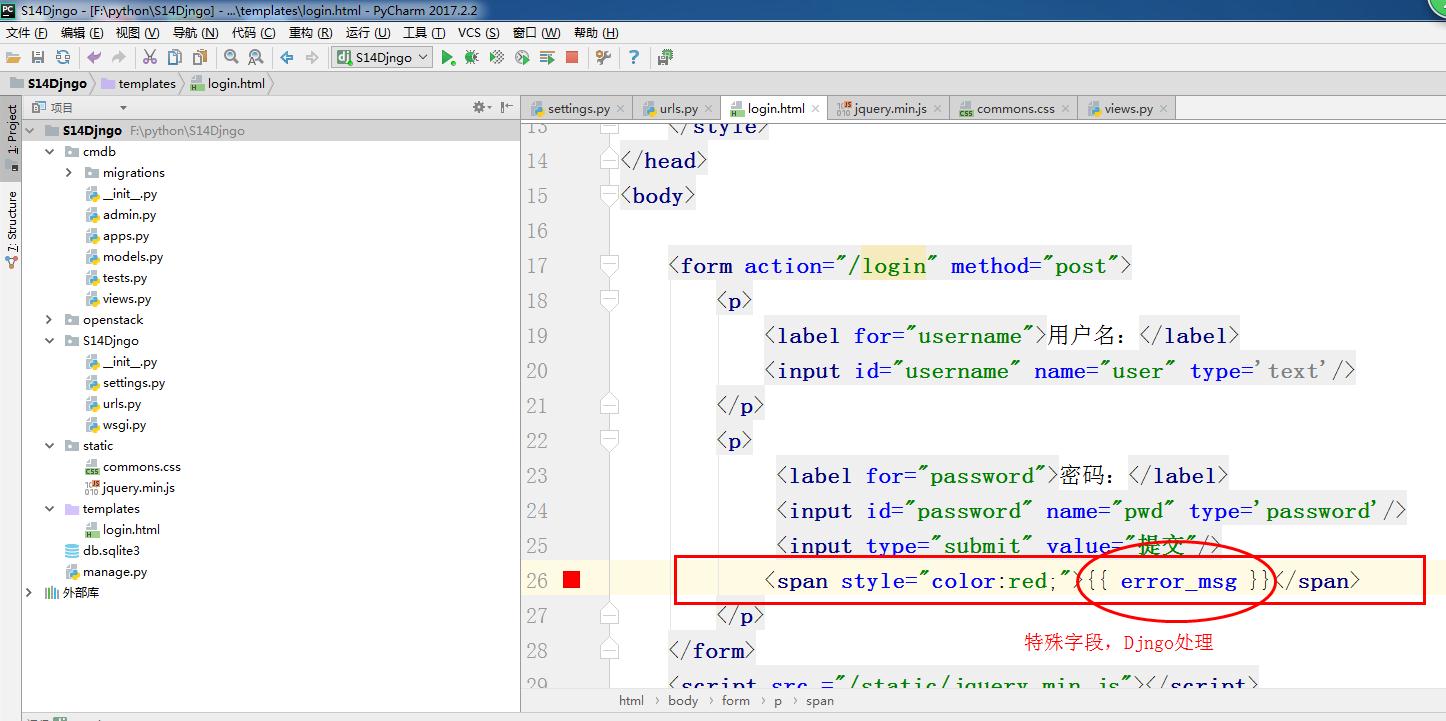
     <form action="/login" method="post">

         <p>

             <label for="username">用户名:</label>

             <input id="username" name="user" type='text'/>

         </p>

         <p>

              <label for="password">密码:</label>

              <input id="password" name="pwd" type='password'/>

              <input type="submit" value="提交"/>

             <span style="color:red;">{{ error_msg }}</span>

         </p>

     </form>

     <script src ="/static/jquery.min.js"></script>

 </body>

 </html>
login.html
其他文件参考以下步骤
用JetBrains PyCharm 2017.2创建运行Django程序
http://www.cnblogs.com/ujq3/p/7882030.html
创建多个Django业务模块
http://www.cnblogs.com/ujq3/p/7884075.html
Django多业务模块的写法
http://www.cnblogs.com/ujq3/p/7884279.html
Django与HTML业务基本结合--基本的用户名密码提交方法2
http://www.cnblogs.com/ujq3/p/7884615.html
Django静态文件以及模板文件的配置
http://www.cnblogs.com/ujq3/p/7884881.html
Django用户名密码错误提示的更多相关文章
- vmware vcenter orchestrator configuration提示“用户名密码错误或登录失败超过次数被锁定”
首次登录,使用默认用户密码登录vmware/vmware vmware vcenter orchestrator configuration提示"用户名密码错误或登录失败超过次数被锁定&qu ...
- win7访问局域网总提示用户名密码错误解决方案
win7访问局域网总提示用户名密码错误解决方案 1.点击开始-在搜索栏输入:secpol.msc(或者直接按下win+r键,输入secpol.msc),打开本地安全策略. 2.找到“安全设置”的“本地 ...
- selenium(python)登录时账号密码错误提示语
selenium(python)登录时账号密码错误提示语的获取 可以用text
- ajax异步验证用户名密码,提示路径错误
使用thinkphp框架异步验证用户名和密码的时候,ajax路径错误可能有多重情况.我遇到的是,我自感路径没问题,且先前使用无错.由于多人合作使用svn,所以在更新代码后,使用firebug显示一直是 ...
- django后台密码错误
如果你忘记了设置Django的Admin密码,那么你可以使用createsuperuser来甚至密码,但是如果你忘记了Admin的密码的话,那么就要用Django shell: 1 python ma ...
- Django Forms的错误提示
1.error_messages={} 首先,在构建form表单时,可以用"error_messages={}"自定义错误信息,例如: # form.py 1 from djang ...
- python用户登录,密码错误3次则锁定
需求: 1.输入用户名密码 2.认证成功后显示欢迎信息 3.输错三次后锁定 实现思路: 1.判断用户是否在黑名单,如果在黑名单提示账号锁定. 2.判断用户是否存在,如果不存在提示账号不存在. 3.判断 ...
- php 实现密码错误三次锁定账号10分钟
/** * 登录 * 1.接收数据 * 2.正则判断接收到的数据是否合理 * 3.根据用户名获取用户数据 * 获取到数据 -> 继续执行 * 没有获取到数据 -> 提示:用户名密码错误 * ...
- Ajax登录用户名密码
<script src="http://code.jquery.com/jquery-latest.js"></script>#引入jQuery#当点击函数 ...
随机推荐
- 2019-8-30-Jenkins-配置自动合并-release-分支到-master-分支
title author date CreateTime categories Jenkins 配置自动合并 release 分支到 master 分支 lindexi 2019-08-30 08:5 ...
- 第一个WindowService服务
背景:Web项目中需要定时执行一段程序 方法: 1.新建一个WindowService项目 2.添加代码 public partial class Service1 : ServiceBase { S ...
- 动态库加载时GetLasterror();值总是126的原因
1.dll路径不正确,导致找不到dll文件. 2.有可能是你要载入的DLL在内部还需要载入其它的dll,而它不存在,同样会返回126错误代码.比如一个你给系统添加了一个PCI设备,像AD采集卡之类的, ...
- 获取计算机以及本机信息API
获取计算机名: BOOL GetComputerName( LPTSTR lpBuffer, // computer name LPDWORD lpnSize // size of name buff ...
- Ubuntu下samba的安装和配置
samba是Linux系统上的一种文件共享协议,可以实现Windows系统访问Linux系统上的共享资源,现在介绍一下如何在Ubuntu 14.04上安装和配置samba一. 一.更新源列表 打开&q ...
- Java虚拟机原理图解-- 1.1、class文件基本组织结构 [转]
作为Java程序猿,我们知道,我们写好的.java 源代码,最后会被Java编译器编译成后缀为.class的文件,该类型的文件是由字节组成的文件,又叫字节码文件.那么,class字节码文件里面到底是有 ...
- 简单易学的机器学习算法—基于密度的聚类算法DBSCAN
简单易学的机器学习算法-基于密度的聚类算法DBSCAN 一.基于密度的聚类算法的概述 我想了解下基于密度的聚类算法,熟悉下基于密度的聚类算法与基于距离的聚类算法,如K-Means算法之间的区别. ...
- 装配SpringBean(五)--注解装配之自动装配
在spring ioc容器中,spring要先完成bean的定义和生成,然后需要需要注入的资源,在上一篇的扫描组件中就是这样实现的.而自动装配中我们只需要定义和生成一个bean,发现bean的过程将由 ...
- Ceisum官方教程1 -- 开始
原文地址:https://cesium.com/docs/tutorials/getting-started/ 学会使用全球地形.影像.3d tile(模型切片).地理编码创建一个Cesium程序. ...
- cookie中转注入
用这个源码搭建网站找注入点http://192.168.226.129/shownews.asp?id=235 判断注入点,在后面加上'http://192.168.226.129/shownews. ...