
CSS水平垂直居中常见方法总结
1、元素水平居中
当然最好使的是:
margin: 0 auto;
居中不好使的原因:
1、元素没有设置宽度,没有宽度怎么居中嘛!
2、设置了宽度依然不好使,你设置的是行内元素吧,行内元素和块元素的区别以及如何将行内元素转换为块元素请看我的另一篇文章!
示例 1:
<div class="box">

    <div class="content">

        哇!居中了

    </div>

</div>

<style type="text/css">

.box {

    background-color: #FF8C00;

    width: 300px;

    height: 300px;

    margin:  auto;

}

.content {

    background-color: #F00;

    width: 100px;

    height: 100px;

    line-height: 100px;//文字在块内垂直居中

    text-align: center;//文字居中

    margin: 0 auto;

}

</style>

、元素水平垂直居中
方案1:position 元素已知宽度
父元素设置为:position: relative;
子元素设置为:position: absolute;
距上50%,据左50%,然后减去元素自身宽度的距离就可以实现
<div class="box">

    <div class="content">

    </div>

</div>

.box {

    background-color: #FF8C00;

    width: 300px;

    height: 300px;

    position: relative;

}

.content {

    background-color: #F00;

    width: 100px;

    height: 100px;

    position: absolute;

    left: 50%;

    top: 50%;

    margin: -50px 0 0 -50px;

}
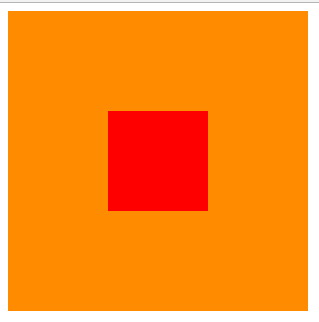
方案2:position transform 元素未知宽度
如果元素未知宽度,只需将上面例子中的margin: -50px 0 0 -50px;替换为:transform: translate(-50%,-50%);
效果如上!
示例 3:
<div class="box">

    <div class="content">

    </div>

</div>

.box {

    background-color: #FF8C00;

    width: 300px;

    height: 300px;

    position: relative;

}

.content {

    background-color: #F00;

    width: 100px;

    height: 100px;

    position: absolute;

    left: 50%;

    top: 50%;

    transform: translate(-50%,-50%);

}

方案3:flex布局 :父元素加
- display: flex;
- justify-content: center;
- align-items: center;
<div class="box">

    <div class="content">

    </div>

</div>

.box {

    background-color: #FF8C00;

    width: 300px;

    height: 300px;

    display: flex;        //flex布局

    justify-content: center;  //使子项目水平居中

    align-items: center;    //使子项目垂直居中

}

.content {

    background-color: #F00;

    width: 100px;

    height: 100px;

}

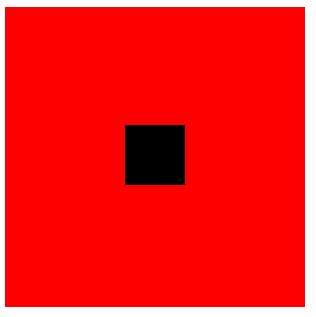
方案4:table-cell布局
示例 5:
因为table-cell相当与表格的td,td为行内元素,无法设置宽和高,所以嵌套一层,嵌套一层必须设置display: inline-block;td的背景覆盖了橘黄色,不推荐使用
<div class="box">

    <div class="content">

        <div class="inner">

        </div>

    </div>

</div>

.box {

    background-color: #FF8C00;//橘黄色

    width: 300px;

    height: 300px;

    display: table;

}

.content {

    background-color: #F00;//红色

    display: table-cell;

    vertical-align: middle;//使子元素垂直居中

    text-align: center;//使子元素水平居中

}

.inner {

    background-color: #000;//黑色

    display: inline-block;

    width: 20%;

    height: 20%;

}
CSS水平垂直居中常见方法总结的更多相关文章
- CSS水平垂直居中常见方法总结2
1.文本水平居中line-height,text-align:center(文字)元素水平居中 margin:0 auo 方案1:position 元素已知宽度 父元素设置为:position: re ...
- 53.CSS---CSS水平垂直居中常见方法总结
CSS水平垂直居中常见方法总结 1.元素水平居中 当然最好使的是: margin: 0 auto; 居中不好使的原因: 1.元素没有设置宽度,没有宽度怎么居中嘛! 2.设置了宽度依然不好使,你设置的是 ...
- CSS水平垂直居中的方法
原文链接:http://caibaojian.com/370.html 水平垂直居中,特别是使用在列表的时候经常会用到的,以前有需求的时候我也做过类似的代码,是使用display:table-cell ...
- 介绍一种css水平垂直居中的方法(非常好用!)
这次介绍一下一个水平垂直居中的css方法,这个方法可以说是百试百灵,废话不多说,直接附上代码: html,body{ width:100%; height:100%; } 你需要居中的元素{ posi ...
- css水平垂直居中的方法与 vertical-align 的用法
前言:这是笔者学习之后自己的理解与整理.如果有错误或者疑问的地方,请大家指正,我会持续更新! 1. 已知元素宽度 方法一:已知宽高,可以用position定位 + margin负值的方法 : 绝对定位 ...
- css 水平垂直居中的方法总结
在项目中经常会遇到设置元素水平垂直居中的需求.而且具体的场景也不同,所以将个人总结的方法做个汇总,希望对浏览者有用. 以下所举的例子都以一个html为准,这里规定好一些公用样式. body { bac ...
- [css]水平垂直居中的方法
1.top:cale(50% - 2rem); left:cale(50% - 2rem);
- CSS水平垂直居中总结
行内元素水平居中 把行内元素包裹在块级父元素中,且父元素中的css设置text-align:center; <!DOCTYPE html> <html> <head> ...
- CSS水平垂直居中的几种方法2
直接进入主题! 一.脱离文档流元素的居中 方法一:margin:auto法 CSS代码: div{ width: 400px; height: 400px; position: relative; b ...
随机推荐
- bzoj4199: [Noi2015]品酒大会 (并查集 && 后缀数组)
据说用后缀自动机 + dp也能做 然而并不会 后缀数组的做法呢 就是先建个后缀数组,求出height值,此时如果直接找,复杂度是n ^ 2的,肯定会超时. 但是height大的值是不会对小的产生影响的 ...
- IDEA中进行远程调试springboot项目
1.以debug的模式启动Springboot项目 命令 java -Xdebug -Xrunjdwp:server=y,transport=dt_socket,address=8888,suspe ...
- nomon+ pyNmonAnalyzer实现基于python的nmon监控性能数据可视化
pip install pyNmonAnalyzer nnmon for linux from sourceforge:https://sourceforge.net/projects/nmon/ ...
- 刷题3. Longest Substring Without Repeating Characters
一.题目 Longest Substring Without Repeating Characters,具体请自行搜索. 这个题目,我看了一下,经过一番思考,我觉得实现起来不是很复杂. 但要做到bug ...
- 深入delphi编程理解之接口(一)接口与类的异同及接口的声明和实现
一.抽象类与接口的异同 接口简单的理解可认为是一个抽象类,我们先定义一个抽象类和接口来对比之间的异同,代码如下: type IFormattedNumber = interface //定义接口 fu ...
- js实现图片轮播图
<!DOCTYPE html><html lang="en"><head> <meta charset="UTF-8" ...
- linux mv命令 cp命令
mv mv [options] source dest -f : 在mv操作要覆盖某已有的目标文件时不给任何指示 命令格式 运行结果 mv 文件名 文件名 将源文件名改为目标文件名 mv 文件名 目录 ...
- Oracle expdp 多表导出处理
一个项目中需要在oracle数据库某个用户下导出1000多个表,导入到测试库做数据分析测试.很少遇到需要导出这么多表的情况,通常都是按schema导出,或者整库导出.考虑到expdp中include参 ...
- lightoj 1408 概率dp
https://blog.csdn.net/moon_sky1999/article/details/98097470 博主在此,牛逼神犇 #include<bits/stdc++.h> ...
- 优酷1080p的kux格式文件怎么转换为MP4格式?
直接使用优酷自己的FFMPEG解码! 格式为:"优酷ffmpeg.exe的安装地址" -y -i ".kux文件储存地址" -c:v copy -c:a cop ...