
LNMP环境配置(1)
安装Nginx、MySQL、PHP
概念
LNMP是Linux Nginx MySQL PHP 的简写,把Nginx、MySQL以及PHP安装在Linux系统上,组成一个环境来运行PHP的脚本语言。
Nginx是类似Apache的一种Web服务软件
MySQL是比较小型的数据库软件
Apache和PHP需要在同一台机器上
(先安装c编译语言)

安装MySQL
切换目录

下载源码包

解压

给文件改名

挪动位置

建立MySQL用户

创建datadir,数据库文件会放到这里面

更改权限

可能的安装包(出现错误)




最后(出现两个ok)

复制配置文件

配置文件
# vi /etc/my.cnf

basedir是MySQL包所在路径
datadir是定义的存放数据的地方
port定义MySQL服务监听的端口(默认是3306)
server_id定义ID号
socket定义服务监听的的套接字地址
复制启动脚本文件并修改其属性

修改启动脚本
# vi /etc/init.d/mysqld

把启动脚本加入系统服务项,设定开机启动

检查MySQL是否启动(大于两行)

安装PHP
下载PHP

配置编译选项
./configure \
> --prefix=/usr/local/php-fpm \
> --with-config-file-path=/usr/local/php-fpm/etc \
> --enable-fpm \
> --with-fpm-user=php-fpm \
> --with-fpm-group=php-fpm \
> --with-mysql=/usr/local/mysql \
> --with-mysql-sock=/tmp/mysql.sock \
> --with-libxml-dir \
> --with-gd \
> --with-jpeg-dir \
> --with-png-dir \
> --with-freetype-dir \
> --with-iconv-dir \
> --with-zlib-dir \
> --with-mcrypt \
> --enable-soap \
> --enable-gd-native-ttf \
> --enable-ftp \
> --enable-mbstring \
> --enable-exif \
> --disable-ipv6 \
> --with-pear \
> --with-curl \
> --with-openssl
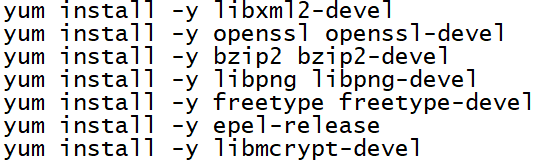
可能出现的错误

编译安装
修改配置文件
# cp php.ini-production /usr/local/php-fpm/etc/php.ini
# vi /usr/local/php-fpm/etc/php-fpm.conf
写入以下内容
[global]
pid = /usr/local/php-fpm/var/run/php-fpm.pid
error_log = /usr/local/php-fpm/var/log/php-fpm.log
[www]
listen = /tmp/php-fcgi.sock
listen.mode = 666
user = php-fpm
group = php-fpm
pm = dynamic
pm.max_children = 50
pm.start_servers = 20
pm.min_spare_servers = 5
pm.max_spare_servers = 35
pm.max_requests = 500
rlimit_files =1024
检验配置是否正确

复制配置文件
# cp /usr/local/src/php-5.6.30/sapi/fpm/init.d.php-fpm /etc/init.d/php-fpm
设置权限
# chmod 755 /etc/init.d/php-fpm
创建用户
# useradd -s /sbin/nologin php-fpm
启动php-fpm

设置开机启动

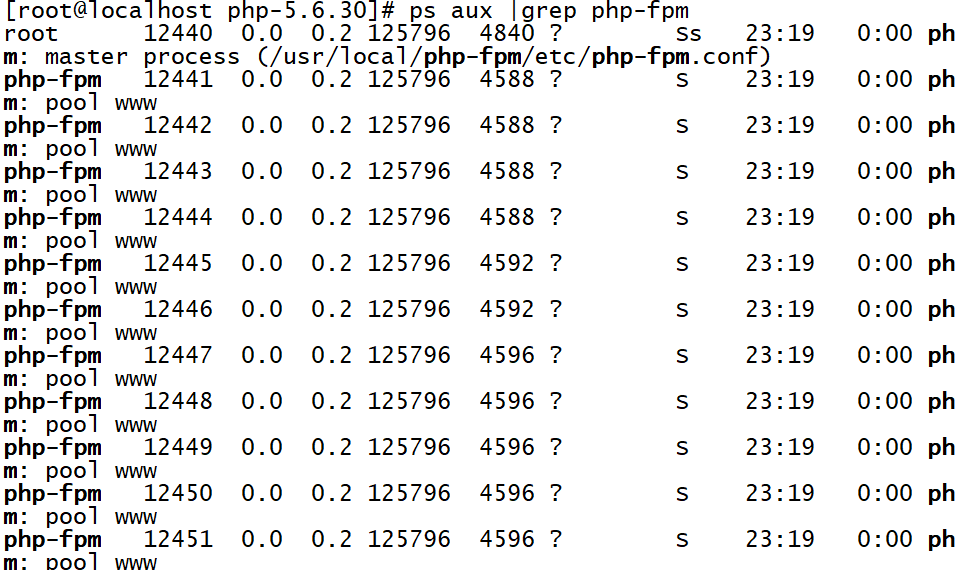
检测是否启动
安装Nginx
下载nginx
解压

配置编译选项


编译和安装
编写启动脚本

加入以下内容
#!/bin/bash
# chkconfig: - 30 21
# description: http service.
# Source Function Library
. /etc/init.d/functions
# Nginx Settings
NGINX_SBIN="/usr/local/nginx/sbin/nginx"
NGINX_CONF="/usr/local/nginx/conf/nginx.conf"
NGINX_PID="/usr/local/nginx/logs/nginx.pid"
RETVAL=0
prog="Nginx"
start()
{
echo -n $"Starting $prog: "
mkdir -p /dev/shm/nginx_temp
daemon $NGINX_SBIN -c $NGINX_CONF
RETVAL=$?
echo
return $RETVAL
}
stop()
{
echo -n $"Stopping $prog: "
killproc -p $NGINX_PID $NGINX_SBIN -TERM
rm -rf /dev/shm/nginx_temp
RETVAL=$?
echo
return $RETVAL
}
reload()
{
echo -n $"Reloading $prog: "
killproc -p $NGINX_PID $NGINX_SBIN -HUP
RETVAL=$?
echo
return $RETVAL
}
restart()
{
stop
start
}
configtest()
{
$NGINX_SBIN -c $NGINX_CONF -t
return 0
}
case "$1" in
start)
start
;;
stop)
stop
;;
reload)
reload
;;
restart)
restart
;;
configtest)
configtest
;;
*)
echo $"Usage: $0 {start|stop|reload|restart|configtest}"
RETVAL=1
esac
exit $RETVAL
保存后更改权限

设置开机启动

更改配置文件
清空配置文件

编写启动脚本
# vi /usr/local/nginx/conf/nginx.conf
加入以下内容
user nobody nobody;
worker_processes 2;
error_log /usr/local/nginx/logs/nginx_error.log crit;
pid /usr/local/nginx/logs/nginx.pid;
worker_rlimit_nofile 51200;
events
{
use epoll;
worker_connections 6000;
}
http
{
include mime.types;
default_type application/octet-stream;
server_names_hash_bucket_size 3526;
server_names_hash_max_size 4096;
log_format combined_realip '$remote_addr $http_x_forwarded_for [$time_local]'
' $host "$request_uri" $status'
' "$http_referer" "$http_user_agent"';
sendfile on;
tcp_nopush on;
keepalive_timeout 30;
client_header_timeout 3m;
client_body_timeout 3m;
send_timeout 3m;
connection_pool_size 256;
client_header_buffer_size 1k;
large_client_header_buffers 8 4k;
request_pool_size 4k;
output_buffers 4 32k;
postpone_output 1460;
client_max_body_size 10m;
client_body_buffer_size 256k;
client_body_temp_path /usr/local/nginx/client_body_temp;
proxy_temp_path /usr/local/nginx/proxy_temp;
fastcgi_temp_path /usr/local/nginx/fastcgi_temp;
fastcgi_intercept_errors on;
tcp_nodelay on;
gzip on;
gzip_min_length 1k;
gzip_buffers 4 8k;
gzip_comp_level 5;
gzip_http_version 1.1;
gzip_types text/plain application/x-javascript text/css text/htm
application/xml;
server
{
listen 80;
server_name localhost;
index index.html index.htm index.php;
root /usr/local/nginx/html;
location ~ \.php$
{
include fastcgi_params;
fastcgi_pass unix:/tmp/php-fcgi.sock;
fastcgi_index index.php;
fastcgi_param SCRIPT_FILENAME /usr/local/nginx/html$fastcgi_script_name;
}
}
}
检验配置

启动nginx

检测是否启动

测试能否正确解析

测试

LNMP环境配置(1)的更多相关文章
- CentOS 下 LNMP 环境配置
安装配置 Nginx 安装配置 MySQL 安装配置 PHP Nginx 与 PHP-FPM 集成 环境配置验证 LNMP 环境代表 Linux 系统下 Nginx + MySQL + PHP 网 ...
- WIN10 vagrant和virtualbox虚拟机和一键搭建lnmp环境配置thinkphp虚拟主机
版本:win10系统 virtualbox:5.1.26 vagrant :1.9.7 centos 7.0 xshell/git 首先下载好对应版本的软件 配置vagrant和virtualbox ...
- VM虚拟机 Centos7 lnmp环境 配置域名问题 windows浏览器访问的问题
CentOS7 ip地址为 192.168.0.155 搭有 LNMP集成环境 执行 lnmp vhost add 配置服务器 指定目录的域名 mark.com 这时windows 机器的 浏览器想 ...
- CentOS 7 lnmp环境配置laravel项目的问题总结!
一.最常见的几个问题 1.部署好站点后,访问站点的时候始终是“File Not Found”!(nginx中的路由配置问题) 2.除了根目录可以访问其它的访问全是403问题!(权限问题) 3.除了根目 ...
- [LNMP]——LNMP环境配置
LNMP=Linux+Nginx+Mysql+PHP Install Nginx //安装依赖包 # yum install openssl openssl-devel zlib-devel //安装 ...
- LNMP环境配置SSL证书 lnmp ssl add
.4新增的添加SSL功能 lnmp ssl add 如果需要添加输入 y ,不添加输入 n 回车. 选择了添加SSL会提示 有两个选项,1 选项为使用自己准备好的SSL证书和key. > &g ...
- 【Linux运维】LNMP环境配置
安装准备: Centos7.3 MYSQL5.6 PHP5.6 NGINX1.10.3 一.安装Mysql mysql:[root@host129 src]#cd /usr/local/src/ [r ...
- LNMP环境配置(2)
php-fpm配置,Nginx配置 Nginx配置 默认虚拟主机 修改主配置文件 # vi /usr/local/nginx/conf/nginx.conf 在最后 } 符号上面写入 includ ...
- vmware搭建lnmp环境配置域名
找到nginx配置文件,修改server_name 然后找到/etc/hosts文件 修改成如下 之后在Windows本地的C盘的hosts文件中添加解析 好了,这样就可以访问了 通往牛逼的路上,在意 ...
随机推荐
- 51Nod 1021 石子归并(区间dp经典入门)
题意: N堆石子摆成一条线.现要将石子有次序地合并成一堆.规定每次只能选相邻的2堆石子合并成新的一堆,并将新的一堆石子数记为该次合并的代价.计算将N堆石子合并成一堆的最小代价. n<=100 思 ...
- LAMP: 分布式 HTTP 2.4.25 + PHP 5.4.13 + MySQL 5.5.28 分离部署
目录 A. 环境说明:B. 效果截图:C. HTTP编译安装D. MySQL二进制安装E. PHP源码编译安装F. PHP连接HTTPG. PHP支持扩展功能xcacheH. PHP连接MySQLI. ...
- String、StringBuffer和StringBuilder总结
String String类是不可变(final)的,对String类的任何改变,都是返回一个新的String类对象. StringBuffer 当对字符串进行修改的时候,需要使用 StringBuf ...
- 《Head first设计模式》之迭代器模式
迭代器模式提供一种方法顺序访问一个聚合对象中的各个元素,而又不暴露其内部的表示. 爆炸性新闻:对象村餐厅和对象村煎饼屋合并了! 真是个好消息!现在我们可以在同一个地方,享用煎饼屋美味的煎饼早餐,和好吃 ...
- 20200110--python学习第八天
今日内容 进制 对于计算机而言无论是计算机存储或是网络传输输入的本质都是:二进制:例如电脑上存储的视频/图形/文件/微信/qq的表情包/小视频都是二进制. 二进制:计算机内部 八进制: 十进制: 十六 ...
- lua 打印一个table的实现
print("-------------Test-----------------") local tb = {} function printProperties(t, csp) ...
- Vue生命周期和钩子函数及使用keeplive缓存页面不重新加载
Vue生命周期 每个Vue实例在被创建之前都要经过一系列的初始化过程,这个过程就是vue的生命周期,在这个过程中会有一些钩子函数会得到回调 Vue中能够被网页直接使用的最小单位就是组件,我们经常写的: ...
- C# 中Trim()、TrimStart()、TrimEnd()、ToUpper()、ToLower()的用法
Trim():删除字符串头部及尾部出现的空格,删除的过程为从外到内,直到碰到一个非空格的字符为止,所以不管前后有多少个连续的空格都会被删除掉. TrimStart():只删除字符串的头部的空格. Tr ...
- pikachu-暴力破解漏洞解析
本篇blog导航 ~暴力破解&暴力破解漏洞概述 ~基于表单的暴力破解实验 ~暴力破解的绕过和防范(验证码&Token) ~验证码的基础知识 ~验证码绕过(on clie ...
- Java架构-高并发的解决实战总结方案
Java架构-高并发的解决实战总结方案 1.应用和静态资源分离 刚开始的时候应用和静态资源是保存在一起的,当并发量达到一定程度的时候就需要将静态资源保存到专门的服务器中,静态资源主要包括图片.视频.j ...