
Spring Cloud Config整合Spring Cloud Kubernetes,在k8s上管理配置
1 前言
欢迎访问南瓜慢说 www.pkslow.com获取更多精彩文章!
Kubernetes有专门的ConfigMap和Secret来管理配置,但它也有一些局限性,所以还是希望通过Spring Cloud Config来管理。在Kubernetes上面的微服务系统会有所不同,我们来探索一下如何整合Spring Cloud Kubernetes来做配置管理。
整体方案与《使用Spring Cloud Config统一管理配置,别再到处放配置文件了》差不多,只是引入Spring Cloud Kubernetes来使用Kubernetes的服务发现,而不使用Eureka等。
2 服务端
引入依赖:
<dependency>

  <groupId>org.springframework.cloud</groupId>

  <artifactId>spring-cloud-config-server</artifactId>

  <version>2.2.0.RELEASE</version>

</dependency>

<dependency>

  <groupId>org.springframework.cloud</groupId>

  <artifactId>spring-cloud-starter-kubernetes</artifactId>

</dependency>
服务端启动类如下:
package com.pkslow.config;

import org.springframework.boot.SpringApplication;

import org.springframework.boot.autoconfigure.SpringBootApplication;

import org.springframework.cloud.client.discovery.EnableDiscoveryClient;

import org.springframework.cloud.config.server.EnableConfigServer;

@SpringBootApplication

@EnableConfigServer

@EnableDiscoveryClient

public class ConfigServerK8s {

    public static void main(String[] args) {

        SpringApplication.run(ConfigServerK8s.class, args);

    }

}
服务端的application.properties配置如下:
server.port=8888

spring.application.name=config-server-k8s

spring.cloud.config.server.git.uri=https://github.com/pkslow/pkslow-config

spring.cloud.config.server.git.username=admin@pkslow.com

spring.cloud.config.server.git.password=***

spring.cloud.config.server.git.default-label=master

spring.cloud.config.server.git.search-paths=demo
这里的应用名字为config-server-k8s,后续部署到k8s也是用这个名字。
k8s的资源定义文件如下:
apiVersion: apps/v1

kind: Deployment

metadata:

  name: config-server-k8s-deployment

spec:

  selector:

    matchLabels:

      app: config-server-k8s

  replicas: 1

  template:

    metadata:

      labels:

        app: config-server-k8s

    spec:

      containers:

        - name: config-server-k8s

          image: pkslow/config-server-k8s:1.0-SNAPSHOT

          ports:

            - containerPort: 8888

---

apiVersion: v1

kind: Service

metadata:

  labels:

    app: config-server-k8s

  name: config-server-k8s

spec:

  ports:

    - port: 8888

      name: config-server-k8s

      protocol: TCP

      targetPort: 8888

  selector:

    app: config-server-k8s

  type: ClusterIP

---

apiVersion: extensions/v1beta1

kind: Ingress

metadata:

  name: config-server-k8s

  annotations:

    kubernetes.io/ingress.class: nginx

spec:

  rules:

    - http:

        paths:

          - path: /

            backend:

              serviceName: config-server-k8s

              servicePort: 8888

      host: config-server-k8s.localhost
保持Service名字统一为config-server-k8s。
3 客户端
引入依赖:
<dependency>

  <groupId>org.springframework.boot</groupId>

  <artifactId>spring-boot-starter-web</artifactId>

</dependency>

<dependency>

  <groupId>org.springframework.cloud</groupId>

  <artifactId>spring-cloud-starter-kubernetes</artifactId>

</dependency>

<dependency>

  <groupId>org.springframework.cloud</groupId>

  <artifactId>spring-cloud-starter-config</artifactId>

</dependency>

<dependency>

  <groupId>org.springframework.boot</groupId>

  <artifactId>spring-boot-starter-actuator</artifactId>

</dependency>
spring-cloud-starter-kubernetes为服务发现;
spring-cloud-starter-config作为配置客户端;
spring-boot-starter-actuator提供EndPoint来刷新配置。
启动类为:
package com.pkslow.config;

import org.springframework.boot.SpringApplication;

import org.springframework.boot.autoconfigure.SpringBootApplication;

import org.springframework.cloud.client.discovery.EnableDiscoveryClient;

@SpringBootApplication

@EnableDiscoveryClient

public class ConfigClientK8s {

    public static void main(String[] args) {

        SpringApplication.run(ConfigClientK8s.class, args);

    }

}
配置文件bootstrap.properties如下:
server.port=8080

# 服务名

spring.application.name=config-client-k8s

# 读取配置时的profile

spring.profiles.active=dev

# 读取配置时的代码分支

spring.cloud.config.label=release

# 开放刷新接口

management.endpoints.web.exposure.include=*

management.endpoint.health.show-details=always

# 通过服务名找到配置服务器

spring.cloud.config.discovery.enabled=true

spring.cloud.config.discovery.service-id=config-server-k8s
展示配置结果的Web服务:
package com.pkslow.config;

import org.springframework.beans.factory.annotation.Value;

import org.springframework.cloud.context.config.annotation.RefreshScope;

import org.springframework.web.bind.annotation.GetMapping;

import org.springframework.web.bind.annotation.RestController;

import java.util.HashMap;

import java.util.Map;

@RefreshScope

@RestController

public class PkslowController {

    @Value("${pkslow.age:0}")

    private Integer age;

    @Value("${pkslow.email:null}")

    private String email;

    @Value("${pkslow.webSite:null}")

    private String webSite;

    @GetMapping("/pkslow")

    public Map<String, String> getConfig() {

        Map<String, String> map = new HashMap<>();

        map.put("age", age.toString());

        map.put("email", email);

        map.put("webSite", webSite);

        return map;

    }

}
客户端的k8s文件:
apiVersion: apps/v1

kind: Deployment

metadata:

  name: config-client-k8s-deployment

spec:

  selector:

    matchLabels:

      app: config-client-k8s

  replicas: 1

  template:

    metadata:

      labels:

        app: config-client-k8s

    spec:

      containers:

        - name: config-client-k8s

          image: pkslow/config-client-k8s:1.0-SNAPSHOT

          ports:

            - containerPort: 8080

---

apiVersion: v1

kind: Service

metadata:

  labels:

    app: config-client-k8s

  name: config-client-k8s

spec:

  ports:

    - port: 8080

      name: config-client-k8s

      protocol: TCP

      targetPort: 8080

  selector:

    app: config-client-k8s

  type: ClusterIP

---

apiVersion: extensions/v1beta1

kind: Ingress

metadata:

  name: config-client-k8s

  annotations:

    kubernetes.io/ingress.class: nginx

spec:

  rules:

    - http:

        paths:

          - path: /

            backend:

              serviceName: config-client-k8s

              servicePort: 8080

      host: config-client-k8s.localhost
注意Service名字为config-client-k8s。
4 部署与测试
总结一下,服务端主要做了两件事:
(1)提供配置服务,从Github中读取配置;
(2)把自己注册到Kubernetes中去,以让客户端发现并读取配置。
客户端主要做了件事:
(1)作为配置客户端,从服务端读配置;
(2)把自己注册到Kubernetes中去,让服务端可以访问;
(3)提供刷新配置的功能给外界调用。
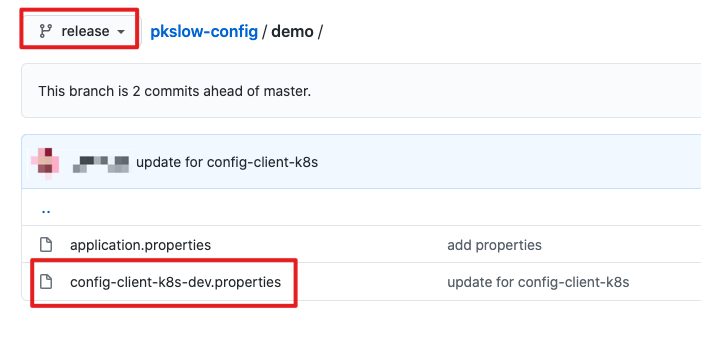
根据客户端的名字、配置的label和profile,客户端便会读取release分支的配置文件config-client-k8s-dev.properties的内部。
访问http://config-client-k8s.localhost/pkslow结果如下:

如果修改了配置信息,客户端不能及时生效,需要通过发送POST请求到http://config-client-k8s.localhost/actuator/refresh,这点不再赘述。
5 服务端统一刷新
如果改了大量配置,或者基础配置,想让所有客户端生效怎么办?总不能一个个去刷新?而且在客户端有多个Pod需要LoadBalance的情况下,无法确保每个Java应用都能刷新到。
所以让服务去读取所有相关的客户端,并刷新。实现很简单,直接新增一个RefreshController就可以了:
package com.pkslow.config;

import org.springframework.beans.factory.annotation.Autowired;

import org.springframework.cloud.client.ServiceInstance;

import org.springframework.cloud.client.discovery.DiscoveryClient;

import org.springframework.http.HttpEntity;

import org.springframework.http.HttpHeaders;

import org.springframework.http.MediaType;

import org.springframework.http.ResponseEntity;

import org.springframework.web.bind.annotation.GetMapping;

import org.springframework.web.bind.annotation.RestController;

import org.springframework.web.client.RestTemplate;

import java.util.HashMap;

import java.util.List;

import java.util.Map;

@RestController

public class RefreshController {

    @Autowired

    private DiscoveryClient discoveryClient;

    private RestTemplate rest = new RestTemplate();

    @GetMapping("/refresh")

    public Map<String, String> refresh() {

        Map<String, String> result = new HashMap<>();

        List<String> services = discoveryClient.getServices();

        result.put("Basic Info", "Total services in k8s:" + services.size());

        services.stream()

                .filter(s -> (!"config-server-k8s".equals(s)) && s.startsWith("config-client"))

                .forEach(service -> {

                    List<ServiceInstance> instances = discoveryClient.getInstances(service);

                    instances.forEach(instance -> {

                        String url = "http://" + instance.getHost() + ":" + instance.getPort() + "/actuator/refresh";

                        try {

                            HttpHeaders headers = new HttpHeaders();

                            headers.setContentType(MediaType.APPLICATION_JSON);

                            HttpEntity<String> entity = new HttpEntity<>(null, headers);

                            ResponseEntity<String> response = rest.postForEntity(url, entity, String.class);

                            result.put(service + " " + url, response.getStatusCode().getReasonPhrase());

                        } catch (Exception e) {

                            result.put(service + " " + url, e.getMessage());

                        }

                    });

                });

        return result;

    }

}
注意上面的过滤逻辑,因为不是所有Service都可以、都需要refresh,具体逻辑看业务。
请求http://config-server-k8s.localhost/refresh结果如下(把客户端的replicas设置成了3):
{

  "config-client-k8s http://10.1.0.126:8080/actuator/refresh": "OK",

  "config-client-k8s http://10.1.0.125:8080/actuator/refresh": "OK",

  "Basic Info": "Total services in k8s:7",

  "config-client-k8s http://10.1.0.122:8080/actuator/refresh": "OK"

}
注:可能会遇到权限不足的问题,创建一个对应的Kubernetes ServiceAccount即可,不清楚可以参考:把Spring Cloud Data Flow部署在Kubernetes上,再跑个任务试试
客户端其实不一定需要引入
DiscoveryService,如果不通过Server的ServiceId来寻找地址,而是直接配置服务端地址spring.cloud.config.uri。但服务端是需要的,因为要获取客户端的信息来实现统一reload。
6 总结
配置管理其实是一门大学问,把Spring Cloud Config放在Kubernetes上用只是其中一种场景。
关于配置的一些文章:
Spring Cloud Config在Spring Cloud Task中的应用,比Web应用更简单
Spring Cloud Config整合Spring Cloud Kubernetes,在k8s上管理配置
使用Spring Cloud Config统一管理配置,别再到处放配置文件了
Java怎么从这四个位置读取配置文件Properties(普通文件系统-classpath-jar-URL)
注解@ConfigurationProperties让配置整齐而简单
Springboot整合Jasypt,让配置信息安全最优雅方便的方式
欢迎关注微信公众号<南瓜慢说>,将持续为你更新...

多读书,多分享;多写作,多整理。
Spring Cloud Config整合Spring Cloud Kubernetes,在k8s上管理配置的更多相关文章
- 【Spring Cloud】Spring Cloud之整合Spring Cloud Bus以及最佳实践
一.整合步骤 1)加入Maven坐标 <!-- actuator监控模块 --> <dependency> <groupId>org.springframework ...
- spring cloud config 结合 spring cloud bus实现配置自定的刷新
在线上环境中,有时候我们希望系统中的某些配置参数在修改后,可以立即生效而不用重新启动服务.由上一节我们知道,我们可以把配置文件统一放到配置服务中进行管理,这一节我们在配置中心中整合spring clo ...
- Spring Cloud Config采用Git存储时两种常用的配置策略
由于Spring Cloud Config默认采用了Git存储,相信很多团队在使用Spring Cloud的配置中心时也会采用这样的策略.即便大家都使用了Git存储,可能还有各种不同的配置方式,本文就 ...
- Spring Boot 应用系列 1 -- Spring Boot 2 整合Spring Data JPA和Druid,双数据源
最近Team开始尝试使用Spring Boot + Spring Data JPA作为数据层的解决方案,在网上逛了几圈之后发现大家并不待见JPA,理由是(1)MyBatis简单直观够用,(2)以Hib ...
- Spring Boot:整合Spring Security
综合概述 Spring Security 是 Spring 社区的一个顶级项目,也是 Spring Boot 官方推荐使用的安全框架.除了常规的认证(Authentication)和授权(Author ...
- Spring Boot:整合Spring Data JPA
综合概述 JPA是Java Persistence API的简称,是一套Sun官方提出的Java持久化规范.其设计目标主要是为了简化现有的持久化开发工作和整合ORM技术,它为Java开发人员提供了一种 ...
- Spring Data JPA 整合Spring
1.1 Spring Data JPA 与 JPA和hibernate之间的关系 JPA是一套规范,内部是有接口和抽象类组成的.hibernate是一套成熟的ORM框架,而且Hibernate实现 ...
- 菜鸟级springmvc+spring+mybatis整合开发用户登录功能(上)
由于本人愚钝,整合ssm框架真是费劲了全身的力气,所以打算写下这篇文章,一来是对整个过程进行一个回顾,二来是方便有像我一样的笨鸟看过这篇文章后对其有所帮助,如果本文中有不对的地方,也请大神们指教. 一 ...
- Spring Data JPA 整合Spring 第二篇
主要是在CustomerDao中去写一些代码,在调用Query中去用SQL 例如 public interface CustomerDao extends JpaRepository<Custo ...
随机推荐
- Day02_CMS前端开发
CMS前端开发 1 Vue.js与Webpack研究 参考链接:https://www.cnblogs.com/artwalker/p/13387386.html 2 CMS前端工程创建 2.1 导入 ...
- Day01_搭建环境&CMS服务端开发
学成在线 第1天 讲义-项目概述 CMS接口开发 1 项目的功能构架 1.1 项目背景 受互联网+概念的催化,当今中国在线教育市场的发展可谓是百花齐放.如火如荼. 按照市场领域细分为:学前教育.K12 ...
- 06_Python基础课程
学于黑马和传智播客联合做的教学项目 感谢 黑马官网 传智播客官网 微信搜索"艺术行者",关注并回复关键词"软件测试"获取视频和教程资料! b站在线视频 Pyth ...
- PHP date_isodate_set() 函数
------------恢复内容开始------------ 实例 设置 2013 年第 5 周的 ISO 日期: <?php$date=date_create();date_isodate_s ...
- Python 访问字符串中的值
Python 访问字符串中的值 Python 不支持单字符类型,单字符在 Python 中也是作为一个字符串使用.高佣联盟 www.cgewang.com Python 访问子字符串,可以使用方括号来 ...
- PHP expm1() 函数
实例 返回 exp() - 1: <?phpecho(expm1(0) . "<br>");echo(expm1(1) . "<br>&qu ...
- CF613D Kingdom and its Cities 虚树 树形dp 贪心
LINK:Kingdom and its Cities 发现是一个树上关键点问题 所以考虑虚树刚好也有标志\(\sum k\leq 100000\)即关键点总数的限制. 首先当k==1时 答案显然为0 ...
- bzoj 2125 最短路 点双 圆方树
LINK:最短路 一张仙人掌图 求图中两点最短路. \(n<=10000,Q<=10000,w>=1\) 考虑边数是多少 m>=n-1 对于一张仙人掌图 考虑先构建出来dfs树 ...
- 使用jsdelivr + GitHub + PicGo搭建免费图床
前言 之前一直有开通有道云笔记会员,主要是为了会员markdown图片可以在线保存的功能,前一阵子会员到期,考虑这个功能可不可以自己单独实现,从而替代使用有道云会员. 通过网上搜索的方式,查询到了几种 ...
- Python代码规范性检测
一定要注重代码规范,按照平时的代码管理,可以将Python代码规范检测分为两种: 静态本地检测:可以借助静态检查工具,比如:Flake8,Pylint等,调研了一下,用Flake8的相对较多,功能满足 ...