
Web API 2 入门——使用Web API与ASP.NET Web窗体(谷歌翻译)
作者:Mike Wasson
虽然ASP.NET Web API与ASP.NET MVC打包在一起,但很容易将Web API添加到传统的ASP.NET Web窗体应用程序中。本教程将引导您完成步骤。
概观
要在Web窗体应用程序中使用Web API,有两个主要步骤:
- 添加从ApiController类派生的Web API控制器。
- 向Application_Start方法添加路由表。
创建Web窗体项目
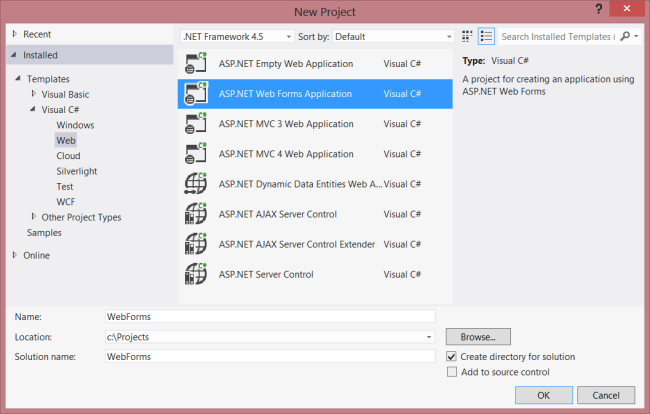
启动Visual Studio并从“ 开始”页面选择“ 新建项目 ” 。或者,从文件菜单中选择新建,然后选择项目。
在“ 模板”窗格中,选择“ 已安装的模板”并展开Visual C#节点。在Visual C#下,选择Web。在项目模板列表中,选择ASP.NET Web窗体应用程序。输入项目的名称,然后单击确定。
创建模型和控制器
本教程使用与入门教程相同的模型和控制器类。
首先,添加一个模型类。在解决方案资源管理器中,右键单击项目并选择添加类。命名产品类,并添加以下实现:
public class Product

{

    public int Id { get; set; }

    public string Name { get; set; }

    public decimal Price { get; set; }

    public string Category { get; set; }

}
接下来,将Web API控制器添加到项目中。控制器是处理Web API HTTP请求的对象。
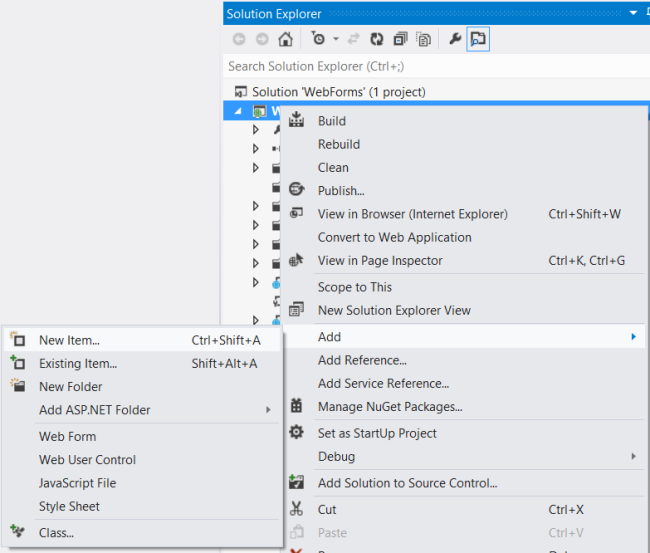
在解决方案资源管理器中,右键单击项目。选择添加新项目。
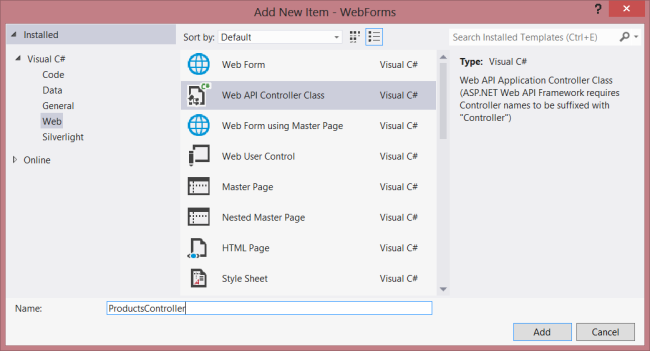
在已安装的模板下,展开Visual C#并选择Web。然后,从模板列表中选择Web API Controller Class。命名控制器“ProductsController”,然后单击添加。
“ 添加新项目”向导将创建一个名为ProductsController.cs的文件。删除向导包含的方法并添加以下方法:
namespace WebForms

{

    using System;

    using System.Collections.Generic;

    using System.Linq;

    using System.Net;

    using System.Net.Http;

    using System.Web.Http;

    public class ProductsController : ApiController

    {

        Product[] products = new Product[]

        {

            new Product { Id = 1, Name = "Tomato Soup", Category = "Groceries", Price = 1 },

            new Product { Id = 2, Name = "Yo-yo", Category = "Toys", Price = 3.75M },

            new Product { Id = 3, Name = "Hammer", Category = "Hardware", Price = 16.99M }

        };

        public IEnumerable<Product> GetAllProducts()

        {

            return products;

        }

        public Product GetProductById(int id)

        {

            var product = products.FirstOrDefault((p) => p.Id == id);

            if (product == null)

            {

                throw new HttpResponseException(HttpStatusCode.NotFound);

            }

            return product;

        }

        public IEnumerable<Product> GetProductsByCategory(string category)

        {

            return products.Where(

                (p) => string.Equals(p.Category, category,

                    StringComparison.OrdinalIgnoreCase));

        }

    }

}
有关此控制器中的代码的更多信息,请参阅入门教程。
添加路由信息
接下来,我们将添加一个URI路由,以便将“/ api / products /”形式的URI路由到控制器。
在解决方案资源管理器中,双击Global.asax以打开代码隐藏文件Global.asax.cs。添加以下using语句。
using System.Web.Http;
然后将以下代码添加到Application_Start方法中:
RouteTable.Routes.MapHttpRoute(

    name: "DefaultApi",

    routeTemplate: "api/{controller}/{id}",

    defaults: new { id = System.Web.Http.RouteParameter.Optional }

);
有关路由表的更多信息,请参阅ASP.NET Web API中的路由。
添加客户端AJAX
这就是创建一个客户端可以访问的Web API所需要的。现在我们来添加一个使用jQuery调用API的HTML页面。
打开文件Default.aspx。更换主内容部分中的样板文本,如图所示:
<%@ Page Title="Home Page" Language="C#" MasterPageFile="~/Site.Master"

    AutoEventWireup="true" CodeBehind="Default.aspx.cs" Inherits="WebForms._Default" %>

<asp:Content ID="HeaderContent" runat="server" ContentPlaceHolderID="HeadContent">

</asp:Content>

<asp:Content ID="BodyContent" runat="server" ContentPlaceHolderID="MainContent">

    <h2>Products</h2>

    <table>

    <thead>

        <tr><th>Name</th><th>Price</th></tr>

    </thead>

    <tbody id="products">

    </tbody>

    </table>

</asp:Content>
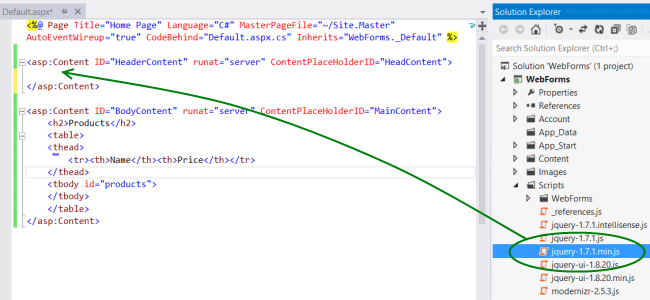
接下来,在该HeaderContent部分中添加对jQuery源文件的引用:
<asp:Content ID="HeaderContent" runat="server" ContentPlaceHolderID="HeadContent">

    <script src="Scripts/jquery-1.7.1.min.js" type="text/javascript"></script>

</asp:Content>
注意:您可以通过将解决方案资源管理器中的文件拖放到代码编辑器窗口中来轻松添加脚本引用。
在jQuery脚本标记下面添加以下脚本块:
<script type="text/javascript">

    function getProducts() {

        $.getJSON("api/products",

            function (data) {

                $('#products').empty(); // Clear the table body.

                // Loop through the list of products.

                $.each(data, function (key, val) {

                    // Add a table row for the product.

                    var row = '<td>' + val.Name + '</td><td>' + val.Price + '</td>';

                    $('<tr/>', { text: row })  // Append the name.

                        .appendTo($('#products'));

                });

            });

        }

        $(document).ready(getProducts);

</script>
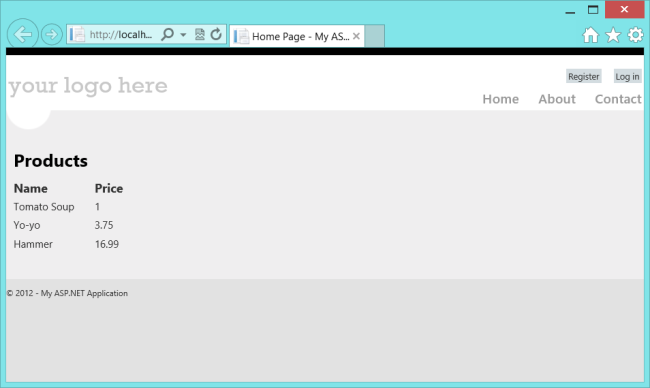
当文档加载时,此脚本会向“api / products”发出AJAX请求。该请求返回JSON格式的产品列表。该脚本将产品信息添加到HTML表中。
运行应用程序时,应该如下所示:
Web API 2 入门——使用Web API与ASP.NET Web窗体(谷歌翻译)的更多相关文章
- 【ASP.NET Web API教程】1.1 第一个ASP.NET Web API
Your First ASP.NET Web API (C#)第一个ASP.NET Web API(C#) By Mike Wasson|January 21, 2012作者:Mike Wasson ...
- Asp.Net Core 实现谷歌翻译ApI 免费版
由于谷歌翻译官方API是付费版本,本着免费和开源的精神.分享一下用 Net Core 实现谷歌翻译API的代码. 项目引用的Nuget 包: ChakraCore.NET Newtonsoft.Jso ...
- ASP.Net Web API 输出缓存 转载 -- Output caching in ASP.NET Web API
一.Nuget安装相关dll Web API 2 : Install-Package Strathweb.CacheOutput.WebApi2 Web API 1 : Install-Package ...
- ASP.NET Web API系列教程目录
ASP.NET Web API系列教程目录 Introduction:What's This New Web API?引子:新的Web API是什么? Chapter 1: Getting Start ...
- Swagger 生成 ASP.NET Web API
使用 Swagger 生成 ASP.NET Web API 在线帮助测试文档 原文:ASP.NET Web API Help Pages using Swagger作者:Shayne Boyer翻译: ...
- ASP.NET Web API系列教程(目录)(转)
注:微软随ASP.NET MVC 4一起还发布了一个框架,叫做ASP.NET Web API.这是一个用来在.NET平台上建立HTTP服务的Web API框架,是微软的又一项令人振奋的技术.目前,国内 ...
- [转]ASP.NET Web API系列教程(目录)
本文转自:http://www.cnblogs.com/r01cn/archive/2012/11/11/2765432.html 注:微软随ASP.NET MVC 4一起还发布了一个框架,叫做ASP ...
- 杂项:ASP.NET Web API
ylbtech-杂项:ASP.NET Web API ASP.NET Web API 是一种框架,用于轻松构建可以访问多种客户端(包括浏览器和移动设备)的 HTTP 服务. ASP.NET Web A ...
- ASP.NET Web API 管道模型
ASP.NET Web API 管道模型 前言 ASP.NET Web API是一个独立的框架,也有着自己的一套消息处理管道,不管是在WebHost宿主环境还是在SelfHost宿主环境请求和响应都是 ...
- ASP.NET Web API 路由对象介绍
ASP.NET Web API 路由对象介绍 前言 在ASP.NET.ASP.NET MVC和ASP.NET Web API这些框架中都会发现有路由的身影,它们的原理都差不多,只不过在不同的环境下作了 ...
随机推荐
- XNA 中3D模型的显示
XNA 中3D模型的显示: ModelMeshPart[] meshParts; Model start_model; Matrix[] dq_model_transforms; Matrix vie ...
- Java学习之路(四):面向对象
Java中的面向对象 概念:面向对象的原本的意思是“”万物皆对象“” 面向对象思想的特点: 是一种更符合我们思想习惯的思想,将复杂的事情简单化 使我们角色发生了转换,将我们从执行者变成了指挥者 面向对 ...
- CentOS6.4 安装Maven及Nexus仓库代理
本文安装的apache-maven-3.5.0-bin.tar.gz,nexus-2.9.0-04-bundle.tar.gz 1.由于网络并不是特别好我这边是通过本地下载过来,通过sftp上传至Ce ...
- MySQL移动数据目录出现权限问题
MySQL移动数据目录出现权限问题 环境: ubuntu 14.04.4 LTS 现象 今天把/var/lib/mysql下的数据文件移动到其他目录下,之后发现启动mysql报错,并且mysql无法运 ...
- jcef视频教程
http://www.cnblogs.com/Johness/p/java-cef-1-building.html
- C#(Winform)禁用TextBox控件的鼠标事件
1. 继承TextBox,然后重写父类的部分方法,核心代码如下 public class MyTextBox : TextBox { protected override void WndProc(r ...
- linux多线程同步
1. 互斥量是线程同步的一种机制,用来保护多线程的共享资源.同一时刻,只允许一个线程对临界区进行访问.互斥量的工作流程:创建一个互斥量,把这个互斥量的加锁调用放在临界区的开始位置,解锁调用放到临界区的 ...
- Struts2入门介绍(二)
一.Struts执行过程的分析. 当我们在浏览器中输入了网址http://127.0.0.1:8080/Struts2_01/hello.action的时候,Struts2做了如下过程: 1.Stru ...
- Bash编程(1) 基础
1. 基本知识 (1) $HOME: 当前用户的家目录 (2) `pwd`或$PWD:当前目录 (3) 脚本命名避免使用test,通过type -a test,可以查看所有匹配test的命令 gas@ ...
- web渗透笔记
1.安装nmap记录:(1)下载:wget http://nmap.org/dist/nmap-6.46.tar.bz2(最新版)wget http://nmap.org/dist/nmap-6.00 ...