
Dependent Parameters in Concurrent Program using Special Value Set
Dependent Parameters in Oracle Applications
Requirement:
Say there is a concurrent program that lets you retrieve employee details based on employee name or employee number.
The concurrent program has 3 parameters:
1.Search Criteria is a value set containing “Employee Name” and “Employee Number” as values
2.Employee Name
3.Employee Number
When the user wants to search employee based on Employee number, he selects Employee Number in the parameter “Search Criteria”.
Automatically Employee name parameter should be disabled so that user can enter only number in the parameter Employee number to search that employee.
Similarly if the users wants to to search employee based on Employee name, Employee number parameter should be disabled thus preventing the users to search based on Employee number.

As seen in the above screenshot, say there is a Concurrent program which has 3 parameters defined:
1. Select Parameter to Disable
2. Parameter – 1
3. Parameter – 2
And Parameter “Select Parameter to Disable” is a value set that has values –
PARAM-1, PARAM-2
The requirement here is if the user selects PARAM-1 as the value for the parameter “Select Parameter to Disable”, then the Parameter “Parameter – 1” should be disabled meaning the user should not be able to enter any information for that parameter.
If user selects PARAM-2 as the value for the parameter “Select Parameter to Disable”, then the Parameter “Parameter – 2” should be disabled.
Steps to implement the above requirement:
1. Create the below Value Sets:
I. Value Set “ERPS_SP_VS_PARA_DEMO”:
· Navigation: System Administrator responsibility>Application>Validation>Set
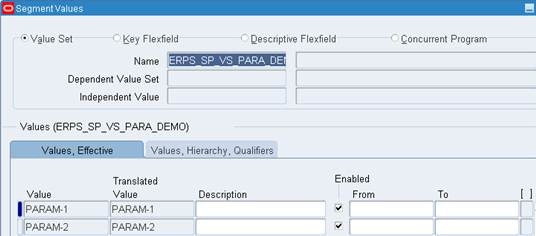
· Enter the details as shown in screenshot below and save your work.

· Navigation: System Administrator responsibility>Application>Validation>Values
· Give the name as “ERPS_SP_VS_PARA_DEMO” and click on Find.

· Enter Values as PARAM-1 and PARAM-2 as shown bin the below screenshot and save your work.
II. Value Set “ERPS_SP_VS_PAR1_DUMMY”:
· Navigation: System Administrator responsibility>Application>Validation>Set
· Enter the details as shown in screenshot below and save your work.

III. Value Set ERPS_SP_VS_PAR2_DUMMY
· Navigation: System Administrator responsibility>Application>Validation>Set
· Enter the details as shown in screenshot below

IV. Create Value Set ERPS_SP_VS_PAR1
· Navigation: System Administrator responsibility>Application>Validation>Set
· Enter the details as shown in screenshot below.
· Click “Edit Information” button.

· Select Event as Validate and add the below code in the Function textbox
FND PLSQL”BEGIN
IF :$FLEX$.ERPS_SP_VS_PAR1_DUMMY <> 1 THEN
NULL;
END IF;
END;
”
· Save your work

V. Create Value Set ERPS_SP_VS_PAR2
· Navigation: System Administrator responsibility>Application>Validation>Set
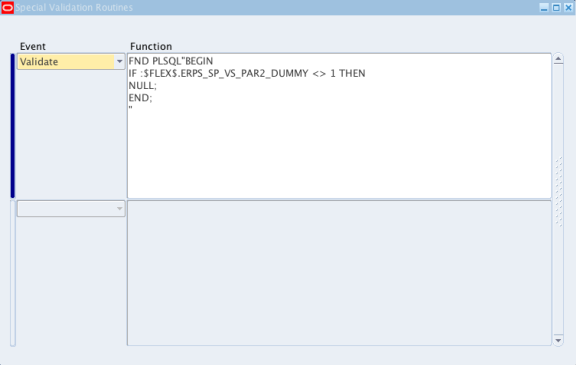
· Enter the details as shown in screenshot below.
· Click “Edit Information” button.

· Select Event as Validate and add the below code in the Function textbox
FND PLSQL”BEGIN
IF :$FLEX$.ERPS_SP_VS_PAR2_DUMMY <> 1 THEN
NULL;
END;
”
· Save your work
2. Define Executable for the concurrent program
· Navigation: System Administrator responsibility>Concurrent>Program>Executable
· Enter the details as shown in screenshot below.
· Save your work

3. Define the concurrent program:
· Navigation: System Administrator responsibility>Concurrent>Program>Define
· Enter the details as shown in screenshot below.
· Save your work

4. Define Parameters for the concurrent program:
· Click on “Parameters” button and enter the below details
A. Seq: 10
B. Parameter: Enter Parameter Num to Disable
C. Value Set: ERPS_SP_VS_PARA_DEMO
D. Prompt: Select Parameter to Disable

A. Seq:15
B. Parameter: Parameter – 1 Dummy
C. Value Set: ERPS_SP_VS_PAR1_DUMMY
D. Default Type: SQL Statement
E. Default Value: select 1 from Dual where :$FLEX$.ERPS_SP_VS_PARA_DEMO != ‘PARAM-1’
F. Uncheck the Display Checkbox

A. Seq:20
B. Parameter: Parameter – 1
C. Value Set: ERPS_SP_VS_PAR1

A. Seq:25
B. Parameter: Parameter – 2 Dummy
C. Value Set: ERPS_SP_VS_PAR2_DUMMY
D. Default Type: SQL Statement
E. Default Value: select 1 from Dual where :$FLEX$.ERPS_SP_VS_PARA_DEMO != ‘PARAM-2’
F. Uncheck the Display Checkbox

A. Seq:30
B. Parameter: Parameter – 2
C. Value Set: ERPS_SP_VS_PAR2
D. Save the work.

Assign this concurrent program to the desired responsibility and check the result.
For detailed explanation on how to define a concurrent program, please refer to the below article:
http://erpschools.com/articles/concurrent-program-registration-and-add-it-to-request-group
Dependent Parameters in Concurrent Program using Special Value Set的更多相关文章
- How to Create a Java Concurrent Program
In this Document Goal Solution Overview Steps in writing Java Concurrent Program Template ...
- Email the output of a concurrent program as Attachment
This article illustrates the steps to be followed to Email a concurrent program's output. Write a pr ...
- IGS_学习笔记05_IREP开发Concurrent Program为客户化集合接口(案例)
20150819 Created By BaoXinjian
- R12: Improving Performance of General Ledger and Journal Import (Doc ID 858725.1 )
In this Document Purpose Scope Details A) Database Init.ora Parameters B) Concurrent Progr ...
- Credit Summaries & Importing External Credit Exposure
In this Document Goal Solution APPLIES TO: Oracle Order Management - Version 11.5.10.2 to 12.1.3 ...
- Concurrent.Thread.js
(function(){ if ( !this.Data || (typeof this.Data != 'object' && typeof this.Data != 'functi ...
- How To Get Log, Trace Files In OA Framework Pages And Concurrent Request Programs
Goal Solution References APPLIES TO: Oracle Supplier Lifecycle Management - Version 12.1.2 and l ...
- Form_通过Trace分析Concurrent和Form性能和异常详解(案例)
2014-06-21 Created By BaoXinjian
- Spring Named Parameters examples in SimpleJdbcTemplate
In JdbcTemplate, SQL parameters are represented by a special placeholder "?" symbol and bi ...
随机推荐
- C基础 算法实现层面套路
引言 - 从实践狗讲起 理论到实践(有了算法到实现) 中间有很多过程. 算法方面本人啥也不懂, 只能说说实现方面. 例如下面 一个普通的插入排序. // // 插入排序默认从大到小 // extern ...
- 【LabVIEW技巧】LabVIEW中的错误1
前言 前几日,小黑充电学习意外的看到了下面的这个东东. 编程许久竟然没有见过这样子的错误枚举,甚为好奇,问刘大后才知道是Error Ring,为此恶补一下LabVIEW中与错误处理相关的内容. 错误的 ...
- jquery - 实例1
<%@ Page Language="C#" AutoEventWireup="true" CodeBehind="text2.aspx.cs& ...
- 2017百度春招<度度熊买帽子的问题>
题目: 度度熊想去商场买一顶帽子,商场里有N顶帽子,有些帽子的价格可能相同.度度熊想买一顶价格第三便宜的帽子,问第三便宜的帽子价格是多少? 数组中找到第三小的数字 注意边界条件 用STL中的set来 ...
- HIbernate学习笔记4 之 延迟加载和 关联映射
一.延迟加载 * 在使用hibernate一些方法的查询数据的时候,返回的只是一个空对象(除id外属性都为NULL),并没有真正的查询数据库,而是在使用这个对象时才会触发查询数据库,并将这些数据注入到 ...
- SEO页面标题Title的优化
我在一个月前改过页面标题(Title),随后表现是:百度网页快照4天不更新,Google正常.而我仅仅是改了两个词组而已.在建博初期,修改Title的最频繁的时期,下面卢松松就我经历的修改Title过 ...
- AC日记——聪明的质监员 洛谷 P1314
聪明的质监员 思路: 二分: 代码: #include <bits/stdc++.h> using namespace std; #define maxn 200005 #define l ...
- 前端读者 | 由setTimeout引发的JS引擎运行机制的研究
本文来自 @xiaoyuze88 链接:http://xiaoyuze88.github.io/ 太久没碰代码了,那天想到关于循环调用setTimeout实现每隔一秒输出递增的数的那个问题,搞了搞,发 ...
- java中常用的String方法
1 length()字符串的长度 String a = "Hello Word!"; System.out.println(a.length); 输出的结果是字符串长度10. 2 ...
- Codeforces 1082 D. Maximum Diameter Graph-树的直径-最长链-构造题 (Educational Codeforces Round 55 (Rated for Div. 2))
D. Maximum Diameter Graph time limit per test 2 seconds memory limit per test 256 megabytes input st ...