
Java ssh 访问windows/Linux
工作中遇到的问题:
Java code运行在一台机器上,需要远程到linux的机器同时执行多种命令。原来采用的方法是直接调用ssh命令或者调用plink的命令。
google下java的其他ssh方法,发现有个包。
具体介绍如下:
Ganymed SSH2 for Java is a library which implements the SSH-2 protocol in pure Java.It allows one to connect to SSH servers from within Java programs. It supports SSH sessions(remote command execution and shell access),local and remote port forwarding, local stream forwarding, X11 forwarding, SCP and SFTP.There are no dependencies on any JCE provider, as all crypto functionality is included.
Ganymed SSH2 for Java was first developed for the Ganymed replication project and acouple of other projects at the IKS group at ETH Zurich.
Website: http://www.cleondris.ch/opensource/ssh2/.
给个链接:http://www.cleondris.ch/opensource/ssh2/javadoc/
更多关于ssh协议的介绍可以查看http://www.ietf.org/rfc/rfc4251.txt
包中主要的类:
Package ch.ethz.ssh2
| Interface Summary | |
|---|---|
| ChannelCondition | Contains constants that can be used to specify what conditions to wait for on a SSH-2 channel (e.g., represented by aSession). |
| ConnectionMonitor | A ConnectionMonitor is used to get notified when the underlying socket of a connection is closed. |
| InteractiveCallback | An InteractiveCallback is used to respond to challenges sent by the server if authentication mode "keyboard-interactive" is selected. |
| ProxyData | An abstract marker interface implemented by all proxy data implementations. |
| ServerHostKeyVerifier | A callback interface used to implement a client specific method of checking server host keys. |
| Class Summary | |
|---|---|
| Connection | A Connection is used to establish an encrypted TCP/IP connection to a SSH-2 server. |
| ConnectionInfo | In most cases you probably do not need the information contained in here. |
| DHGexParameters | A DHGexParameters object can be used to specify parameters for the diffie-hellman group exchange. |
| HTTPProxyData | A HTTPProxyData object is used to specify the needed connection data to connect through a HTTP proxy. |
| KnownHosts | The KnownHosts class is a handy tool to verify received server hostkeys based on the information inknown_hosts files (the ones used by OpenSSH). |
| LocalPortForwarder | A LocalPortForwarder forwards TCP/IP connections to a local port via the secure tunnel to another host (which may or may not be identical to the remote SSH-2 server). |
| LocalStreamForwarder | A LocalStreamForwarder forwards an Input- and Outputstream pair via the secure tunnel to another host (which may or may not be identical to the remote SSH-2 server). |
| SCPClient | A very basic SCPClient that can be used to copy files from/to the SSH-2 server. |
| Session | A Session is a remote execution of a program. |
| SFTPv3Client | A SFTPv3Client represents a SFTP (protocol version 3) client connection tunnelled over a SSH-2 connection. |
| SFTPv3DirectoryEntry | A SFTPv3DirectoryEntry as returned by SFTPv3Client.ls(String). |
| SFTPv3FileAttributes | A SFTPv3FileAttributes object represents detail information about a file on the server. |
| SFTPv3FileHandle | A SFTPv3FileHandle. |
| StreamGobbler | A StreamGobbler is an InputStream that uses an internal worker thread to constantly consume input from another InputStream. |
| Exception Summary | |
|---|---|
| HTTPProxyException | May be thrown upon connect() if a HTTP proxy is being used. |
| SFTPException | Used in combination with the SFTPv3Client. |
给个例子:
(1) SSH到Linux机器
package ssh;
import java.io.BufferedReader;
import java.io.IOException;
import java.io.InputStream;
import java.io.InputStreamReader;
import ch.ethz.ssh2.Connection;
import ch.ethz.ssh2.*;
public class Basic {
public static void main(String[] args)
{
String hostname ="9.12.175.30";
String username="root";
String password="password";
try{
//建立连接
Connection conn= new Connection(hostname);
System.out.println("set up connections");
conn.connect();
//利用用户名和密码进行授权
boolean isAuthenticated = conn.authenticateWithPassword(username, password);
if(isAuthenticated ==false)
{
throw new IOException("Authorication failed");
}
//打开会话
Session sess = conn.openSession();
System.out.println("Execute command:/usr/bin/perl /test/discover.pl /test/meps_linux.txt");
//执行命令
sess.execCommand("/usr/bin/perl /test/discover.pl /test/meps_linux.txt");
System.out.println("The execute command output is:");
InputStream stdout = new StreamGobbler(sess.getStdout());
BufferedReader br = new BufferedReader(new InputStreamReader(stdout));
while(true)
{
String line = br.readLine();
if(line==null) break;
System.out.println(line);
}
System.out.println("Exit code "+sess.getExitStatus());
sess.close();
conn.close();
System.out.println("Connection closed");
}catch(IOException e)
{
System.out.println("can not access the remote machine");
}
}
}
(2) SSH到windows机器:
windows由于没有默认的ssh server,因此在允许ssh之前需要先安装ssh server。
下载freeSSHd
http://www.freesshd.com/?ctt=download
安装
直接执行freeSSHd.exe就可以进行安装了(用户一定要有管理员权限),安装过程中freeSSHd会问你
Private keys should be created. Should I do it now?
这是问你是否需要现在创建私钥,回答是
Do you want to run FreeSSHd as a system service?
这是问你是否希望把freeSSHd作为系统服务启动,回答是之后就安装完成了
配置用户名和密码:
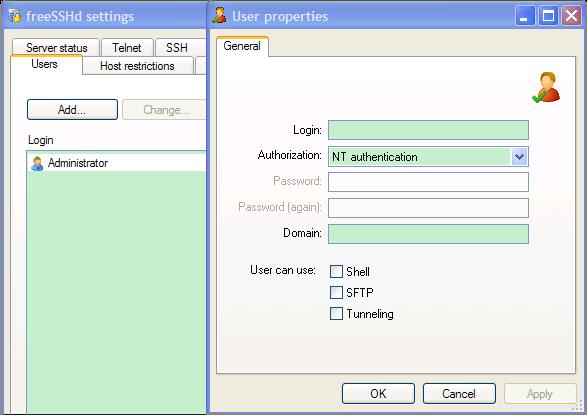
用putty测试连接。
Microsoft Windows XP [Version 5.1.2600]
(C) Copyright 1985-2001 Microsoft Corp.
C:\WINDOWS\system32>
例子一中需要两行代码进行修改:
String hostname ="localhost";
sess.execCommand("cmd");
输出结果:
set up connections
Begin execute remote commands
The execute command output is:
Microsoft Windows XP [Version 5.1.2600]
(C) Copyright 1985-2001 Microsoft Corp.
如果要在cmd中执行其他命令,如perl
则使用:
sess.execCommand("cmd.exe /c \"perl -V\"");
cmd /c dir 是执行完dir命令后关闭命令窗口。
cmd /k dir 是执行完dir命令后不关闭命令窗口。
cmd /c start dir 会打开一个新窗口后执行dir指令,原窗口会关闭。
cmd /k start dir 会打开一个新窗口后执行dir指令,原窗口不会关闭。
可以用cmd /?查看帮助信息。
说白了感觉java的ssh就是一个client
Java ssh 访问windows/Linux的更多相关文章
- 外网ssh内网Linux服务器holer实现
外网ssh访问内网linux 内网的主机上安装了Linux系统,只能在局域网内访问,怎样从公网也能ssh访问本地Linux服务器? 本文将介绍使用holer实现的具体步骤. 1. 准备工作 1.1 安 ...
- Linux 中 java 访问 windows共享目录
有两个方案: 1.将windows共享目录,挂载到linux系统下,通过使用本地目录访问windows共享目录 2.通过samba的java实现包,不过需要开个windows共享目录的账户 http ...
- Jenkins踩坑系列--你试过linux主机ssh登录windows,启动java进程吗,来试试吧
一.问题概述 在一个多月前,组长让我研究下持续集成.我很自然地选择了jenkins.当时,(包括现在也是),部分服务器用的是windows主机. 我当时想了想,如果我把jenkins装在windows ...
- Windows Azure Virtual Machine (25) 使用SSH登录Azure Linux虚拟机
<Windows Azure Platform 系列文章目录> 本文介绍内容适合于Azure Global和Azure China 为什么使用SSH登录Azure Linux虚拟机? 我们 ...
- nat123外网SSH访问内网LINUX的N种方法
一,动态公网IP环境 1,环境描述: 路由器分配的是动态公网IP,且有路由管理权限,LINUX主机部署在路由内网.如何实现外网SSH访问内网LINUX主机? 2,解决方案: 使用nat123动态域名解 ...
- 外网SSH访问内网LINUX的N种方法
外网SSH访问内网LINUX的N种方法 http://www.nat123.com/Pages_8_260.jsp 一,动态公网IP环境 1,环境描述: 路由器分配的是动态公网IP,且有路由管理权限, ...
- 在windows上通过ssh远程链接linux服务器[转]
本文分别转自 [http://jingyan.baidu.com/article/6d704a130de40e28db51cab5.html] [http://www.cnblogs.com/mliu ...
- windows linux 通过SSH X11Forwrding 使用图形化界面
有时候,我们需要在命令行中使用远程的GUI程序,这样我们就需要x11转发的来进行访问: Linux平台下不需要特别的配置,假如我们要远程的机器是centos机器,只要做如下配置即可: #vi /etc ...
- windows下使用火狐浏览器插件AutoProxy+MyEnTunnel+SSH访问海外站点(转)
windows下使用火狐浏览器插件AutoProxy+MyEnTunnel+SSH访问海外站点 平时需要查阅一些技术资料,光走VPN太浪费流量,所以这儿教大家一种使用火狐浏览器的插件 AutoPr ...
随机推荐
- C#中窗体的互相访问
1.在父窗体中构造子窗体对象时,将父窗体传递过去: 如:FrmSub frm=new FrmSub(this);//this代表父窗体 2.将父窗体中要访问的变量和方法修改为public 3.在子窗体 ...
- mysql基础三(视图、触发器、函数、存储过程、事务、防注入)
一.视图 视图是一个虚拟表(非真实存在),其本质是[根据SQL语句获取动态的数据集,并为其命名],用户使用时只需使用[名称]即可获取结果集,并可以将其当作表来使用. 1.创建视图 -格式:CREATE ...
- c语言之fopen参数(r+,w+,a+)
经查找一些资料,并且亲自实验之后得出: r+:打开已存在的文件时,光标位于开头,文件可读,可写, 写数据时,由于光标位于开头,所以会覆盖原有数据 w+:打开的文件已存在时,将覆盖原文件 a+:打开已存 ...
- MVC学习系列——ModelBinder扩展
在MVC系统中,我们接受数据,运用的是ModelBinder 的技术. MVC学习系列——ActionResult扩展在这个系列中,我们自定义了XmlResult的返回结果. 那么是不是意味着能POS ...
- Core身份认证
Core中实现一个基础的身份认证 注:本文提到的代码示例下载地址> How to achieve a basic authorization in ASP.NET Core 如何在ASP.NET ...
- Java 基础学习1 -- 基础语法
1.变量
- [搜片神器]winform程序自己如何更新自己的方法代码
DHT抓取程序开源地址:https://github.com/h31h31/H31DHTDEMO 数据处理程序开源地址:https://github.com/h31h31/H31DHTMgr 国外测试 ...
- SQL SERVER字符串函数
本篇文章还是学习<程序员的SQL金典>内容的记录,此次将讲解的是SQL SERVER的字符串函数. 其实数据库跟程序语言库一样,都会集成很多可以使用的API.这些API,如果你熟悉的话,将 ...
- 如何通过CSS3实现背景图片色彩的梯度渐变
随着网站的越来越普及,CSS3和HTML5必将成为网站前端发展的主流方向,特别是在移动端,高端浏览器给前端工程师们带来了无以言表的体验. 通俗的来讲,CSS3可以说是CSS技术的升级版本,CSS3语言 ...
- ubuntu下opencv 3.0和python2.7安装测试
1.安装opencv所需的库(编译器.必须库.可选库) sudo apt-get install build-essential sudo apt-get install cmake git libg ...