
IOS开发UI篇之tableView 的用法详解
1.我们知道tableView是IOS中的高级视图,其继承与ScrollView,故我们知道他有具有ScrollView的所有功能。而且还扩展了许多。当然在这里就不一一介绍了。
2.tableView的表现格式分两种Plain和Grouped两种风格
3.tableView的两种代理类delegate和dataSource.这两种代理至关重要,我们在做tableView和这些代理是分不开的。
4.代理中比较常用的代理方法:
(1)dataSource的两个必须使用的代理
@required
//显示UITableView的Cell的个数
- (NSInteger)tableView:(UITableView *)tableView numberOfRowsInSection:(NSInteger)section
//Cell和model的数据的交互
- (UITableViewCell *)tableView:(UITableView *)tableView cellForRowAtIndexPath:(NSIndexPath *)indexPath
(2)delegate的常用代理方法
@optional
//用于设定tableView的高度
- (CGFloat)tableView:(UITableView *)tableView heightForRowAtIndexPath:(NSIndexPath *)indexPath
//当选中Cell时候调用的方法
- (void)tableView:(UITableView *)tableView didSelectRowAtIndexPath:(NSIndexPath *)indexPath
4.一般来说这四个代理已经能够处理函数tableView没有问题了,但是有时我们在做tableView时候,tableView的第一个Cell或者最后一个Cell和其他Cell不同,所以我们有可能用到下面的两个函数
//给tableview头的Cell和Model的数据交互
- (UIView *)tableView:(UITableView *)tableView viewForHeaderInSection:(NSInteger)section
//定义tableView的头部的高度
- (CGFloat)tableView:(UITableView *)tableView heightForHeaderInSection:(NSInteger)section
//给tableview尾部的Cell和Model的数据交互
- (UIView *)tableView:(UITableView *)tableView viewForFooterInSection:(NSInteger)section
//定义tableView的尾部的高度
- (CGFloat)tableView:(UITableView *)tableView heightForFooterInSection:(NSInteger)section
5.还有一种方法,应为tableView的对象自带的有这两个属性
例如:
ableView的对象自带的有这两个属性的属性要注意的是他接收的对象UIView
//截图
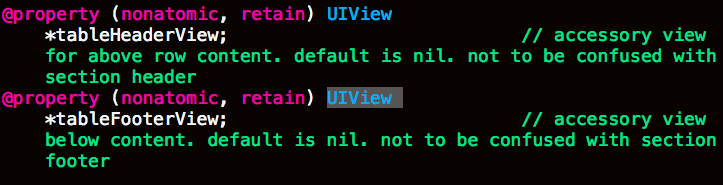
self.tableView.tableFooterView
self.tableView.tableHeaderView
以上基本上就可以做出完整的tableView了。那下面我们看一看tableView的扩展吧
6.我们知道tableView继承于scrollview,但是scrollView有时候加载过多的东西时候使用内存较大,会导致手机卡死;这时候我们一般有三个方法解决,一,重用scrollView 二,使用瀑布流 三,使用横向tableView
使用横向tableView:
一下例子只是我从工程中取出来的文件,可能运行不了,但是可以借鉴其步骤
其中代理函数不会发生改变,但是其中心和Frame都要发生改变
Frame需要X与Y 宽度和长度都要反过来
横向tableView主要有几句很重要的代码
这两句话:第一句话是将tableView横向旋转,第二句话是改变tableView中心。这两句话放在tabbleView的对象定义的时候,可见下面“设置界面”代码
table.transform = CGAffineTransformMakeRotation(- M_PI / 2);
table.center = CGPointMake(self.view.frame.size.width / 2 , self.view.frame.size.height / 2 + 30);
这一句话是放在Cell和Model数据交互中,其作用是将Cell也横向旋转
cell.contentView.transform = CGAffineTransformMakeRotation(M_PI / 2);
//设置界面

- (void) SettingsView

{

    self.tableViewX = [[UITableView alloc] initWithFrame:CGRectMake(, , HEIGHT -, WIDTH)];

    self.tableViewX.transform = CGAffineTransformMakeRotation(- M_PI / );

    self.tableViewX.center = CGPointMake(WIDTH /  , (HEIGHT + ) / + );

    self.tableViewX.dataSource =self;

    self.tableViewX.delegate = self;

    self.tableViewX.pagingEnabled = YES;

    self.tableViewX.showsVerticalScrollIndicator= NO;

    self.tableViewX.bounces = YES;

    [self.view addSubview:self.tableViewX];

}

//显示有几个Cell

- (NSInteger)tableView:(UITableView *)tableView numberOfRowsInSection:(NSInteger)section

{

    return ;

}

//数据交互

- (UITableViewCell *)tableView:(UITableView *)tableView cellForRowAtIndexPath:(NSIndexPath *)indexPath

{

    //数据

    NSArray * newpho = allNewsarray[];

    NSArray * newarr = allNewsarray[];

    NSDictionary * newsPhotosDic = newpho[indexPath.row];

    NSDictionary * newsdic = newarr[indexPath.row];

    NSArray * photos = [newsPhotosDic objectForKey:@"data"];

    NSString * identifier = [NSString stringWithFormat:@"Cell%lu",indexPath.row];

    YZXViewCellX * Cell = [tableView dequeueReusableCellWithIdentifier:identifier];

    if (Cell == nil)

    {

        Cell = [[YZXViewCellX alloc] initWithStyle:UITableViewCellStyleDefault reuseIdentifier:identifier andArray:photos];

    }

    Cell.nowArray = [newsdic objectForKey:@"data"];

    Cell.PhotoArray = [newsPhotosDic objectForKey:@"data"];

    NSLog(@"+++++++++++++++%lu %lu",Cell.nowArray.count, Cell.PhotoArray.count);

    Cell.contentView.transform = CGAffineTransformMakeRotation(M_PI / );

    Cell.block = ^(YZXViewCellX * newCell, newsList * aa)

    {

        NSLog(@"详情");

        DetailedNewsController * det = [[DetailedNewsController alloc] init];

        det.New = aa;

        [self.navigationController pushViewController:det animated:YES];

    };

    return Cell;

}

//因为横向tableView代替scroll故,高度为屏幕宽度

- (CGFloat)tableView:(UITableView *)tableView heightForRowAtIndexPath:(NSIndexPath *)indexPath

{

    return WIDTH;

}
IOS开发UI篇之tableView 的用法详解的更多相关文章
- iOS开发UI篇 -- UISearchBar 属性、方法详解及应用(自定义搜索框样式)
很多APP都会涉及到搜索框,苹果也为我们提供了默认的搜索框UISearchBar.但实际项目中我们通常需要更改系统默认搜索框的样式.为了实现这一目标,我们需要先搞懂 UISearchBar 的属性及方 ...
- iOS开发UI篇-实现tableView的层级显示
进来要实现一个tableView 的cell层级显示,网上找的思路都各不相同.下面说一下我的实现思路. 根据根标题存储cell的展开状态,添加到字典中. 话不多说,直接上代码. #define S ...
- ios开发 <AppName>-Prefix.pch文件的用法详解
我们知道,每新建立一个工程,比如说HelloWord,在分类SupportingFiles里都会有一个以工程名开头-Prefix.pch结尾的文件,如HelloWord-Prefix.pch.对于这个 ...
- iOS开发UI篇—iPad开发中得modal介绍
iOS开发UI篇—iPad开发中得modal介绍 一.简单介绍 说明1: 在iPhone开发中,Modal是一种常见的切换控制器的方式 默认是从屏幕底部往上弹出,直到完全盖住后面的内容为止 说明2: ...
- ios开发UI篇—使用纯代码自定义UItableviewcell实现一个简单的微博界面布局
本文转自 :http://www.cnblogs.com/wendingding/p/3761730.html ios开发UI篇—使用纯代码自定义UItableviewcell实现一个简单的微博界面布 ...
- iOS开发UI篇—Kvc简单介绍
ios开发UI篇—Kvc简单介绍 一.KVC简单介绍 KVC key valued coding 键值编码 KVC通过键值间接编码 补充: 与KVC相对的时KVO,即key valued observ ...
- iOS开发UI篇—UITableview控件简单介绍
iOS开发UI篇—UITableview控件简单介绍 一.基本介绍 在众多移动应⽤用中,能看到各式各样的表格数据 . 在iOS中,要实现表格数据展示,最常用的做法就是使用UITableView,UIT ...
- iOS开发UI篇—UITableview控件基本使用
iOS开发UI篇—UITableview控件基本使用 一.一个简单的英雄展示程序 NJHero.h文件代码(字典转模型) #import <Foundation/Foundation.h> ...
- iOS开发UI篇—UITableviewcell的性能优化和缓存机制
iOS开发UI篇—UITableviewcell的性能问题 一.UITableviewcell的一些介绍 UITableView的每一行都是一个UITableViewCell,通过dataSource ...
随机推荐
- 检测iOS的APP性能的一些方法
首先如果遇到应用卡顿或者因为内存占用过多时一般使用Instruments里的来进行检测.但对于复杂情况可能就需要用到子线程监控主线程的方式来了,下面我对这些方法做些介绍: Time Profiler ...
- 1001.A+B Format (20)(思路,bug发现及其修改,提交记录)
https://github.com/031502316a/object-oriented/tree/master/1001 ---恢复内容开始--- 1.解题思路 一开始见到题目时,感觉难的就是输出 ...
- Vmware 虚拟的Linux系统如何与宿主主机共享上网
学校局域网内的机器是经过一个计费登陆客户端Gmon上网的,我前两天刚用Vmware虚拟了一个Linux Guest OS 用作测试用,在Vmware的VM>>Settings 里 ...
- 数据结构——图——最短路径D&F算法
一.Dijkstra算法(贪心地求最短距离的算法) 在此算法中,我按照自己的理解去命名,理解起来会轻松一些. #define MAXSIZE 100 #define UNVISITED 0 #defi ...
- C++学习之const整理总结
1什么是const? (const类型)常类型是指使用类型修饰符const说明的类型,常类型的变量或对象的值是不能被更新的.(但可以偷梁换柱进行更新) 2为什么引入const? const 推出的初始 ...
- 第二章TP-Link 703N OpenWrt刷回原厂固件
(TP官网)首先原厂固件下载 用终端,使用cat /proc/mtd查看路由支持的升级命令,我的是root@OpenWrt:~# cat /proc/mtd dev: size erases ...
- JavaScript escape encodeURI encodeURIComponent() 函数
总结一下: 1.encodeURI(),和encodeURIComponent()是对字符进行编码. 2.decodeURI(),和decodeURIComponent()是对相应编码过的字符进行解码 ...
- 1.单一职责原则(Single Responsibility Principle)
1.定义 就一个类而言,应该仅有一个引起它变化的原因. 2.定义解读 这是六大原则中最简单的一种,通俗点说,就是不存在多个原因使得一个类发生变化,也就是一个类只负责一种职责的工作. 3.优点 类的复杂 ...
- 如何选择PDA的操作系统? Android OR WINCE?
PDA(Personal Digital Assistant),又称为掌上电脑,可以帮助我们完成在移动中工作,学习,娱乐等.按使用来分类,分为工业级PDA和消费品PDA.当我们需要购买PDA的时候, ...
- gitignore无效最简单解决办法
git rm --cached 文件或者文件夹 git commit 提交 git push 提交