
CentOs5.8下安装Oracle12C
12C安装向导:
http://docs.oracle.com/database/121/LTDQI/toc.htm
12C下载地址:
http://www.oracle.com/technetwork/database/enterprise-edition/downloads/index.html
1.安装Oracle依赖包
使用yum安装Oracle12C依赖,标注32 bit不需安装。没有yum环境的这些包可以在操作系统安装介质中查找。这些需要的安装依赖包可以在Oracle提供的12C在线安装文档中找到。操作系统版本不同,所需要的依赖包略有差别。
binutils-2.17.50.0.

compat-libstdc++--3.2.

compat-libstdc++--3.2. ( bit)

gcc-4.1.

gcc-c++-4.1.

glibc-2.5-

glibc-2.5- ( bit)

glibc-devel-2.5-

glibc-devel-2.5- ( bit)

ksh

libaio-0.3.

libaio-0.3. ( bit)

libaio-devel-0.3.

libaio-devel-0.3. ( bit)

libgcc-4.1.

libgcc-4.1. ( bit)

libstdc++-4.1.

libstdc++-4.1. ( bit)

libstdc++-devel 4.1.

libXext-1.0.

libXext-1.0. ( bit)

libXtst-1.0.

libXtst-1.0. ( bit)

libX11-1.0.

libX11-1.0. ( bit)

libXau-1.0.

libXau-1.0. ( bit)

libXi-1.0.

libXi-1.0. ( bit)

make-3.81

sysstat-7.0.
2. 创建用户及组
[root@edu ~]# groupadd oinstall

[root@edu ~]# groupadd dba

[root@edu ~]# useradd -g oinstall -G dba oracle

[root@edu ~]# passwd oracle

Changing password for user oracle.

New UNIX password:

BAD PASSWORD: it is based on a dictionary word

Retype new UNIX password:

passwd: all authentication tokens updated successfully.
3.修改系统内核参数
使用vi命令修改配置文件/etc/sysctl.conf,使用/sbin/sysctl –p命令使内核配置生效。
fs.aio-max-nr =

fs.file-max =

kernel.shmall =

kernel.shmmax =

kernel.shmmni =

kernel.sem =

net.ipv4.ip_local_port_range =

net.core.rmem_default =

net.core.rmem_max =

net.core.wmem_default =

net.core.wmem_max =
4.修改用户资源限制
使用vi命令修改配置文件/etc/security/limits.conf
oracle soft nofile

oracle hard nofile

oracle soft nproc

oracle hard nproc

oracle stack nproc
5.创建安装目录
[root@edu ~]# mkdir -p /u01/app

[root@edu ~]# chown -R oracle:oinstall /u01

[root@edu ~]# chmod -R  /u01

[root@edu ~]# ls -ld /u01/app/

drwxrwxr-x  oracle oinstall  Jan  : /u01/app/

[root@edu ~]#
6.配置Oracle用户环境变量
修改Oracle下的.bash_profile文件,不同的shell名称会有区别。source .bash_profile使修改生效。
ORACLE_BASE=/u01/app;export ORACLE_BASE

ORACLE_HOME=$ORACLE_BASE/product/12.1./dbhome_1     export ORACLE_HOME

ORACLE_SID=ORCL;export ORACLE_SID

TMP=/tmp;export TMP

TMPDIR=/tmp;export TMPDIR

PATH=$PATH:$ORACLE_HOME/bin;export PATH

DISPLAY=:0.0;export DISPLAY
7. 解压执行安装Oracle12C软件


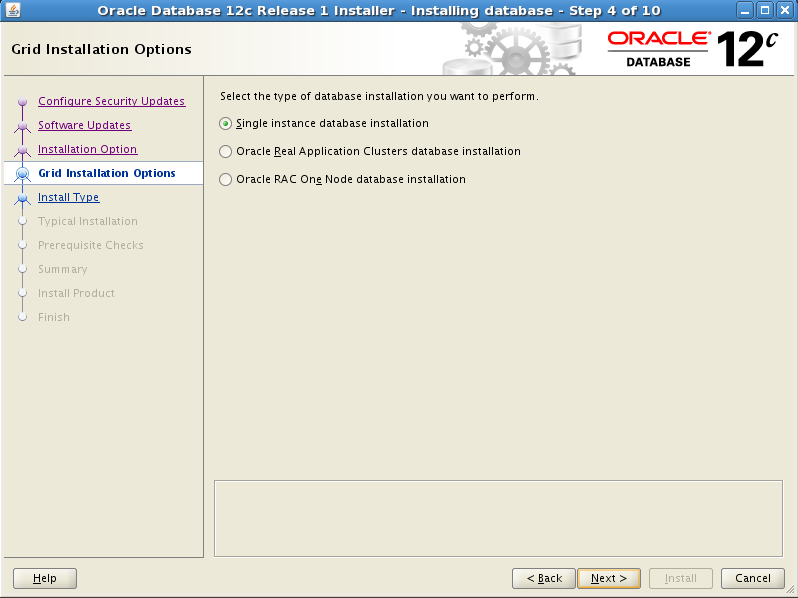


按照提示以root身份执行以下脚本:
[root@edu /]# /u01/oraInventory/orainstRoot.sh

Changing permissions of /u01/oraInventory.

Adding read,write permissions for group.

Removing read,write,execute permissions for world.

Changing groupname of /u01/oraInventory to oinstall.

The execution of the script is complete.
[root@edu /]# /u01/app/product/12.1./dbhome_1/root.sh

Performing root user operation for Oracle 12c

The following environment variables are set as:

    ORACLE_OWNER= oracle

    ORACLE_HOME=  /u01/app/product/12.1./dbhome_1

Enter the full pathname of the local bin directory: [/usr/local/bin]:

   Copying dbhome to /usr/local/bin ...

   Copying oraenv to /usr/local/bin ...

   Copying coraenv to /usr/local/bin ...

Creating /etc/oratab file...

Entries will be added to the /etc/oratab file as needed by

Database Configuration Assistant when a database is created

Finished running generic part of root script.

Now product-specific root actions will be performed.

8.使用dbca创建数据库
在Oracle用户下直接执行dbca命令:


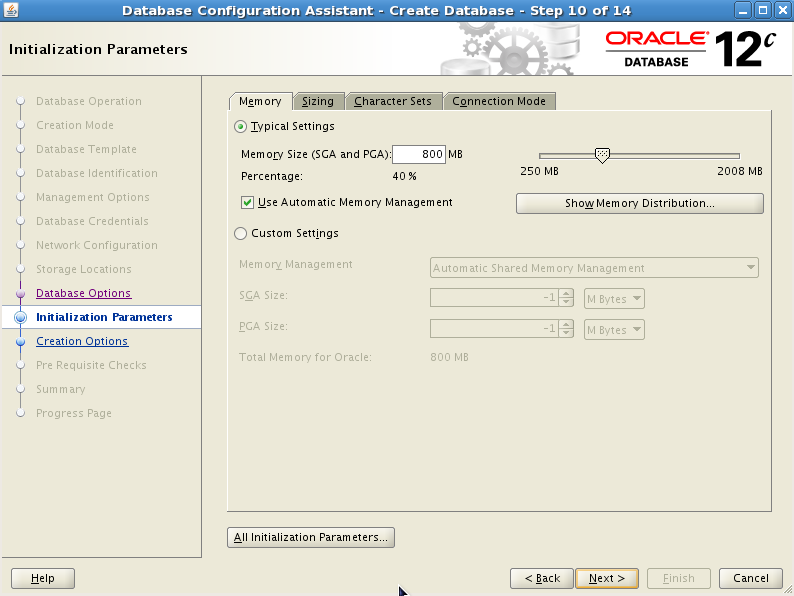


9.使用netca创建监听


10.验证数据库及监听安装
[oracle@edu database]$ sqlplus '/as sysdba'

SQL*Plus: Release 12.1.0.1. Production on Fri Jan  ::

Copyright (c) , , Oracle.  All rights reserved.

Connected to:

Oracle Database 12c Enterprise Edition Release 12.1.0.1. - 64bit Production

With the Partitioning, OLAP, Advanced Analytics and Real Application Testing options

SQL> select banner from v$version;

BANNER

----------------------------------------------------------------------------

Oracle Database 12c Enterprise Edition Release 12.1.0.1. - 64bit Production

PL/SQL Release 12.1.0.1. - Production

CORE    12.1.0.1.    Production

TNS for Linux: Version 12.1.0.1. - Production

NLSRTL Version 12.1.0.1. – Production
[oracle@edu database]$ lsnrctl status

LSNRCTL for Linux: Version 12.1.0.1. - Production on -JAN- ::

Copyright (c) , , Oracle.  All rights reserved.

Connecting to (DESCRIPTION=(ADDRESS=(PROTOCOL=TCP)(HOST=edu.localdomain)(PORT=)))

STATUS of the LISTENER

------------------------

Alias                     LISTENER

Version                   TNSLSNR for Linux: Version 12.1.0.1. - Production

Start Date                -JAN- ::

Uptime                     days  hr.  min.  sec

Trace Level               off

Security                  ON: Local OS Authentication

SNMP                      OFF

Listener Parameter File   /u01/app/product/12.1./dbhome_1/network/admin/listener.ora

Listener Log File         /u01/app/diag/tnslsnr/edu/listener/alert/log.xml

Listening Endpoints Summary...

  (DESCRIPTION=(ADDRESS=(PROTOCOL=tcp)(HOST=edu.localdomain)(PORT=)))

  (DESCRIPTION=(ADDRESS=(PROTOCOL=ipc)(KEY=EXTPROC1521)))

  (DESCRIPTION=(ADDRESS=(PROTOCOL=tcps)(HOST=edu.localdomain)(PORT=))(Security=(my_wallet_directory=/u01/app/admin/ORCL/xdb_wallet))(Presentation=HTTP)(Session=RAW))

Services Summary...

Service "ORCL" has  instance(s).

  Instance "ORCL", status READY, has  handler(s) for this service...

Service "ORCLXDB" has  instance(s).

  Instance "ORCL", status READY, has  handler(s) for this service...

The command completed successfully
至此我们的Oracle12c数据库安装成功!
CentOs5.8下安装Oracle12C的更多相关文章
- CentOS5.6下安装Oracle10G软件 【保留报错经验】
CentOS5.6下安装Oracle10G ****************************************************************************** ...
- Windows下安装Oracle12C(二)
一.安装Oracle 参考 Windows下安装Oracle12C(一) 二.新建用户 1. 安装完成后,启动SQLPlus,然后输入内置的用户名和密码 用户名:sys 密码:as sysdba ...
- CentOS5.4下安装codeblocks 12.11
centos6.3下安装codeblock简单多了,这些开源的软件也都在不断进步.原来装过codeblocks10.05,忘了,这次安装又花了我半天时间,最后总算搞定. 先是安装了wxGTK-2.8. ...
- 64位Win8系统下安装Oracle12c
经过3个小时的折腾,终于在64位win8系统下成功安装了Oracle 12c.这篇文章主要把安装过程中遇到的一些问题总结一下,以便帮助后来人参考. 首先我把我的机器的主要配制情况列举出来: 1. 系统 ...
- Centos下安装Oracle12c
总结一次安装oracle的折腾血泪史环境准备 centos7 虚拟机VMware Workstation Pro14 IP:192.168.245.128(根据实际情况) 4G物理内存,8G虚拟内存, ...
- CentOS5.5下安装Ant
从yum源直接下ant: [root@master local]$ yum install ant 运行ant,发现报错: java.lang.NoClassDefFoundError: org/ap ...
- 在Linux下安装Oracle12c
其实,对于oracle数据库和oracle实例的安装,借用图形化安装还是比较容易的,只是有个别地方需要特别注意外,其余的默认安装即可: 1.安装前的准备: 启动SSH工具: 先启动倒数第三个(想用图像 ...
- Windows下安装Oracle12C(一)
1,在官网上下载oracle的压缩文件,两个都要下载. 并两个同时选中解压在一个文件夹里面. 2,解压之后,如下图,点击setup.exe稍等一会儿 ,3,开始安装: 不选点击下一步,或者直接点击下一 ...
- Centos5.5下安装cacti
系统环境OS:CentOSDataBase:MySQL5.0PHP Apachenet-snmp部署CentOS cacti配置需要的环境安装MySQLyum -y install mysqlyum ...
随机推荐
- Hbase原理、基本概念、基本架构
来源:http://blog.csdn.net/woshiwanxin102213/article/details/17584043 概述 HBase是一个构建在HDFS上的分布式列存储系统:HBas ...
- Java生成验证码小工具
无意中看到一个生成简易验证码的小工具类(保存学习): 工具类代码: import java.awt.BasicStroke; import java.awt.Color; import java.aw ...
- 【转载】C++中public,protected,private访问
第一:private, public, protected 访问标号的访问范围. 假如我们约定: 类内部-----指的是当前类类型的定义中,以及其成员函数的声明和定义中: 类外部-----指的是不在当 ...
- Liferay 6.2 改造系列之二十:修改默认添加用户权限及用户是否拥有个人站点的配置
1.修改默认添加用户权限为User,而非Powers User: 在/portal-master/portal-impl/src/portal.properties文件中有如下配置: # # Inpu ...
- AOP动态代理解析3-增强方法的获取
对于指定bean的增强方法的获取一定是包含两个步骤的: 获取所有的增强 寻找所有增强中使用于bean的增强并应用 那么findCandidateAdvisors与findAdvisorsThatCan ...
- iOS10 UI教程视图调试
iOS10 UI教程视图调试 iOS10 UI教程视图调试,当视图很复杂的时候,层次结构就不会很简单了.Xcode可以通过视图(View)调试帮助开发者解决层次结构复杂的问题.视图调试是在Xcode ...
- Console.log,Window.alert,Document.write三者区别
1.Console.log不会阻断程序继续进行,在控制台可以看到测试结果. 2.Window.alert弹出框会阻断程序运行,在弹出框可以看到测试结果. 3.Document.write不会阻断程序继 ...
- 07 JavaWeb
软件开发的两种架构:c/s和b/s * C/S client/server 客户端/服务器 例子:QQ 快播 暴风影音... ...
- TODO软件工程--如何预算项目的工期
我的项目后台接口已经开发好,是前人留下的接口,现在只需要和前端联调,本以为后台的开发周期短,可以提早上线,可以因为旧接口不兼容新的要求 不得不重新写,造成了工期的延误. 如何计算一个工期被提上日程.
- BZOJ4382 : [POI2015]Podział naszyjnika
对于每种颜色,可以发现可以切的位置被分割成了若干段独立的区域. 给每个区域一个编号,将$m$种颜色的情况当成字符串来看,如果两个切口的字符串完全匹配,那么可以在这里切两刀. 可以构造hash函数,通过 ...