
postgresql 存储过程动态插入数据 2
最近学习postgresql,正一个小活要用上,所以就开始学习了!
然而,学习的过程极其艰辛,但却也充满了乐趣.

一般来说数据库的操作不外如何增,删,改,查,
而首要的就是要添加数据到数据库中,因为以前的经验,
存储过程要比不用存储过程效率要高不少,至少我的程序环境是这样的结果!

所以就想要做写些存储过程,如果一个表一个存储过程,那仅存储过程就得写好几百个
这个实是有点夸张了!(这还仅是插入.加上删除/修改/查询那得近上千)

那么能不能有个方法,可以减少工作量呢?自动根据表名,字段名及字段值与插入?
POSTGRESQL 真的很强大!虽然我还没有入门!

这个问题我通过测试看函数花了三整天,总算有点眉目:
干货直接拉到最后看最后一个插入存储过程.
下面是我的学习过程,本不想加上,可这是我一步步的做过来的.

-- 目标:动态插入表中数据

-- 老规矩上代码

-- 插入函数如下

----------------------------------------

CREATE OR REPLACE FUNCTION f_insert_module_string(

modulename text,

feildname  text[],

feildvalue text[],

out returnValue text ) AS $$

DECLARE

    myid         integer;

    ex_result    integer default 0;

    ex_sql       text;

BEGIN

    myid:=f_getNewID(modulename,'id');

    ex_sql:='insert into '

        ||quote_ident(moduleName)

        ||'(id,'

        ||array_to_string(feildname,',')

        ||') values('||myid||','''

        ||array_to_string(feildvalue,''',''')

        ||''')';

    execute ex_sql;

    GET DIAGNOSTICS ex_result:= ROW_COUNT;

    if ex_result<>0 then  returnValue:='{"SUCCESS":"插入操作'||ex_sql||'成功!"}';

    else                  returnValue:='{"ERROR":"插入操作'||ex_sql||'失败!"}';

    end if;

END;

$$ language plpgsql;

-- 实际操作

select f_insert_module_string('test','{name,code,gen_time}','{whq,111000,2018-08-20}');

-- 得到如下结果:
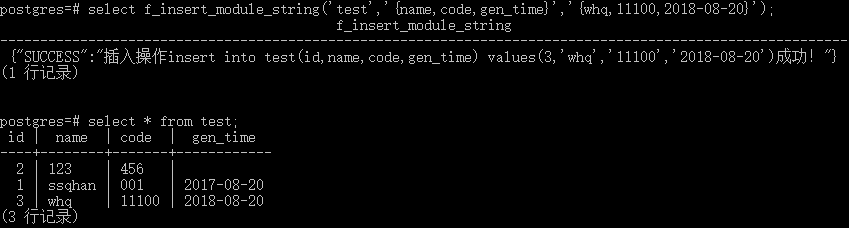
--同样,在插入时,直接用单引号把日期给引起来,INSERT 也不会报错,
--那么如果用C#调用存储过程会不会报错呢?
--我们拭目以待!
------------------------------
--经测试没有问题!
--下面是测试过程及改进代码

--===================================================

--插入数据除了 id ,其余字段全部以TEXT 格式传递

--modulename 即为表名

--feildname  即为字段名

--feildvalue 即为对应的字段值(插入时全部为text)

--这里的字段名和字段值是一一对应的关系,否则出错

--===================================================

CREATE OR REPLACE FUNCTION f_insert_module_string(

modulename text,

feildname  text[],

feildvalue text[],

out returnValue text ) AS $$

DECLARE

    myid         integer;

    ex_result    integer default 0;

    ex_sql       text;

BEGIN

    myid:=f_getNewID(modulename,'id');

    ex_sql:='insert into '

        ||quote_ident(moduleName)

        ||'(id,'

        ||array_to_string(feildname,',')

        ||') values('||myid||','''

        ||array_to_string(feildvalue,''',''')

        ||''')';

    execute ex_sql;

    GET DIAGNOSTICS ex_result:= ROW_COUNT;

    if ex_result<>0 then  returnValue:='{"SUCCESS":"插入操作'||ex_sql||'成功!"}';

    else                  returnValue:='{"ERROR":"插入操作'||ex_sql||'失败!"}';

    end if;

END;

$$ language plpgsql;

--===================================================

--插入数据除了 id ,其余字段全部以 text格式传递

--modulename 即为表名

--feildname  即为字段名

--feildvalue 即为对应的字段值(插入时全部以int格式)

--这里的字段名和字段值是一一对应的关系,否则出错

--===================================================

CREATE OR REPLACE FUNCTION f_insert_module_string(

modulename text,

feildname  text[],

feildvalue text[],

out returnValue text ) AS $$

DECLARE

    myid         integer;

    ex_result    integer default 0;

    ex_sql       text;

BEGIN

    myid:=f_getNewID(modulename,'id');

    ex_sql:='insert into '

        ||quote_ident(moduleName)

        ||'(id,'

        ||array_to_string(feildname,',')

        ||') values('||myid||','

        ||array_to_string(feildvalue,',')

        ||')';

    execute ex_sql;

    GET DIAGNOSTICS ex_result:= ROW_COUNT;

    if ex_result<>0 then  returnValue:='{"SUCCESS":"插入操作'||ex_sql||'成功!"}';

    else                  returnValue:='{"ERROR":"插入操作'||ex_sql||'失败!"}';

    end if;

END;

$$ language plpgsql;

--===================================================

--以下是合并以上两个过程的代码,但增加了一个类型参数
--主要是为了区分除ID字段外,其他字段的类型
--0:         认为其他字段以text类型插入,即加单引号
--others:     认为其他字段以int类型插入,即没有单引号
--那么问题来了:如果里面有int numeric text交叉怎么办?
--可不可以这样:
--           feildname 顺序打乱(不按表中顺序)
--                     把不用带单引号的字段放前面
--                     需要带引号的放后面
--           当然feildvalue要分成两个ARRAY了
--                     feildname1 text[]不用带单引号的字段值,
--                     feildname2 text[]需要带引号的字段值
--我也不知道,我们将继续学习!
--===================================================
--插入数据除了 id ,其余字段全部以 text格式传递

--modulename 即为表名

--feildname  即为字段名

--feildvalue 即为对应的字段值

--inserttype 插入类型 如为0 则插入 text,否则直接插入

--这里的字段名和字段值是一一对应的关系,否则出错--===================================================

CREATE OR REPLACE FUNCTION f_insert_module_string(

modulename text,

feildname  text[],

feildvalue text[],

inserttype integer,

out returnValue text ) AS $$

DECLARE

    myid         integer;

    ex_result    integer default 0;

    ex_sql       text;

BEGIN

    myid:=f_getNewID(modulename,'id');

    ex_sql:='insert into '

        ||quote_ident(moduleName)

        ||'(id,'

        ||array_to_string(feildname,',');

    if inserttyp<>0  then

        ex_sql:=ex_sql||') values('||myid||','

                      ||array_to_string(feildvalue,',')

                      ||')';

    else

        ex_sql:=ex_sql||') values('||myid||','''

                      ||array_to_string(feildvalue,''',''')

                      ||''')';

    execute ex_sql;

    GET DIAGNOSTICS ex_result:= ROW_COUNT;

    if ex_result<>0 then  returnValue:='{"SUCCESS":"插入操作'||ex_sql||'成功!"}';

    else                  returnValue:='{"ERROR":"插入操作'||ex_sql||'失败!"}';

    end if;

END;

$$ language plpgsql;

--============================================
--坑永远也填不完,上面完成的挺好的,可是当我用NPGSQL
--parameters.add时发现根本不能传递数组!!
--是的,我用的npgsql 是2.* for .net 4.0
--===========================================
--其实绕了个大弯:
--在f_insert_test中不是用  ARRAY_TO_STRING了吗
--为什么不直接传递一个text类型的字符串过来??
-------------------------------------------
--再来
--===========================================
--C#数据库访问部分:
 public static string ExecuteInsertProcedure(string proName, string tableName, string paramName,  string values, Int32 returnType)

    {

        string returnValue = string.Empty;

        NpgsqlConnection connection = new NpgsqlConnection(getConnectionString());

        NpgsqlCommand command = new NpgsqlCommand(proName, connection);

        command.CommandType = System.Data.CommandType.StoredProcedure;

        SP_SetParam(command, "tablename", NpgsqlDbType.Text, System.Data.ParameterDirection.Input, tableName);

        SP_SetParam(command, "feidname",NpgsqlDbType.Text, System.Data.ParameterDirection.Input, paramName);

        SP_SetParam(command, "feidvalue", NpgsqlDbType.Text, System.Data.ParameterDirection.Input, values);

        SP_SetParam(command, "inserttype", NpgsqlDbType.Integer, System.Data.ParameterDirection.Input, returnType);

        SP_SetParam(command, "returnvalue", NpgsqlDbType.Text, System.Data.ParameterDirection.Output, "");

        try

        {

            connection.Open();

            command.ExecuteNonQuery();

            returnValue = command.Parameters["returnValue"].Value.ToString();

        }

        catch (NpgsqlException exception)

        {

            throw new Exception(string.Format("执行SQL【{0}】出错,详细信息为:{1}", proName, exception.Message));

        }

        finally

        {

            connection.Close();

        }

        return returnValue;

    }
--C#程序处理部分:
public string insertModule(string tableName, string keys, string values, int returnType)

{

string jsonResult = string.Empty;

if(string.IsNullOrEmpty(tableName)){ jsonResult = "{\"ERROR\":\"请给出需要插入的表名!\"}"; return jsonResult; }

jsonResult = sqlHelper.ExecuteInsertProcedure("f_insert", tableName, keys,values, returnType);

return jsonResult;

}
--plpgsql插入函数再改造如下
--
CREATE OR REPLACE FUNCTION f_insert(

modulename text,

feildname  text,

feildvalue text,

inserttype integer,

out returnValue text ) AS $$

DECLARE

    myid          integer;

    ex_result     integer default 0;

    ex_sql        text;

    my_feildvalue text[];

BEGIN

    myid:=f_getNewID(modulename,'id');

    my_feildvalue:=string_to_array(feildvalue,',');

    ex_sql:='insert into '

        ||quote_ident(moduleName)

        ||'(id,'

        ||feildname;

    if inserttype<>0  then

        ex_sql:=ex_sql||') values('||myid||','

                      ||array_to_string(my_feildvalue,',')

                      ||')';

    else

        ex_sql:=ex_sql||') values('||myid||','''

                      ||array_to_string(my_feildvalue,''',''')

                      ||''')';

    end if;

    execute ex_sql;

    GET DIAGNOSTICS ex_result:= ROW_COUNT;

    if ex_result<>0 then  returnValue:='{"SUCCESS":"插入操作'||ex_sql||'成功!"}';

    else                  returnValue:='{"ERROR":"插入操作'||ex_sql||'失败!"}';

    end if;

END;

$$ language plpgsql;
这样可以了吗?
是的,可以了!测试通过!
干货在这里
--============================================

--既含有需要单引号: date,text,varchar等类型,

--又含不需要单引号的:int,nemeric等类型

--feildname 也要按顺序放

--不需要单引号字段名放前面, feildValue

--需要的放后面              feildsingle

--inserttype=0 :表示所有插入字段不需单引号

--           1 :表示所有插入字段需要单引号

--           2 :表示一部分不需单引号,

--                  一部分需要单引号

--===========================================

CREATE OR REPLACE FUNCTION f_insert_all(

modulename  text,

feildname   text,

feildvalue  text,

feildsingle text,

inserttype  int,

out returnValue text ) AS $$

DECLARE

    myid          integer;

    ex_result     integer default 0;

    ex_sql        text;

    my_feildvalue text[];

BEGIN

    myid:=f_getNewID(modulename,'id');

    my_feildvalue:=string_to_array(feildvalue,',');

    ex_sql:='insert into '

        ||quote_ident(moduleName)

        ||'(id,'

        ||feildname;

    if inserttype=0  then

        ex_sql:=ex_sql||') values('||myid||','

                      ||array_to_string(my_feildvalue,',')

                      ||')';

    else if inserttype=1 then

        ex_sql:=ex_sql||') values('||myid||','''

                      ||array_to_string(my_feildvalue,''',''')

                      ||''')';

    else

        ex_sql:=ex_sql||') values('||myid||','

                      ||array_to_string(my_feildvalue,',');

        my_feildvalue:=string_to_array(feildsingle,',');

        ex_sql:=ex_sql||','''

                      ||array_to_string(my_feildvalue,''',''')

                      ||''')';

    end if;

    end if;

    execute ex_sql;

    GET DIAGNOSTICS ex_result:= ROW_COUNT;

    if ex_result<>0 then  returnValue:='{"SUCCESS":"插入操作'||ex_sql||'成功!"}';

    else                  returnValue:='{"ERROR":"插入操作'||ex_sql||'失败!"}';

    end if;

END;

$$ language plpgsql;
怎么样。感觉这个不够好??
最好的永远是下一个:
drop function f_insert_all(text,text);

create or replace function f_insert_all(

    table_name         text,       --表名

    insert_feilds      text,       --需要插入的字段和字段 [{"feild_name":"pt_name","feild_value":"我是中国人"},{"feild_name":"pt_description","feild_value":"我骄傲"}]

    out return_value   text        --返回值

) as $$

declare

    ex_sql             text;

    recs               record;

    _key               text ;

    _value               text;

    ex_result           integer;

    _maxid               integer;

begin

    --检查是否插入重复数据,如果重复,返回重复提示

    ex_result:=f_insert_check(table_name,insert_feilds);

    if ex_result<>0 then

        return_value:='{"ERROR":"插入操作失败!请检查是该记录是否已存在!"}';

    else

        _maxid:=f_getnewid(table_name,'id');

        ex_sql:='insert into '||quote_ident(table_name)||'(id';

        _value:='('||_maxid;

        for recs in select * from json_array_elements(insert_feilds::json)   loop

            ex_sql   := ex_sql|| ',' || (recs.value ->> 'feild_name');            --insert feilds

            if json_typeof(recs.value -> 'feild_value') ='number' then

                _value:=_value||','  ||(recs.value ->> 'feild_value') ;            --insert values numeric

            else

                _value:=_value||','''||(recs.value ->> 'feild_value')||'''' ;    --insert values not numeric

            end if;

        end loop;

        ex_sql:=ex_sql||') values'||_value||')';

        execute ex_sql;

        GET DIAGNOSTICS ex_result:= ROW_COUNT;

        if ex_result<>0 then  return_value:='{"SUCCESS":"插入操作'||ex_sql||'成功!","id":'||_maxid||'}';

        else                  return_value:='{"ERROR":"插入操作'||ex_sql||'失败!"}';

        end if;

        --return_value:='{"ERROR":"插入操作'||ex_result||'失败!"}';

    end if;

end;

$$ language plpgsql;
postgresql 存储过程动态插入数据 2的更多相关文章
- postgresql 存储过程动态更新数据
-- 目标:动态更新表中数据 -- 老规矩上代码-----------------------------tablename 表名--feildname 字段名数组--feildvalue 字段值数组 ...
- PG数据库创建并执行存储过程批量插入数据
记录一下PG数据库创建并执行存储过程批量插入数据的SQL: create or replace function addId() returns boolean AS $BODY$ declare i ...
- sqlserver存储过程批量插入数据
在系统中经常会遇到向数据库中批量插入数据情况,存储过程中没有数组,只有通过字符串分割循环插入,下面是一个本人研究的一个例子: 1 2 3 4 5 6 7 8 9 10 11 12 13 14 15 c ...
- mysql应用存储过程批量插入数据
--批量插入数据的sql语句 delimiter $$ DROP PROCEDURE IF EXISTS `test.sp_insert_batch` $$ CREATE DEFINER =`root ...
- mybatis动态插入数据(使用trim标签)
知识点: 当向一张表里插入数据,传入的参数不固定时,使用到mybatis的动态插入(trim标签) 参考博客:https://blog.csdn.net/h12kjgj/article/details ...
- Oracle 存储过程批量插入数据
oracle 存储过程批量插入大量数据 declare numCount number; userName varchar2(512); email varchar2(512); markCommen ...
- mysql利用存储过程批量插入数据
最近需要测试一下mysql单表数据达到1000W条以上时增删改查的性能.由于没有现成的数据,因此自己构造,本文只是实例,以及简单的介绍. 首先当然是建表: [sql]view plaincopy CR ...
- 使用Oracle的存储过程批量插入数据
原文地址:http://www.cnblogs.com/liaoyu/p/oracle-procedure-batch-insert.html 作者:L君还在说之乎者也 最近在工作中,需要使用生成一些 ...
- postgres 使用存储过程批量插入数据
參考资料(pl/pgsql 官方文档): http://www.postgresql.org/docs/9.3/static/plpgsql.html create or replace functi ...
随机推荐
- 获取.net对象的属性集
int count = System. ComponentModel.TypeDescriptor .GetProperties( StudyInfo).Count ; ...
- 手把手教你上传文件到GitHub并发布到pod
第一步:定位到要上传到GitHub的文件夹, 第二步:GitHub中建立一个仓库,用于存放项目. 第三步:建立podspec文件, pod spec create openinstall 然后修改里面 ...
- Python的subprocess子进程和管道进行交互
在很久以前,我写了一个系列,Python和C和C++的交互,如下 http://blog.csdn.net/marising/archive/2008/08/28/2845339.aspx 目的是解决 ...
- 86标准SQL与92标准SQL用法区别
86标准SQL与92标准SQL用法区别 在开发Oracle 9i时, 数据库还时间了ANSL SQL/92标准的链接语法, 在书中建议在使用Oracle 9i及更高版本时,应该使用SQL/92标准的语 ...
- 读取web应用下的资源文件(例如properties)
package gz.itcast.b_resource; import java.io.IOException; import java.io.InputStream; import java.ut ...
- Incorrect string value: '\xF0\x9F...' for column 'XXX' at row 1
Incorrect string value: '\xF0\x9F...' for column 'XXX' at row 1 这个问题,原因是UTF-8编码有可能是两个.三个.四个字节.Emoji表 ...
- python中出现 IndentationError:unindent does not match any outer indentation level
python中出现IndentationError:unindent does not match any outer indentation level 今天在网上copy的一段代码,代码很简单,每 ...
- python 2 与python 3 区别
print def print(self, *args, sep=' ', end='\n', file=None): # known special case of print "&quo ...
- 利用C++创建DLL并C#调用
日期:2018年11月26日 环境:window 10,VS2015 community 一.利用C++创建DLL 1.新建项目: 2.打开CreateDLL.cpp文件,并输入测试代码 #inclu ...
- SCUT - 12 - 西方国家 - 矩阵快速幂
https://scut.online/p/12 可以用矩阵快速幂来做. #include<bits/stdc++.h> using namespace std; typedef long ...