
ZipOutputStream 用法 小计

ZipOutputStream s = new ZipOutputStream(File.Create(ZipedFile));
构造函数之后

文件就已经创建出来了 只是 0kb
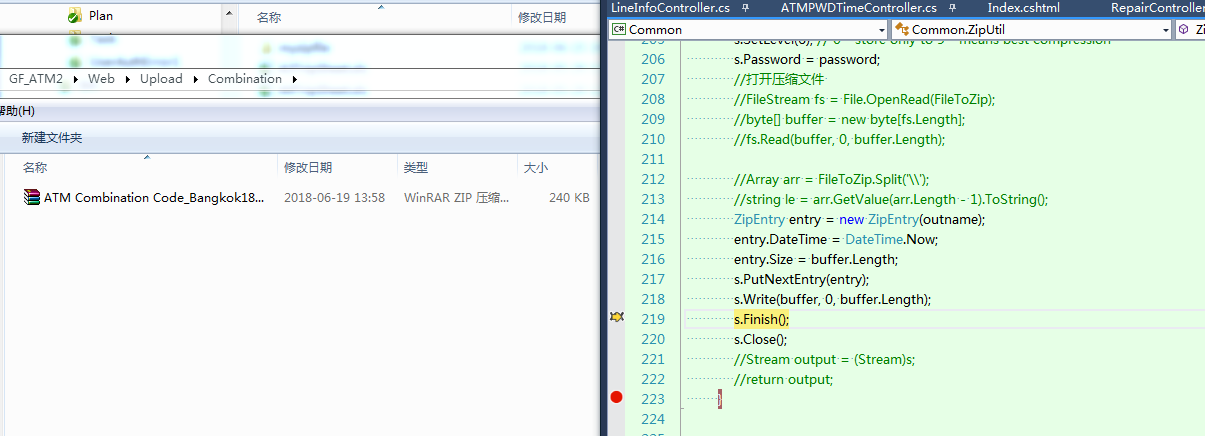
s.Write(buffer, 0, buffer.Length); 内容写进去了 写到服务器里面了 还设置了密码

最后 return 出来

服务器上还是有
public FileResult ExcelPrint(string bgrq, string endrq, string jijubianhao, string customerName, string status, string numMin, string numMax)
        {
            var user = _isysUserService.GetById(_userInfo.UserId);
            int? _numMin = string.IsNullOrEmpty(numMin) ? null : (int?)int.Parse(numMin);
            int? _numMax = string.IsNullOrEmpty(numMax) ? null : (int?)int.Parse(numMax);
            DateTime? _BgRq = string.IsNullOrEmpty(bgrq) ? null : (DateTime?)Convert.ToDateTime(bgrq);
            DateTime? _EndRq = string.IsNullOrEmpty(endrq) ? null : (DateTime?)Convert.ToDateTime(endrq);
            int pagecnt, thresholdCount;
            List<VMSelectItem> list = _IAtmAtmService.GetDataList(_BgRq, _EndRq, jijubianhao, customerName, status, , , out pagecnt, "", "", out thresholdCount, _numMin, _numMax, "export");

            string[] titles = { "Atm ID", "Location Name", "Customer", "Old Password", "Current Password", "Change By", "Change Time" };
            string[] props = { "One", "BeiZhu", "Remark", "Three", "Two", "UserName", "banci" };
            List<PorpTitle> ptlist = new List<PorpTitle>();

            string _BranchCode = _ISysProjectService.GetProjectNameById(_userInfo.ProjectId);
            string title = "ATM Combination Code-" + _BranchCode + "           Export by: " + user.UserName;
            DateTime dt = DateTime.Now;
            string dateTime = dt.ToString("yyMMdd");//yyMMddHHmmssfff
            string dateTimess = dt.ToString("yyMMddHHmmssfff");//yyMMddHHmmssfff

            //MemoryStream ms = NpoiToExcel.ListToExcel(list, title, titles, props, ptlist);
            //ms.Seek(0, SeekOrigin.Begin);
            //string fileName = "ATM Combination Code_" + _BranchCode + dateTime + ".xls";
            //return File(ms, "application/vnd.ms-excel", fileName);

            string pass = "COMBI00";
            var syspro = _ISysProjectService.GetById(_userInfo.ProjectId);
            pass = syspro == null ? pass : "COMBI" + syspro.Code;
            string outfileName = "ATM Combination Code_" + _BranchCode + dateTime + ".xls";
            string fileName = "ATM Combination Code_" + _BranchCode + dateTimess + ".zip";
            string fileNameout = "ATM Combination Code_" + _BranchCode + dateTime + ".zip";
            MemoryStream ms = this.ListToExcel2("CC.xls", list, title, titles, props, ptlist);    // ms 是流内容   内存的流 已写入过内容
            string strpath = Server.MapPath("/Upload/Combination/" + fileName);  // 保存路径
            Common.ZipUtil.ZipFileMain(ms.ToArray(), strpath, pass, outfileName);  // 保存位置名字(zip)   密码   zip中内容文件名称
            return File(strpath, "application/octet-stream", fileNameout);   // 返回
        }
public static void ZipFileMain(byte[] buffer, string ZipedFile, string password,string outname)
        {
            ZipOutputStream s = new ZipOutputStream(File.Create(ZipedFile));  // 构造出来 zip就创建好了 0kb
            s.SetLevel(); // 0 - store only to 9 - means best compression
            s.Password = password;  // 密码
            //打开压缩文件
            //FileStream fs = File.OpenRead(FileToZip);
            //byte[] buffer = new byte[fs.Length];
            //fs.Read(buffer, 0, buffer.Length);

            //Array arr = FileToZip.Split('\\');
            //string le = arr.GetValue(arr.Length - 1).ToString();
            ZipEntry entry = new ZipEntry(outname);   // outname 内容名称
            entry.DateTime = DateTime.Now;
            entry.Size = buffer.Length;  // 内容大小
            s.PutNextEntry(entry);//编写新的ZIP文件条目
            s.Write(buffer, , buffer.Length); //写出 这句就写出来了
            s.Finish();
            s.Close();
            //Stream output = (Stream)s;
            //return output;
        }
public MemoryStream ListToExcel2<T>(string tmpnm, List<T> data, string strHeaderText, string[] titles, string[] props = null, List<PorpTitle> ptlist = null)
        {
            ////
            string configurl = System.Configuration.ConfigurationSettings.AppSettings["TempletsPath"].ToString();
            string FileFullPath = Server.MapPath(configurl) + tmpnm;

            if (!System.IO.File.Exists(FileFullPath))
            {
                return null;
            }

            HSSFWorkbook workbook = new HSSFWorkbook();
            string pass = "COMBI00";
            var syspro = _ISysProjectService.GetById(_userInfo.ProjectId);
            pass = syspro == null ? pass : "COMBI" + syspro.Code;

            using (FileStream file = new FileStream(FileFullPath, FileMode.Open, FileAccess.Read))
            {
                //NPOIHelper.ExcelPasswork(workbook, _ISysProjectService.GetProjectNameById(_userInfo.ProjectId));
                NPOI.HSSF.Record.Crypto.Biff8EncryptionKey.CurrentUserPassword = ";
                workbook = (HSSFWorkbook)WorkbookFactory.Create(file);
                //workbook.WriteProtectWorkbook("123456", "");//设置新密码
                //NPOIHelper.ExcelPasswork(workbook, _ISysProjectService.GetProjectNameById(_userInfo.ProjectId));
                workbook.WriteProtectWorkbook("", "");//设置密码
            }

            HSSFSheet sheet = (HSSFSheet)workbook.GetSheetAt();
            PropertyDescriptorCollection properties = TypeDescriptor.GetProperties(typeof(T));

            ;
             * ;
            #region 基础数据定义
            HSSFCellStyle cellstyle = (HSSFCellStyle)workbook.CreateCellStyle();
            cellstyle.BorderBottom = (BorderStyle)CellBorderType.THIN;
            cellstyle.BorderLeft = (BorderStyle)CellBorderType.THIN;
            cellstyle.BorderRight = (BorderStyle)CellBorderType.THIN;
            cellstyle.BorderTop = (BorderStyle)CellBorderType.THIN;
            cellstyle.Alignment = NPOI.SS.UserModel.HorizontalAlignment.CENTER; // 居中
            cellstyle.VerticalAlignment = NPOI.SS.UserModel.VerticalAlignment.CENTER;
            #endregion

            #region 首行首列定义
            HSSFRow headerRow = (HSSFRow)sheet.CreateRow();
            //HSSFRow headerRow = (HSSFRow)workbook.GetSheetAt(0);
            headerRow.HeightInPoints = rowheight;//行高
            if (strHeaderText.Contains("ATM Combination Code"))
            {
                headerRow.CreateCell().SetCellValue("Export Date:" + DateTime.Today.Date.ToString("MM/dd/yyyy") + "     " + strHeaderText);
            }
            else
            {
                headerRow.CreateCell().SetCellValue(strHeaderText);
            }

            HSSFCellStyle hvstyleh = (HSSFCellStyle)workbook.CreateCellStyle();
            hvstyleh.BorderBottom = (BorderStyle)CellBorderType.THIN;
            hvstyleh.BorderLeft = (BorderStyle)CellBorderType.THIN;
            hvstyleh.BorderRight = (BorderStyle)CellBorderType.THIN;
            hvstyleh.BorderTop = (BorderStyle)CellBorderType.THIN;
            hvstyleh.Alignment = NPOI.SS.UserModel.HorizontalAlignment.CENTER; // 居中
            hvstyleh.VerticalAlignment = NPOI.SS.UserModel.VerticalAlignment.CENTER; // 居中
            hvstyleh.VerticalAlignment = NPOI.SS.UserModel.VerticalAlignment.CENTER;
            HSSFFont fonth = (HSSFFont)workbook.CreateFont();
            fonth.FontHeightInPoints = ;
            fonth.Boldweight = ;
            hvstyleh.SetFont(fonth);
            CellRangeAddress m_region = , , , titles.Count() - );  //合并0列的n--n+2行
            sheet.AddMergedRegion(m_region);
            setcelltag(m_region, hvstyleh, sheet);
            headerRow.GetCell().CellStyle = hvstyleh;
            var day = DateTime.Now;
            ;
            #endregion

            #region sheet页的表头定义
            if (ptlist != null)
            {
                )
                {
                    rowIndex = ;
                    HSSFRow ttdataRow = (HSSFRow)sheet.CreateRow(rowIndex - );
                    ttdataRow.HeightInPoints = rowheight;//行高
                    foreach (PorpTitle title in ptlist)
                    {
                        HSSFCell ttCell = (HSSFCell)ttdataRow.CreateCell(title.Poss);
                        ttCell.SetCellValue(title.TitleNM);
                        if (title.Poss != title.Pose)
                        {
                            CellRangeAddress m_region1 = , , title.Poss, title.Pose);  //合并0列的n--n+2行
                            sheet.AddMergedRegion(m_region1);
                            setcelltag(m_region1, cellstyle, sheet);
                            ttCell.CellStyle = cellstyle;
                        }
                        else
                        {
                            ttCell.CellStyle = cellstyle;
                        }
                    }
                }
            }

            #endregion

            #region 表记录记录
            var jyzindex = rowIndex;

            #region 定义表头
            ;
            HSSFRow dataRow = (HSSFRow)sheet.CreateRow(jyzindex);
            dataRow.HeightInPoints = rowheight;//行高
            HSSFCell newCell;
            foreach (string prop in titles)
            {
                newCell = (HSSFCell)dataRow.CreateCell(cellcnt);
                newCell.SetCellValue(prop);
                newCell.CellStyle = cellstyle;
                sheet.SetColumnWidth(cellcnt, colheight);
                cellcnt++;
            }
            #endregion

            #region 定义表内容
            jyzindex++;
            foreach (T item in data)
            {
                dataRow = (HSSFRow)sheet.CreateRow(jyzindex);
                dataRow.HeightInPoints = rowheight;//行高
                cellcnt = ;

                if (props != null)
                {
                    foreach (string prop in props)
                    {
                        PropertyDescriptor prop1 = properties[prop];
                        var val = "";
                        try { val = ConvertHelper.ToStr(prop1.GetValue(item) ?? DBNull.Value); }
                        catch { }
                        newCell = (HSSFCell)dataRow.CreateCell(cellcnt);
                        newCell.SetCellValue(val);
                        newCell.CellStyle = cellstyle;
                        sheet.SetColumnWidth(cellcnt, colheight);
                        cellcnt++;
                    }
                }
                else
                {
                    foreach (PropertyDescriptor prop in properties)
                    {
                        var val = "";
                        try { val = ConvertHelper.ToStr(prop.GetValue(item) ?? DBNull.Value); }
                        catch { }
                        newCell = (HSSFCell)dataRow.CreateCell(cellcnt);
                        newCell.SetCellValue(val);
                        newCell.CellStyle = cellstyle;
                        sheet.SetColumnWidth(cellcnt, colheight);
                        cellcnt++;
                    }
                }
                jyzindex++;
            }
            //sheet.ProtectSheet("password");
            #endregion

            #endregion

            System.IO.MemoryStream ms = new System.IO.MemoryStream();
            workbook.Write(ms);
            return ms;
        }
ZipOutputStream 用法 小计的更多相关文章
- git常用命令及用法小计
git init 初始化一个本地git仓库repository git status 查看状态 git add <file> 将工作区修改加到暂存区(stage) git commit - ...
- pmap用法小计
By francis_hao Aug 4,2017 pmap-报告进程的内存映射. 概要 pmap [options] pid [...] 描述 pmap命令用来报告一个或多个进程的 ...
- sql小计汇总 rollup用法实例分析
这里介绍sql server2005里面的一个使用实例: ),city ),score int) GO 1. 只有一个汇总 select province as 省,sum(score) as 分数 ...
- SQLSERVER 使用 ROLLUP 汇总数据,实现分组统计,合计,小计
表结构: CREATE TABLE [dbo].[Students]( ,) NOT NULL, ) NULL, [Sex] [int] NOT NULL, ) NULL, ) NULL, , ) N ...
- PB gird类型数据窗口 设置分组、分组小计、合计
今天遇到一个需求,gird表格数据如下: 部门 类型 数据 A 类型1 1 A 类型2 2 B 类型1 3 B 类型2 4 合计 10 实际需要显示的结果为: 部门 ...
- 简单的angular购物车商品小计
<!DOCTYPE html> <html lang="en" ng-app="shopApp"> <head> <m ...
- C#给DataTable添加序号、C#给DataTable添加合计、小计
/// <summary> /// 给DataTable添加序号 /// </summary> /// <param name= ...
- SAP ALV中同一列的不同行显示不同的小数位,并能够总计,小计
物料数量字段,根据物料类型的不同,来显示不同的小数位:要求有点苛刻: 首先,要能够总计和小计的话,这一列的字段类型必须是数值类型. 这样的话,就不能通过截取的方式改变不同行的小数位. 以下是两种思路: ...
- 每日学习心得:SQL查询表的行列转换/小计/统计(with rollup,with cube,pivot解析)
2013-8-20 1. SQL查询表的行列转换/小计/统计(with rollup,with cube,pivot解析) 在实际的项目开发中有很多项目都会有报表模块,今天就通过一个小的SQL ...
随机推荐
- 九度oj 题目1374:所有员工年龄排序
题目描述: 公司现在要对所有员工的年龄进行排序,因为公司员工的人数非常多,所以要求排序算法的效率要非常高,你能写出这样的程序吗? 输入: 输入可能包含多个测试样例,对于每个测试案例, 输入的第一行为一 ...
- php单一入口和多入口模式详细讲解
php单一入口模式可谓是现在一种比较流行的大型web应用开发模式,比如当前比较流行的一些php开发框架,zend,thinkphp,qeephp,还有cakephp 等他们都是采用的单一入口模式的.本 ...
- bzoj 1758 [Wc2010]重建计划 分数规划+树分治单调队列check
[Wc2010]重建计划 Time Limit: 40 Sec Memory Limit: 162 MBSubmit: 4345 Solved: 1054[Submit][Status][Disc ...
- 头条PC端的鼠标经过图片放大效果
<!DOCTYPE html> <html lang="en"> <head> <meta charset="UTF-8&quo ...
- JSTL <C:if></C:if> 和<C:ForEach></C:ForEach> 入门级~
一.<C:If>标签:条件判断语句 <c:if test="${objList.nodetype == 1}">上级节点</c:if> te ...
- hdu 5971 Wrestling Match 二分图染色
题目链接 题意 \(n\)人进行\(m\)场比赛,给定\(m\)场比赛的双方编号:再给定已知的为\(good\ player\)的\(x\)个人的编号,已知的为\(bad\ player\)的\(y\ ...
- AC日记——【模板】线段树 1 洛谷 P3372
题目描述 如题,已知一个数列,你需要进行下面两种操作: 1.将某区间每一个数加上x 2.求出某区间每一个数的和 输入输出格式 输入格式: 第一行包含两个整数N.M,分别表示该数列数字的个数和操作的总个 ...
- AC日记——方格取数 洛谷 P1004
题目描述 设有N*N的方格图(N<=9),我们将其中的某些方格中填入正整数,而其他的方格中则放 人数字0.如下图所示(见样例): A 0 0 0 0 0 0 0 0 0 0 13 0 0 6 0 ...
- (5)DataSet
DataTable赋值给DataSet DataSet ds = new DataSet(); DataTable dt1 = new DataTable(); DataTable dt2 = new ...
- TCP server和client
http://blog.csdn.net/hguisu/article/details/7445768/ 原文:http://www.cnblogs.com/dolphinX/p/3460545.ht ...