
flask中自定义日志类
一:项目架构
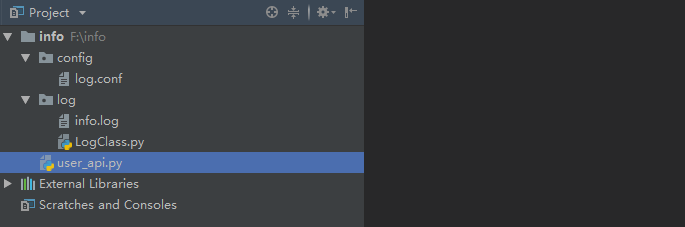
二:自定义日志类
1. 建立log.conf的配置文件
log.conf
[log]

LOG_PATH = /log/

LOG_NAME = info.log
2. 定义日志类
LogClass.py
import logging

from logging import handlers

class Mylogger(object):

    def __init__(self,log_path,log_name):

        # 1.指明日志记录到哪个文件 "F:/xxx/xx" + "info.log"

        logfile = log_path + log_name

        # 2.配置日志操作器

        handler = handlers.RotatingFileHandler(logfile, maxBytes=1024 * 1024, backupCount=5, encoding='utf-8')

        # 3.设置日志格式

        fmt = "%(levelname)s-%(asctime)s-%(module)s-%(lineno)d-%(message)s"

        # 4. 配置格式实例

        formatter = logging.Formatter(fmt)

        # 5.操作器加载格式实例

        handler.setFormatter(formatter)

        # 6.创建logger实例

        self.logger = logging.getLogger()

        # 7.给实例增加日志操作器

        self.logger.addHandler(handler)

        # 8.给实例增加日志输出登记

        self.logger.setLevel(logging.DEBUG)

  # 设置方法返回looger实例

    def get_logger(self):

        return self.logger
三:视图中使用logger日志
user_api.py
from flask import Flask,request,jsonify

from flask_cors import CORS

from log.LogClass import Mylogger

import os

import configparser

app = Flask(__name__)

CORS(app,supports_credentials=True)

# 1.获取根目录

root_path = os.path.split(os.path.realpath(__file__))[0]

# 2. 设置日志解析实例

cf = configparser.ConfigParser()

# 3.读取日志文件

cf.read(root_path+"/config/log.conf")

# 4. 创建自定义日志类的实例对象

logger = Mylogger(root_path + cf.get("log","LOG_PATH"),cf.get("log","LOG_NAME")).get_logger()

@app.route("/index",methods=["POST","GET"])

def demo():

    try:

        print(1/0)

    except Exception as e:

        logger.error(e)

if __name__ == '__main__':

    app.run(debug=True)
运行程序后 访问 127.0.0.1:5000/index,在log文件夹里面增加了info.log文件
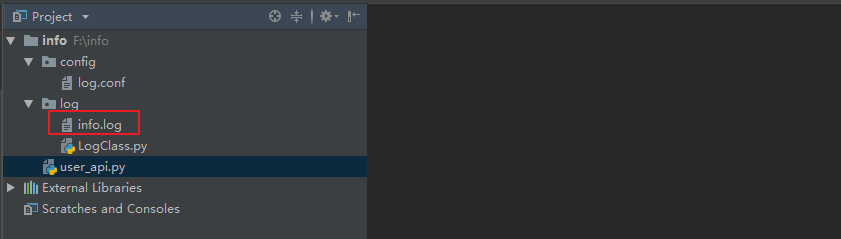
查看info.log
INFO-2019-12-10 14:36:22,124-_internal-122- * Restarting with stat

WARNING-2019-12-10 14:36:22,590-_internal-122- * Debugger is active!

INFO-2019-12-10 14:36:22,594-_internal-122- * Debugger PIN: 259-203-506

INFO-2019-12-10 14:36:22,602-_internal-122- * Running on http://127.0.0.1:5000/ (Press CTRL+C to quit)

ERROR-2019-12-10 14:36:25,475-user_api-23-division by zero

INFO-2019-12-10 14:36:25,480-_internal-122-127.0.0.1 - - [10/Dec/2019 14:36:25] "GET /index HTTP/1.1" 500 -

INFO-2019-12-10 14:36:25,497-_internal-122-127.0.0.1 - - [10/Dec/2019 14:36:25] "GET /index?__debugger__=yes&cmd=resource&f=style.css HTTP/1.1" 200 -

INFO-2019-12-10 14:36:25,498-_internal-122-127.0.0.1 - - [10/Dec/2019 14:36:25] "GET /index?__debugger__=yes&cmd=resource&f=debugger.js HTTP/1.1" 200 -

INFO-2019-12-10 14:36:25,498-_internal-122-127.0.0.1 - - [10/Dec/2019 14:36:25] "GET /index?__debugger__=yes&cmd=resource&f=jquery.js HTTP/1.1" 200 -

INFO-2019-12-10 14:36:25,537-_internal-122-127.0.0.1 - - [10/Dec/2019 14:36:25] "GET /index?__debugger__=yes&cmd=resource&f=ubuntu.ttf HTTP/1.1" 200 -

INFO-2019-12-10 14:36:25,581-_internal-122-127.0.0.1 - - [10/Dec/2019 14:36:25] "GET /index?__debugger__=yes&cmd=resource&f=console.png HTTP/1.1" 200 -

INFO-2019-12-10 14:36:25,626-_internal-122-127.0.0.1 - - [10/Dec/2019 14:36:25] "GET /index?__debugger__=yes&cmd=resource&f=console.png HTTP/1.1" 200 -
将LogClass.py中 self.logger.setLevel(logging.DEBUG) 改为 self.logger.setLevel(logging.ERROR),然后运行程序,查看info.log
INFO-2019-12-10 14:40:12,643-_internal-122- * Detected change in 'F:\\info\\log\\LogClass.py', reloading

INFO-2019-12-10 14:40:12,673-_internal-122- * Restarting with stat

WARNING-2019-12-10 14:40:13,135-_internal-122- * Debugger is active!

INFO-2019-12-10 14:40:13,139-_internal-122- * Debugger PIN: 259-203-506

INFO-2019-12-10 14:40:13,147-_internal-122- * Running on http://127.0.0.1:5000/ (Press CTRL+C to quit)

ERROR-2019-12-10 14:40:17,367-user_api-23-division by zero

INFO-2019-12-10 14:40:17,372-_internal-122-127.0.0.1 - - [10/Dec/2019 14:40:17] "GET /index HTTP/1.1" 500 -

INFO-2019-12-10 14:40:17,388-_internal-122-127.0.0.1 - - [10/Dec/2019 14:40:17] "GET /index?__debugger__=yes&cmd=resource&f=style.css HTTP/1.1" 200 -

INFO-2019-12-10 14:40:17,389-_internal-122-127.0.0.1 - - [10/Dec/2019 14:40:17] "GET /index?__debugger__=yes&cmd=resource&f=jquery.js HTTP/1.1" 200 -

INFO-2019-12-10 14:40:17,389-_internal-122-127.0.0.1 - - [10/Dec/2019 14:40:17] "GET /index?__debugger__=yes&cmd=resource&f=debugger.js HTTP/1.1" 200 -

INFO-2019-12-10 14:40:17,427-_internal-122-127.0.0.1 - - [10/Dec/2019 14:40:17] "GET /index?__debugger__=yes&cmd=resource&f=ubuntu.ttf HTTP/1.1" 200 -

INFO-2019-12-10 14:40:17,466-_internal-122-127.0.0.1 - - [10/Dec/2019 14:40:17] "GET /index?__debugger__=yes&cmd=resource&f=console.png HTTP/1.1" 200 -

INFO-2019-12-10 14:40:17,511-_internal-122-127.0.0.1 - - [10/Dec/2019 14:40:17] "GET /index?__debugger__=yes&cmd=resource&f=console.png HTTP/1.1" 200 -
# 具体原因 TODO
flask中自定义日志类的更多相关文章
- Python3自定义日志类教程
一.说明 Python3的logging功能是比较丰富的支持不同层次的日志输出,但或是我们想在日志前输出时间.或是我们想要将日志输入到文件,我们还是想要自定义日志类. 之前自己也尝试写过但感觉文档太乱 ...
- Flask之自定义模型类
4.3自定义模型类 定义模型 模型表示程序使用的数据实体,在Flask-SQLAlchemy中,模型一般是Python类,继承自db.Model,db是SQLAlchemy类的实例,代表程序使用的数据 ...
- 关于MapReduce中自定义分区类(四)
MapTask类 在MapTask类中找到run函数 if(useNewApi){ runNewMapper(job, splitMetaInfo, umbilical, reporter ...
- 关于MapReduce中自定义分组类(三)
Job类 /** * Define the comparator that controls which keys are grouped together * for a single ...
- python3.4中自定义数组类(即重写数组类)
'''自定义数组类,实现数组中数字之间的四则运算,内积运算,大小比较,数组元素访问修改及成员测试等功能''' class MyArray: '''保证输入值为数字元素(整型,浮点型,复数)''' de ...
- shell脚本中自定义日志记录到文件
自定义日志函数和前期变量 # adirname - return absolute dirname of given file adirname() { odir=`pwd`; cd `dirname ...
- 如何自定义Flask中的响应类
http://codingpy.com/article/customizing-the-flask-response-class/
- Python3自定义日志类 mylog
#encoding=utf-8 import os, sysimport datetimeimport time class Mylog(object): # 根文件夹 root_dir = s ...
- 关于MapReduce中自定义Combine类(一)
MRJobConfig public static fina COMBINE_CLASS_ATTR 属性COMBINE_CLASS_ATTR = "mapreduce.j ...
随机推荐
- 在项目中配置PageHelper插件时遇到类型转换异常
PageHelper是一种常用的分页工具,按照常规方法在mybatis的配置文件中整合它: <?xml version="1.0" encoding="UTF-8& ...
- Python学习之==>模块结构调整
一.为什么要进行模块结构调整 当一个脚本中有大量的配置.方法及接口时,脚本显得十分臃肿,可读性很差.为了提高代码的易读性,可以将一个繁杂的脚本根据不同的功能放在不同的目录下分类管理,这整个过程叫做模块 ...
- 【Html5】表单全选、全不选
以下为页面效果图 用HBuilder做 谷歌浏览器 index.html代码 <!DOCTYPE html> <html> <head> <meta c ...
- ---Mock---基本使用
一.mock解决的问题 开发时,后端还没完成数据输出,前端只好写静态模拟数据.数据太长了,将数据写在js文件里,完成后挨个改url.某些逻辑复杂的代码,加入或去除模拟数据时得小心翼翼.想要尽可能还原真 ...
- java 接入微信 spring boot 接入微信
1.pom.xml <?xml version="1.0" encoding="UTF-8"?> <project xmlns="h ...
- kafka生产者java客户端
producer 包含一个用于保存待发送消息的缓冲池,缓冲池中消息是还没来得及传输到kafka集群的消息. 位于底层的kafka I/O线程负责将缓冲池中的消息转换成请求发送到集群.如果在结束prod ...
- Windows Server 2012 上安装 dotNET Framework v3.5
Windows Server 2012不能直接运行dotNET Framework v3.5安装程序进行安装,系统提供通过服务器管理器的添加功能和角色向导进行安装. 安装的前几个步骤再这里略去,在默认 ...
- [LeetCode] 52. N皇后 II
题目链接 : https://leetcode-cn.com/problems/n-queens-ii/ 题目描述: n 皇后问题研究的是如何将 n 个皇后放置在 n×n 的棋盘上,并且使皇后彼此之间 ...
- PY个康托展开
卡 PY 的题,和 BIT 一样,不说了 内存还卡的挺紧的? 具体而言,刚好打完的 BIT 扒过来用用,然后打个阶乘就完事儿了 没什么好说的 Code fac=[0 for i in range(10 ...
- centos7修改端口登陆
1 安装ssh服务 yum install -y openssh-server2 修改默认端口并保存 vim /etc/ssh/sshd_config 3 打开防火墙 service firewall ...