
TypeScript 3.0下react默认属性DefaultProps解决方案
ts和react的默认属性的四种解决方案
- Non-null assertion operator(非空断言语句)
- Component type casting(组件类型重置)
- High order function for defining defaultProps(高阶组件)
- Props getter function(Getter函数)
1、 非空断言语句
1、const color = this.props.color!;

2、this.props.onBlur ? this.props.onBlur(e): undefined;
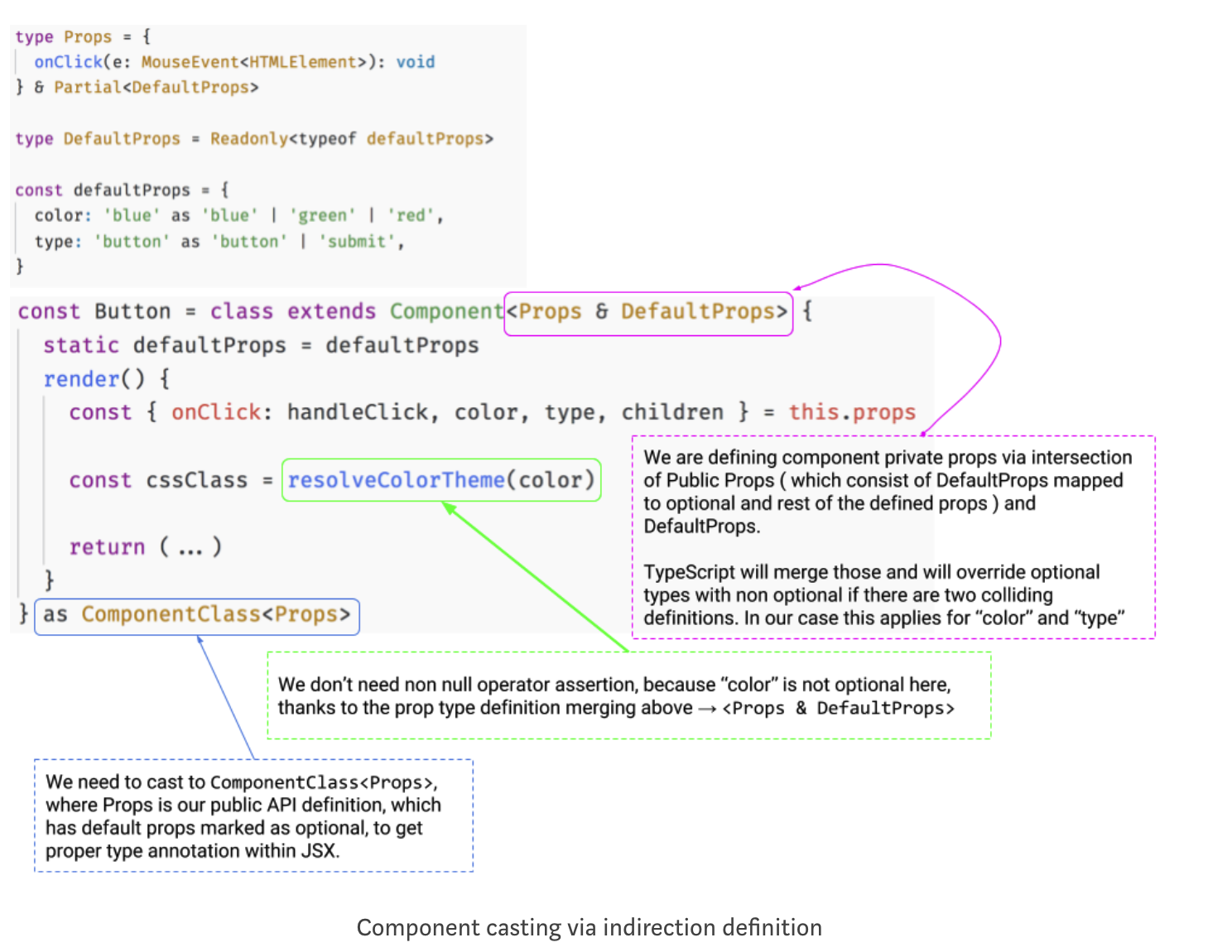
2、组件类型重置
以通过匿名类创建组件,并将其分配给常量,我们将使用适当的道具类型将其转换为最终结果组件,同时保留实现中定义的所有“defaultProps”
3、高阶组件
globals.d.ts
declare type Omit<T, K> = Pick<T, Exclude<keyof T, K>>
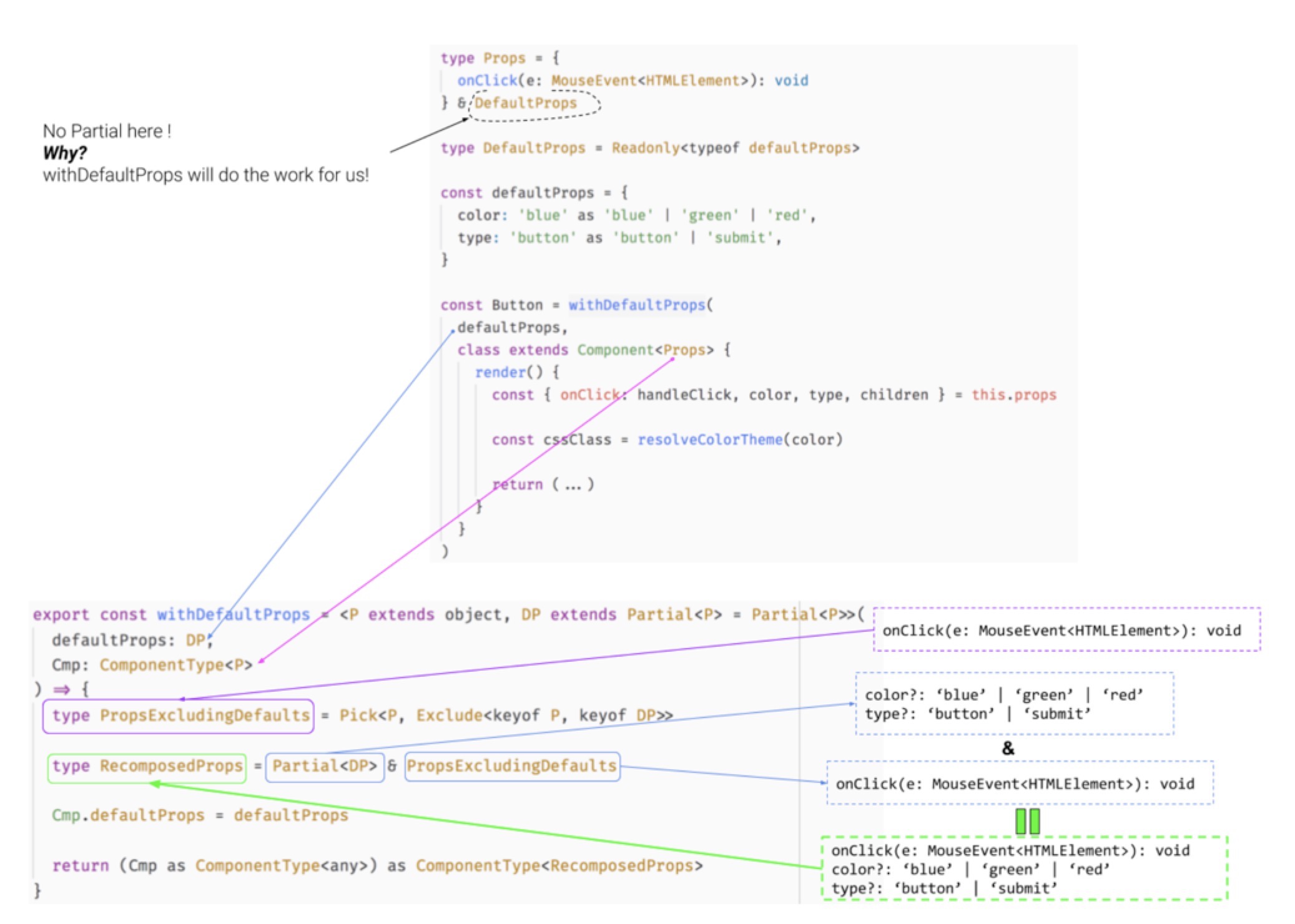
在uitls中定义withDefaultProps
export const withDefaultProps = <P extends object, DP extends Partial<P> = Partial<P>>(

  defaultProps: DP,

  Cmp: React.ComponentType<P>

) => {

  type RequiredProps = Omit<P, keyof DP>

  type Props = Partial<DP> & RequiredProps

  Cmp.defaultProps = defaultProps

  return (Cmp as React.ComponentType<any>) as React.ComponentType<Props>

}
说明
使用上面或者下面的实现都可以
input组件为一个完整的例子:
import classnames from 'classnames';

import * as React from 'react';

import { withDefaultProps } from '../utils';

import './style/input.styl';

const defaultProps = {

  type: 'text',

  value: '',

  disabled: false,

  readonly: false,

  maxlength: 60,

  placehololder: '',

  autofocus: false,

  autocomplete: '',

  clearable: false,

  passShow: false

}

type DefaultProps = Readonly<typeof defaultProps>;

type InputInnerProps = {

  prepend?: React.ReactNode;

  append?: React.ReactNode;

  className?: string;

  style?: React.CSSProperties;

  onChange?: (value: string) => void;

  onBlur?: (e: React.FocusEvent<HTMLInputElement>) => void;

  onFocus?: (e: React.FocusEvent<HTMLInputElement>) => void;

} & DefaultProps;

const InputState = {

  isFocus: false,

  inputValue: '',

  open: false

};

type State = Readonly<typeof InputState>;

const Input = withDefaultProps(

  defaultProps,

  class extends React.Component<InputInnerProps, State> {

    readonly state: State = InputState;

    private inputRef: React.RefObject<any> = React.createRef();

    getDerivedStateFromProps() {

      this.setState({

        open: this.props.passShow,

        inputValue: this.props.value

      })

    }

    private changeHander = (e: React.ChangeEvent<HTMLInputElement>):void => {

      this.setState({

        inputValue: e.target.value

      })

      this.props.onChange ? this.props.onChange(e.target.value) : undefined;

    }

    private handleFoucus = (e: React.FocusEvent<HTMLInputElement>):void => {

      this.props.onFocus ? this.props.onFocus(e): undefined;

      this.setState({

        isFocus: true

      })

    }

    private handleBlur = (e: React.FocusEvent<HTMLInputElement>):void => {

      this.props.onBlur ? this.props.onBlur(e): undefined;

      this.setState({

        isFocus: true

      })

    }

    private handleClear = ():void => {

      this.setState({

        inputValue: ''

      })

      this.inputRef.current.focus();

    }

    private handlePwdEye = ():void => {

      this.setState({

        open: !this.state.open

      })

    }

    public render() {

      const {

        type,

        disabled,

        readonly,

        autocomplete,

        autofocus,

        clearable,

        passShow,

        className,

        style,

        prepend,

        append,

        ...restProps

      } = this.props;

      const {

        isFocus,

        inputValue,

        open

      } = this.state;

      const inputCls = classnames('afo-input', className, {

        'afo-input--active': isFocus

      })

      const inputType:string = type === 'password' && passShow ? 'text': type;

      const showClear:boolean = clearable && inputValue && !readonly && !disabled ? true: false;

      const showPwdEye:boolean = type === 'password' && passShow && !disabled ? true: false;

      return (

        <div className={inputCls} style={style}>

          {

            prepend ? <div className="afo-input__prepend">{prepend}</div> : ''

          }

          <input

            className="afo-input__field"

            ref={this.inputRef}

            value={inputValue}

            {...restProps}

            type={inputType}

            disabled={disabled}

            readOnly={readonly}

            autoComplete={autocomplete}

            autoFocus={autofocus}

            onFocus={(e) => this.handleFoucus(e)}

            onBlur={(e) => this.handleBlur(e)}

            onChange={(e) => this.changeHander(e)}

          />

          {

            append || showClear || showPwdEye?

            <div className="afo-input__append">

              {

                showClear ? <div className="afo-input__clear"  onClick={() => this.handleClear()}>

                  <i className="afo-wrong" />

                </div> : ''

              }

              {

                showPwdEye ?

                <div className="afo-input__eye"  onClick={() => this.handlePwdEye()}>

                  <i className={open ? 'afo-inupt__eye--visible' : 'afo-inupt__eye--invisible'} />

                </div> : ''

              }

              {append}

            </div> :''

          }

        </div>

      )

    }

  }

)

export default Input;
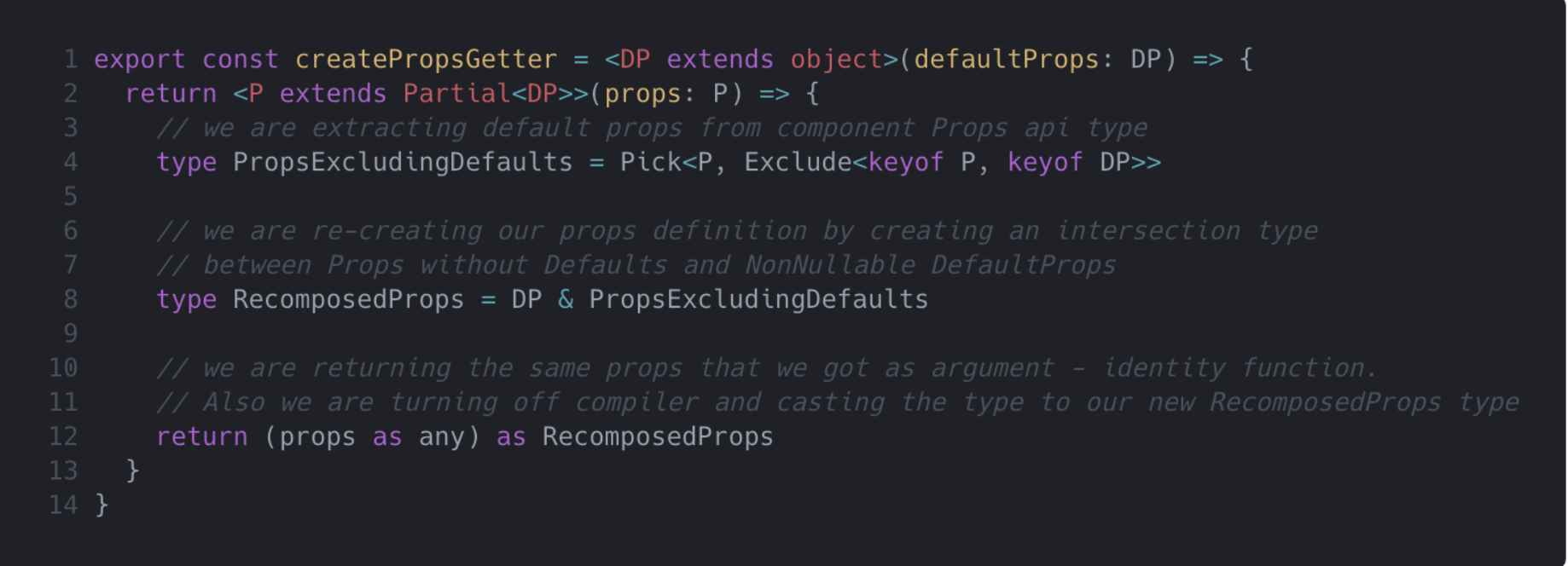
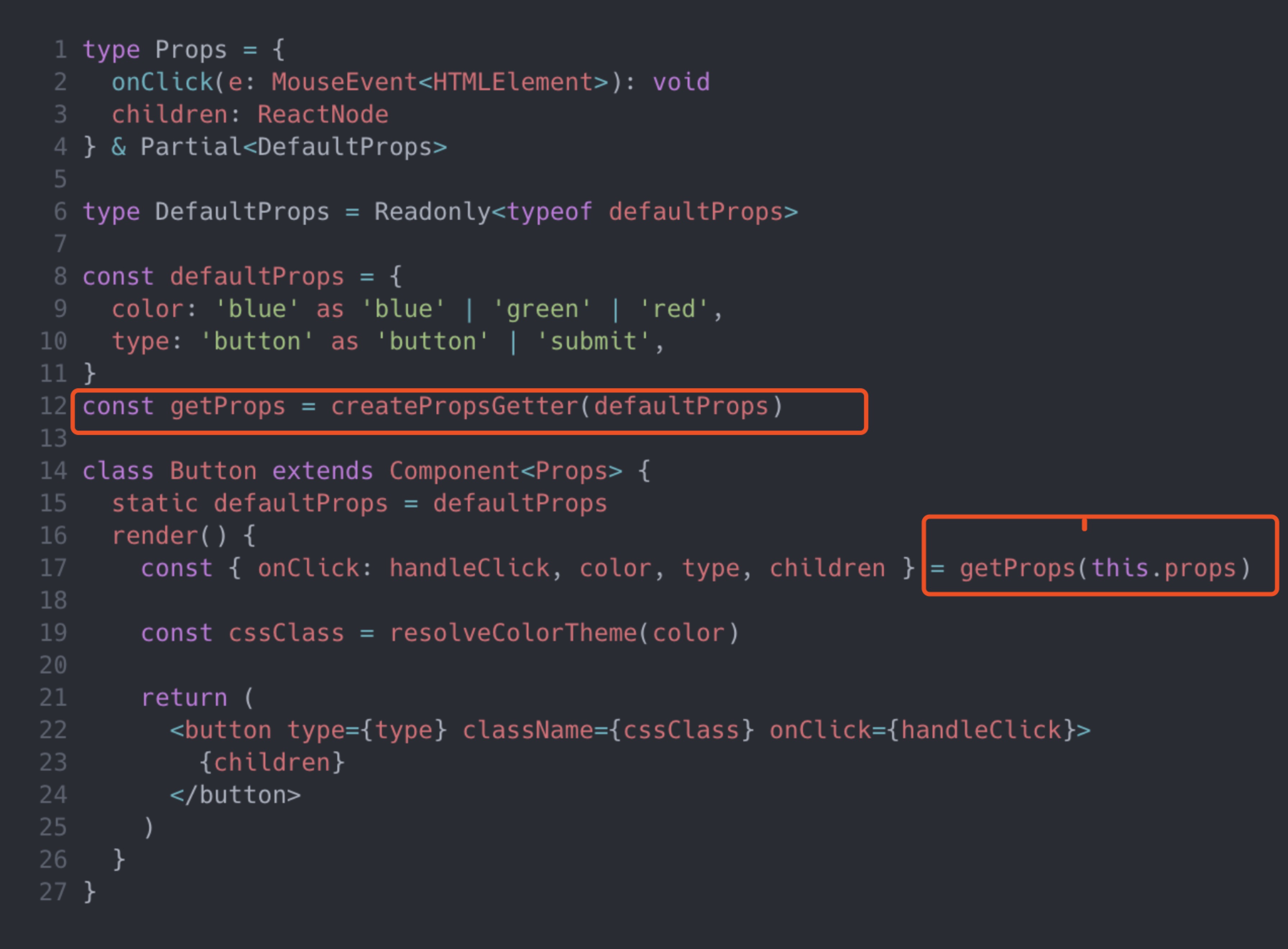
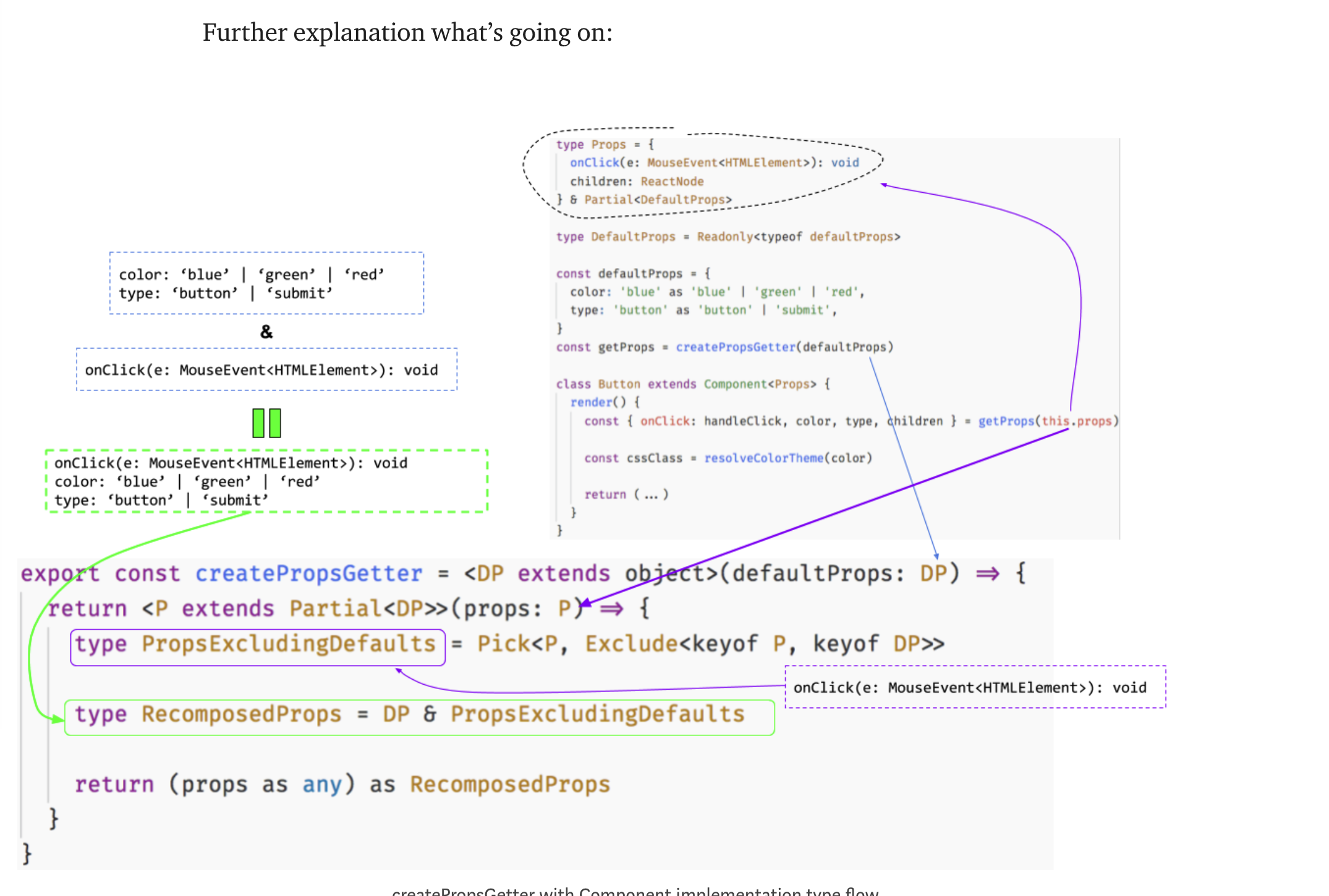
4、Props getter function
条件类型映射的简陋工厂/闭包标识函数模式。
注意,我们使用了与withDefaultProps函数类似的类型映射构造,但我们不将defaultProps映射为可选的,因为它们在组件实现中是不可选的。
TypeScript 3.0下react默认属性DefaultProps解决方案的更多相关文章
- IE10-IE11在NET4.0下出现“__doPostBack未定义”解决方案
IE10在NET4.0下出现"__doPostBack未定义"的办法 参考文章: http://blogs.msdn.com/b/scott_hanselman/archive/2 ...
- React 学习(二) ---- props验证与默认属性
在上一节中, 我们提到了props, 组件之间数据的传递使用props. 我们调用组件时可以设置props, 组件内部通过props获取. 为了props 使用更加友好, React 提供了简单的验证 ...
- 关于div容器在ie6下默认高度不为0(存在默认高度)
最近做项目的时候遇到一个问题,相信很多人都遇到过,就是在测试兼容性的时候,在ie6下小于12px 的背景的高度不等于原高,或许这样说你可能不是很明白,那就举个例子吧! 如图所示: 锯齿状的背景图本来是 ...
- CDH 6.0.1 版本 默认配置下 HUE | happybase 无法访问 Hbase 的问题
第一个问题 HUE 无法直接连接到 HBase 在默认配置下 CDH 6.0.1 版本下的 HBase2.0 使用了默认配置 hbase.regionserver.thrift.compact = T ...
- React组件属性部类(propTypes)校验
React组件属性类型(propTypes)校验 Prop 验证 随着应用不断变大,保证组件被正确使用变得非常有用.为此我们引入propTypes.React.PropTypes 提供很多验证器 (v ...
- 在 Typescript 2.0 中使用 @types 类型定义
在 Typescript 2.0 中使用 @type 类型定义 基于 Typescript 开发的时候,很麻烦的一个问题就是类型定义.导致在编译的时候,经常会看到一连串的找不到类型的提示.解决的方式经 ...
- Vue.js 2.0 和 React、Augular
Vue.js 2.0 和 React.Augular 引言 这个页面无疑是最难编写的,但也是非常重要的.或许你遇到了一些问题并且先前用其他的框架解决了.来这里的目的是看看Vue是否有更好的解决方案.那 ...
- 使用Typescript重构axios(十五)——默认配置
0. 系列文章 1.使用Typescript重构axios(一)--写在最前面 2.使用Typescript重构axios(二)--项目起手,跑通流程 3.使用Typescript重构axios(三) ...
- TypeScript 2.0开启空值的严格检查
摘要:在编程过程成空指针是最常见的bug之一,但是在TypeScript中我们无法使用具体的类型来表示特定的变量不能为空!幸运的是,TypeScript 2.0 解决了这个问题. 本文分享自华为云社区 ...
随机推荐
- Apache.Tomcat 调用Servlet原理之Class类的反射机制,用orc类解释
有一个兽人类 package com.swift.servlet; public class OrcDemo { private int hp; private int mp; private int ...
- ant Design表单验证笔记
1.pattern正则验证 <Col md={12} sm={24}> <FormItem {...formItemLayout} label="班数"> ...
- 【学时总结】◆学时·VI◆ SPLAY伸展树
◆学时·VI◆ SPLAY伸展树 平衡树之多,学之不尽也…… ◇算法概述 二叉排序树的一种,自动平衡,由 Tarjan 提出并实现.得名于特有的 Splay 操作. Splay操作:将节点u通过单旋. ...
- tcp服务端socket
import socket if __name__ == '__main__': # 创建tcp服务端socket tcp_server_socket = socket.socket(socket.A ...
- Shell学习——数值运算
在Bash shell中,可以利用let.(( )).[]执行基本的算术操作,在高级操作时,使用expr和bc两个工具1.let[root@client02 ~]# no1=4[root@client ...
- scrapy--cnblogs
之前一直在学习关于滑块验证码的爬虫知识,最接近的当属于模拟人的行为进行鼠标移动,登录页面之后在获取了,由于一直找不到滑块验证码的原图,无法通过openCV获取当前滑块所需要移动的距离. 1.机智如我开 ...
- python之微信自动发送消息
代码如下: from __future__ import unicode_literals from threading import Timer from wxpy import * import ...
- Django自带后台管理配置
Django自带后台管理的配置 创建项目和应用 修改配置文件 数据库配置 DATABASES = { 'default': { 'ENGINE': 'django.db.backends.mysql' ...
- java_servlet
在servlet 解决中文乱码 response.setContentType("text/html;charset=utf-8"); //必须在getWrite()上面,不然依然 ...
- python 表格存取方法(转)
xlwt/xlrd库 存Excel文件:(如果存储数据中有字符,那么写法还有点小小的变化) import xlwt workbook = xlwt.Workbook(encoding='utf-8') ...