
OpenCV——饱和度调整
参考:
// define head function

#ifndef PS_ALGORITHM_H_INCLUDED

#define PS_ALGORITHM_H_INCLUDED

#include <iostream>

#include <string>

#include "cv.h"

#include "highgui.h"

#include "cxmat.hpp"

#include "cxcore.hpp"

using namespace std;

using namespace cv;

void Show_Image(Mat&, const string &);

#endif // PS_ALGORITHM_H_INCLUDED

/*

This program adjust

the saturation.

*/

#include "PS_Algorithm.h"

#include <time.h>

using namespace std;

using namespace cv;

int main(void)

{

    string Img_name("4.jpg");

    Mat Img;

    Img=imread(Img_name);

    Show_Image(Img, Img_name);

    Mat Img_out(Img.size(), CV_32FC3);

    Img.convertTo(Img_out, CV_32FC3);

    Mat Img_in(Img.size(), CV_32FC3);

    Img.convertTo(Img_in, CV_32FC3);

    // define the iterator of the input image

    MatIterator_<Vec3f> inp_begin, inp_end;

    inp_begin=Img_in.begin<Vec3f>();

    inp_end =Img_in.end<Vec3f>();

    // define the iterator of the output image

    MatIterator_<Vec3f> out_begin, out_end;

    out_begin=Img_out.begin<Vec3f>();

    out_end =Img_out.end<Vec3f>();

    // increment (-100.0, 100.0)

    float Increment=-50.0/100.0;

    float delta=0;

    float minVal, maxVal;

    float t1, t2, t3;

    float L,S;

    float alpha;

    for(; inp_begin!=inp_end; inp_begin++, out_begin++)

    {

        t1=(*inp_begin)[0];

        t2=(*inp_begin)[1];

        t3=(*inp_begin)[2];

        minVal=std::min(std::min(t1,t2),t3);

        maxVal=std::max(std::max(t1,t2),t3);

        delta=(maxVal-minVal)/255.0;

        L=0.5*(maxVal+minVal)/255.0;

        S=std::max(0.5*delta/L, 0.5*delta/(1-L));

        if (Increment>0)

        {

            alpha=max(S, 1-Increment);

            alpha=1.0/alpha-1;

            (*out_begin)[0]=(*inp_begin)[0]+((*inp_begin)[0]-L*255.0)*alpha;

            (*out_begin)[1]=(*inp_begin)[1]+((*inp_begin)[1]-L*255.0)*alpha;

            (*out_begin)[2]=(*inp_begin)[2]+((*inp_begin)[2]-L*255.0)*alpha;

        }

        else

        {

            alpha=Increment;

            (*out_begin)[0]=L*255.0+((*inp_begin)[0]-L*255.0)*(1+alpha);

            (*out_begin)[1]=L*255.0+((*inp_begin)[1]-L*255.0)*(1+alpha);

            (*out_begin)[2]=L*255.0+((*inp_begin)[2]-L*255.0)*(1+alpha);

        }

    }

    Img_out=Img_out/255.0;

    Show_Image(Img_out, "out");

    imwrite("out.jpg", Img_out*255);

    waitKey();

    cout<<"All is well."<<endl;

}

// define the show image

#include "PS_Algorithm.h"

#include <iostream>

#include <string>

using namespace std;

using namespace cv;

void Show_Image(Mat& Image, const string& str)

{

    namedWindow(str.c_str(),CV_WINDOW_AUTOSIZE);

    imshow(str.c_str(), Image);

}
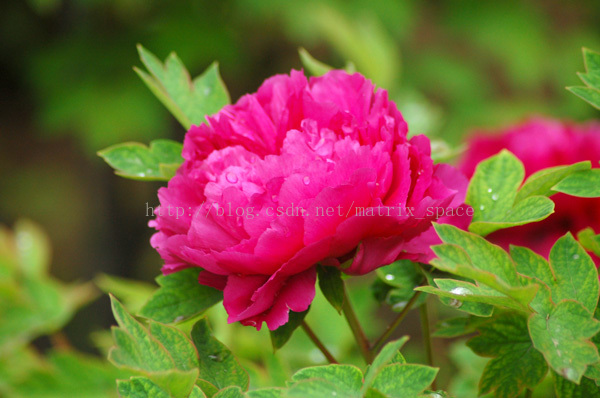
原图
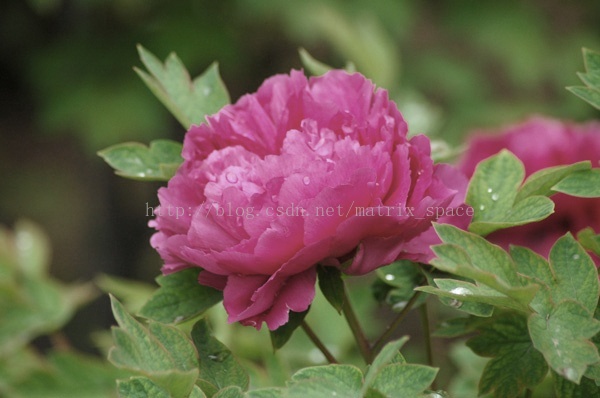
效果图
OpenCV——饱和度调整的更多相关文章
- PS 图像调整算法——饱和度调整
算法参考自 阿发伯 的博客. http://blog.csdn.net/maozefa 饱和度调整 图像的饱和度调整有很多方法,最简单的就是判断每个象素的R.G.B值是否大于或小于128,大于加上调整 ...
- Python: PS 图像调整--饱和度调整
本文用 Python 实现 PS 图像调整中的饱和度调整算法,具体的算法原理和效果可以参考之前的博客: http://blog.csdn.net/matrix_space/article/detail ...
- C# vb .net实现饱和度调整特效滤镜
在.net中,如何简单快捷地实现Photoshop滤镜组中的饱和度调整呢?答案是调用SharpImage!专业图像特效滤镜和合成类库.下面开始演示关键代码,您也可以在文末下载全部源码: 设置授权 第一 ...
- GPUImage中饱和度调整的实现——GPUImageSaturationFilter
饱和度saturation,是指色彩的鲜艳程度,也称色彩的纯度.饱和度取决于该色中含色成分和消色成分(灰色)的比例.含色成分越大,饱和度越大:消色成分越大,饱和度越小.纯的颜色都是高度饱和的,如鲜红, ...
- Opencv学习笔记4:Opencv处理调整图片亮度和对比度
一.理论基础 在数学中我们学过线性理论,在图像亮度和对比度调节中同样适用,看下面这个公式: 在图像像素中其中: 参数f(x)表示源图像像素. 参数g(x) 表示输出图像像素. 参数a(需要满足a> ...
- OpenCV尺寸调整
#include<cv.h> #include<highgui.h> int main(int argc, char** argv) { IplImage* img = cvL ...
- OpenCV——黑白调整
参考算法: 闲人阿发伯的博客 // define head function #ifndef PS_ALGORITHM_H_INCLUDED #define PS_ALGORITHM_H_INCLUD ...
- Unity Shader-后处理:简单的颜色调整(亮度,饱和度,对比度)
好久没坚持写blog了,是时候开始撸一波新博文了!学习Unity有一段时间了,关于Shader的书也看了几本<Unity Shader入门精要>,<Unity 3D ShaderLa ...
- ISP模块之色彩增强算法--HSV空间Saturation通道调整 .
色彩增强不同于彩色图像增强,图像增强的一般处理方式为直方图均衡化等,目的是为了增强图像局部以及整体对比度.而色彩增强的目的是为了使的原有的不饱和的色彩信息变得饱和.丰富起来.对应于Photoshop里 ...
随机推荐
- Android 中通过切割图片创建人物行走动画
以前一直使用序列图片来实现动画效果,造成空间的极大浪费,所以想要尝试下切割图片来实现动画. 如图所示,是由66rpg纸娃娃系统生成的角色行走图.本程序必须实现将人物的整体图片切割后存入4x4的数组来动 ...
- Intellij idea subversion checkout error
Subversion 1.8 and IntelliJ IDEA 13 Unlike its earlier versions, Subversion 1.8 support uses the nat ...
- UISegmentedControl 功能简单 分析
UISegmentedControl类似于UIButton,它可以提供多个选择操作,响应事件,但具有很大的局限性,我们更多的是使用自定义的,不过在这里还是介绍下它的基本用法. NSArray *seg ...
- error items-9022:missing required icon file.the bundle does not contain an app icon for iPhone/iPad Touch of exactly '120x120' pixels,in.pen format for ios versions >= 7.0
error items-9022:missing required icon file.the bundle does not contain an app icon for iPhone/iPad ...
- PIL+百度aip
1.PIL模块安装 选择PIL 官方没有支持python3.6的PIL库,所以用pillow代替 http://www.lfd.uci.edu/~gohlke/pythonlibs/#pillow 链 ...
- MySQL常见问题和命令
问题: 1.centos MySQL启动失败:关闭selinux, vi /etc/selinux/config, 设置SELINUX=disabled,重启电脑: 命令: 停止.启动mysql服务器 ...
- php解析xml文件为数组
$xml = simplexml_load_file($fullfilename); $arr = json_decode(json_encode($xml),true); echo "&l ...
- 换教室(期望+DP)
换教室(期望+DP) \(dp(i,j,1/0)\)表示第\(i\)节课,申请了\(j\)次调换,这节课\(1/0\)调换. 换教室 转移的时候考虑: 上次没申请 这次也没申请 加上\(dis(fr[ ...
- tfboys——tensorflow模块学习(一)
Tensorflow的基本使用 TensorFlow 的特点: 使用图 (graph) 来表示计算任务. 在被称之为 会话 (Session) 的上下文 (context) 中执行图. 使用 tens ...
- Gradle-jar-aar
Ref:Android Studio系列教程 Ref:Android Studio系列教程四--Gradle基础 Ref:Intellij IDEA 14.x 中的Facets和Artifacts的区 ...