
java访问微信接口发送消息
最近在开发activiti流程的时候有个需求:流程到达每个审批节点后,需要向该节点的审批人发送一个消息,提示有审批需要处理。
参考了一下微信的开发者文档和网络上的一些技术博客,现在记录一下。以便后续继续研究微信开发。【微信开发真的很好玩的】
首先,你需要注册一个企业微信账号:https://work.weixin.qq.com/wework_admin/register_wx?from=myhome
然后进入后台管理,创建一个应用
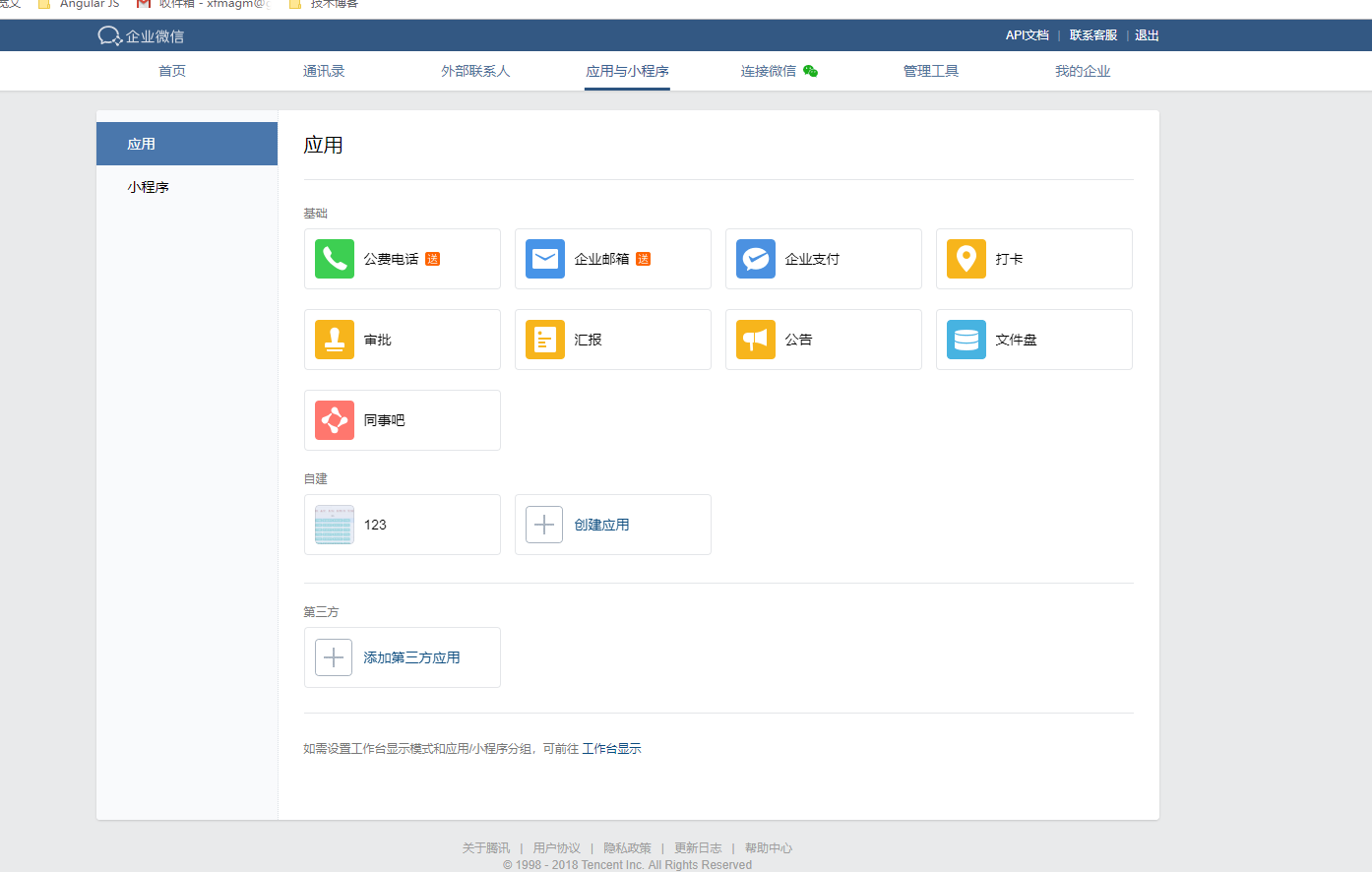
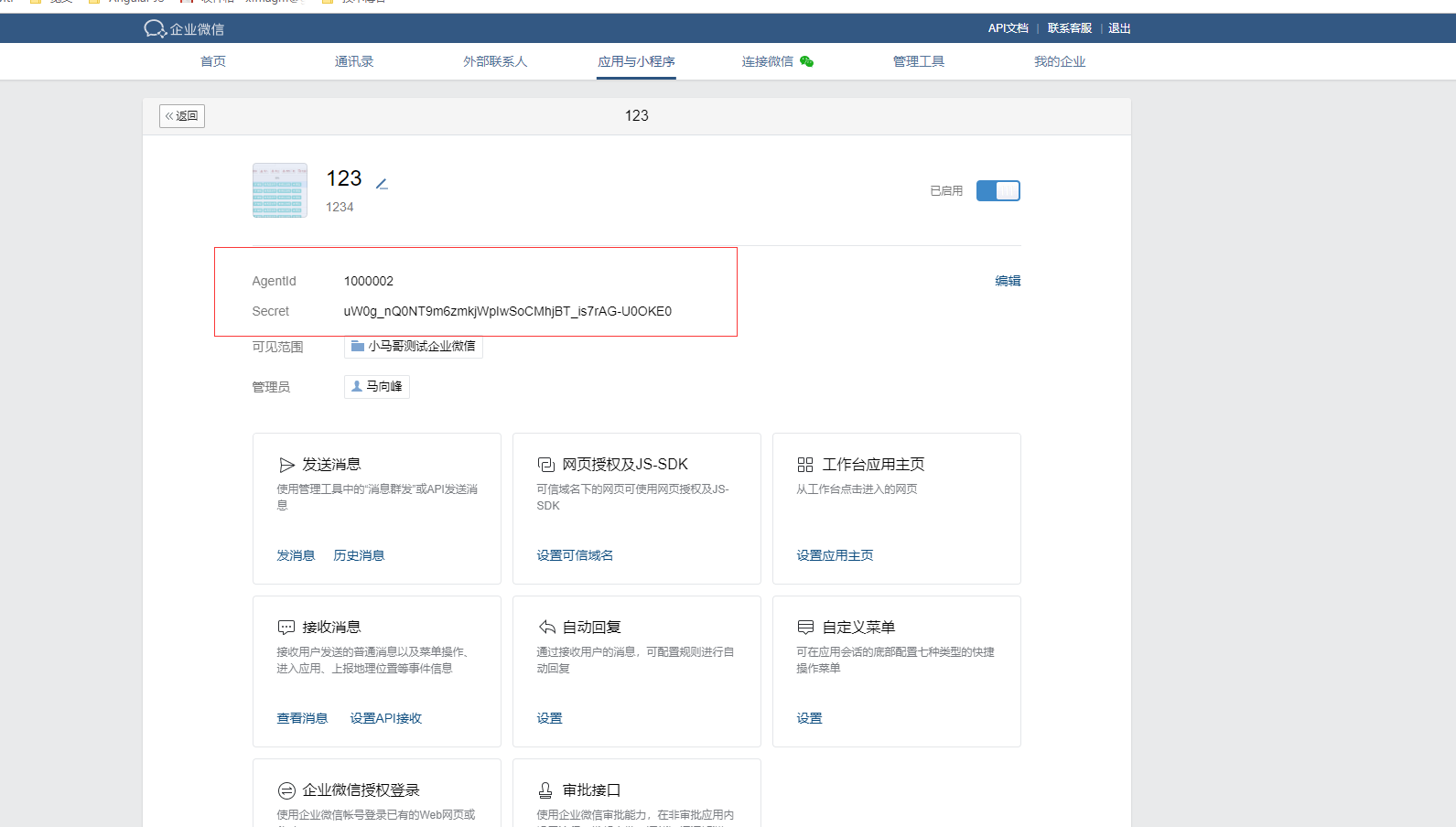
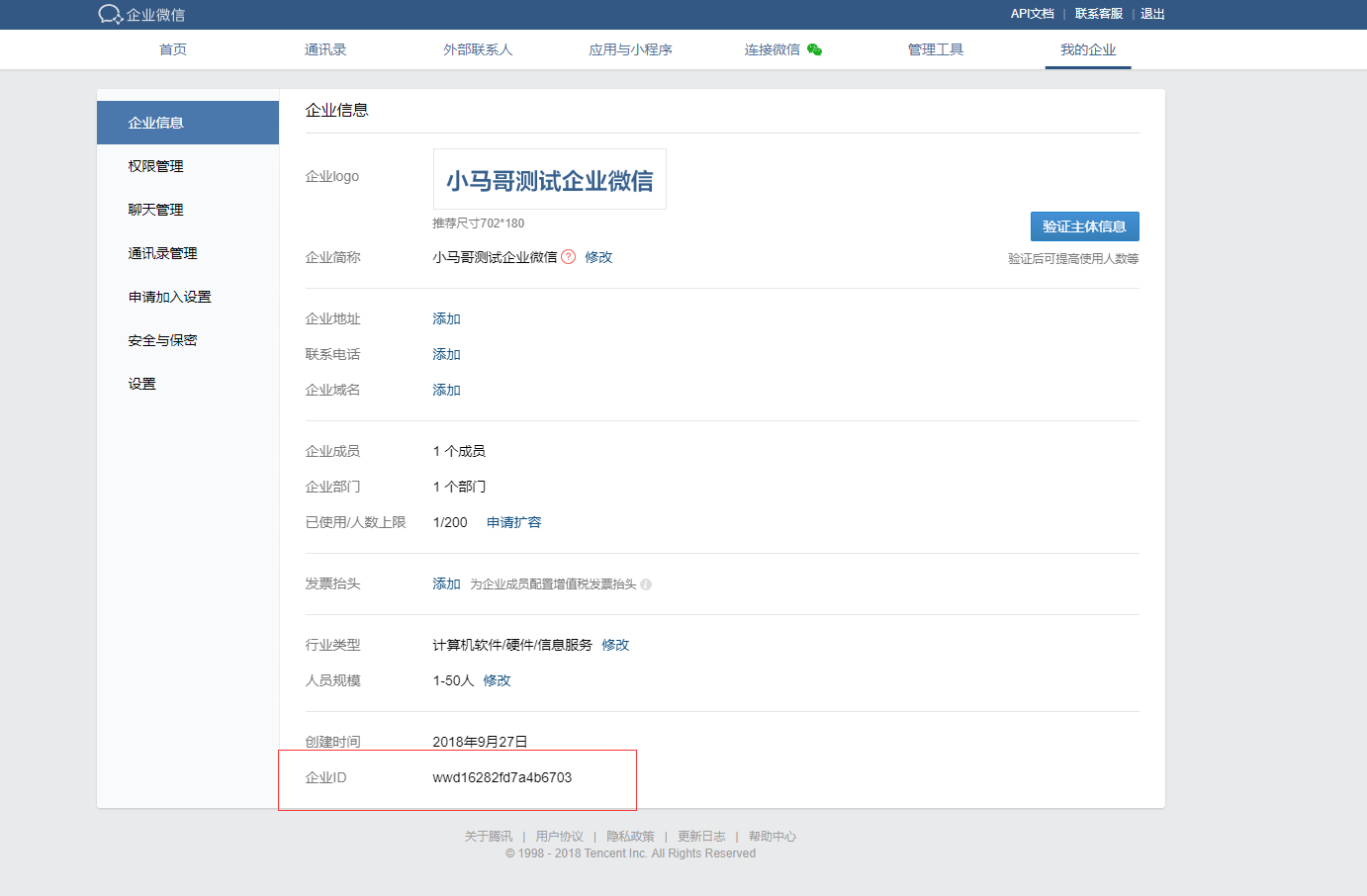
上面标红的信息,都是开发测试需要用到的,需要记录一下。
先贴代码:
WeChatData.java
package com.xfma.wx.test;

/**

 * 微信消息发送实体类

 * @author PC-MXF

 *

 */

public class WeChatData {

	 //发送微信消息的URLString sendMsgUrl="https://qyapi.weixin.qq.com/cgi-bin/message/send?access_token=";

	/**

	 * 成员账号

	 */

	private String touser;

	/**

	 * 消息类型

	 */

	private String msgtype;

	/**

	 * 企业用用的agentid

	 */

	private String agentid;

	/**

	 * 十几接收map类型数据

	 */

	private Object text;

	public String getTouser() {

		return touser;

	}

	public void setTouser(String touser) {

		this.touser = touser;

	}

	public String getMsgtype() {

		return msgtype;

	}

	public void setMsgtype(String msgtype) {

		this.msgtype = msgtype;

	}

	public String getAgentid() {

		return agentid;

	}

	public void setAgentid(String agentid) {

		this.agentid = agentid;

	}

	public Object getText() {

		return text;

	}

	public void setText(Object text) {

		this.text = text;

	}

}
WeChatUrlData.java
package com.xfma.wx.test;

/**

 * 微信授权请求

 * @author PC-MXF

 *

 */

public class WeChatUrlData {

	 /**

	  *  企业Id

     */

	private String corpid;

	 /**

     * secret管理组的凭证密钥

     */

	private String corpsecret;

	 /**

	  * 获取ToKen的请求

     */

	private String Get_Token_Url;

	 /**

	  * 发送消息的请求

     */

	private String SendMessage_Url;

	public String getCorpid() {

		return corpid;

	}

	public void setCorpid(String corpid) {

		this.corpid = corpid;

	}

	public String getCorpsecret() {

		return corpsecret;

	}

	public void setCorpsecret(String corpsecret) {

		this.corpsecret = corpsecret;

	}

	public String getGet_Token_Url() {

		return Get_Token_Url;

	}

	public void setGet_Token_Url(String corpid,String corpsecret) {

		Get_Token_Url = "https://qyapi.weixin.qq.com/cgi-bin/gettoken?corpid="+corpid+"&corpsecret="+corpsecret;

	}

	public String getSendMessage_Url() {

		 SendMessage_Url = "https://qyapi.weixin.qq.com/cgi-bin/message/send?access_token=";

		return SendMessage_Url;

	}

	public void setSendMessage_Url(String sendMessage_Url) {

		SendMessage_Url = sendMessage_Url;

	}

}
WeChatMsgSend.java
package com.xfma.wx.test;

import java.io.IOException;

import java.text.SimpleDateFormat;

import java.util.HashMap;

import java.util.Map;

import org.apache.http.HttpEntity;

import org.apache.http.client.methods.CloseableHttpResponse;

import org.apache.http.client.methods.HttpGet;

import org.apache.http.client.methods.HttpPost;

import org.apache.http.entity.StringEntity;

import org.apache.http.impl.client.CloseableHttpClient;

import org.apache.http.impl.client.HttpClients;

import org.apache.http.util.EntityUtils;

import org.slf4j.LoggerFactory;

import com.google.gson.Gson;

import com.google.gson.reflect.TypeToken;

/**

 * 微信发送消息

 *

 * @author PC-MXF

 *

 */

public class WeChatMsgSend {

	private CloseableHttpClient httpClient;

	/**

	 * 用于提交登录数据

	 */

	private HttpPost httpPost;

	/**

	 * 用于获得登陆后页面

	 */

	private HttpGet httpGet;

	public static final String CONTENT_TYPE = "Content-Type";

	SimpleDateFormat df = new SimpleDateFormat("yyyy-MM-dd HH:mm:ss");

	private static Gson gson = new Gson();

	/**

	 * 微信授权请求,GET类型,获取授权响应,用于其他方法截取token

	 *

	 * @param Get_Token_Url

	 * @return String 授权响应内容

	 * @throws IOException

	 */

	protected String toAuth(String Get_Token_Url) throws IOException {

		httpClient = HttpClients.createDefault();

		httpGet = new HttpGet(Get_Token_Url);

		CloseableHttpResponse response = httpClient.execute(httpGet);

		String resp = "";

		try {

			HttpEntity entity = response.getEntity();

			resp = EntityUtils.toString(entity, "utf-8");

			EntityUtils.consume(entity);

		} catch (Exception e) {

			e.getStackTrace();

		} finally {

			response.close();

		}

		LoggerFactory.getLogger(getClass()).info(" resp:{}", resp);

		return resp;

	}

	/**

	 * corpid应用组织编号 corpsecret应用秘钥 获取toAuth(String

	 * Get_Token_Url)返回结果中键值对中access_token键的值

	 *

	 * @param

	 */

	public String getToken(String corpid, String corpsecret) throws IOException {

		WeChatMsgSend sw = new WeChatMsgSend();

		WeChatUrlData uData = new WeChatUrlData();

		uData.setGet_Token_Url(corpid, corpsecret);

		String resp = sw.toAuth(uData.getGet_Token_Url());

		System.out.println("resp=====:" + resp);

		try {

			Map<String, Object> map = gson.fromJson(resp, new TypeToken<Map<String, Object>>() {

			}.getType());

			return map.get("access_token").toString();

		} catch (Exception e) {

			e.getStackTrace();

			return resp;

		}

	}

	/**

	 * 创建微信发送请求post数据 touser发送消息接收者 ,msgtype消息类型(文本/图片等), application_id应用编号。

	 * 本方法适用于text型微信消息,contentKey和contentValue只能组一对

	 *

	 * @param touser

	 * @param msgtype

	 * @param application_id

	 * @param contentKey

	 * @param contentValue

	 * @return

	 */

	public String createpostdata(String touser, String msgtype, int application_id, String contentKey,

			String contentValue) {

		WeChatData wcd = new WeChatData();

		wcd.setTouser(touser);

		wcd.setAgentid(application_id + "");

		wcd.setMsgtype(msgtype);

		Map<Object, Object> content = new HashMap<Object, Object>();

		content.put(contentKey, contentValue);

		wcd.setText(content);

		return gson.toJson(wcd);

	}

	/**

	 * @Title  创建微信发送请求post实体,charset消息编码    ,contentType消息体内容类型,

	 * url微信消息发送请求地址,data为post数据,token鉴权token

	 * @param charset

	 * @param contentType

	 * @param url

	 * @param data

	 * @param token

	 * @return

	 * @throws IOException

	 */

	public String post(String charset, String contentType, String url, String data, String token) throws IOException {

		CloseableHttpClient httpclient = HttpClients.createDefault();

		httpPost = new HttpPost(url + token);

		httpPost.setHeader(CONTENT_TYPE, contentType);

		httpPost.setEntity(new StringEntity(data, charset));

		CloseableHttpResponse response = httpclient.execute(httpPost);

		String resp;

		try {

			HttpEntity entity = response.getEntity();

			resp = EntityUtils.toString(entity, charset);

			EntityUtils.consume(entity);

		} finally {

			response.close();

		}

		LoggerFactory.getLogger(getClass()).info("call [{}], param:{}, resp:{}", url, data, resp);

		return resp;

	}

}
Test.java
package com.xfma.wx.test;

public class Test {

	public static void main(String[] args) {

		WeChatMsgSend swx = new WeChatMsgSend();

		try {

			String token = swx.getToken("ww44a4ede4d3626a","w6tRMGfN5WSFarMmqdpkwBztPRy-HVXRRs76QXvFU");

			String postdata = swx.createpostdata("jiangpin", "text", 1000009, "content","这是一条测试信息");

			String resp = swx.post("utf-8", WeChatMsgSend.CONTENT_TYPE,(new WeChatUrlData()).getSendMessage_Url(), postdata, token);

			System.out.println("获取到的token======>" + token);

			System.out.println("请求数据======>" + postdata);

			 System.out.println("发送微信的响应数据======>" + resp);

		}catch (Exception e) {

			e.getStackTrace();

		}

	}

}
java访问微信接口发送消息的更多相关文章
- [实例]JAVA调用微信接口发送图文消息,不用跳到详情页
package com.test; import java.io.IOException; import java.io.InputStream; import java.io.OutputStrea ...
- 全网最全的Windows下Python2 / Python3里正确下载安装用来向微信好友发送消息的itchat库(图文详解)
不多说,直接上干货! 建议,你用Anaconda2或Anaconda3. 见 全网最全的Windows下Anaconda2 / Anaconda3里正确下载安装用来向微信好友发送消息的itchat库( ...
- java微信接口之五—消息分组群发
一.微信消息分组群发接口简介 1.请求:该请求是使用post提交地址为: https://api.weixin.qq.com/cgi-bin/message/mass/sendall?access_t ...
- Java企业微信开发_05_消息推送之发送消息(主动)
一.本节要点 1.发送消息与被动回复消息 (1)流程不同:发送消息是第三方服务器主动通知微信服务器向用户发消息.而被动回复消息是 用户发送消息之后,微信服务器将消息传递给 第三方服务器,第三方服务器接 ...
- Java企业微信开发_04_消息推送之发送消息(主动)
源码请见: Java企业微信开发_00_源码及资源汇总贴 一.本节要点 1.发送消息与被动回复消息 (1)流程不同:发送消息是第三方服务器主动通知微信服务器向用户发消息.而被动回复消息是 用户发送消息 ...
- 通过企业微信API接口发送消息
最近给公司测试组内部开发一个记账小工具,当账目出现问题的时候需要发送消息通知大家,前期主要采用的QQ发送通知消息,但是有一天突然无法连接到QQ服务器,运维的同学建议采用微信的方式对接然后进行告警,所以 ...
- Java企业微信开发_05_消息推送之被动回复消息
一.本节要点 1.消息的加解密 微信加解密包 下载地址:http://qydev.weixin.qq.com/java.zip ,此包中封装好了AES加解密方法,直接调用方法即可. 其中,解 ...
- Java实现 微信小程序 + 消息推送
实现效果: 下面要显示五个字段 接下来,参照官方文档,一步步实现: https://developers.weixin.qq.com/miniprogram/dev/api-backend/open- ...
- 使用WeCloud消息推送接口发送消息NodeJs版
WeCloud是一家初创公司的产品,眼下主要在做Android和IOS消息推送这块.他们提供了用于向设备发送消息的协议,详细协议内容见消息推送协议. 这篇文章将使用NodeJs基于这个推送协议完毕向A ...
随机推荐
- 经典的排序算法java实现版
/** * * @author yuzhiping * @version 1.0 * 功能说明:计算机领域经典的算法 * */ public class sortAlgorithm<T exte ...
- A Quick Look at P3P
P3P Made Simple By default, IE will reject cookies coming from 3rd-party contexts. A 3rd-party conte ...
- 【MVC4】依頼注入
※本文参照<ASP.NET MVC 4高级编程>
- Linux下的各文件夹的作用(转)
linux下的文件结构,看看每个文件夹都是干吗用的/bin 二进制可执行命令 /dev 设备特殊文件 /etc 系统管理和配置文件 /etc/rc.d 启动的配置文件和脚本 /home 用户主目录的基 ...
- Service和Activity交互之广播方式
一.使用场景如果要通知多个Activity,广播较为适合.但广播较为耗费性能. 二.Broadcast更新Activity中的UI 1.新建一个接口OnUpdateUI,用于回调更新UI public ...
- sed `grep` 查找并替换
sed "s/libletvwatermark/libletv_watermark/" `grep -rl libletvwatermark` grep [options] 3.主 ...
- OpenStack 网络总结之:openstack中网络的基本概念
原文:openstack-install-guide-yum-icehouse.pdf/7. Add a networking service/Networking concepts OpenStac ...
- HTML5实战与剖析之媒体元素(6、视频实例)
HTML5中的视频标签和及其模仿视频播放器的效果在一些手机端应用比較多.由于手机端基本上废除了flash的独断.让HTML5当家做主人,所以对视频支持的比較好. 所以今天专门为大家奉上HTML5视频标 ...
- Docker Push 镜像到公共仓库
首选需要在https://hub.docker.com/上注册用户. 1.登录docker账号主要命令:docker login sudo docker login 2.推送镜像主要命令:docker ...
- webpack 功能大全 【环境配置】
1. webpack简介 webpack 是一个模块打包工具.它使得模块相互依赖并且可构建等价于这些模块的静态资源.相比于已经存在的模块打包器(module bundler),webpack的开发动机 ...