
React-Native(四):React Native之View学习
React Native实现以下布局效果:携html5(http://m.ctrip.com/html5/)
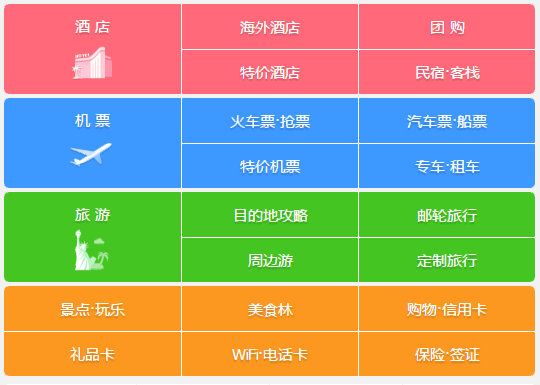
基于HelloWord修改项目代码:
 /**

  * Sample React Native App

  * https://github.com/facebook/react-native

  * @flow

  */

 import React, { Component } from 'react';

 import {

   AppRegistry,

   StyleSheet,

   PixelRatio,

   Text,

   View

 } from 'react-native';

 export default class HelloWord extends Component {

   render() {

     return (

       <View style={styles.body}>

         <View style={[styles.container,styles.redColor]}>

           <View style={[styles.item,styles.center]}>

             <Text style={styles.font}>酒 店</Text>

           </View>

           <View style={[styles.item,styles.leftRightLine]}>

             <View style={[styles.center,styles.flex,styles.bottonLine]}>

               <Text style={styles.font}>海外酒店</Text>

             </View>

             <View style={[styles.center,styles.flex]}>

               <Text style={styles.font}>特价酒店</Text>

             </View>

           </View>

           <View style={[styles.item]}>

             <View style={[styles.center,styles.flex,styles.bottonLine]}>

               <Text style={styles.font}>团购</Text>

             </View>

             <View style={[styles.center,styles.flex]}>

               <Text style={styles.font}>民宿*客栈</Text>

             </View>

           </View>

         </View>

         <View style={[styles.container,styles.blueColor]}>

           <View style={[styles.item,styles.center]}>

             <Text style={styles.font}>机 票</Text>

           </View>

           <View style={[styles.item,styles.leftRightLine]}>

             <View style={[styles.center,styles.flex,styles.bottonLine]}>

               <Text style={styles.font}>火车票·抢票</Text>

             </View>

             <View style={[styles.center,styles.flex]}>

               <Text style={styles.font}>特价机票</Text>

             </View>

           </View>

           <View style={[styles.item]}>

             <View style={[styles.center,styles.flex,styles.bottonLine]}>

               <Text style={styles.font}>汽车票·船票</Text>

             </View>

             <View style={[styles.center,styles.flex]}>

               <Text style={styles.font}>专车·租车</Text>

             </View>

           </View>

         </View>

         <View style={[styles.container,styles.greenColor]}>

           <View style={[styles.item,styles.center]}>

             <Text style={styles.font}>旅 游</Text>

           </View>

           <View style={[styles.item,styles.leftRightLine]}>

             <View style={[styles.center,styles.flex,styles.bottonLine]}>

               <Text style={styles.font}>目的地攻略</Text>

             </View>

             <View style={[styles.center,styles.flex]}>

               <Text style={styles.font}>周边游</Text>

             </View>

           </View>

           <View style={[styles.item]}>

             <View style={[styles.center,styles.flex,styles.bottonLine]}>

               <Text style={styles.font}>邮轮旅行</Text>

             </View>

             <View style={[styles.center,styles.flex]}>

               <Text style={styles.font}>定制旅行</Text>

             </View>

           </View>

         </View>

         <View style={[styles.container,styles.yellowColor]}>

           <View style={styles.item}>

             <View style={[styles.center,styles.flex,styles.bottonLine]}>

               <Text style={styles.font}>景点·玩乐</Text>

             </View>

             <View style={[styles.center,styles.flex]}>

               <Text style={styles.font}>礼品卡</Text>

             </View>

           </View>

           <View style={[styles.item,styles.leftRightLine]}>

             <View style={[styles.center,styles.flex,styles.bottonLine]}>

               <Text style={styles.font}>美食林</Text>

             </View>

             <View style={[styles.center,styles.flex]}>

               <Text style={styles.font}>WiFi·电话卡</Text>

             </View>

           </View>

           <View style={[styles.item]}>

             <View style={[styles.center,styles.flex,styles.bottonLine]}>

               <Text style={styles.font}>购物·信用卡</Text>

             </View>

             <View style={[styles.center,styles.flex]}>

               <Text style={styles.font}>保险·签证</Text>

             </View>

           </View>

         </View>

       </View>

     );

   }

 }

 const styles = StyleSheet.create({

   body:{

     flex:1,

   },

   flex:{

     flex:1,

   },

   container: {

     marginTop:1,

     marginLeft:1,

     marginRight:1,

     height:84,

     flexDirection:'row',

     borderRadius:5,

     padding:2,

   },

   redColor:{

     backgroundColor:'#FF0067',

   },

   blueColor:{

     backgroundColor:'#3d98ff',

   },

   greenColor:{

     backgroundColor:'#44c522',

   },

   yellowColor:{

     backgroundColor:'#fc9720',

   },

   item:{

     flex:1,

     height:80,

   },

   center:{

     justifyContent:'center',

     alignItems:'center',

   },

   font:{

     color:'#fff',

     fontSize:16,

     fontWeight:'bold',

   },

   leftRightLine:{

     borderLeftWidth:1/PixelRatio.get(),

     borderRightWidth:1/PixelRatio.get(),

     borderColor:'#fff',

   },

   bottonLine:{

     borderBottomWidth:1/PixelRatio.get(),

     borderColor:'#fff',

   },

 });

 AppRegistry.registerComponent('HelloWord', () => HelloWord);
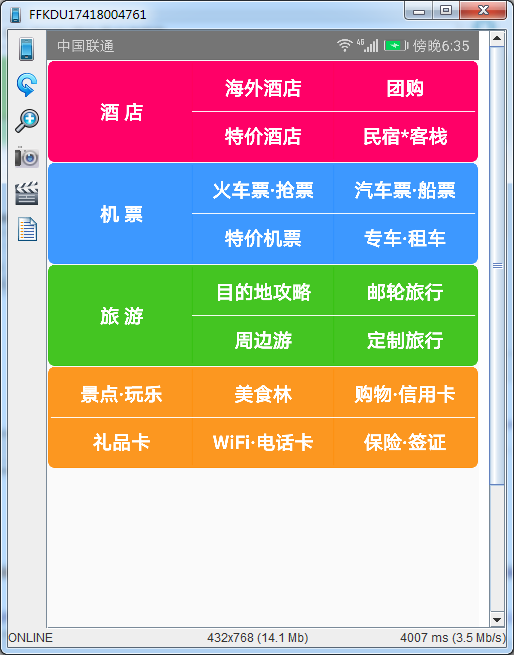
最终运行效果:
React-Native(四):React Native之View学习的更多相关文章
- React Native组件(二)View组件解析
相关文章 React Native探索系列 React Native组件系列 前言 了解了RN的组件的生命周期后,我们接着来学习RN的具体的组件.View组件是最基本的组件,也是首先要掌握的组件,这一 ...
- React Native指南汇集了各类react-native学习资源、开源App和组件
来自:https://github.com/ele828/react-native-guide React Native指南汇集了各类react-native学习资源.开源App和组件 React-N ...
- React Native(四)——顶部以及底部导航栏实现方式
效果图: 一步一步慢慢来: 其实刚入手做app的时候,就应该做出简单的顶部以及底部导航栏.无奈又在忙其他事情,导致这些现在才整理出来. 1.顶部导航栏:react-native-scrollable- ...
- React Native之React速学教程(下)
概述 本篇为<React Native之React速学教程>的最后一篇.本篇将带着大家一起认识ES6,学习在开发中常用的一些ES6的新特性,以及ES6与ES5的区别,解决大家在学习Reac ...
- React Native之React速学教程(中)
概述 本篇为<React Native之React速学教程>的第一篇.本篇将从React的特点.如何使用React.JSX语法.组件(Component)以及组件的属性,状态等方面进行讲解 ...
- React Native之React速学教程(上)
概述 本篇为<React Native之React速学教程>的第一篇.本篇将从React的特点.如何使用React.JSX语法.组件(Component)以及组件的属性,状态等方面进行讲解 ...
- 【React Native】React Native项目设计与知识点分享
闲暇之余,写了一个React Native的demo,可以作为大家的入门学习参考. GitHub:https://github.com/xujianfu/ElmApp.git GitHub:https ...
- Native VS React Native VS 微信小程序
随着React Native和 微信小程序的出现,Native一家独大的局面出现裂痕,很多小公司使用已经正在着手微信小程序和React Native了,我公司就已经走上React Native之路.那 ...
- React Native & react-native-web-player & React Native for Web
React Native & react-native-web-player & React Native for Web https://github.com/dabbott/rea ...
随机推荐
- 笔记:Maven 项目基本配置
Maven 的基本设置包含项目基本信息和项目信息,基本信息主要用于设置当前包的归属项目.当前项目等,配置文件结构如下: <project xmlns="http://maven.apa ...
- 什么是DOM,DOM level 1\2\3 的区别是什么
DOM 文档对象模型(Document Object Model,简称DOM),是W3C组织推荐的处理可扩展标志语言的标准编程接口.Document Object Model的历史可以追溯至1990年 ...
- Lombok介绍、使用方法和总结
1 Lombok背景介绍 官方介绍如下: Project Lombok makes java a spicier language by adding 'handlers' that know how ...
- Day3---------Linux操作系统
---恢复内容开始--- 网络基础和DOS命令 一.网络分类 1.地理位置 1).局域网(LAN) 2).城域网(MAN) 3).广域网(WAN) 2.传输介质 1).有线网 2).光纤网 3).无线 ...
- webpack-dev-server 搭建本地服务以及浏览器实时刷新
一.概述开发项目中为了保证上线,开发项目是都需要使用localhost进行开发,以前的做法就是本地搭建Apache或者Tomcat服务器.有的前端开发人员 对服务器的搭建和配置并不熟悉,这个时候需要后 ...
- virtualbox主机与虚拟机之间互相通信教程
前言 在使用虚拟机搭建集群时,需要实现虚拟机与虚拟机之间互相ping通,并且主机与虚拟机也可以互相ping通. 一.环境准备: 1.主机为win7 2.virtualbox下创建两台ubuntu虚拟机 ...
- selenium2自动化测试学习笔记(四)
今天是学习selenium2第四天.总结下今天的学习成果,自动登录网易邮箱并写信发送邮件. 知识点or坑点: 1.模块化编写测试模块(类似java里的抽象方法,js的函数编写) from 包名 imp ...
- python全栈开发-Day11 迭代器、生成器、面向过程编程
一. 迭代器 一 .迭代的概念 迭代器即迭代的工具,那什么是迭代呢? 迭代是一个重复的过程,每次重复即一次迭代,并且每次迭代的结果都是下一次迭代的初始值 while True: #只是单纯地重复,因而 ...
- VC++开发AutoCAD 2018/objectARX 用向导新建项目无法新建的问题
话说笔者最近想用新机子上装的AutoCAD ObjectARX 2018来进行二次开发,兴致勃勃安装了ARX API和向导, 然后打开VS2015,新建项目,无法新建. 折腾了一下,还是没有解决,后面 ...
- C++ STL常用容器基本用法汇总
1.vector 包含头文件#include<vector> 使用命名域using namespace std 定义元素类型为T的vector vector<T> vec 增: ...