
Centos 6.5升级openssh漏洞
CentOS 6.5下openssh升级
在有的企业中每年都会安全扫描,因为实现远程连接比较重要,如果openssh版本过低,就要对其升级,本文主要讲述openssh升级的步骤。
openssh升级主要有三步:
(1) 安装新版本的openssl
(2) 安装新版本的openssh
如果是生产环境,并且存在备机,建议从备机开始升级,备机升级完了再升级主机。
详细的过程如下:
1.1 安装zlib
Zlib下载地址: http://www.greenxiazai.com/soft/101492.html
[root@localhost ~]# tar –xf zlib-1.2.8.tar.gz
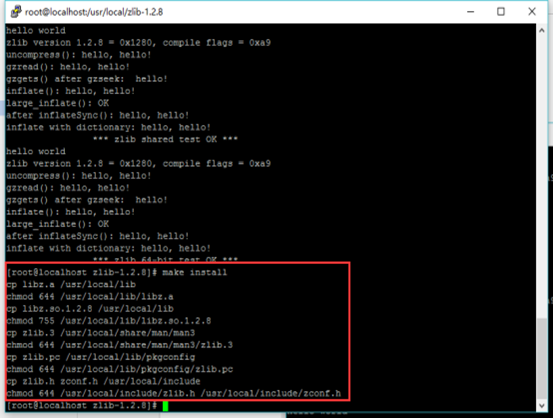
[root@localhost ~]# cd zlib-1.2.8 && ./configure –shared && make && make test && make install
1.2 安装新版本的openssl
这里给出openssl的下载地址:
https://www.openssl.org/source/openssl-1.0.2i.tar.gz,
如果是生产环境,请一定要先确认之前运行的服务是否支持最新的ssl链接库。 安装的命令如下:
1) 备份之前的ssh配置及相关文件
[root@localhost ~]# cp -raf /etc/ssh /etc/ssh.old
[root@localhost ~]# cp -raf /etc/init.d/sshd /etc/init.d/sshd.old
[root@localhost ~]# cp -raf /root/.ssh/ /root/.ssh.old
2) 删掉旧的openssl和openssh
[root@localhost ~]# yum remove -y openssh
[root@localhost ~]# rpm -qa | grep openssl | xargs rpm -e --nodeps
3) 安装openssl
[root@localhost ~]# tar zxvf openssl-1.0.2j.tar.gz
[root@localhost ~]# cd openssl-1.0.2j
[root@localhost ~]# ./config --prefix=/usr/ --shared --openssldir=/etc/ssl --libdir=lib zlib-dynamic
[root@localhost ~]# make depend && make
[root@localhost ~]# make MANDIR=/usr/share/man MANSUFFIX=ssl install && install -dv -m755 /usr/share/doc/openssl-1.0.2i && cp -vfr doc/* /usr/share/doc/openssl-1.0.2i
4) 链接一些必要的库
[root@localhost~]#ln -s \ /usr/lib/libcrypto.so.1.0.0 /usr/lib64/libcrypto.so.1.0.0
[root@localhost ~]# ln -s \ /usr/lib/libssl.so.1.0.0 /usr/lib64/libssl.so.1.0.0
[root@localhost ~]# ln -s \ /usr/lib/libcrypto.so.1.0.0 /usr/lib64/libcrypto.so.10
[root@localhost ~]# ln -s \ /usr/lib/libssl.so.1.0.0 /usr/lib64/libssl.so.10
如果不链接一些必要的库,有一些程序可能会使用不了,比如yum和mysql,安装完成之后可以使用openssl version命令查看版本信息,如果显示下面的图片,表示安装成功。
1.3. 安装并重启openssh
这里给出openssh的下载地址:
http://openbsd.hk/pub/OpenBSD/OpenSSH/portable/openssh-7.4p1.tar.g
1) 安装并重启的命令如下:
[root@localhost ~]# tar zxvf openssh-7.4p1.tar.gz
[root@localhost ~]# cd openssh-7.4p1
2) 隐藏版本号配置
[root@localhost ~]# sed -i '/SSH_VERSION/s/OpenSSH_7.4/Goodbye/g' version.h
[root@localhost ~]# sed -i '/SSH_PORTABLE/s/p1/./g' version.h
[root@localhost ~]# echo "/usr/include/openssl/">>/etc/ld.so.conf
[root@localhost ~]# ldconfig
[root@localhost~]#./configure --prefix=/usr --sysconfdir=/etc/ssh --with-md5-passwords --with-ssl-dir=/usr/local/ssl/ --with-privsep-path=/var/empty/sshd
[root@localhost ~]# make
[root@localhost ~]# make install &&
[root@localhost~]# install -v -m755 contrib/ssh-copy-id /usr/bin && install -v -m644 contrib/ssh-copy-id.1 /usr/share/man/man1 && install -v -m755 -d /usr/share/doc/openssh-7.4p1 && install -v -m644 INSTALL LICENCE OVERVIEW README* /usr/share/doc/openssh-7.4p1
3) 恢复备份
[root@localhost ~]# cp -raf /etc/init.d/sshd.old /etc/init.d/sshd
[root@localhost~]#mv /etc/ssh/sshd_config /etc/ssh/sshd_config.new
[root@localhost~]#cp -raf/etc/ssh.old/sshd_config /etc/ssh/sshd_config
注:同样,如果在生产环境下,公司对出网有端口限制,那么就要先杀死dropbear第一个监听的端口,把sshd服务配置文件(/etc/ssh/sshd_config)中的监听端口改掉,然后重启sshd服务。
[root@localhost ~]# service sshd restart
重启如果出现下面图片显示的内容:

只需要在sshd配置文件中将相关项注释掉即可,并不影响使用。
最后将sshd服务设置为开机自启动。
[root@localhost ~]# chkconfig sshd on
4) 查看版本

1.4. 注意事项
升级完成后如果ssh拒绝root登录,需修改配置:
[root@localhost ~]# vi /etc/ssh/sshd_config

[root@localhost ~]# service sshd restart
[root@localhost ~]# chkconfig sshd on
升级完成后如果使用xftp拒绝连接,做以下配置:
[root@localhost ~]# vi /etc/ssh/sshd_config
默认配置:

修改后配置:

重启服务:
[root@localhost ~]# service sshd restart
Centos 6.5升级openssh漏洞的更多相关文章
- CentOS 6.9 升级OpenSSH版本 关闭ssh服务后门
最近用低版本的OpenSSH(5.9p1版本) 的漏洞给系统留了个后门 , 可以劫持root密码或者给root开启后门密码 : 利用Openssh后门 劫持root密码 如果公司还在用CentOS6的 ...
- 升级openssh漏洞
升级openssl和openssh 最近接收到客户的漏洞提醒,openssl和openssh的漏洞,解决办法就只有升级. 升级前环境 ~]# ssh -V OpenSSH_5.3p1, OpenSSL ...
- CentOS 7 下升级OpenSSH 7.4p1到OpenSSH 8.4p1
文章目录 一.环境介绍 二.安装配置telnet 2.1.安装telnet-server 2.2.配置telnet 2.3.配置telnet登录的终端类型 2.4.启动telnet服务 三.切换登录方 ...
- CentOS 7.x 升级OpenSSH
升级SSH 存在中断风险,如果SSH 升级失败将会导致终端无法登录,建议在使用本地虚拟机进行测试后对线上生产环境进行升级操作!!! 三级等保评测中对主机进行漏洞扫描发现linux主机存在高危漏洞,查看 ...
- Centos 6.5升级openssh到7.5p1版本
centos6自带的ssh版本较低,存在高危漏洞,目前部分服务器需要升级到最新版本(目前是7.5p1). 注:升级ssh存在一定的危险性,一旦不成功可能无法通过远程连接到系统,因此在升级之前最好有远程 ...
- centos 6&7 升级openssh
1.查看现在的版本 # rpm -qa | grep openssh openssh-clients-6.6.1p1-22.el7.x86_64 openssh-server-6.6.1p1-22.e ...
- centos升级openssh版本
似乎升级就是简单的安装ssh包就行了,没进行其他修改,虚拟机24个中高低漏洞解决 安装最新包: 1.下载:https://cdn.openbsd.org/pub/OpenBSD/OpenSSH/por ...
- CentOS 升级 openSSH
openSSH作为linux远程连接工具,容易受到攻击,必须更新版本来解决,低版本有如下等漏洞: a. OpenSSH 远程代码执行漏洞(CVE-2016-10009) b. OpenSSH aut ...
- CentOS 升级 openSSH+ sh脚本自动运维
升级前后对比 openSSH作为linux远程连接工具,容易受到攻击,必须更新版本来解决,低版本有如下等漏洞: OpenSSH 远程代码执行漏洞(CVE-2016-10009) OpenSSH au ...
随机推荐
- js中的深拷贝与浅拷贝
对象的深拷贝于浅拷贝 对于基本类型,浅拷贝过程就是对值的复制,这个过程会开辟出一个新的内存空间,将值复制到新的内存空间.而对于引用类型来书,浅拷贝过程就是对指针的复制,这个过程并没有开辟新的堆内存空间 ...
- 关于int main( int argc, char *argv[] )
int main(int argc, char *argv[], char *env[]) 1. int argc 表示你在命令行下输入命令的时候,一共有多少个参数. 2. char *argv[] ...
- Django REST framework反向生成url
Django REST framework是一个基于Django的框架,REST framework又是怎么反向生成url的呢?? 在前面的例子中,知道在REST framework中有6种版本控制的 ...
- apr-util的安装
下载软件 下载链接: http://pan.baidu.com/s/1o6sOwgM http://pan.baidu.com/s/1hqIdcA4 ########安装apr######### ta ...
- 看图说话,P2P 分享率 90% 以上的 P2P-CDN 服务,来了!
事情是这样的:今年年初的时候,公司准备筹划一个直播项目,在原有的 APP 中嵌入直播模块,其中的一个问题就是直播加速服务的选取. 老板让我负责直播加速的产品选型,那天老板把我叫到办公室,语重心长地说: ...
- php 生成缩略图
$src = '4.jpg'; list($width,$height) = getimagesize($src); $im = imagecreatefromjpeg($src); $panl = ...
- shell编程之环境变量配置文件(4)
1 source命令 修改了配置文件,并让它立刻生效,而不用重新登录 source 配置文件 或者 .配置文件 2 环境变量配置文件简介 PATH HISTSIZE PS1 HOSTNAME等环境变量 ...
- Virtualbox以及VWare在Win10下的不兼容
异常处理汇总-开发工具 http://www.cnblogs.com/dunitian/p/4522988.html Hyper原因导致的,关闭即可 禁用 hyper-vbcdedit /set h ...
- 一个例子理解break和continue的区别
结论:break用于终止整个循环,而continue用于终止某一次循环.public class Test { public static void main(String[] args) { for ...
- [翻译] 编写高性能 .NET 代码--第二章 GC -- 减少大对象堆的碎片,在某些情况下强制执行完整GC,按需压缩大对象堆,在GC前收到消息通知,使用弱引用缓存对象
减少大对象堆的碎片 如果不能完全避免大对象堆的分配,则要尽量避免碎片化. 对于LOH不小心就会有无限增长,但LOH使用的空闲列表机制可以减轻增长的影响.利用这个空闲列表,我们可以在两块分配区域中间找到 ...