
在NAS设备上用NFS服务为RAC数据库和集群件存储oracle文件时的mount选项
今天在家折腾自己的小实验室,把自己NAS上的一个目录用NFS挂载到一套11g RAC的实验环境中。
当我在备份数据库到NAS上时,发现一个奇怪的问题,同样的目录下,默认backup 备份集的情况,备份是成功的,但如果使用backup as copy备份则会报错,现象如下:
RMAN> backup datafile 6 format '/public/backup/oradb23/dbs_d_jingyu.bak';

Starting backup at 25-MAR-17

using channel ORA_DISK_1

channel ORA_DISK_1: starting full datafile backup set

channel ORA_DISK_1: specifying datafile(s) in backup set

input datafile file number=00006 name=+DATA/jyzhao/datafile/dbs_d_jingyu.268.937515173

channel ORA_DISK_1: starting piece 1 at 25-MAR-17

channel ORA_DISK_1: finished piece 1 at 25-MAR-17

piece handle=/public/backup/oradb23/dbs_d_jingyu.bak tag=TAG20170325T210550 comment=NONE

channel ORA_DISK_1: backup set complete, elapsed time: 00:00:07

Finished backup at 25-MAR-17

Starting Control File and SPFILE Autobackup at 25-MAR-17

piece handle=/public/backup/oradb23/c-2520969382-20170325-01 comment=NONE

Finished Control File and SPFILE Autobackup at 25-MAR-17

RMAN> backup as copy datafile 6 format '/public/backup/oradb23/%u.dbf';

Starting backup at 25-MAR-17

using channel ORA_DISK_1

channel ORA_DISK_1: starting datafile copy

input datafile file number=00006 name=+DATA/jyzhao/datafile/dbs_d_jingyu.268.937515173

RMAN-00571: ===========================================================

RMAN-00569: =============== ERROR MESSAGE STACK FOLLOWS ===============

RMAN-00571: ===========================================================

RMAN-03009: failure of backup command on ORA_DISK_1 channel at 03/25/2017 21:07:30

ORA-19504: failed to create file "/public/backup/oradb23/0vs0200h.dbf"

ORA-27054: NFS file system where the file is created or resides is not mounted with correct options

Additional information: 3

Additional information: 12

RMAN>
看backup as copy的报错明显是告诉我们无法在/public/backup/oradb23/目录下创建文件,但目录肯定有写权限,不然备份集备份也一样不会成功。
使用oerr简单先查看该错误号的说明:
[oracle@oradb23 ~]$ oerr ora 27504

27504, 00000, "IPC error creating OSD context"

// *Cause:  This is an operating system/cluster interconnect error.

// *Action: Check the value of errno and contact Oracle Support Services.
也没有太多有价值的内容。
进而查看MOS,最终找到下面这篇文档,
Mount Options for Oracle files for RAC databases and Clusterware when used with NFS on NAS devices (文档 ID 359515.1)
RAC including RACone and single instance RAC
In the table below
Binaries is the shared mount points where the Oracle Home and CRS_HOME is installed.
Datafiles includes Online Logs, Controlfile and Datafiles
nfsvers and vers are identical on those OS platforms that has nfsvers. The ver option is an alternative to the nfsvers option. It is included for compatibility with other operating systems
Please note that the mount options on each of the following cells are applicable only to those type of files listed in the column heading.
For RMAN backup sets, image copies, and Data Pump dump files, the "NOAC" mount option should not be specified - that is because RMAN and Data Pump do not check this option and specifying this can adversely affect performance.
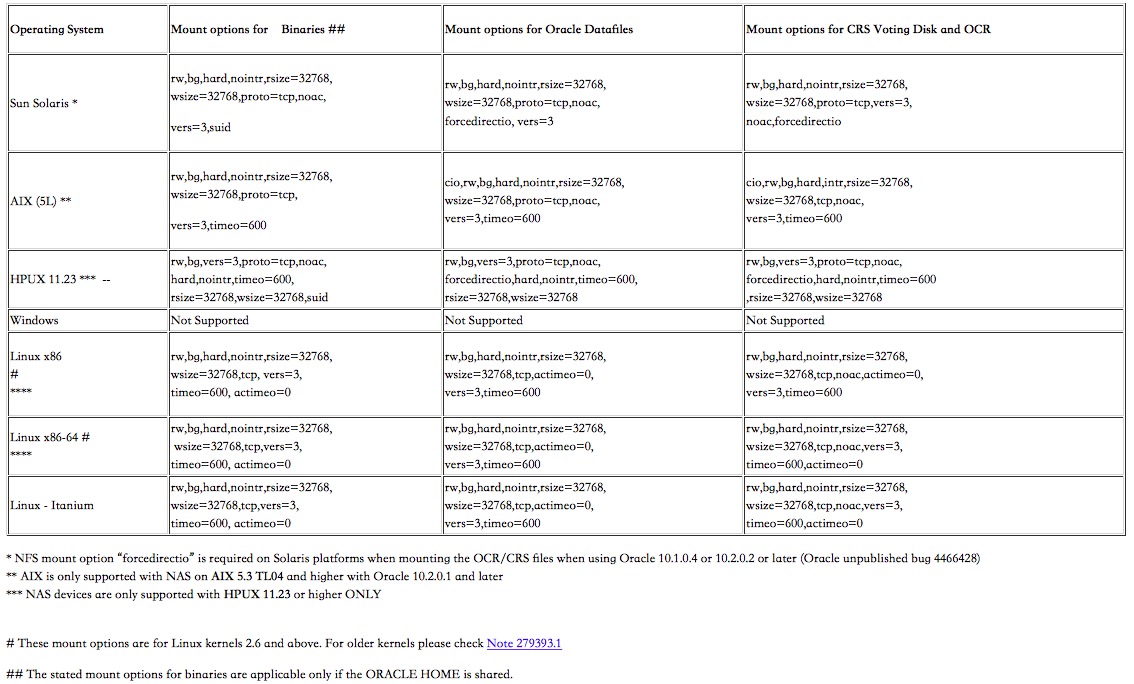
Due to Unpublished bug 5856342, it is necessary to use the following init.ora parameter when using NAS with all versions of RAC on Linux (x86 & X86-64 platforms) until 10.2.0.4. This bug is fixed and included in 10.2.0.4 patchset.
filesystemio_options = DIRECTIO
大概意思是存储数据文件的话,在mount时,还需要指定一些特定的选项:
--vi /etc/fstab

#192.168.1.196:/mnt/HD/HD_a2/Public     /public nfs rw

192.168.1.196:/mnt/HD/HD_a2/Public     /public nfs rw,bg,hard,nointr,rsize=32768,wsize=32768,tcp,actimeo=0,vers=3,timeo=600
第一行注释的是之前我配置的NFS挂载,而实际如果要存放数据文件,则需要按照上面提到的MOS文档进行配置,也就是第二行内容。
修改完重新挂载/public, 再次测试backup as copy,已经可以正常备份了。
RMAN> backup as copy datafile 6 format '/public/backup/oradb23/%u.dbf';

Starting backup at 25-MAR-17

using channel ORA_DISK_1

channel ORA_DISK_1: starting datafile copy

input datafile file number=00006 name=+DATA/jyzhao/datafile/dbs_d_jingyu.268.937515173

output file name=/public/backup/oradb23/17s022f8.dbf tag=TAG20170325T214928 RECID=16 STAMP=939592197

channel ORA_DISK_1: datafile copy complete, elapsed time: 00:00:35

Finished backup at 25-MAR-17

Starting Control File and SPFILE Autobackup at 25-MAR-17

piece handle=/public/backup/oradb23/c-2520969382-20170325-03 comment=NONE

Finished Control File and SPFILE Autobackup at 25-MAR-17
至此,就可以正常backup as copy到我的NAS设备中了。
在NAS设备上用NFS服务为RAC数据库和集群件存储oracle文件时的mount选项的更多相关文章
- android设备上运行i-jetty服务
android设备上运行i-jetty服务: 1) i-jetty安装 本人小菜一个,i-jetty源码有好几个文件,不知道怎么运行起来,于是找了一个现成可运行的i-jetty工程(感谢这位同学的分享 ...
- Nginx集群之WCF大文件上传及下载(支持6G传输)
目录 1 大概思路... 1 2 Nginx集群之WCF大文件上传及下载... 1 3 BasicHttpBinding相关配置解析... 2 4 编写 ...
- 在Centos 7上安装配置 Apche Kafka 分布式消息系统集群
Apache Kafka是一种颇受欢迎的分布式消息代理系统,旨在有效地处理大量的实时数据.Kafka集群不仅具有高度可扩展性和容错性,而且与其他消息代理(如ActiveMQ和RabbitMQ)相比,还 ...
- 搭建ELK日志分析平台(上)—— ELK介绍及搭建 Elasticsearch 分布式集群
笔记内容:搭建ELK日志分析平台(上)-- ELK介绍及搭建 Elasticsearch 分布式集群笔记日期:2018-03-02 27.1 ELK介绍 27.2 ELK安装准备工作 27.3 安装e ...
- Win10上的Docker应用:Kubernetes(容器集群)
阅读目录: Docker应用:Hello World Docker应用:Docker-compose(容器编排) Docker应用:Kubernetes(容器集群) 前言: 终于出第三篇了,上个月就已 ...
- RabbitMQ的使用(二)- RabbitMQ服务在单机中做集群
RabbitMQ的使用(二)- RabbitMQ服务在单机中做集群 作者:markjiang7m2 原文地址:https://www.cnblogs.com/markjiang7m2/p/128371 ...
- 一个线上问题的思考:Eureka注册中心集群如何实现客户端请求负载及故障转移?
前言 先抛一个问题给我聪明的读者,如果你们使用微服务SpringCloud-Netflix进行业务开发,那么线上注册中心肯定也是用了集群部署,问题来了: 你了解Eureka注册中心集群如何实现客户端请 ...
- 探针配置失误,线上容器应用异常死锁后,kubernetes集群未及时响应自愈重启容器?
探针配置失误,线上容器应用异常死锁后,kubernetes集群未及时响应自愈重启容器? 探针配置失误,线上容器应用异常死锁后,kubernetes集群未及时响应自愈重启容器? 线上多个服务应用陷入了死 ...
- Spring Cloud之微服务注册到Eureka Server集群后访问改造
上篇Spring Cloud之服务注册中心搭建Eureka Server服务注册中⼼ - 池塘里洗澡的鸭子 - 博客园 (cnblogs.com)已经已经成功将两个微服务注册到集群中,那么能正常能与注 ...
随机推荐
- java_XML_Dom4j
一.DOM4j中,获得Document对象的方式有三种: 1.读取XML文件,获得document对象 SAXReader reader = new SAXReader(); Document doc ...
- qmake的配置功能(Configuration Features)
Configuration Features qmake can be set up with extra configuration features that are specified in f ...
- asp.net core mvc剖析:处理管道构建
在启动流程文章中提到,在WebHost类中,通过BuildApplication完成http请求处理管道的构建.在来看一下代码: ...... //这个调用的就是Startup.cs类中的Config ...
- 一个RESTful+MySQL程序
前言 本章内容适合初学者(本人也是初学者). 上一章内容(http://www.cnblogs.com/vanezkw/p/6414392.html)是在浏览器中显示Hello World,今天我们要 ...
- linux中的软连接和硬连接
1. 创建软连接的方法 ln -s /path/to/original /path/to/linkName 当我们对软连接文件进行修改后,对应的修改也会反映到原始的文件(反之亦然). 当我们删除软连接 ...
- HTTP协议详解【转】
当今web程序的开发技术真是百家争鸣,ASP.NET, PHP, JSP,Perl, AJAX 等等. 无论Web技术在未来如何发展,理解Web程序之间通信的基本协议相当重要, 因为它让我们理解了We ...
- "table" is not mapped 解决方法
现象:使用hql="from person" 出现" person is not mapped " 错误 配置文件如下:<hibernate-mappin ...
- MASM32使用教程
代码如果你在用汇编语言来开发windows下的程序的话,MASM32是很好的选择. (Masm32下载地址请用google搜索罢.) 工欲善其事,必先利其器. 本文主要针对masm32 v8来说明三点 ...
- 关于 <textarea ></textarea >标签在苹果微信浏览器出现 内阴影
解决方法:(去除浏览器默认的样式元素) textarea { box-shadow:0px 0px 0px rgba(0,0,0,0); -webkit-appearance:none; }
- redis安装(针对2.8以上版本)
1. 下载安装包 http://redis.io/ 2. 下载tcl/tck http://124.202.164.12/files/41060000061B56BD/downloads.source ...