
使用Selenium模块报错的解决办法 (FileNotFound,WebDriverException)
添加Chrome浏览器程序的目录到系统Path变量中:
C:\Users\%USERNAME%\AppData\Local\Google\Chrome\Application ,使用pip3 install selenium安装selenium模块后,在jupyter notebook中运行示例程序:
from selenium import webdriver

browser = webdriver.Chrome()

browser.get('http://www.baidu.cn')
【报错信息】:
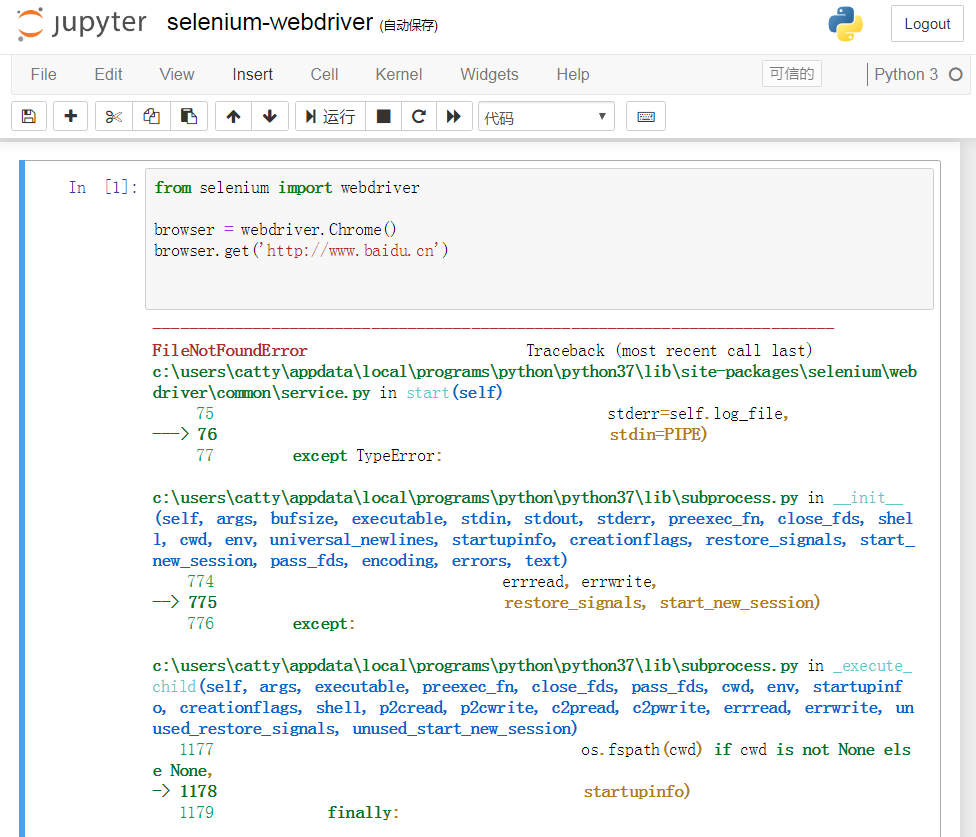
FileNotFoundError Traceback (most recent call last)
c:\users\catty\appdata\local\programs\python\python37\lib\site-packages\selenium\webdriver\common\service.py in start(self)
75 stderr=self.log_file,
---> 76 stdin=PIPE)
77 except TypeError:
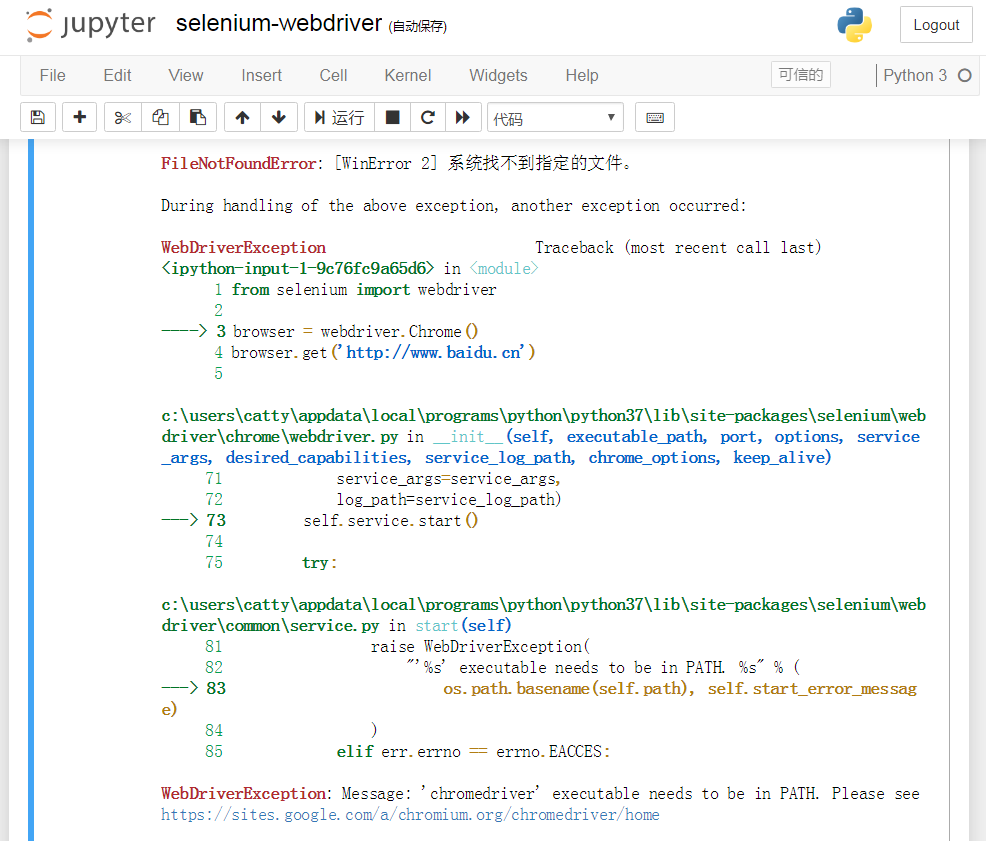
FileNotFoundError: [WinError 2] 系统找不到指定的文件。
During handling of the above exception, another exception occurred:
WebDriverException Traceback (most recent call last)
<ipython-input-1-9c76fc9a65d6> in <module>
1 from selenium import webdriver
2
----> 3browser = webdriver.Chrome()
4 browser.get('http://www.baidu.cn')
5
WebDriverException: Message: 'chromedriver' executable needs to be in PATH. Please see https://sites.google.com/a/chromium.org/chromedriver/home
【解决办法】:
到网址:http://npm.taobao.org/mirrors/chromedriver/
下载与浏览器程序Chrome.exe相对应的版本的chromedriver.exe 程序,放到系统能够找到的路径中,比如:C:\Users\catty\AppData\Local\Programs\Python\Python37目录下,再次在jupyter notebook中运行示例,不再报错,能够正常使用谷歌Chrome浏览器打开百度网站。
参考链接:
python Selenium2.0模块使用中报错的解决办法
https://blog.csdn.net/limeilian10221017/article/details/70570056
chromedriver.exe下载
https://blog.csdn.net/morling05/article/details/81094151
Chromedriver.exe 下载地址:
http://npm.taobao.org/mirrors/chromedriver/73.0.3683.68/
http://npm.taobao.org/mirrors/chromedriver/
Mirror index of http://chromedriver.storage.googleapis.com/
使用Selenium模块报错的解决办法 (FileNotFound,WebDriverException)的更多相关文章
- Springboot数据库连接池报错的解决办法
Springboot数据库连接池报错的解决办法 这个异常通常在Linux服务器上会发生,原因是Linux系统会主动断开一个长时间没有通信的连接 那么我们的问题就是:数据库连接池长时间处于间歇状态,导致 ...
- Loadrunner参数化连接oracle、mysql数据源报错及解决办法
Loadrunner参数化连接oracle.mysql数据源报错及解决办法 (本人系统是Win7 64, 两位小伙伴因为是默认安装lr,安装在 最终参数化的时候,出现连接字符串无法自动加载出来: 最 ...
- PHP empty函数报错的解决办法
PHP empty函数在检测一个非变量情况下报错的解决办法. PHP开发时,当你使用empty检查一个函数返回的结果时会报错:Fatal error: Can't use function retur ...
- eclipse中的js文件报错的解决办法
在使用别人的项目的时候,导入到eclipse中发现js文件报错,解决办法是关闭eclipse的js校验功能. 三个步骤: 1. 右键点击项目->properties->Validation ...
- Base64 报错 的解决办法 (Base-64 字符数组或字符串的长度无效。, 输入的不是有效的 Base-64 字符串,因为它包含非 Base-64 字符、两个以上的填充字符,或者填充字符间包含非法字符。)
Base64 报错 的解决办法, 报错如下:1. FormatException: The input is not a valid Base-64 string as it contains a n ...
- VM装mac10.9教程+报错信息解决办法
VM装mac10.9教程+报错信息解决办法 教程1: 教你在Vmware 10下安装苹果Mac10.9系统 地址:http://tieba.baidu.com/p/2847457021 教程2: VM ...
- Oracle数据库误删文件导致rman备份报错RMAN-06169解决办法
Oracle数据库误删文件导致rman备份报错RMAN-06169解决办法 可能是误删文件导致在使用rman备份时候出现以下提示 RMAN-06169: could not read file hea ...
- Xamarin开发安装Visual Studio 2015 update2报错的解决办法
Xamarin开发安装Visual Studio 2015 update2报错的解决办法错误信息:update 2 requires a member of the visual studio 201 ...
- Linux虚拟机--进入MySQL报错的解决办法
在Linux安装MySQL有时候会出现 [mysql]ERROR 2002 (HY000): Can't connect to local MySQL server through socket '/ ...
随机推荐
- python类与对象-如何创建可管理的对象属性
如何创建可管理的对象属性 问题举例 在面向对象编程中, 我们把方法看作对象的接口, 直接访问对象的属性可能是不安全的,或设计上不够灵活. 但是使用调用方法在形式上不如访问属性简洁. circle.ge ...
- JavaScript实现RSA加解密
在GitHub上找到jsencrypt.js对RSA加解密的工具文件,地址分别是:https://github.com/travist/jsencrypt和https://github.com/ope ...
- if __name__ == '__main__' 这段代码怎么理解???
__name__是内置变量,可用于表示当前模块的名字,而“__main__”等于当前执行文件的名称. 两个名称搞不清没关系,往下看待会解释 对很多编程语言来说,程序都需要一个入口,例如C系列.Java ...
- Kafka笔记4(消费者)
消费者和消费群组: Kafka消费者从属于消费者群组,一个群组里的消费者订阅的是同一个主题,每个消费者接收主题的一部分分区消息 消费者的数量不要超过主题分区的数量,多余的消费者只会被闲置 一个主题可以 ...
- UIManager
创建UIManager,管理所有UI面板 准备工作: 1. 创建Canvas并设置Tag为Main Canvas 2. 在Canvas下新建五个层级节点,因为UGUI显示层级越往下越靠前 using ...
- 利用反射和JDBC元数据实现更加通用的查询方法
package com.at221.jdbc; import java.io.IOException; import java.io.InputStream; import java.sql.*; i ...
- 网络编程之实现server端并发聊天
程序如下: import socketserver class MyServer(socketserver.BaseRequestHandler): #自己定义一个类,继承BaseRequestHan ...
- IDE中使用System.getProperty()获取一些属性
使用环境:一般在项目首页或者项目后端配置中会使用到一些属性获取: package com.liuyc.study.utils; /** * 获取当前操作系统中或者当前环境中的一些默认配置 * @aut ...
- keil在线烧录突然提示 No target connected #
keil在线烧录突然提示 No target connected 运行环境 IDE:keil uvsion5 微处理器:STM32F0xx 系列 烧录器:ST-LINK/V2 问题描述 烧录新程序并进 ...
- Oracle树查询及相关函数
Oracle树查询的最重要的就是select...start with... connect by ...prior 语法了.依托于该语法,我们可以将一个表形结构的中以树的顺序列出来.在下面列述了Or ...