
Web Service(下)
4.WSDL文档
<?xml version='1.0' encoding='UTF-8'?>

<wsdl:definitions xmlns:xsd="http://www.w3.org/2001/XMLSchema"

	xmlns:wsdl="http://schemas.xmlsoap.org/wsdl/"

	xmlns:tns="http://ws.day01_ws.atguigu.com/"

	xmlns:soap="http://schemas.xmlsoap.org/wsdl/soap/"

	xmlns:ns1="http://schemas.xmlsoap.org/soap/http"

	name="HelloWSImplService"

	targetNamespace="http://ws.day01_ws.atguigu.com/">

	<!--

		types

			schema : 定义了一些标签结构

	 -->

	<wsdl:types>

		<xs:schema xmlns:xs="http://www.w3.org/2001/XMLSchema"

			xmlns:tns="http://ws.day01_ws.atguigu.com/" elementFormDefault="unqualified"

			targetNamespace="http://ws.day01_ws.atguigu.com/" version="1.0">

			<!--

				//用于请求

				<sayHello>

					<arg0>string</arg0>

				</sayHello>

					<q0:sayHello>

						<arg0>BB</arg0>

					</q0:sayHello>

				//用于响应

				<sayHelloResponse>

					<return>string</return>

				</sayHelloResponse>

					<ns2:sayHelloResponse">

						<return>Hello BB</return>

					</ns2:sayHelloResponse>

			 -->

			<xs:element name="sayHello" type="tns:sayHello" />

			<xs:element name="sayHelloResponse" type="tns:sayHelloResponse" />

			<xs:complexType name="sayHello">

				<xs:sequence>

					<xs:element minOccurs="0" name="arg0" type="xs:string" />

				</xs:sequence>

			</xs:complexType>

			<xs:complexType name="sayHelloResponse">

				<xs:sequence>

					<xs:element minOccurs="0" name="return" type="xs:string" />

				</xs:sequence>

			</xs:complexType>

		</xs:schema>

	</wsdl:types>

	<!--

		message: 用来定义消息的结构   soap消息

			part : 指定引用types中定义的标签片断

	 -->

	<wsdl:message name="sayHelloResponse">

		<wsdl:part element="tns:sayHelloResponse" name="parameters">

		</wsdl:part>

	</wsdl:message>

	<wsdl:message name="sayHello">

		<wsdl:part element="tns:sayHello" name="parameters">

		</wsdl:part>

	</wsdl:message>

	<!--

		portType: 用来定义服务器端的SEI(WebService EndPoint Interface)

			operation : 用来指定SEI中的处理请求的方法

				input : 指定客户端应用传过来的数据, 会引用上面的定义的<message>

				output : 指定服务器端返回给客户端的数据, 会引用上面的定义的<message>

	 -->

	<wsdl:portType name="HelloWS">

		<wsdl:operation name="sayHello">

			<wsdl:input message="tns:sayHello" name="sayHello">

			</wsdl:input>

			<wsdl:output message="tns:sayHelloResponse" name="sayHelloResponse">

			</wsdl:output>

		</wsdl:operation>

	</wsdl:portType>

	<!--

		binding : 用于定义SEI的实现类

			type属性: 引用上面的<portType>

			<soap:binding style="document"> : 绑定的数据是一个document(xml)

			operation : 用来定义实现的方法

				<soap:operation style="document" /> 传输的是document(xml)

				input: 指定客户端应用传过来的数据

					<soap:body use="literal" /> : 文本数据

				output : 指定服务器端返回给客户端的数据

					<soap:body use="literal" /> : 文本数据

	 -->

	<wsdl:binding name="HelloWSImplServiceSoapBinding" type="tns:HelloWS">

		<soap:binding style="document"

			transport="http://schemas.xmlsoap.org/soap/http" />

		<wsdl:operation name="sayHello">

			<soap:operation soapAction="" style="document" />

			<wsdl:input name="sayHello">

				<soap:body use="literal" />

			</wsdl:input>

			<wsdl:output name="sayHelloResponse">

				<soap:body use="literal" />

			</wsdl:output>

		</wsdl:operation>

	</wsdl:binding>

	<!--

		service : 一个webservice的容器

			name属性: 它用来指定客户端容器类

			port : 用来指定一个服务器端处理请求的入口(就SEI的实现)

				binding属性: 引用上面定义的<binding>

				address : 当前webservice的请求地址

	 -->

	<wsdl:service name="HelloWSImplService">

		<wsdl:port binding="tns:HelloWSImplServiceSoapBinding" name="HelloWSImplPort">

			<soap:address location="http://192.168.1.108:8888/day01_ws/hellows" />

		</wsdl:port>

	</wsdl:service>

</wsdl:definitions>
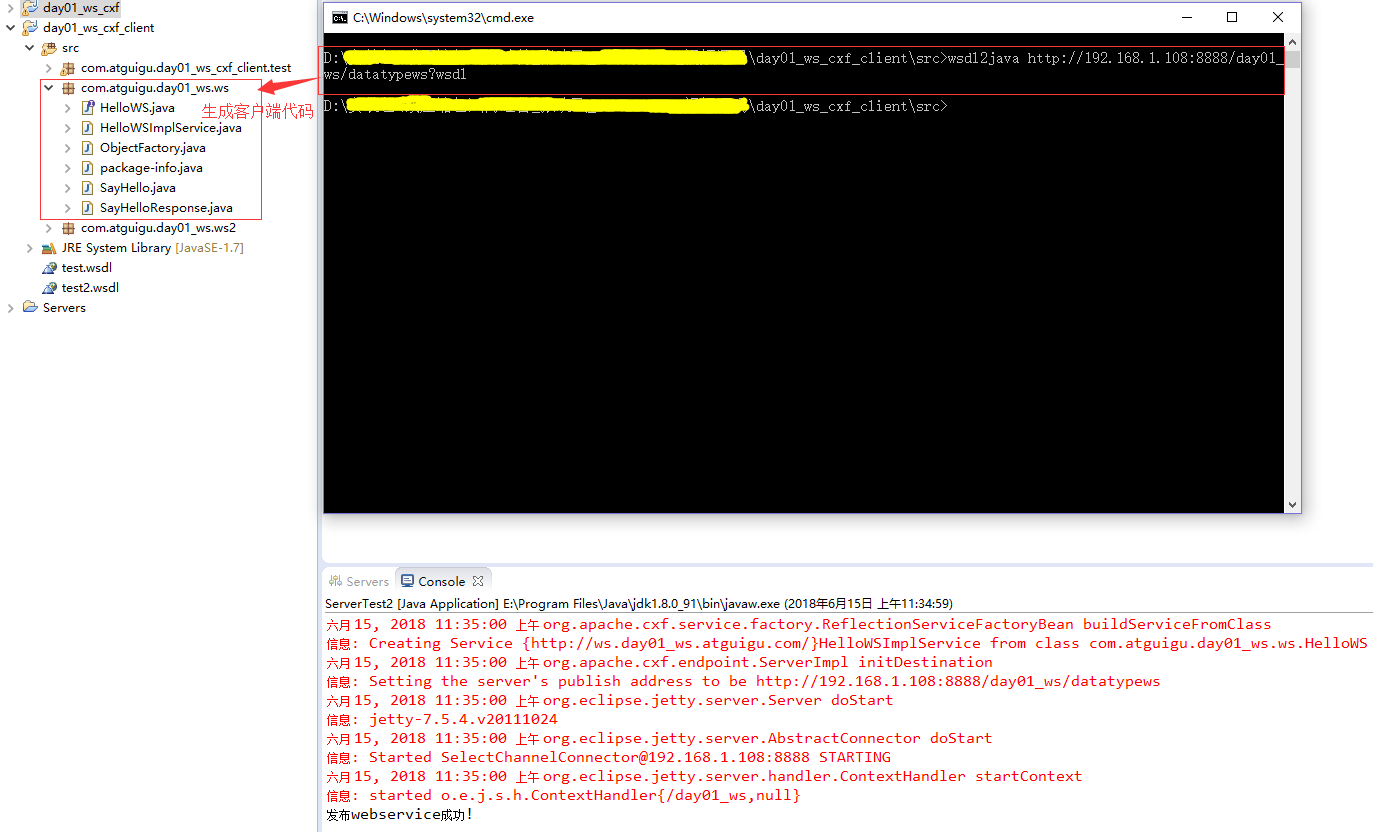
请求Web Service
import com.atguigu.day01_ws.ws.HelloWS;

import com.atguigu.day01_ws.ws.HelloWSImplService;

public class ClientTest {

	public static void main(String[] args) {

		HelloWSImplService factory = new HelloWSImplService();

		HelloWS hellWS = factory.getHelloWSImplPort();

		String result = hellWS.sayHello("BOB");

		System.out.println("client "+result);

	}

}
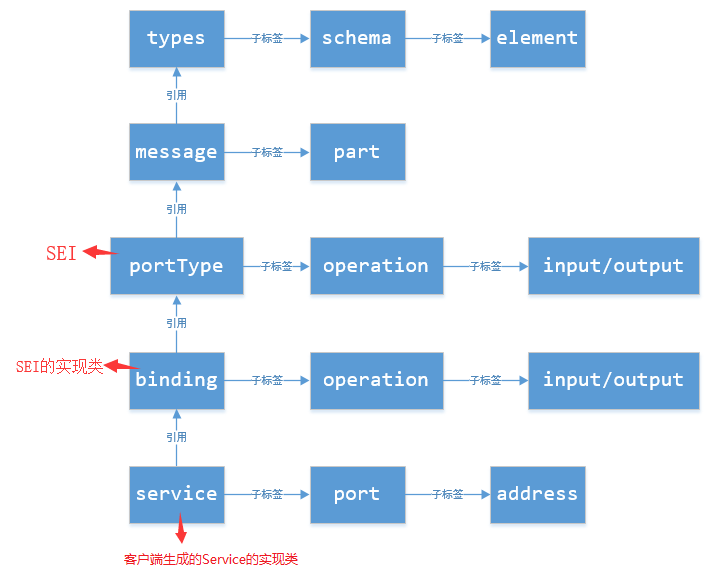
WSDL文档结构
<definitions>

	<types>

		<xs:schema>

			<xs:element>

		</xs:schema>

	</types>

	<message>

		<part>

	</message>

	<portType>

		<operation>

			<input>

			<output>

		</operation>

	</portType>

	<binding>

		<soap:binding/>

		<operation>

			<input>

			<output>

		</operation>

	</binding>

	<service>

		<port>

			<soap:address location="" />

		</port>

	</service>

</definitions>
WSDL文档图解
5.使用框架开发Web Service
Apache CXF继承了 Celtix 和 XFire 两大开源项目的精华,提供了对JAX-WS全面的支持,并且提供了多种 Binding 、DataBinding、Transport 以及各种 Format 的支持,并且可以根据实际项目的需要,采用代码优先(Code First)或者 WSDL 优先(WSDL First)来轻松地实现 Web Services 的发布和使用。
Apache CXF支持的数据类型有:int、float、String、自定义类型、集合、数组、List、Set、Map。
5.1 Web Service的请求流程
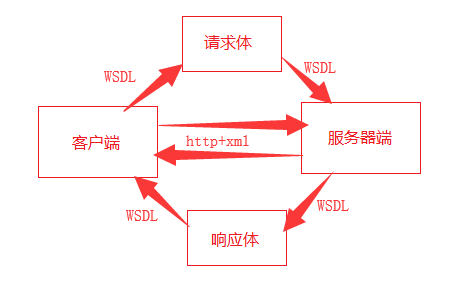
使用Apache CXF框架开发Web Service需要将相关的jar包导入到项目的类路径下,并且客户端使用wsdl2java命令生成客户端代码。
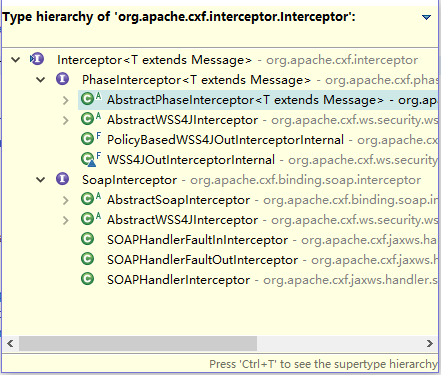
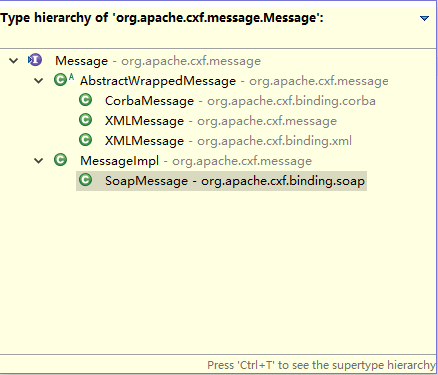
5.2 Apache CXF的拦截器
为了在Web Service请求过程中,能动态操作请求和响应数据,Apache CXF设计了拦截器。
package org.apache.cxf.interceptor;

import org.apache.cxf.message.Message;

/**

 * Base interface for all interceptors.

 */

public interface Interceptor<T extends Message> {

    /**

     * Intercepts a message.

     * Interceptors should NOT invoke handleMessage or handleFault

     * on the next interceptor - the interceptor chain will

     * take care of this.

     *

     * @param message

     */

    void handleMessage(T message) throws Fault;

    /**

     * Called for all interceptors (in reverse order) on which handleMessage

     * had been successfully invoked, when normal execution of the chain was

     * aborted for some reason.

     *

     * @param message

     */

    void handleFault(T message);

}
5.3 用Apache CXF编写基于Spring的Web Service
5.3.1 服务器端
beans.xml
<?xml version="1.0" encoding="UTF-8"?>

<beans xmlns="http://www.springframework.org/schema/beans"

   xmlns:xsi="http://www.w3.org/2001/XMLSchema-instance"

   xmlns:jaxws="http://cxf.apache.org/jaxws"

   xsi:schemaLocation="http://www.springframework.org/schema/beans http://www.springframework.org/schema/beans/spring-beans.xsd

		http://cxf.apache.org/jaxws http://cxf.apache.org/jaxws">

  <!-- 引cxf的一些核心配置 -->

   <import resource="classpath:META-INF/cxf/cxf.xml" />

   <import resource="classpath:META-INF/cxf/cxf-extension-soap.xml" />

   <import resource="classpath:META-INF/cxf/cxf-servlet.xml" />

   <jaxws:endpoint

     id="orderWS"

     implementor="com.atguigu.day02_ws_cxf_spring.ws.OrderWSImpl"

     address="/orderws">

     	<!-- <jaxws:inInterceptors>

     		<bean class="com.atguigu.day01_ws.interceptor.CheckUserInterceptor"></bean>

     	</jaxws:inInterceptors> -->

    </jaxws:endpoint>

</beans>
web.xml
<?xml version="1.0" encoding="UTF-8"?>

<web-app xmlns:xsi="http://www.w3.org/2001/XMLSchema-instance" xmlns="http://java.sun.com/xml/ns/javaee" xsi:schemaLocation="http://java.sun.com/xml/ns/javaee http://java.sun.com/xml/ns/javaee/web-app_2_5.xsd" id="WebApp_ID" version="2.5">

  <display-name>day02_ws_cxf_spring</display-name>

  <welcome-file-list>

    <welcome-file>index.html</welcome-file>

    <welcome-file>index.htm</welcome-file>

    <welcome-file>index.jsp</welcome-file>

    <welcome-file>default.html</welcome-file>

    <welcome-file>default.htm</welcome-file>

    <welcome-file>default.jsp</welcome-file>

  </welcome-file-list>

  <!-- 配置beans.xml -->

  <context-param>

      <param-name>contextConfigLocation</param-name>

      <param-value>classpath:beans.xml</param-value>

   </context-param>

   <!--

   		应用启动的一个监听器

    -->

   <listener>

      <listener-class>

         org.springframework.web.context.ContextLoaderListener

      </listener-class>

   </listener>

   <!--

   		所有请求都会先经过cxf框架

    -->

   <servlet>

      <servlet-name>CXFServlet</servlet-name>

      <servlet-class>

         org.apache.cxf.transport.servlet.CXFServlet

      </servlet-class>

      <load-on-startup>1</load-on-startup>

   </servlet>

   <servlet-mapping>

      <servlet-name>CXFServlet</servlet-name>

      <url-pattern>/*</url-pattern>

    </servlet-mapping>

</web-app>
5.3.2 客户端
client-beans.xml
<?xml version="1.0" encoding="UTF-8"?>

<beans xmlns="http://www.springframework.org/schema/beans"

   xmlns:xsi="http://www.w3.org/2001/XMLSchema-instance"

   xmlns:jaxws="http://cxf.apache.org/jaxws"

   xsi:schemaLocation="http://www.springframework.org/schema/beans

   	http://www.springframework.org/schema/beans/spring-beans.xsd

	http://cxf.apache.org/jaxws http://cxf.apache.org/jaxws">

	<jaxws:client id="orderClient"

		serviceClass= "com.atguigu.day02_ws_cxf_spring.ws.OrderWS"

		address= "http://localhost/day02_ws_cxf_spring/orderws">

		<jaxws:outInterceptors>

			<bean class="org.apache.cxf.interceptor.LoggingOutInterceptor"/>

			<bean class="com.atguigu.day01_ws_cxf_client.interceptor.AddUserInterceptor">

				<constructor-arg name="name" value="xfzhang"/>

				<constructor-arg name="password" value="123456"/>

			</bean>

		</jaxws:outInterceptors>

	</jaxws:client>

</beans>
测试
public class ClientTest {

	public static void main(String[] args) {

		ClassPathXmlApplicationContext context = new ClassPathXmlApplicationContext(new String[]  {"client-beans.xml"});

		OrderWS orderWS = (OrderWS) context.getBean("orderClient");

		Order order = orderWS.getOrderById(24);

		System.out.println(order);

	}

}
5.4 通过Ajax请求Web Service
<%@ page language="java" contentType="text/html; charset=utf-8"

	pageEncoding="utf-8"%>

<!DOCTYPE html PUBLIC "-//W3C//DTD HTML 4.01 Transitional//EN" "http://www.w3.org/TR/html4/loose.dtd">

<html>

<head>

<meta http-equiv="Content-Type" content="text/html; charset=utf-8">

<title>Insert title here</title>

<script type="text/javascript">

	 function reqWebService() {

		var name = document.getElementById("name").value;

		var data = '<soap:Envelope xmlns:soap="http://schemas.xmlsoap.org/soap/envelope/"><soap:Body><ns2:sayHello xmlns:ns2="http://ws.day01_ws.atguigu.com/"><arg0>'+name+'</arg0></ns2:sayHello></soap:Body></soap:Envelope>';

		//XMLHttpRequest对象

		var request = getRequest();

		request.onreadystatechange = function(){

			if(request.readyState==4 && request.status==200) {

				var result = request.responseXML;

				alert(result);

				var returnEle = result.getElementsByTagName("return")[0];

				var value = returnEle.firstChild.data;

				alert(value);

			}

		};

		request.open("POST", "http://192.168.10.165:8888/day01_ws/datatypews");

		request.setRequestHeader("Content-type", "application/x-www-form-urlencoded");

		request.send(data);

	}

	function getRequest() {

		var xmlHttp = null;

		try {

			// Firefox, Opera 8.0+, Safari  chrome

			xmlHttp = new XMLHttpRequest();

		} catch (e) {

			// Internet Explorer

			try {

				xmlHttp = new ActiveXObject("Msxml2.XMLHTTP");

			} catch (e) {

				xmlHttp = new ActiveXObject("Microsoft.XMLHTTP");

			}

		}

		return xmlHttp;

	}

</script>

</head>

<body>

	用户名:

	<input id="name" name="username" value="" />

	<br>

	<button onclick="reqWebService()">AJax请求webservice</button>

</body>

</html>
5.4.1 通过JQuery请求Web Service
<%@ page language="java" contentType="text/html; charset=utf-8"

	pageEncoding="utf-8"%>

<!DOCTYPE html PUBLIC "-//W3C//DTD HTML 4.01 Transitional//EN" "http://www.w3.org/TR/html4/loose.dtd">

<html>

<head>

<meta http-equiv="Content-Type" content="text/html; charset=utf-8">

<title>Insert title here</title>

<script type="text/javascript" src="jquery-1.7.2.js"></script>

<script type="text/javascript">

	$(function(){

		$("#btn").click(function(){ //回调函数

			var name = document.getElementById("name").value;

			var data = '<soap:Envelope xmlns:soap="http://schemas.xmlsoap.org/soap/envelope/"><soap:Body><ns2:sayHello xmlns:ns2="http://ws.day01_ws.atguigu.com/"><arg0>'+name+'</arg0></ns2:sayHello></soap:Body></soap:Envelope>';

			//alert(data);

			/* $.post(

				"http://192.168.10.165:8888/day01_ws/datatypews",

				data,

				function(msg){

					alert("------");

					var $Result = $(msg);

					var value = $Result.find("return").text();

					alert(value);

				},

				"xml"

			); */

			$.ajax({

				type : "post",

				url : "http://192.168.10.165:8888/day01_ws/datatypews",

				data : data,

				success : function(msg){

					alert("------");

					var $Result = $(msg);

					var value = $Result.find("return").text();

					alert(value);

				},

				error : function(msg) {

					//alert("-----"+msg);

				},

				dataType : "xml"

			});

		});

	});

</script>

</head>

<body>

	用户名:

	<input id="name" name="username" value="" />

	<br>

	<button id="btn">Jquery请求webservice</button>

</body>

</html>
5.4.2 HttpUrlConnection请求WebService
<%@ page language="java" contentType="text/html; charset=utf-8"

	pageEncoding="utf-8"%>

<!DOCTYPE html PUBLIC "-//W3C//DTD HTML 4.01 Transitional//EN" "http://www.w3.org/TR/html4/loose.dtd">

<html>

<head>

<meta http-equiv="Content-Type" content="text/html; charset=utf-8">

<title>Insert title here</title>

<script type="text/javascript" src="jquery-1.7.2.js"></script>

<script type="text/javascript">

	$(function(){

		$("#btn2").click(function(){

			var name = document.getElementById("name").value;

			$.post(

				"HttpURLConnectionServlet",

				"name="+name,

				function(msg) {

					//alert(msg);

					var $Result = $(msg);

					var value = $Result.find("return").text();

					alert(value);

				},

				"xml"

			);

		});

	});

</script>

</head>

<body>

	用户名:

	<input id="name" name="username" value="" />

	<br>

	<button id="btn2">HttpURLConnection请求webservice</button>

</body>

</html>
public class HttpURLConnectionServlet extends HttpServlet {

	private static final long serialVersionUID = 1L;

	protected void doPost(HttpServletRequest request, HttpServletResponse response) throws ServletException, IOException {

		String name = request.getParameter("name");

		System.out.println("doPost "+name);

		String data = "<soap:Envelope xmlns:soap='http://schemas.xmlsoap.org/soap/envelope/'><soap:Body><ns2:sayHello xmlns:ns2='http://ws.day01_ws.atguigu.com/'><arg0>"+name+"</arg0></ns2:sayHello></soap:Body></soap:Envelope>";

		URL url = new URL("http://192.168.10.165:8888/day01_ws/datatypews");

		HttpURLConnection connection = (HttpURLConnection) url.openConnection();

		connection.setRequestMethod("POST");

		connection.setDoOutput(true);

		connection.setDoInput(true);

		connection.setRequestProperty("Content-Type", "text/xml;charset=utf-8");

		OutputStream os = connection.getOutputStream();

		os.write(data.getBytes("utf-8"));

		int responseCode = connection.getResponseCode();

		if(responseCode==200) {

			InputStream is = connection.getInputStream();//String xml

			System.out.println("return "+is.available());

			response.setContentType("text/xml;charset=utf-8");

			ServletOutputStream outputStream = response.getOutputStream();

			byte[] buffer = new byte[1024];

			int len = 0;

			while((len=is.read(buffer))>0) {

				outputStream.write(buffer, 0, len);

			}

			outputStream.flush();

		}

	}

}
Web Service(下)的更多相关文章
- Linux下用gSOAP开发Web Service服务端和客户端程序
网上本有一篇流传甚广的C版本的,我参考来实现,发现有不少问题,现在根据自己的开发经验将其修改,使用无误:另外,补充同样功能的C++版本,我想这个应该更有用,因为能用C++,当然好过受限于C. 1.gS ...
- VS2010下创建WEBSERVICE,第二天 ----你会在C#的类库中添加web service引用吗?
本文并不是什么高深的文章,只是VS2008应用中的一小部分,但小部分你不一定会,要不你试试: 本人对于分布式开发应用的并不多,这次正好有一个项目要应用web service,我的开发环境是vs2008 ...
- 【转】WCF光芒下的Web Service
WCF光芒下的Web Service 学习.NET的开发人员,在WCF的光芒照耀下,Web Service 似乎快要被人遗忘了.因为身边做技术的人一开口就是WCF多么的牛逼!废话不多,本人很久不写博客 ...
- Python接口测试实战5(下) - RESTful、Web Service及Mock Server
如有任何学习问题,可以添加作者微信:lockingfree 课程目录 Python接口测试实战1(上)- 接口测试理论 Python接口测试实战1(下)- 接口测试工具的使用 Python接口测试实战 ...
- ubuntu下安装 gSOAP 用于C/C++开发web service服务端与客户端
昨天在ubuntu下进行安装gSOAP,费了很多时间,没成功,今天又来找了大量教程资料,终于一次成功,这里写下自己的安装步骤和方法,供大家参考. 首先下载gsoap,我下载的是gsoap-2.8.1. ...
- 什么情况下应该使用Web Service?
现在我将列举三种情况,在这三种情况下,你将会发现使用Web service会带来极大的好处.此后,我还会举出不应该使用Web service的一些情况. 跨越防火墙的通信 如果你的应用程序有成千上万的 ...
- Linux下用gSOAP开发Web Service服务端和客户端程序(一)
1.功能说明: 要开发的Web Service功能非常简单,就是一个add函数,将两个参数相加,返回其和. 2.C版本的程序: (1)头文件:SmsWBS.h,注释部分不可少,url部分的IP必须填写 ...
- .NET基础拾遗(7)Web Service的开发与应用基础
Index : (1)类型语法.内存管理和垃圾回收基础 (2)面向对象的实现和异常的处理 (3)字符串.集合与流 (4)委托.事件.反射与特性 (5)多线程开发基础 (6)ADO.NET与数据库开发基 ...
- Web Service概念梳理
计算机技术难理解的很多,Web Service 对我来说就是一个很难理解的概念:为了弄清它到底是什么,我花费了两周的时间,总算有了一些收获,参考了不少网上的资料,但有些概念说法不一.我以w3c和 一些 ...
随机推荐
- Algorithm - 贪心算法使用场景 ( LEETCODE —— Best Time to Buy and Sell Stock II)
先看一道leetcode题: Best Time to Buy and Sell Stock II Say you have an array for which the ith element is ...
- Scrum Meeting 11.03
成员 今日任务 明日计划 用时 徐越 休息 赵庶宏 编写功能说明书,servlet代码移植 servlet代码移植 3h 薄霖 阅读上一届相关代码,思考改进方法 学习安卓界面设计数据库管理 4 ...
- sprint站立会议
索引卡: 工作认领: 时间 ...
- The Begining
学习记录之旅,就此开始.软件工程,Java神马的统统到我碗里来.
- 人and绩效and职业道德
人行走在这个世界上 避免不了的是各种悲哀 人就像是一个茶几 上面放满了各种杯具 而要做的是要么把杯具打碎了咽下去,要么被杯具打晕 本布衣 躬耕于南阳 不求闻达于诸侯 每个人都可以选择自己的生活方式 或 ...
- In-band Network Function Telemetry
文章名称:In-band Network Function Telemetry 发表时间:2018 期刊来源:SIGCOMM I Introduction (介绍) NFV运行在商品服务器上,在网络功 ...
- 简单实现wc.exe软件基本功能
简单实现wc.exe软件基本功能 软件需求分析: 一.基本功能 支持 -c 统计字符数(char count) 支持 -w 统计单词数(word count) 支持 -l 统计总行数(line ...
- angularJS1笔记-(2)-$watch方法监听变量的变化
html: <!DOCTYPE html> <html lang="en"> <head> <meta charset="UTF ...
- Linux基础五(系统管理)
Linux 系统管理 1. 进程管理 1.1 进程管理简介 进程的简介: 一个程序在运行的时候会占用系统的资源,即系统分配资源给某个程序使用,进程就是正在运行中的某个程序或者命令.进程又可以细分为线程 ...
- 正则化项L1和L2
本文从以下六个方面,详细阐述正则化L1和L2: 一. 正则化概述 二. 稀疏模型与特征选择 三. 正则化直观理解 四. 正则化参数选择 五. L1和L2正则化区别 六. 正则化问题讨论 一. 正则化概 ...