
IOS UITableView拖动排序功能
UITbableView作为列表展示信息,除了展示的功能,有时还会用到删除,排序等功能,下面就来讲解一下如何实现排序。
排序是当表格进入编辑状态后,在单元格的右侧会出现一个按钮,点击按钮,就可以拖动单元格,移动位置,进行手动排序。
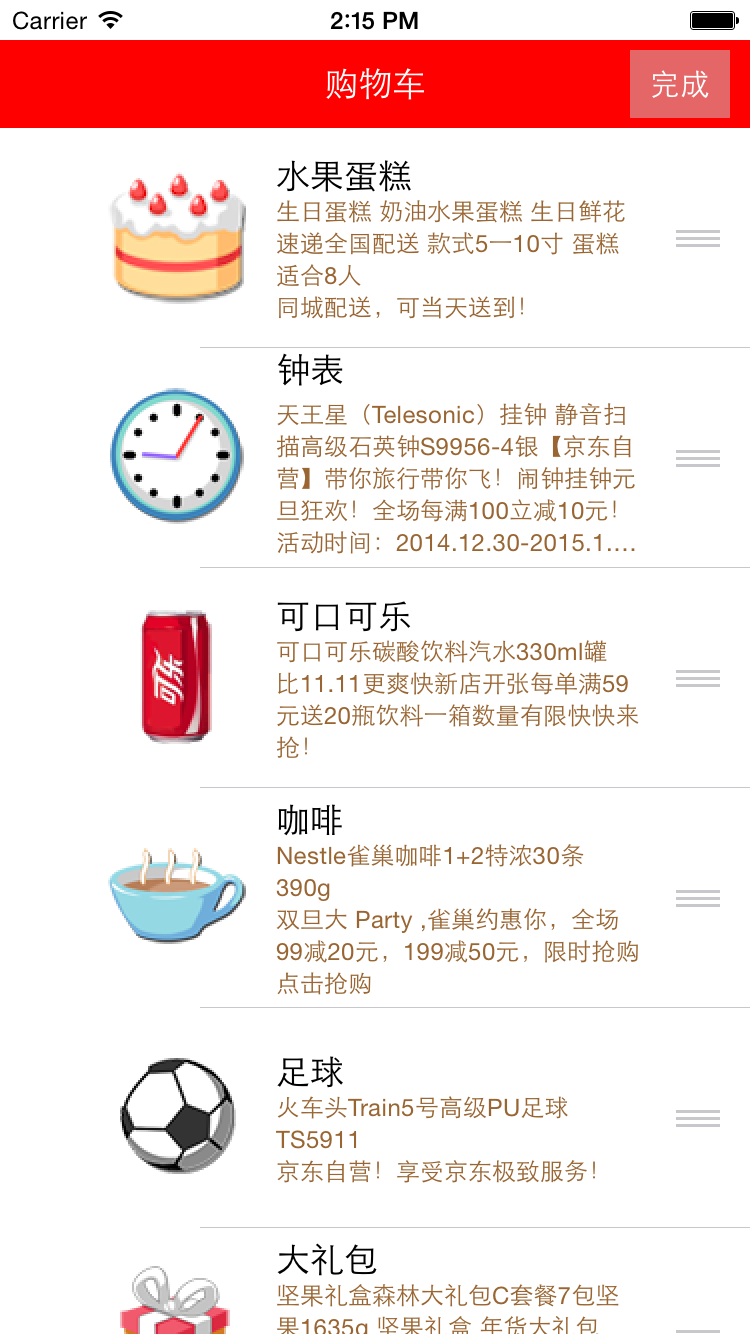
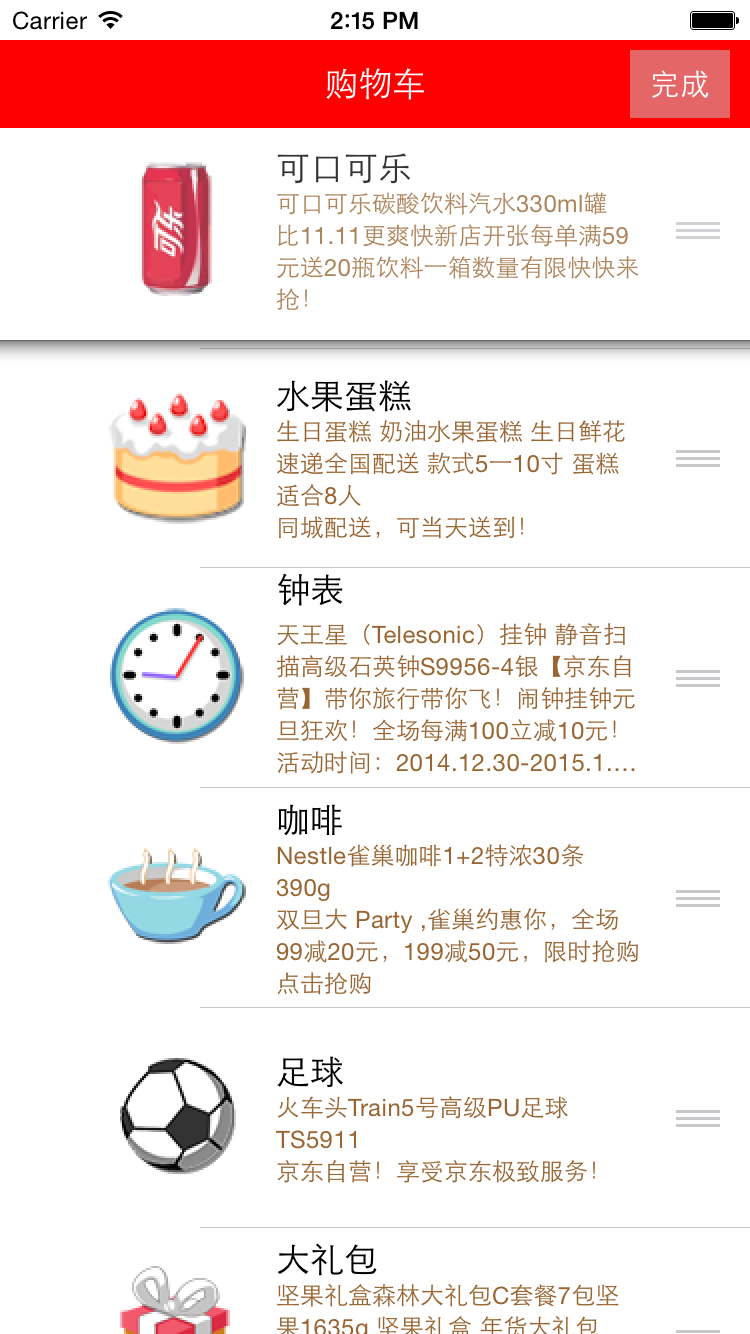
使用系统自带拖动排序功能的步骤:
1、让tableView进入编辑状态,也就是设置它的editing为YES
2、返回编辑模式,也就是实现UITableViewDelegate中的tableview:editingStyleForRowAtIndexPath:方法,在里面返回UITableViewCellEditingStyleNone模式。如果不实现,默认返回的就是删除模式
3、实现tableView:moveRowAtIndexPath:toIndexPath方法,只要实现该方法,就能实现单元格的拖动排序,但只是实现了表面的排序,并没有修改真实地数据
4、在方法中完成数据模型的更新
代码:
//  ViewController.m

//  JRTableView删除

//

//  Created by jerehedu on 15/6/11.

//  Copyright (c) 2015年 jerehedu. All rights reserved.

//

#import "ViewController.h"

#import "Goods.h"

@interface ViewController ()<UITableViewDataSource, UITableViewDelegate>

{

    UITableView *_tableView; //列表

    NSMutableArray *_goodsAry; //商品数组

    UIButton *_editBtn; //编辑按钮

}

@end

@implementation ViewController

- (void)viewDidLoad {

    [super viewDidLoad];

    //添加标题

    UILabel *titleLabel = [[UILabel alloc] initWithFrame:CGRectMake(, , self.view.frame.size.width, )];

    titleLabel.text = @"购物车";

    titleLabel.textAlignment = NSTextAlignmentCenter;

    titleLabel.backgroundColor = [UIColor redColor];

    titleLabel.textColor = [UIColor whiteColor];

    [self.view addSubview:titleLabel];

    //添加编辑按钮

    _editBtn = [UIButton buttonWithType:UIButtonTypeCustom];

    _editBtn.frame = CGRectMake(self.view.frame.size.width-, , , );

    [_editBtn setTitle:@"编辑" forState:UIControlStateNormal];

    [_editBtn setTitle:@"完成" forState:UIControlStateSelected];

    _editBtn.titleLabel.font = [UIFont systemFontOfSize:];

    _editBtn.backgroundColor = [UIColor colorWithRed:0.8 green:0.8 blue:0.8 alpha:0.5];

    [self.view addSubview:_editBtn];

    [_editBtn addTarget:self action:@selector(clickEditBtn:) forControlEvents:UIControlEventTouchUpInside];

    //添加tableview

    _tableView = [[UITableView alloc] initWithFrame:CGRectMake(, , self.view.frame.size.width, self.view.frame.size.height-)];

    _tableView.dataSource = self;

    _tableView.delegate = self;

    [self.view addSubview:_tableView];

    //取数据

    NSArray *ary = [NSArray arrayWithContentsOfFile:[[NSBundle mainBundle] pathForResource:@"ShoppingGoodsList" ofType:@"plist"]];

    //把数据存到模型对象中,然后把对象存到数组中

    _goodsAry = [NSMutableArray array];

    for (int i=; i<ary.count; i++) {

        Goods *good = [Goods goodsWithDic:ary[i]];

        [_goodsAry addObject:good];

    }

}

#pragma mark 数据源  返回有几行

-(NSInteger)tableView:(UITableView *)tableView numberOfRowsInSection:(NSInteger)section

{

    return _goodsAry.count;

}

#pragma mark 每行显示内容

-(UITableViewCell*)tableView:(UITableView *)tableView cellForRowAtIndexPath:(NSIndexPath *)indexPath

{

    static NSString *idGood = @"goods";

    UITableViewCell *cell = [tableView dequeueReusableCellWithIdentifier:idGood];

    if (cell==nil) {

        cell = [[UITableViewCell alloc] initWithStyle:UITableViewCellStyleSubtitle reuseIdentifier:idGood];

    }

    Goods *good = _goodsAry[indexPath.row];

    cell.imageView.image = [UIImage imageNamed:good.icon];

    cell.textLabel.text = good.name;

    cell.detailTextLabel.text = good.details;

    cell.detailTextLabel.numberOfLines = ;

    cell.detailTextLabel.textColor = [UIColor brownColor];

    return cell;

}

#pragma mark 选中行

-(void)tableView:(UITableView *)tableView didSelectRowAtIndexPath:(NSIndexPath *)indexPath

{

    // 取消选中状态

    [tableView deselectRowAtIndexPath:indexPath animated:YES];

}

#pragma mark 设置行高

-(CGFloat)tableView:(UITableView *)tableView heightForRowAtIndexPath:(NSIndexPath *)indexPath

{

    return ;

}

#pragma mark 点击编辑按钮

- (IBAction)clickEditBtn:(UIButton *)sender {

    //设置tableview编辑状态

    BOOL flag = !_tableView.editing;

    [_tableView setEditing:flag animated:YES];

    _editBtn.selected = flag;

}

#pragma mark 选择编辑模式,添加模式很少用,默认是删除

-(UITableViewCellEditingStyle)tableView:(UITableView *)tableView editingStyleForRowAtIndexPath:(NSIndexPath *)indexPath

{

    return UITableViewCellEditingStyleNone;

}

#pragma mark 排序 当移动了某一行时候会调用

//编辑状态下,只要实现这个方法,就能实现拖动排序

-(void)tableView:(UITableView *)tableView moveRowAtIndexPath:(NSIndexPath *)sourceIndexPath toIndexPath:(NSIndexPath *)destinationIndexPath

{

    // 取出要拖动的模型数据

    Goods *goods = _goodsAry[sourceIndexPath.row];

    //删除之前行的数据

    [_goodsAry removeObject:goods];

    // 插入数据到新的位置

    [_goodsAry insertObject:goods atIndex:destinationIndexPath.row];

}

@end
想要了解更多内容的小伙伴,可以点击查看源码,亲自运行测试。
疑问咨询或技术交流,请加入官方QQ群: (452379712)
出处:http://www.cnblogs.com/jerehedu/
本文版权归烟台杰瑞教育科技有限公司和博客园共有,欢迎转载,但未经作者同意必须保留此段声明,且在文章页面明显位置给出原文连接,否则保留追究法律责任的权利。
IOS UITableView拖动排序功能的更多相关文章
- IOS UITableView索引排序功能
UITbableView分组展示信息时,有时在右侧会带索引,右侧的索引一般为分组的首字母,比如城市列表的展示.当点击右侧索引的字母,列表会快速跳到索引对应的分组,方便我们快速查找.下面,就介绍一下索引 ...
- vue+element拖动排序功能
项目中老大心血来潮设计了一可以拖动达到排序的功能,感觉没什么用,但是没办法,实现吧! 这功能肯定不会手撸了,直接上插件 使用Sortable.js,对vue不友好,拖拽有时候乱跳;改用vuedragg ...
- iOS - UITableView 多选功能实现
:自定义Cell中的代码 #import <UIKit/UIKit.h> @interface TestCell : UITableViewCell @property(nonatomic ...
- RecyclerView实现拖动排序和滑动删除功能
RecyclerView 的拖动排序需要借助一下 ItemTouchHelper 这个类,ItemTouchHelper 类是 Google 提供的一个支持 RecyclerView 滑动和拖动的一个 ...
- 基于Metronic的Bootstrap开发框架经验总结(13)--页面链接收藏夹功能的实现2(利用Sortable进行拖动排序)
在上篇随笔<基于Metronic的Bootstrap开发框架经验总结(12)--页面链接收藏夹功能的实现>上,我介绍了链接收藏夹功能的实现,以及对收藏记录的排序处理.该篇随笔主要使用功能按 ...
- iOS开发——UI_swift篇&UITableView实现索引功能
UITableView实现索引功能 关于UItableView的索引在平时项目中所见不多,最多的就是跟联系人有关的界面,虽然如此,但是作为一个swift开发的程序必须知道的一个技术点,所以今天 ...
- IOS tableView 滑动删除与排序功能
// // ViewController.m // 0429 // // Created by apple on 15/4/29. // Copyright (c) 2015年 gense. All ...
- IOS UITableView NSIndexPath属性讲解
IOS UITableView NSIndexPath属性讲解 查看UITableView的帮助文档我们会注意到UITableView有两个Delegate分别为:dataSource和deleg ...
- RecyclerViewItemTouchHelperDemo【使用ItemTouchHelper进行拖拽排序功能】
版权声明:本文为HaiyuKing原创文章,转载请注明出处! 前言 记录使用ItemTouchHelper对Recyclerview进行拖拽排序功能的实现. 效果图 代码分析 ItemTouchHel ...
随机推荐
- Category 特性在 iOS 组件化中的应用与管控
背景 iOS Category功能简介 Category 是 Objective-C 2.0之后添加的语言特性. Category 就是对装饰模式的一种具体实现.它的主要作用是在不改变原有类的前提下, ...
- 【AI in 美团】深度学习在OCR中的应用
AI(人工智能)技术已经广泛应用于美团的众多业务,从美团App到大众点评App,从外卖到打车出行,从旅游到婚庆亲子,美团数百名最优秀的算法工程师正致力于将AI技术应用于搜索.推荐.广告.风控.智能调度 ...
- 推荐:这才是你寻寻觅觅想要的 Python 可视化神器
Plotly Express 是一个新的高级 Python 可视化库:它是 Plotly.py 的高级封装,它为复杂的图表提供了一个简单的语法. 受 Seaborn 和 ggplot2 的启发,它专门 ...
- BZOJ.3110.[ZJOI2013]K大数查询(整体二分 树状数组/线段树)
题目链接 BZOJ 洛谷 整体二分求的是第K小(利用树状数组).求第K大可以转为求第\(n-K+1\)小,但是这样好像得求一个\(n\). 注意到所有数的绝对值\(\leq N\),将所有数的大小关系 ...
- 关于django Class-based views的理解
django是mvt模式,其中v就是这个显示逻辑部分,简单来讲,view函数可以说是接收request,然后处理,返回response的主体函数. 对于一些简单的逻辑关系,可以用直接用函数模式来进行处 ...
- POJ 2104 && POJ 2761 (静态区间第k大,主席树)
查询区间第K大,而且没有修改. 使用划分树是可以做的. 作为主席树的入门题,感觉太神奇了,Orz /* *********************************************** ...
- maven进阶:一个多模块项目
一个多模块项目通过一个父POM 引用一个或多个子模块来定义.父项目,通过以下配置,将子项目关联. <packaging>pom</packaging> <modules& ...
- 解决idea 控制台中文乱码
打开IntelliJ IDEA 14.0安装路径,小编的安装路径为:D:\Program Files\JetBrains\IntelliJ IDEA 14.0\bin 找到idea.exe.vmopt ...
- what is a process?
A process is a program in execution. A process is more than the program code, which is sometimes kno ...
- Android实例剖析笔记(二)
摘要:用实例讲解Andriod的开发过程,以NotesList为实例介绍Android的菜单机制 简介 android提供了三种菜单类型,分别为options menu,context menu,su ...