
玩转mongodb(三):mongodb项目实战(初战)
说明:
主要功能:对mongodb的集合做增删改查。
项目的运行环境:tomcat6、jdk8。
所用技术:jsp/servlet、前端bootstrap。
mongodb:personmap。
mongodb工具类:
定义一个MongoDBUtil的枚举类,枚举类中定义一个instance实例。
MongoDB工具类 Mongo实例代表了一个数据库连接池,即使在多线程的环境中,一个Mongo实例对我们来说已经足够。
注意Mongo已经实现了连接池,并且是线程安全的。
设计为单例模式, 因 MongoDB的Java驱动是线程安全的,对于一般的应用,只要一个Mongo实例即可。
Mongo有个内置的连接池(默认为10个) 对于有大量写和读的环境中,为了确保在一个Session中使用同一个DB时,DB和DBCollection是绝对线程安全的
 public enum MongoDBUtil {

     /**

      * 定义一个枚举的元素,它代表此类的一个实例

      */

     instance;

 }
在MongoDBUtil类中,定义一个MongoClient对象,并根据IP和端口获得该对象。
 private MongoClient mongoClient;

     static {

         System.out.println("===============MongoDBUtil初始化========================");

         // 从配置文件中获取属性值

         String ip = "localhost";

         int port = 27017;

         instance.mongoClient = new MongoClient(ip, port);

     }
根据MongoClient对象,得到MongoDataBase对象和MongoConnection<Document>对象。
  /**

      * 获取DB实例 - 指定DB

      *

      * @param dbName

      * @return

      */

     public MongoDatabase getDB(String dbName) {

         if (dbName != null && !"".equals(dbName)) {

             MongoDatabase database = mongoClient.getDatabase(dbName);

             return database;

         }

         return null;

     }

     /**

      * 获取collection对象 - 指定Collection

      *

      * @param collName

      * @return

      */

     public MongoCollection<Document> getCollection(String dbName, String collName) {

         if (null == collName || "".equals(collName)) {

             return null;

         }

         if (null == dbName || "".equals(dbName)) {

             return null;

         }

         MongoCollection<Document> collection = mongoClient.getDatabase(dbName).getCollection(collName);

         return collection;

     }
工具类的查询、插入、更新、删除方法。
     /**条件查询*/

     public MongoCursor<Document> find(MongoCollection<Document> coll, Bson filter) {

         if(null!=filter){

             return coll.find(filter).iterator();

         }else{

             return coll.find().iterator();

         }

     }

     /**插入一条数据*/

     public void insert(MongoCollection<Document> coll,Document doc){

         coll.insertOne(doc);

     }

     /**更新一条数据*/

     public void update(MongoCollection<Document> coll,Document querydoc,Document updatedoc){

         coll.updateMany(querydoc, updatedoc);

     }

     /**删除一条数据*/

     public void delete(MongoCollection<Document> coll,Document doc){

         coll.deleteMany(doc);

     }
项目中的增删改查:
插入:对应MongoDB中脚本的db.getCollection('person').insert({"name":"ryan1","age":21})
     String name = request.getParameter("name");

     Double age = Double.valueOf(request.getParameter("age"));

     String dbName = "personmap";

         String collName = "person";

         MongoCollection<Document> coll = MongoDBUtil.instance.getCollection(dbName, collName);

         Document doc = new Document();

         doc.put("name", name);

         doc.put("age", age);

         MongoDBUtil.instance.insert(coll, doc);

         PrintWriter out = response.getWriter();

         out.write("insert success!");
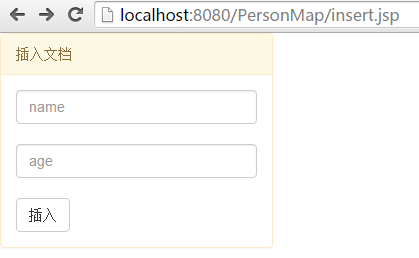
插入功能的servlet
 <div class="panel    panel-warning" style="width:20%">

     <div class="panel-heading">删除文档</div>

     <div class="panel-body">

         <form action="InsertPerson">

             <input type="text" name="name" class="form-control" placeholder="name" aria-describedby="basic-addon1">

             <br/>

             <input type="text" name="age" class="form-control" placeholder="age" aria-describedby="basic-addon1">

             <br/>

             <button type="submit" class="btn btn-default">插入</button>

         </form>

     </div>

 </div>
插入功能的jsp
更新:对应MongoDB中脚本的db.getCollection('person').update({"name":"ryan1"}{"$set":{"age":22}})
     String queryname = request.getParameter("queryname");

     Double updateage = Double.valueOf(request.getParameter("updateage"));

     String dbName = "personmap";

     String collName = "person";

     MongoCollection<Document> coll = MongoDBUtil.instance.getCollection(dbName, collName);

     Document querydoc = new Document();

     querydoc.put("name", queryname);

     Document updatedoc = new Document();

     updatedoc.put("name", queryname);

     updatedoc.put("age", updateage);

     MongoDBUtil.instance.update(coll, querydoc , new Document("$set",updatedoc));

         PrintWriter out = response.getWriter();

         out.write("update success!");
更新功能的servlet
 <div class="panel    panel-warning" style="width:20%">

     <div class="panel-heading">根据name更新age</div>

     <div class="panel-body">

         <form action="UpdatePerson">

             <input type="text" name="queryname" class="form-control" placeholder="queryname" aria-describedby="basic-addon1">

             <br/>

             <input type="text" name="updateage" class="form-control" placeholder="updateage" aria-describedby="basic-addon1">

             <br/>

             <button type="submit" class="btn btn-default">更新</button>

     </form>

     </div>

 </div>
更新功能的jsp

删除:对应MongoDB中脚本的db.getCollection('person').remove({"name":"ryan1"})
     String name = request.getParameter("name");

     String dbName = "personmap";

     String collName = "person";

     MongoCollection<Document> coll = MongoDBUtil.instance.getCollection(dbName, collName);

     Document doc = new Document();

     doc.put("name", name);

     MongoDBUtil.instance.delete(coll, doc);

     PrintWriter out = response.getWriter();

     out.write("delete success!");
删除功能的servlet
 <div class="panel    panel-warning" style="width:20%">

     <div class="panel-heading">删除文档</div>

     <div class="panel-body">

         <form action="DeletePerson">

             <input type="text" name="name" class="form-control" placeholder="name" aria-describedby="basic-addon1">

             <br/>

             <button type="submit" class="btn btn-default">删除</button>

         </form>

     </div>

 </div>
删除功能的jsp

查找:对应MongoDB中脚本的db.getCollection('person').find({})
     String dbName = "personmap";

     String collName = "person";

     MongoCollection<Document> coll = MongoDBUtil.instance.getCollection(dbName, collName);

     List<Person> personList = new ArrayList<Person>();

     // 查询所有

     //Bson filter = Filters.eq("name", "ryan1");

     Bson filter = null;

     MongoCursor<Document> cursor = MongoDBUtil.instance.find(coll, filter);

     while(cursor.hasNext()){

         Document tempdoc = cursor.next();

         Person person = new Person();

         person.set_id(tempdoc.get("_id").toString());

         person.setName(tempdoc.get("name").toString());

 person.setAge(Double.valueOf(tempdoc.get("age").toString()));

             personList.add(person);

     }

     Gson gson = new Gson();

     PrintWriter out = response.getWriter();

     out.write(gson.toJson(personList));
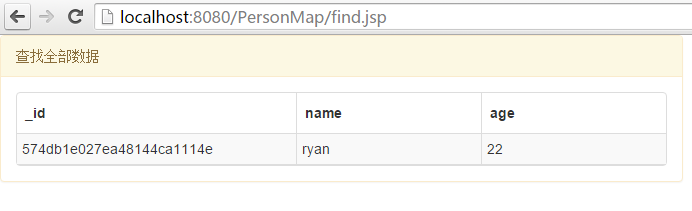
查找功能的servlet
 <div class="panel panel-warning" style="width:50%">

     <div class="panel-heading">查找全部数据</div>

     <div class="panel-body">

     <table data-toggle="table"

                data-url="FindPerson"

                data-classes="table table-hover table-condensed"

                data-striped="true">

         <thead>

             <tr>

                 <th class="col-xs-2" data-field="_id">_id</th>

                 <th class="col-xs-2" data-field="name">name</th>

                 <th class="col-xs-2" data-field="age">age</th>

             </tr>

         </thead>

     </table>

     </div>

 </div>
查找功能的jsp
喜欢请微信扫描下面二维码,关注我公众号--“精修Java”,做一些实战项目中的问题和解决方案分享。

玩转mongodb(三):mongodb项目实战(初战)的更多相关文章
- 转:手把手教你如何玩转Solr(包含项目实战)
原文地址:手把手教你如何玩转Solr(包含项目实战) 参考原文
- VS2013中Nuget程序包管理器控制台使用入门(三)-项目实战(原创)
VS2013中Nuget程序包管理器控制台使用入门(三)-项目实战 1.给指定项目安装Newtonsoft.Json ,Version 4.5.11 PM> Install-Package Ne ...
- MongoDB (三) MongoDB 安装
MongoDB安装在Windows上 在 Windows上,首先要安装 MongoDB下载最新发布的MongoDB: http://www.mongodb.org/downloads 确保得到正确的版 ...
- 快速掌握mongoDB(三)——mongoDB的索引详解
1 mongoDB索引的管理 本节介绍mongoDB中的索引,熟悉mysql/sqlserver等关系型数据库的小伙伴应该都知道索引对优化数据查询的重要性.我们先简单了解一下索引:索引的本质就是一个排 ...
- 手把手教你如何玩转Solr(包含项目实战)
一:Solr简介 Solr是一个独立的企业级搜索应用服务器,它对外提供类似于Web-service的API接口.用户可以通过http请求,向搜索引擎服务器提交一定格式的XML文件,生成索引 ...
- .net转php laraval框架学习系列(三)项目实战---Route&Controllers
本章来学习laravel的路由 一个简单的路由列子 Route::get('/', function() { return 'Hello World'; }); 路由的写法和Node的风格很相似.上面 ...
- selenium3 web自动化测试框架 三:项目实战中PO模型的设计与封装
po模型设计思想 Page Object 模式主要是将每个页面设计为一个class,其中包含页面中的需要测试的元素(按钮,输入框,标题等),这样在Selenium测试页面中可以通过调取页面类来获取页面 ...
- miniFTP项目实战三
项目简介: 在Linux环境下用C语言开发的Vsftpd的简化版本,拥有部分Vsftpd功能和相同的FTP协议,系统的主要架构采用多进程模型,每当有一个新的客户连接到达,主进程就会派生出一个ftp服务 ...
- 第二百五十节,Bootstrap项目实战--响应式导航
Bootstrap项目实战--响应式导航 学习要点: 1.响应式导航 一.响应式导航 基本导航组件+响应式 第一步,声明导航区域,设置导航默认样式,设置导航条固定在顶部navbar样式class类,写 ...
- miniFTP项目实战五
项目简介: 在Linux环境下用C语言开发的Vsftpd的简化版本,拥有部分Vsftpd功能和相同的FTP协议,系统的主要架构采用多进程模型,每当有一个新的客户连接到达,主进程就会派生出一个ftp服务 ...
随机推荐
- H3C交换机流量镜像
今天需要对交换机进行本地流量镜像,在此记录: 交换机:H3C S5120 配置本地端口镜像时,用户首先要创建一个本地镜像组,然后为本地镜像组配置源端口和目的端口. 表1-1 配置本地端口镜像 操作 命 ...
- js常用的原生方法
JavaScript pow() 方法 pow() 方法可返回 x 的 y 次幂的值 语法 Math.pow(x,y) 参数 描述 x 必需.底数.必须是数字. y 必需.幂数.必须是数字. 返回值 ...
- 拷贝构造函数——防篡改
对于普通类型的对象来说,他们之间的复制是简单的,比如: int a = 88; int b = a; 而类和普通对象不同,类对象内部结构一般较为复杂,存在各种成员变量. #include <io ...
- 【Win2D】【译】Win2D 快速入门
原文链接:http://microsoft.github.io/Win2D/html/QuickStart.htm 快速入门 这是 Win2D 的快速入门教程,将会介绍 Win2D 中的基本功能.你将 ...
- 在TFS中使用Git Tags(标签或标记),实现代码的版本管理
一.概述: 与TFVC中标记(Label)一样,Git的标签(Tag)也是TFS系统的代码管理中非常重要的一个版本管理工具.使用标签,我们可以每个时间点的代码注上一个通俗.并且容易记忆的名称(例如标签 ...
- BootStrap 4正式版发布(原文翻译)
原文链接:http://blog.getbootstrap.com/2018/01/18/bootstrap-4/ 关于Bootstrap 什么是Bootstrap Bootstrap,来自 Twit ...
- .net core webapi+EF Core
.net core webapi+EF Core 一.描述: EF Core必须下载.net core2.0版本 Micorsoft.EntityFrameworkCore:EF框架的核心包Micor ...
- 程序媛计划——mysql外键
定义 外键:如果一个表的某个字段指向另一个表的主键,就称之为外键.被指向的表,称之为主表,也叫父表,那么另一个表就是从表,也叫子表 #先新建两个表 mysql> create table aut ...
- android界面
自定义控件EditText 在src中的drawable新建myeditext.xml文件<?xml version="1.0" encoding="utf-8&q ...
- 七,mysql优化——表的垂直划分和水平划分
1,表的水平划分 如果一个表的记录数太多,比如成千上万条,而且需要经常检索,那么我们有必要化整为零.如果我拆成100个表,那么每个表只有10万条记录.当然需要数据在逻辑上可以划分.一个好的划分依据,有 ...