
WebService之CXF
一、配置环境变量(Windows系统下要重启)
1、JAVA_HOME即JDK安装路径bin上一级,java -version命令验证
2、CXF_HOME即cxf安装路径bin上一级,cxf解压包下有samples文件夹,下有java_first_pojo文件夹,此处shift+右键打开命令窗口,ant server启动案例WebService服务,如果报错版本问题,打开samples下文件common_build.xml添加上面的JDK版本(如<equals arg1="${ant.java.version}" arg2="1.7"/>),ant client启动客户端
3、ANT_HOME即ant安装路径bin上一级,ant -version命令验证
二、发布WebService服务
Demo1、ServerFactoryBean类这种方式创建出的WSDL文档名字不符合开发规范,一般不用
1、新建PersonService类
package com.hjp.server;

public class PersonService {

    public String sayHello(String name){

        return "Hello "+name;

    }

}
PersonService
2、创建发布服务类,记得添加cxf安装文件下lib下jar包
package com.hjp.server;

import org.apache.cxf.frontend.ServerFactoryBean;

public class Publisher {

    public static void main(String[] args) {

        //创建cxf发布的服务对象

        ServerFactoryBean serverFactoryBean=new ServerFactoryBean();

        //设置服务的类

        serverFactoryBean.setServiceClass(PersonService.class);

        //设置服务地址

        serverFactoryBean.setAddress("http://localhost:5555/hello");

        //设置服务对象

        serverFactoryBean.setServiceBean(new PersonService());

        //发布

        serverFactoryBean.create();

    }

}
Publisher
Demo2、JaxWsServerFactoryBean类这种方式结合@WebService注解,WSDL文档名称比较规范
1、新建PersonService1类
package com.hjp.server;

import javax.jws.WebService;

@WebService

public class PersonService1 {

    public String sayHello(String name){

        return "Hello "+name;

    }

}
PersonService1
2、创建发布服务类
package com.hjp.server;

import org.apache.cxf.frontend.ServerFactoryBean;

import org.apache.cxf.jaxws.JaxWsServerFactoryBean;

public class Publisher1 {

    public static void main(String[] args) {

        //创建cxf发布的服务对象

        JaxWsServerFactoryBean serverFactoryBean=new JaxWsServerFactoryBean();

        //设置服务的类

        serverFactoryBean.setServiceClass(PersonService1.class);

        //设置服务地址

        serverFactoryBean.setAddress("http://localhost:5555/hello");

        //设置服务对象

        serverFactoryBean.setServiceBean(new PersonService1());

        //发布

        serverFactoryBean.create();

    }

}
Publisher1
Demo3、JaxWsServerFactoryBean发布接口类服务,@WebService注解加在接口上,在实现类上方法无效
1、新建UserService接口及其实现类UserServiceImpl
package com.hjp.server;

import javax.jws.WebService;

@WebService

public interface UserService {

    public String sayHello(String name);

}
UserService
package com.hjp.server;

public class UserServiceImpl implements UserService {

    @Override

    public String sayHello(String name) {

        return "Hello "+name;

    }

}
UserServiceImpl
2、创建发布服务类
package com.hjp.server;

import org.apache.cxf.jaxws.JaxWsServerFactoryBean;

public class Publisher2 {

    public static void main(String[] args) {

        //创建cxf发布的服务对象

        JaxWsServerFactoryBean serverFactoryBean=new JaxWsServerFactoryBean();

        //设置服务的接口类

        serverFactoryBean.setServiceClass(UserService.class);

        //设置服务地址

        serverFactoryBean.setAddress("http://localhost:5555/hello");

        //设置服务对象

        serverFactoryBean.setServiceBean(new UserServiceImpl());

        //发布

        serverFactoryBean.create();

    }

}
Publisher2
三、WebService服务客户端调用
1、使用wsimport命令方式,省略
2、使用cxf中wsdl2java命令(wsimport不支持soap12协议下生成客户端代码)
wsdl2java -d . -p com.hjp.stub.soap12 http://localhost:5555/hello?wsdl
-d生成的客户端代码存放路径,点代表当前路径;-p 第一个参数是生成客户端代码的包路径,第二个参数是wsdl访问地址;如果省略第一个参数,默认包路径为xmlns:tns后面域名倒序
附SOAP12协议代码:
package com.hjp.server;

import javax.jws.WebService;

import javax.xml.ws.BindingType;

import static javax.xml.ws.soap.SOAPBinding.SOAP12HTTP_BINDING;

@WebService

//默认是SOAP11,如果使用SOAP12,需要使用BindingType注解

@BindingType(value = SOAP12HTTP_BINDING)

public interface UserService {

    public String sayHello(String name);

}
UserService接口
四、配置CXFServlet发布服务
1、新建JavaWeb项目
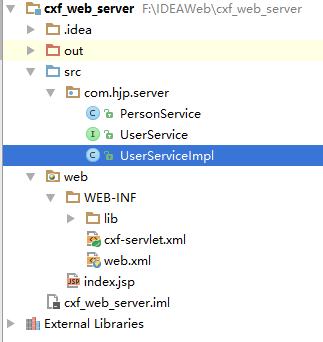
2、面向发布普通类的服务
新建PersonService类
package com.hjp.server;

import javax.jws.WebService;

@WebService

public class PersonService {

    public String sayHello(String name){

        return "Hello "+name;

    }

}
PersonService
在WEB-INF下新建lib文件夹,将cxf所有相关jar包引入
在WEB-INF下新建cxf-servlet.xml文件,配置如下
<?xml version="1.0" encoding="UTF-8"?>

<beans xmlns="http://www.springframework.org/schema/beans"

       xmlns:xsi="http://www.w3.org/2001/XMLSchema-instance" xmlns:jaxws="http://cxf.apache.org/jaxws"

       xmlns:jaxrs="http://cxf.apache.org/jaxrs" xmlns:cxf="http://cxf.apache.org/core"

       xsi:schemaLocation="http://www.springframework.org/schema/beans

          http://www.springframework.org/schema/beans/spring-beans.xsd

            http://cxf.apache.org/jaxrs http://cxf.apache.org/schemas/jaxrs.xsd

            http://cxf.apache.org/jaxws http://cxf.apache.org/schemas/jaxws.xsd

            http://cxf.apache.org/core http://cxf.apache.org/schemas/core.xsd">

    <!-- 引入CXF Bean定义如下,早期的版本中使用 -->

    <import resource="classpath:META-INF/cxf/cxf.xml"/>

    <import resource="classpath:META-INF/cxf/cxf-extension-soap.xml"/>

    <import resource="classpath:META-INF/cxf/cxf-servlet.xml"/>

    <!--

    endpoint:发布类的形式的服务配置

    address:配置时前必须加/

    implementor:具体的服务类

    -->

    <jaxws:endpoint id="personService" address="/personService" implementor="com.hjp.server.PersonService">

        <jaxws:inInterceptors>

            <bean class="org.apache.cxf.interceptor.LoggingInInterceptor"></bean>

        </jaxws:inInterceptors>

        <jaxws:outInterceptors>

            <bean class="org.apache.cxf.interceptor.LoggingOutInterceptor"></bean>

        </jaxws:outInterceptors>

    </jaxws:endpoint>

</beans>
cxf-servlet.xml
在web.xml中配置CXFServlet
<?xml version="1.0" encoding="UTF-8"?>

<web-app xmlns="http://xmlns.jcp.org/xml/ns/javaee"

         xmlns:xsi="http://www.w3.org/2001/XMLSchema-instance"

         xsi:schemaLocation="http://xmlns.jcp.org/xml/ns/javaee http://xmlns.jcp.org/xml/ns/javaee/web-app_3_1.xsd"

         version="3.1">

    <servlet>

        <servlet-name>mycxf</servlet-name>

        <servlet-class>org.apache.cxf.transport.servlet.CXFServlet</servlet-class>

    </servlet>

    <servlet-mapping>

        <servlet-name>mycxf</servlet-name>

        <url-pattern>/services/*</url-pattern>

    </servlet-mapping>

</web-app>
web.xml
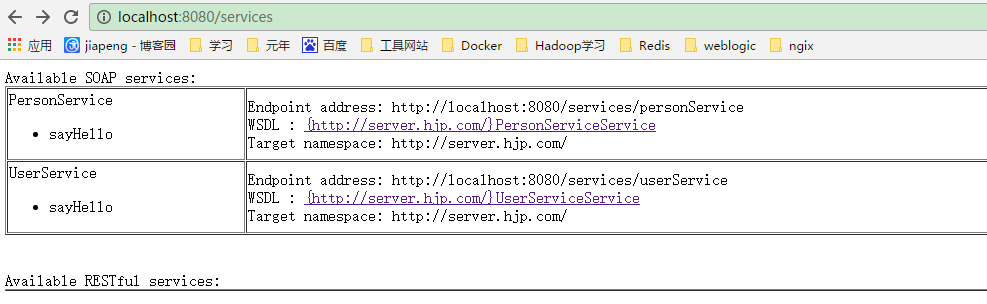
访问地址:http://localhost:8080/services如下图,点击WSDL链接,指向WSDL地址

3、面向发布接口的服务
新建接口及其实现类
package com.hjp.server;

import javax.jws.WebService;

@WebService

public interface UserService {

    public String sayHello(String name);

}
UserService
package com.hjp.server;

public class UserServiceImpl implements UserService {

    @Override

    public String sayHello(String name) {

        return "Hello "+name;

    }

}
UserServiceImpl
修改cxf-servlet.xml配置文件
<?xml version="1.0" encoding="UTF-8"?>

<beans xmlns="http://www.springframework.org/schema/beans"

       xmlns:xsi="http://www.w3.org/2001/XMLSchema-instance" xmlns:jaxws="http://cxf.apache.org/jaxws"

       xmlns:jaxrs="http://cxf.apache.org/jaxrs" xmlns:cxf="http://cxf.apache.org/core"

       xsi:schemaLocation="http://www.springframework.org/schema/beans

          http://www.springframework.org/schema/beans/spring-beans.xsd

            http://cxf.apache.org/jaxrs http://cxf.apache.org/schemas/jaxrs.xsd

            http://cxf.apache.org/jaxws http://cxf.apache.org/schemas/jaxws.xsd

            http://cxf.apache.org/core http://cxf.apache.org/schemas/core.xsd">

    <!-- 引入CXF Bean定义如下,早期的版本中使用 -->

    <import resource="classpath:META-INF/cxf/cxf.xml"/>

    <import resource="classpath:META-INF/cxf/cxf-extension-soap.xml"/>

    <import resource="classpath:META-INF/cxf/cxf-servlet.xml"/>

    <!--

    endpoint:发布类的形式的服务配置

    address:配置时前必须加/

    implementor:具体的服务类

    -->

    <jaxws:endpoint id="personService" address="/personService" implementor="com.hjp.server.PersonService">

        <jaxws:inInterceptors>

            <bean class="org.apache.cxf.interceptor.LoggingInInterceptor"></bean>

        </jaxws:inInterceptors>

        <jaxws:outInterceptors>

            <bean class="org.apache.cxf.interceptor.LoggingOutInterceptor"></bean>

        </jaxws:outInterceptors>

    </jaxws:endpoint>

    <!--

    server:发布接口类形式服务

    serviceClass:接口类

    -->

    <jaxws:server id="userService" address="/userService" serviceClass="com.hjp.server.UserService">

        <!--配置接口实现类-->

        <jaxws:serviceBean>

            <bean class="com.hjp.server.UserServiceImpl"></bean>

        </jaxws:serviceBean>

        <jaxws:inInterceptors>

            <bean class="org.apache.cxf.interceptor.LoggingInInterceptor"></bean>

        </jaxws:inInterceptors>

        <jaxws:outInterceptors>

            <bean class="org.apache.cxf.interceptor.LoggingOutInterceptor"></bean>

        </jaxws:outInterceptors>

    </jaxws:server>

</beans>
cxf-servlet.xml
访问地址:http://localhost:8080/services如下图,点击相应WSDL链接,指向相应WSDL地址
五、WebService发布方式和客户端代码生成方式相互独立,只要有WSDL地址,就可以用某种客户端代码生成工具生成客户端代码
WebService之CXF的更多相关文章
- WebService之CXF注解报错(一)
WebService之CXF注解 1.详细报错例如以下 usage: java org.apache.catalina.startup.Catalina [ -config {pathname} ] ...
- WebService它CXF注释错误(两)
WebService它CXF注解 1.详细报错例如以下 五月 04, 2014 11:24:12 下午 org.apache.cxf.wsdl.service.factory.ReflectionSe ...
- WebService之CXF注解报错(三)
WebService之CXF注解 1.具体错误如下 五月 04, 2014 11:29:28 下午 org.apache.cxf.wsdl.service.factory.ReflectionServ ...
- WebService之CXF注解报错(二)
WebService之CXF注解 1.具体报错如下 五月 04, 2014 11:24:12 下午 org.apache.cxf.wsdl.service.factory.ReflectionServ ...
- 转载 WebService 的CXF框架 WS方式Spring开发
WebService 的CXF框架 WS方式Spring开发 1.建项目,导包. 1 <project xmlns="http://maven.apache.org/POM/4.0 ...
- 【WebService】WebService之CXF和Spring整合(六)
前面介绍了WebService与CXF的使用,项目中我们经常用到Spring,这里介绍CXF与Spring整合 步骤 1.创建一个Maven Web项目,可以参照:[Maven]Eclipse 使用M ...
- 转-JAVA webservice之CXF 范例--http://cxshun.iteye.com/blog/1275408
JAVA webservice之CXF 博客分类: j2ee相关 昨天我们一起学习了一下xfire,今天我们来看一下CXF,为什么学完那个接着学这个呢.因为CXF是在xfire的基础上实现 的,所以我 ...
- Webservice与CXF框架快速入门
1. Webservice Webservice是一套远程调用技术规范 远程调用RPC, 实现了系统与系统进程间的远程通信.java领域有很多可实现远程通讯的技术,如:RMI(Socket + 序列化 ...
- WebService之CXF框架
本文主要包括以下内容 ant工具的使用 利用cxf实现webservice cxf与spring整合 ajax访问webservice ant 工具 1.为什么要用到ant这个工具呢? Ant做为一种 ...
- So easy Webservice 7.CXF 发布WebService
(一)使用ServerFactoryBean 方式实现发布WS服务 1.新建项目,添加cxf jar包到项目中 2.编写服务实现类 /** * CXF WebService * 不用注解 * @aut ...
随机推荐
- PHP zhuaq
change_html_img_src.php <?php $url=$_GET['url']; $id=$_GET['id']; $type=$_GET['type']; $redis_key ...
- Java线程状态及 wait、sleep、join、interrupt、yield等的区别
Java中的线程状态(详见Java线程状态及转换-MarchOn): wait:Object类的实例方法,释放CPU执行权,进入等待状态,直到 被中断.被拥有该对象锁的线程唤醒(notify或not ...
- Ubuntu 16.04 标题栏实时显示上下行网速、CPU及内存使用率
有时感觉网络失去响应,就通过Ubuntu 14.04自带的系统监视器程序来查看当前网速,但是这样很不方便,遂打算让网速显示在标题栏,那样就随时可直观的看到.一番搜索尝试后,成功实现!同时也实现了CPU ...
- USB学习笔记连载(十二):USB描述符
USB设备是端口,接口,配置的集合,USB协议是以各种USB描述符来表征USB设备的功能.计算机通过这些描述符来获得USB设备的功能. USB描述符包括: USB标准设备描述符,USB集线器描述符.H ...
- SpannableString属性详解
1.BackgroundColorSpan 背景色 2.ClickableSpan 文本可点击,有点击事件 3.ForegroundColorSpan 文本颜色(前景色) 4.Ma ...
- 百度搜索_如何打开Intellij IDEA的代码提示功能?
Intellij IDEA是一款优秀的编程软件,相比较Eclipse之下它的用户群较小,但并不代表它的功能就比Eclipse差,如果用顺手了还是特别好用的.代码提示功能对于程序员来说非常重要,那么我们 ...
- JDBC Like子句实例
在本教程将演示如何在JDBC应用程序中,从数据库表中查询数据记录, 在查询选择记录时使用Like子句添加其他条件. 在执行以下示例之前,请确保您已经准备好以下操作: 具有数据库管理员权限,以在给定模式 ...
- perl 安装Image::Magick 模块
ImageMagick 是一个处理图片的库,有C, perl, python, java 等多种语言对应的库 在安装perl 对应的Image::Magick 模块之前,首先需要安装 ImgeMagi ...
- 正则split
string content = "第1行导入失败,失败原因为: <加班原因>字段必填"; string[] resultString = Regex.Split(co ...
- utf8 ucs4
这个问题不好回答,首先UTF-8编码只不过是一种Unicode的转换,兼容ASCII.所以,UTF-8编码支持的最大字符编码应该是Unicode支持的最大字符编码. 理论上,UTF-8编码可以支持最大 ...