
Android OpenGL ES(九)绘制线段Line Segment .
创建一个DrawLine Activity,定义四个顶点:
float vertexArray[] = {

 -0.8f, -0.4f * 1.732f, 0.0f,

 -0.4f, 0.4f * 1.732f, 0.0f,

 0.0f, -0.4f * 1.732f, 0.0f,

 0.4f, 0.4f * 1.732f, 0.0f,

};
分别以三种模式GL_LINES,GL_LINE_STRIP,GL_LINE_LOOP 来绘制直线:
public void DrawScene(GL10 gl) {

 super.DrawScene(gl);

 ByteBuffer vbb

 = ByteBuffer.allocateDirect(vertexArray.length*);

 vbb.order(ByteOrder.nativeOrder());

 FloatBuffer vertex = vbb.asFloatBuffer();

 vertex.put(vertexArray);

 vertex.position();

 gl.glLoadIdentity();

 gl.glTranslatef(, , -);

 gl.glEnableClientState(GL10.GL_VERTEX_ARRAY);

 gl.glVertexPointer(, GL10.GL_FLOAT, , vertex);

 index++;

 index%=;

 switch(index){

 case :

 case :

 case :

 gl.glColor4f(1.0f, 0.0f, 0.0f, 1.0f);

 gl.glDrawArrays(GL10.GL_LINES, , );

 break;

 case :

 case :

 case :

 gl.glColor4f(0.0f, 1.0f, 0.0f, 1.0f);

 gl.glDrawArrays(GL10.GL_LINE_STRIP, , );

 break;

 case :

 case :

 case :

 case :

 gl.glColor4f(0.0f, 0.0f, 1.0f, 1.0f);

 gl.glDrawArrays(GL10.GL_LINE_LOOP, , );

 break;

 }

 gl.glDisableClientState(GL10.GL_VERTEX_ARRAY);

}
这里index 的目的是为了延迟一下显示(更好的做法是使用固定时间间隔)。前面说过GLSurfaceView 的渲染模式有两种,一种是连续不断的更新屏幕,另一种为on-demand ,只有在调用requestRender() 在更新屏幕。 缺省为RENDERMODE_CONTINUOUSLY 持续刷新屏幕。
OpenGLDemos 使用的是缺省的RENDERMODE_CONTINUOUSLY持续刷新屏幕 ,因此Activity的drawScene 会不断的执行。本例中屏幕上顺序以红,绿,蓝色显示LINES, LINE_STRIP,LINE_LOOP。
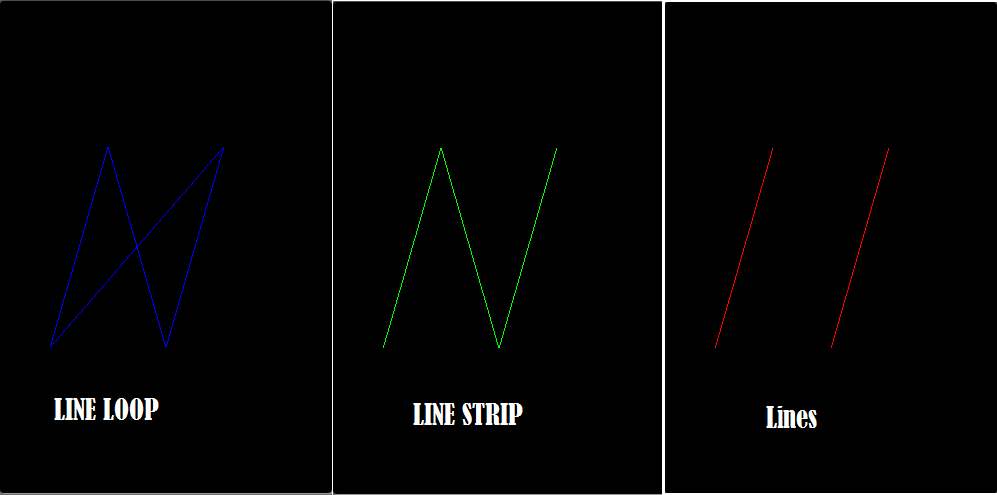
完整代码:
MainActivity.java
package com.example.gltest;

import java.nio.ByteBuffer;

import java.nio.ByteOrder;

import java.nio.FloatBuffer;

import javax.microedition.khronos.opengles.GL10;

import android.opengl.GLSurfaceView;

import android.os.Bundle;

import android.app.Activity;

import android.view.Menu;

import android.view.Window;

import android.view.WindowManager;

public class MainActivity extends Activity

       implements IOpenGLDemo{

    float vertexArray[] = {

             -0.8f, -0.4f * 1.732f, 0.0f,

             -0.4f, 0.4f * 1.732f, 0.0f,

             0.0f, -0.4f * 1.732f, 0.0f,

             0.4f, 0.4f * 1.732f, 0.0f,

            };

        /** Called when the activity is first created. */

        @Override

        public void onCreate(Bundle savedInstanceState) {

            super.onCreate(savedInstanceState);

            this.requestWindowFeature(Window.FEATURE_NO_TITLE);

            getWindow()

             .setFlags(WindowManager.LayoutParams.FLAG_FULLSCREEN,

                WindowManager.LayoutParams.FLAG_FULLSCREEN);

            mGLSurfaceView = new GLSurfaceView(this);

            mGLSurfaceView.setRenderer(new OpenGLRenderer(this));

            setContentView(mGLSurfaceView);

        }

//        public void DrawScene(GL10 gl) {

//            gl.glClearColor(1.0f, 0.0f, 0.0f, 0.0f);

//            // Clears the screen and depth buffer.

//            gl.glClear(GL10.GL_COLOR_BUFFER_BIT

//              | GL10.GL_DEPTH_BUFFER_BIT);

//

//        }

        public void DrawScene(GL10 gl) {

             //super.DrawScene(gl);

             ByteBuffer vbb

             = ByteBuffer.allocateDirect(vertexArray.length*);

             vbb.order(ByteOrder.nativeOrder());

             FloatBuffer vertex = vbb.asFloatBuffer();

             vertex.put(vertexArray);

             vertex.position();

             gl.glLoadIdentity();

             gl.glTranslatef(, , -);

             gl.glEnableClientState(GL10.GL_VERTEX_ARRAY);

             gl.glVertexPointer(, GL10.GL_FLOAT, , vertex);

             int index = ;

            index ++;

             index%=;

             switch(index){

             case :

             case :

             case :

             gl.glColor4f(1.0f, 0.0f, 0.0f, 1.0f);

             gl.glDrawArrays(GL10.GL_LINES, , );

             break;

             case :

             case :

             case :

             gl.glColor4f(0.0f, 1.0f, 0.0f, 1.0f);

             gl.glDrawArrays(GL10.GL_LINE_STRIP, , );

             break;

             case :

             case :

             case :

             case :

             gl.glColor4f(0.0f, 0.0f, 1.0f, 1.0f);

             gl.glDrawArrays(GL10.GL_LINE_LOOP, , );

             break;

             }

             gl.glDisableClientState(GL10.GL_VERTEX_ARRAY);

            }

        @Override

        protected void onResume() {

            // Ideally a game should implement

            // onResume() and onPause()

            // to take appropriate action when the

            //activity looses focus

            super.onResume();

            mGLSurfaceView.onResume();

        }

        @Override

        protected void onPause() {

            // Ideally a game should implement onResume()

            //and onPause()

            // to take appropriate action when the

            //activity looses focus

            super.onPause();

            mGLSurfaceView.onPause();

        }

        private GLSurfaceView mGLSurfaceView;

    }
OpenGLRenderer.java
package com.example.drawpointer;

import javax.microedition.khronos.opengles.GL10;

import android.opengl.EGLConfig;

import android.opengl.GLSurfaceView.Renderer;

import android.opengl.GLU;

public class OpenGLRenderer implements Renderer {

     private final IOpenGLDemo openGLDemo;

     public OpenGLRenderer(IOpenGLDemo demo){

     openGLDemo=demo;

     }

     public void onSurfaceCreated(GL10 gl, EGLConfig config) {

     // Set the background color to black ( rgba ).

     gl.glClearColor(0.0f, 0.0f, 0.0f, 0.5f);

     // Enable Smooth Shading, default not really needed.

     gl.glShadeModel(GL10.GL_SMOOTH);

     // Depth buffer setup.

     gl.glClearDepthf(1.0f);

     // Enables depth testing.

     gl.glEnable(GL10.GL_DEPTH_TEST);

     // The type of depth testing to do.

     gl.glDepthFunc(GL10.GL_LEQUAL);

     // Really nice perspective calculations.

     gl.glHint(GL10.GL_PERSPECTIVE_CORRECTION_HINT,

     GL10.GL_NICEST);

     }

     public void onDrawFrame(GL10 gl) {

     if(openGLDemo!=null){

     openGLDemo.DrawScene(gl);

     }

     }

     public void onSurfaceChanged(GL10 gl, int width, int height) {

     // Sets the current view port to the new size.

     gl.glViewport(, , width, height);

     // Select the projection matrix

     gl.glMatrixMode(GL10.GL_PROJECTION);

     // Reset the projection matrix

     gl.glLoadIdentity();

     // Calculate the aspect ratio of the window

     GLU.gluPerspective(gl, 45.0f,

     (float) width / (float) height,

     0.1f, 100.0f);

     // Select the modelview matrix

     gl.glMatrixMode(GL10.GL_MODELVIEW);

     // Reset the modelview matrix

     gl.glLoadIdentity();

     }

    @Override

    public void onSurfaceCreated(GL10 arg0,

            javax.microedition.khronos.egl.EGLConfig arg1) {

        // TODO Auto-generated method stub

    }

    }
IOpenGLDemo.java
package com.example.gltest;

import javax.microedition.khronos.opengles.GL10;

public interface IOpenGLDemo {

     public void DrawScene(GL10 gl);

    }
Android OpenGL ES(九)绘制线段Line Segment .的更多相关文章
- Android OpenGL ES 开发教程 从入门到精通
感谢,摘自:http://blog.csdn.net/mapdigit/article/details/7526556 Android OpenGL ES 简明开发教程 Android OpenGL ...
- Android OpenGL ES(七)基本几何图形定义 .
在前面Android OpenGL ES(六):创建实例应用OpenGLDemos程序框架 我们创建了示例程序的基本框架,并提供了一个“Hello World”示例,将屏幕显示为红色. 本例介绍Ope ...
- Android OpenGL ES(八)绘制点Point ..
上一篇介绍了OpenGL ES能够绘制的几种基本几何图形:点,线,三角形.将分别介绍这几种基本几何图形的例子.为方便起见,暂时在同一平面上绘制这些几何图形,在后面介绍完OpenGL ES的坐标系统和坐 ...
- [置顶] 使用Android OpenGL ES 2.0绘图之五:添加运动
传送门 ☞ 系统架构设计 ☞ 转载请注明 ☞ http://blog.csdn.net/leverage_1229 传送门 ☞ GoF23种设计模式 ☞ 转载请注明 ☞ http://blog.csd ...
- Android OpenGL ES(十二):三维坐标系及坐标变换初步 .
OpenGL ES图形库最终的结果是在二维平面上显示3D物体(常称作模型Model)这是因为目前的打部分显示器还只能显示二维图形.但我们在构造3D模型时必须要有空间现象能力,所有对模型的描述还是使用三 ...
- Android OpenGL ES(五)GLSurfaceView .
Android OpenGL ES 相关的包主要定义在 javax.microedition.khronos.opengles GL 绘图指令 javax.microedition.khrono ...
- [工作记录] Android OpenGL ES: non-square texture - continue
previous: [工作记录] Android OpenGL ES 2.0: square texture not supported on some device recently I found ...
- Android OpenGL ES(十三)通用的矩阵变换指令 .
Android OpenGL ES 对于不同坐标系下坐标变换,大都使用矩阵运算的方法来定义和实现的.这里介绍对应指定的坐标系(比如viewmodel, projection或是viewport) An ...
- Android OpenGL ES .介绍
引自:http://blog.csdn.net/hgl868/article/details/6971624 1. OpenGL ES 简介 Android 3D引擎采用的是OpenGL ES. ...
随机推荐
- Web安全知多少
随着Web2.0.网络社交等一系列新型的互联网产品的诞生,基于Web环境的互联网应用越来越广泛,企业信息化的过程中,越来越多的应用都架设在Web平台上.Web业务的迅速发展吸引了黑客们的强烈关注,接踵 ...
- arttemplate函数摘录
对artTemplate函数摘录,希望可以用到自己平时的工作中去 var toString = function (value, type) { if (typeof value !== 'strin ...
- Servlet图片上传
package com.servlet; import java.io.DataInputStream; import java.io.FileOutputStream; import java.io ...
- wuzhi 五指 基本知识
参数:m 模块 在于 /coreframe/app/模块文件夹 |默认 content f php文件 控制器 在于/coreframe/app/模块 /文件.php | 默认 index v ...
- spring memcache 缓存
application-cache.xml的配置 在web.xml中引入了这个配置文件 <context-param> <param-name>contextConfigLoc ...
- UISwitch 开关控件
UISwitch iOS中的开关控件,只有两种状态,打开或关闭. aSwitch.tintColor = [UIColor redColor]; //关闭状态下的渲染颜色 aSwitch.onTint ...
- 2015 ACM/ICPC Asia Regional Changchun Online
1001 Alisha’s Party 比赛的时候学长stl吃T.手写堆过. 赛后我贴了那两份代码都过.相差.2s. 于是用stl写水果. # include <iostream> # i ...
- sftp配置多用户权限
sftp配置多用户权限 工作需要,用户上传文件到目录下,用ftp不太安全,选择sftp.让用户在自己的home目录下活动,不能ssh到机器进行操作. 下面开始干活. 查看ssh版本 ssh - ...
- c# 获取命名空间 类名 方法名
c# 获取命名空间 类名 方法名 转[http://blog.sina.com.cn/s/blog_3fc2dcc1010189th.html] 分类: Winform public static ...
- 基于ZooKeeper的分布式Session实现
1. 认识ZooKeeper ZooKeeper—— “动物园管理员”.动物园里当然有好多的动物,游客可以根据动物园提供的向导图到不同的场馆观赏各种类型的动物,而不是像走在原始丛林里,心惊胆颤的被 ...