
Android入门(九):CheckBox多选清单和ScrollView滚动条
字符串资源文件strings.xml:
<resources>
    <string name="hello">主类main</string>
    <string name="app_name">选项</string>
    <string name="music">音乐</string>
    <string name="sing">唱歌</string>
    <string name="dance">跳舞</string>
    <string name="travel">旅行</string>
    <string name="reading">阅读</string>
    <string name="writing">写作</string>
    <string name="climbing">爬山</string>
    <string name="swim">游泳</string>
    <string name="exercise">运动</string>
    <string name="fitness">健身</string>
    <string name="photo">摄影</string>
    <string name="eating">美食</string>
    <string name="painting">画画</string>
    <string name="promptSelOK">确定</string>
    <string name="hobList">你的兴趣爱好:</string>
</resources>

界面布局文件main.xml
<?xml version="1.0" encoding="utf-8"?>
<ScrollView xmlns:android="http://schemas.android.com/apk/res/android"
    android:layout_width="match_parent"
    android:layout_height="match_parent">
    <LinearLayout
        android:orientation="vertical"
        android:layout_width="match_parent"
        android:layout_height="match_parent"
        android:gravity="center_horizontal">

        <CheckBox android:id="@+id/chbMusic"
            android:layout_width="200dp"
            android:layout_height="wrap_content"
            android:textSize="30sp"
            android:text="@string/music"/>
        <CheckBox android:id="@+id/chbSing"
            android:layout_width="200dp"
            android:layout_height="wrap_content"
            android:textSize="30sp"
            android:text="@string/sing"/>
        <CheckBox android:id="@+id/chbDance"
            android:layout_width="200dp"
            android:layout_height="wrap_content"
            android:textSize="30sp"
            android:text="@string/dance"/>
        <CheckBox android:id="@+id/chbTravel"
            android:layout_width="200dp"
            android:layout_height="wrap_content"
            android:textSize="30sp"
            android:text="@string/travel"/>
        <CheckBox android:id="@+id/chbReading"
            android:layout_width="200dp"
            android:layout_height="wrap_content"
            android:textSize="30sp"
            android:text="@string/reading"/>
        <CheckBox android:id="@+id/chbWriting"
            android:layout_width="200dp"
            android:layout_height="wrap_content"
            android:textSize="30sp"
            android:text="@string/writing"/>
        <CheckBox android:id="@+id/chbClimbing"
            android:layout_width="200dp"
            android:layout_height="wrap_content"
            android:textSize="30sp"
            android:text="@string/climbing"/>
        <CheckBox android:id="@+id/chbSwim"
            android:layout_width="200dp"
            android:layout_height="wrap_content"
            android:textSize="30sp"
            android:text="@string/swim"/>
        <CheckBox android:id="@+id/chbExercise"
            android:layout_width="200dp"
            android:layout_height="wrap_content"
            android:textSize="30sp"
            android:text="@string/exercise"/>
        <CheckBox android:id="@+id/chbFitness"
            android:layout_width="200dp"
            android:layout_height="wrap_content"
            android:textSize="30sp"
            android:text="@string/fitness"/>
        <CheckBox android:id="@+id/chbPhoto"
            android:layout_width="200dp"
            android:layout_height="wrap_content"
            android:textSize="30sp"
            android:text="@string/photo"/>
        <CheckBox android:id="@+id/chbEating"
            android:layout_width="200dp"
            android:layout_height="wrap_content"
            android:textSize="30sp"
            android:text="@string/eating"/>
        <CheckBox android:id="@+id/chbPainting"
            android:layout_width="200dp"
            android:layout_height="wrap_content"
            android:textSize="30sp"
            android:text="@string/painting"/>
        <Button android:id="@+id/btnSelOK"
            android:layout_width="200dp"
            android:layout_height="wrap_content"
            android:textSize="30sp"
            android:text="@string/promptSelOK"/>
        <TextView android:id="@+id/txtHobList"
            android:layout_width="300dp"
            android:layout_height="wrap_content"
            android:textSize="20sp"
            android:text="@string/hobList"/>
    </LinearLayout>
</ScrollView>
程序代码:
public class MainActivity extends Activity {

    private CheckBox chbMusic, chbSing, chbDance, chbTravel, chbReading, chbWriting, chbClimbing,
            chbSwim, chbExercise, chbFitness, chbPhoto, chbEating, chbPainting;

    private Button btnSelOK;
    private TextView txtHobList;

    @Override
    public void onCreate(Bundle savedInstanceState) {
        super.onCreate(savedInstanceState);
        setContentView(R.layout.activity_main);

        setupViewComponent();
    }

    private void setupViewComponent()
    {
        chbMusic = (CheckBox)findViewById(R.id.chbMusic);
        chbSing = (CheckBox)findViewById(R.id.chbSing);
        chbDance = (CheckBox)findViewById(R.id.chbDance);
        chbTravel = (CheckBox)findViewById(R.id.chbTravel);
        chbReading = (CheckBox)findViewById(R.id.chbReading);
        chbWriting = (CheckBox)findViewById(R.id.chbWriting);
        chbClimbing = (CheckBox)findViewById(R.id.chbClimbing);
        chbSwim = (CheckBox)findViewById(R.id.chbSwim);
        chbExercise = (CheckBox)findViewById(R.id.chbExercise);
        chbFitness = (CheckBox)findViewById(R.id.chbFitness);
        chbPhoto = (CheckBox)findViewById(R.id.chbPhoto);
        chbEating = (CheckBox)findViewById(R.id.chbEating);
        chbPainting = (CheckBox)findViewById(R.id.chbPainting);
        btnSelOK = (Button) findViewById(R.id.btnSelOK);
        txtHobList = (TextView) findViewById(R.id.txtHobList);

        btnSelOK.setOnClickListener(btnSelOKOnClick);
    }

    private Button.OnClickListener btnSelOKOnClick = new Button.OnClickListener()
    {
        public void onClick(View v)
        {
            String s = getString(R.string.hobList);
            if(chbMusic.isChecked())
            {
                s += chbMusic.getText().toString();
            }

            if(chbSing.isChecked())
            {
                s += chbSing.getText().toString();
            }

            if(chbDance.isChecked())
            {
                s += chbDance.getText().toString();
            }

            if(chbTravel.isChecked())
            {
                s += chbTravel.getText().toString();
            }

            if(chbReading.isChecked())
            {
                s += chbReading.getText().toString();
            }

            if(chbWriting.isChecked())
            {
                s += chbWriting.getText().toString();
            }

            if(chbClimbing.isChecked())
            {
                s += chbClimbing.getText().toString();
            }

            if(chbSwim.isChecked())
            {
                s += chbSwim.getText().toString();
            }

            if(chbExercise.isChecked())
            {
                s += chbExercise.getText().toString();
            }

            if(chbFitness.isChecked())
            {
                s += chbFitness.getText().toString();
            }

            if(chbPhoto.isChecked())
            {
                s += chbPhoto.getText().toString();
            }

            if(chbEating.isChecked())
            {
                s += chbEating.getText().toString();
            }

            if(chbPainting.isChecked())
            {
                s += chbPainting.getText().toString();
            }

            txtHobList.setText(s);
        }
    };
}
效果图: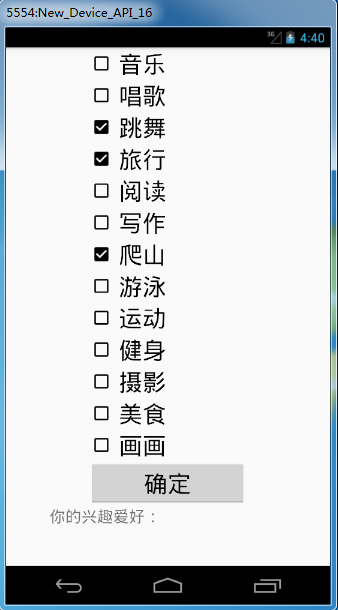
Android入门(九):CheckBox多选清单和ScrollView滚动条的更多相关文章
- elementUI 学习入门之 checkbox 复选框
CheckBox 复选框 与单选框基本类似.如:按钮样式.带边框.复选框按钮大小. eg: <template> <el-checkbox-group v-model="s ...
- Android入门(九)文件存储与SharedPreferences存储
原文链接:http://www.orlion.ga/578/ Android系统中主要提供了三种方式用于简单地实现数据持久化功能,即文件存储.SharedPreference存储以及数据库存储.当然, ...
- Android 单选按钮(RadioButton)和复选框(CheckBox)的使用
1.RadioButton (1)介绍 (2)单选按钮点击事件的用法 (3)RadioButton与RadioGroup配合使用实现单选题功能 (4)xml布局及使用 <?xml version ...
- Android基础控件单选按钮RadioButton和Checkbox复选按钮的使用
1.相关简介 RadioButton需要和RadioGroup结合使用,在RadioGroup设置布局方式! Checkbox是单独使用,本文为了方便放在了RadioGroup中! 2.简单使用 方法 ...
- Android控件之CheckBox(复选框控件)
一.有两种状态: 选中状态(true).未选中状态(false) 二.属性 android:id = "@+id/checkbox" android:layout_width=&q ...
- Android笔记-5-EditText密码和Checkbox二选一
EditText密码:明文和密文 密文: public class MainActivity extends Activity { private EditText password = null; ...
- Android的CheckBox(多选框)
1.布局文件 <LinearLayout xmlns:android="http://schemas.android.com/apk/res/android" xmlns:t ...
- Android中ListView结合CheckBox判断选中项
本文主要实现在自定义的ListView布局中加入CheckBox控件,通过判断用户是否选中CheckBox来对ListView的选中项进行相应的操作.通过一个Demo来展示该功能,选中ListView ...
- 网络编程懒人入门(九):通俗讲解,有了IP地址,为何还要用MAC地址?
1.前言 标题虽然是为了解释有了 IP 地址,为什么还要用 MAC 地址,但是本文的重点在于理解为什么要有 IP 这样的东西.本文对读者的定位是知道 MAC 地址是什么,IP 地址是什么. (本文同步 ...
随机推荐
- AFNetworking certificate AFNetworking 证书设置
+ (AFSecurityPolicy*)customSecurityPolicy { // /先导入证书 NSString *cerPath = [[NSBundle mainBundle] pat ...
- Property和attribute的区别[转]
Attribute和Property都可以翻译成“属性”,有的地方用Attribute表示“属性”,有的地方又在用Property,初 学者常常在这两个单词间“迷失”,甚至认为二者没有区别,是一样的. ...
- rsync快速删除海量文件
rsync --delete-before -avH --progress --stats /tmp/empty/ /var/spool/postfix/maildrop/ 由于业务侧使用时,一些脚本 ...
- Sql Server FOR XML PATH
FOR XML PATH 有的人可能知道有的人可能不知道,其实它就是将查询结果集以XML形式展现,有了它我们可以简化我们的查询语句实现一些以前可能需要借助函数活存储过程来完成的工作.那么以一个实例为主 ...
- Android之layout_weight解析
我们先来看以下这段Android布局代码: <LinearLayout xmlns:android="http://schemas.android.com/apk/res/androi ...
- 问题--feed列表有新闻重复的问题
1. 经常有运营反应,客户端展示的feed列表有重复的问题. 重复问题分为两种,一种是两条新闻标题类似,另一种是两条新闻标题是完全相同. (1)标题类似 原来过滤的逻辑,是两个标题完全相等,才认为两条 ...
- js 的Location对象
Location对象 location用于获取或设置窗体的URL,并且可以用于解析URL. 语法: location.[属性|方法] location对象属性图示: location 对象属性: ha ...
- Mysqle 常用 函数
一.数学函数 数学函数主要用于处理数字,包括整型.浮点数等. select 可以用作输出 ABS(x) 返回x的绝对值 SELECT ABS(-1) -- 返回1 CEIL ...
- NEFU 560 半数集
题目链接 递推就行,把a[0]设为1很巧妙. #include <cstdio> #include <iostream> using namespace std; ]={}; ...
- Android笔记:调试android程序
1.Debug 第一步: 添加断点 第二步: 右击项目→Debug As→Android Application //之后一个对话框出现,一会自动消失 第三步: 执行手机端操作,Eclipse 就会 ...