
Python 利用pytesser模块识别图像文字
使用的是python的pytesser模块,原先想做的是图片中文识别,搞了一段时间了,在中文的识别上还是有很多问题,这里做记录分享。
pytesser,OCR in Python using the Tesseract engine from Google。是谷歌OCR开源项目的一个模块,可将图片中的文字转换成文本(主要是英文)。
1.pytesser安装
使用设备:win8 64位
PyTesser使用Tesseract OCR引擎,将图像转换到可接受的格式,然后执行tesseract提取出文本信息。使用PyTesser ,你无须安装Tesseract OCR引擎,但必须要先安装PIL模块(Python Image Library,python的图形库)
pytesser下载:http://code.google.com/p/pytesser/ 若打不开,可通过百度网盘下载:http://pan.baidu.com/s/1o69LL8Y
PIL官方下载:http://www.pythonware.com/products/pil/
其中PIL可直接点击exe安装,pytesser无需安装,解压后可以放在python安装文件夹的\Lib\site-packages\ 下直接使用(需要添加pytesser.pth)
Ubuntu安装
sudo pip install pytesseract

sudo apt-get install tesseract-ocr
2.pytesser源码
通过查看pytesser.py的源码,可以看到几个主要函数:
(1)call_tesseract(input_filename, output_filename)
该函数调用tesseract外部执行程序,提取图片中的文本信息
(2)image_to_string(im, cleanup = cleanup_scratch_flag)
该函数处理的是image对象,所以需用使用im = open(filename)打开文件,返回一个image对象。其中调用util.image_to_scratch(im, scratch_image_name)将内存中的图像文件保存为bmp,以便tesserac程序能正常处理。
(3)image_file_to_string(filename, cleanup = cleanup_scratch_flag, graceful_errors=True)
该函数直接使用Tesseract读取图像文件,如果图像是不相容的,会先转换成兼容的格式,然后再提取图片中的文本信息。
"""OCR in Python using the Tesseract engine from Google

http://code.google.com/p/pytesser/

by Michael J.T. O'Kelly

V 0.0.1, 3/10/07"""

import Image

import subprocess

import util

import errors

tesseract_exe_name = 'tesseract' # Name of executable to be called at command line

scratch_image_name = "temp.bmp" # This file must be .bmp or other Tesseract-compatible format

scratch_text_name_root = "temp" # Leave out the .txt extension

cleanup_scratch_flag = False  # Temporary files cleaned up after OCR operation

def call_tesseract(input_filename, output_filename):

    """Calls external tesseract.exe on input file (restrictions on types),

    outputting output_filename+'txt'"""

    args = [tesseract_exe_name, input_filename, output_filename]

    proc = subprocess.Popen(args)

    retcode = proc.wait()

    if retcode!=0:

        errors.check_for_errors()

def image_to_string(im, cleanup = cleanup_scratch_flag):

    """Converts im to file, applies tesseract, and fetches resulting text.

    If cleanup=True, delete scratch files after operation."""

    try:

        util.image_to_scratch(im, scratch_image_name)

        call_tesseract(scratch_image_name, scratch_text_name_root)

        text = util.retrieve_text(scratch_text_name_root)

    finally:

        if cleanup:

            util.perform_cleanup(scratch_image_name, scratch_text_name_root)

    return text

def image_file_to_string(filename, cleanup = cleanup_scratch_flag, graceful_errors=True):

    """Applies tesseract to filename; or, if image is incompatible and graceful_errors=True,

    converts to compatible format and then applies tesseract.  Fetches resulting text.

    If cleanup=True, delete scratch files after operation."""

    try:

        try:

            call_tesseract(filename, scratch_text_name_root)

            text = util.retrieve_text(scratch_text_name_root)

        except errors.Tesser_General_Exception:

            if graceful_errors:

                im = Image.open(filename)

                text = image_to_string(im, cleanup)

            else:

                raise

    finally:

        if cleanup:

            util.perform_cleanup(scratch_image_name, scratch_text_name_root)

    return text

if __name__=='__main__':

    im = Image.open('phototest.tif')

    text = image_to_string(im)

    print text

    try:

        text = image_file_to_string('fnord.tif', graceful_errors=False)

    except errors.Tesser_General_Exception, value:

        print "fnord.tif is incompatible filetype.  Try graceful_errors=True"

        print value

    text = image_file_to_string('fnord.tif', graceful_errors=True)

    print "fnord.tif contents:", text

    text = image_file_to_string('fonts_test.png', graceful_errors=True)

    print text
  3.pytesser使用
  在代码中加载pytesser模块,简单的测试代码如下:
from pytesser import *

im = Image.open('fonts_test.png')

text = image_to_string(im)

print "Using image_to_string(): "

print text

text = image_file_to_string('fonts_test.png', graceful_errors=True)

print "Using image_file_to_string():"

print text
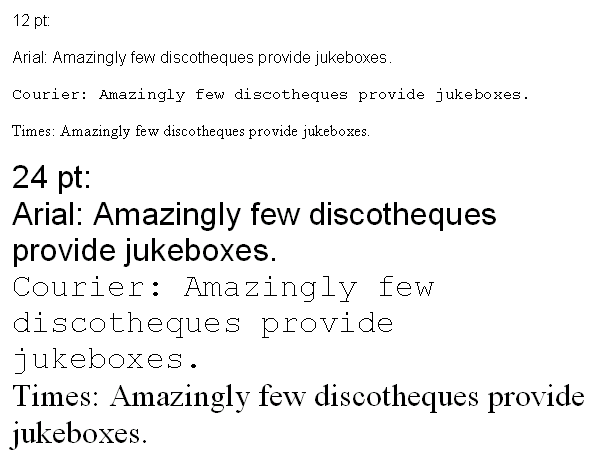
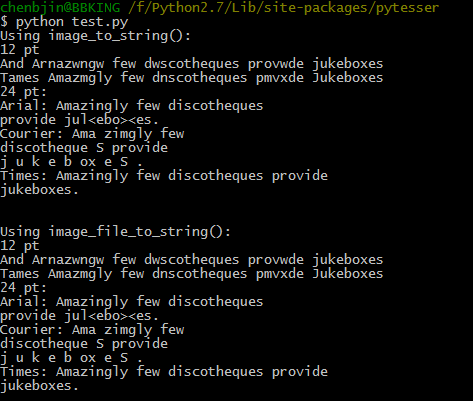
识别结果如下:基本能将英文字符提取出来,但对一些复杂点的图片,比如说我尝试对一些英文论文图片进行识别,但结果实在不理想。
由于在中文识别方面还有很多问题,以后再进一步研究分享。
参考:HK_JH的专栏 http://blog.csdn.net/hk_jh/article/details/8961449
Python 利用pytesser模块识别图像文字的更多相关文章
- python利用selenium库识别点触验证码
利用selenium库和超级鹰识别点触验证码(学习于静谧大大的书,想自己整理一下思路) 一.超级鹰注册:超级鹰入口 1.首先注册一个超级鹰账号,然后在超级鹰免费测试地方可以关注公众号,领取1000积分 ...
- 利用Hough变换识别图像中的直线
引入 近期看到2015年数学建模A题太阳影子定位中的第四问,需要根据附件中视频里的直杆的太阳影子的变化确定拍摄地点.其实确定拍摄地点这个问题并不是十分困难,因为有前三问的铺垫,我们已经得出了太阳影子长 ...
- Python利用os模块批量修改文件名
初学Python.随笔记录自己的小练习. 通过查阅资料os模块中rename和renames都可以做到 他们的区别为.rename:只能修改文件名 renames:可以修改文件名,还可以修改文件上 ...
- python 利用tkinter模块设计出window窗口(搞笑版)
代码如下 from tkinter import * import tkinter from tkinter import messagebox #定义了一个函数,当关闭window窗口时将会弹出一个 ...
- python利用twilio模块给自己发短信
1.访问http://twilio.com/并填写注册表单.注册了新账户后,你需要验证一个手机号码,短信将发给该号码. 2.Twilio 提供的试用账户包括一个电话号码,它将作为短信的发送者.你将需要 ...
- [Python] 利用commands模块执行Linux shell命令
http://blog.csdn.net/dbanote/article/details/9414133 http://zhou123.blog.51cto.com/4355617/1312791
- python利用scapy模块写一个TCP路由追踪和扫描存活IP的脚本
前言: 没有前言 0x01 from scapy.all import * import sys from socket import * import os from threading impor ...
- python 利用csv模块导入数据
- 利用pytesser识别图形验证码
简单识别 1.一般思路 验证码识别的一般思路为: 图片降噪 图片切割 图像文本输出 1.1 图片降噪 所谓降噪就是把不需要的信息通通去除,比如背景,干扰线,干扰像素等等,只剩下需要识别的文字,让图片变 ...
随机推荐
- PHP中的闭包和匿名函数
闭包的概念是指在创建闭包时,闭包会封装周围的状态的函数.即便闭包所在环境不在了.但闭包中封装的状态依然存在. 匿名函数就是没有名称的函数. 它们看似很函数一样,实际上它们属于Closure类的实例 P ...
- [bzoj3155]Preprefix sum(树状数组)
3155: Preprefix sum Time Limit: 1 Sec Memory Limit: 512 MBSubmit: 1183 Solved: 546[Submit][Status] ...
- Android Activity的加载模式和onActivityResult方法之间的冲突
前言 今天在调试程序时,发现在某一Activity上点击返回键会调用该Activity的onActivityResult()方法.我一开始用log,后来用断点跟踪调试半天,还是百思不得其解.因为之前其 ...
- JAVA 列表排序
以前都通过Comparator进行排序,今天看到个例子,通过apache-common工具包进行排序,实现例子参考下面界面 http://blog.csdn.net/lizeyang/article/ ...
- Canvas学习
参考了慕课网课程:炫丽的倒计时效果Canvas绘图与动画基础 感谢 liuyubobobo 老师 ,提供了这么好的课程 1.<canvas><canvas>标签 注 ...
- iOS - Xcode 插件
Xcode 插件 Xcode 插件安装目录: ~/library/Application Support/Developer/Shared/Xcode/Plug-ins Xcode 插件大全 http ...
- tcp/ip详解-ip头部选项字段
IP头部的选项字段 作用:用于网络调试和测试 IP首部的可变部分就是一个可选字段.选项字段用来支持排错.测量以及安全等措施,内容很丰富.此字段的长度可变,从1个字节到40个字节不等,取决于所选择的项目 ...
- python中Scikit-Learn机器学习模块
Scikit-Learn是基于python的机器学习模块,基于BSD开源许可证.这个项目最早由DavidCournapeau 在2007 年发起的,目前也是由社区自愿者进行维护. Scikit-Lea ...
- hdu2243考研路茫茫——单词情结(ac+二分矩阵)
链接 跟2778差不多,解决了那道题这道也不成问题如果做过基本的矩阵问题. 数比较大,需要用unsigned longlong 就不需要mod了 溢出就相当于取余 #include <iostr ...
- iOS开发之UITapGestureRecognizer单双击
转自手势开发 IOS开发之手势——UIGestureRecognizer 共存 在 iPhone 或 iPad 的开发中,除了用 touchesBegan / touchesMoved / touch ...