
org.hibernate.service.classloading.spi.ClassLoadingException: Specified JDBC Driver com.mysql.jdbc.Driver class not found
今天在使用hibernate搭建开发环境的时候出现了一个不可思议的问题:
 org.hibernate.service.classloading.spi.ClassLoadingException: Specified JDBC Driver com.mysql.jdbc.Driver class not found

     at org.hibernate.service.jdbc.connections.internal.DriverManagerConnectionProviderImpl.configure(DriverManagerConnectionProviderImpl.java:107)

     at org.hibernate.service.internal.StandardServiceRegistryImpl.configureService(StandardServiceRegistryImpl.java:75)

     at org.hibernate.service.internal.AbstractServiceRegistryImpl.initializeService(AbstractServiceRegistryImpl.java:159)

     at org.hibernate.service.internal.AbstractServiceRegistryImpl.getService(AbstractServiceRegistryImpl.java:131)

     at org.hibernate.engine.jdbc.internal.JdbcServicesImpl.buildJdbcConnectionAccess(JdbcServicesImpl.java:223)

     at org.hibernate.engine.jdbc.internal.JdbcServicesImpl.configure(JdbcServicesImpl.java:89)

     at org.hibernate.service.internal.StandardServiceRegistryImpl.configureService(StandardServiceRegistryImpl.java:75)

     at org.hibernate.service.internal.AbstractServiceRegistryImpl.initializeService(AbstractServiceRegistryImpl.java:159)

     at org.hibernate.service.internal.AbstractServiceRegistryImpl.getService(AbstractServiceRegistryImpl.java:131)

     at org.hibernate.cfg.SettingsFactory.buildSettings(SettingsFactory.java:71)

     at org.hibernate.cfg.Configuration.buildSettingsInternal(Configuration.java:2277)

     at org.hibernate.cfg.Configuration.buildSettings(Configuration.java:2273)

     at org.hibernate.cfg.Configuration.buildSessionFactory(Configuration.java:1742)

     at com.hibtest.entity.TestUsers.testShemaExport(TestUsers.java:23)

     at sun.reflect.NativeMethodAccessorImpl.invoke0(Native Method)

     at sun.reflect.NativeMethodAccessorImpl.invoke(NativeMethodAccessorImpl.java:39)

     at sun.reflect.DelegatingMethodAccessorImpl.invoke(DelegatingMethodAccessorImpl.java:25)

     at java.lang.reflect.Method.invoke(Method.java:597)

     at org.junit.runners.model.FrameworkMethod$1.runReflectiveCall(FrameworkMethod.java:45)

     at org.junit.internal.runners.model.ReflectiveCallable.run(ReflectiveCallable.java:15)

     at org.junit.runners.model.FrameworkMethod.invokeExplosively(FrameworkMethod.java:42)

     at org.junit.internal.runners.statements.InvokeMethod.evaluate(InvokeMethod.java:20)

     at org.junit.runners.ParentRunner.runLeaf(ParentRunner.java:263)

     at org.junit.runners.BlockJUnit4ClassRunner.runChild(BlockJUnit4ClassRunner.java:68)

     at org.junit.runners.BlockJUnit4ClassRunner.runChild(BlockJUnit4ClassRunner.java:47)

     at org.junit.runners.ParentRunner$3.run(ParentRunner.java:231)

     at org.junit.runners.ParentRunner$1.schedule(ParentRunner.java:60)

     at org.junit.runners.ParentRunner.runChildren(ParentRunner.java:229)

     at org.junit.runners.ParentRunner.access$000(ParentRunner.java:50)

     at org.junit.runners.ParentRunner$2.evaluate(ParentRunner.java:222)

     at org.junit.runners.ParentRunner.run(ParentRunner.java:300)

     at org.eclipse.jdt.internal.junit4.runner.JUnit4TestReference.run(JUnit4TestReference.java:50)

     at org.eclipse.jdt.internal.junit.runner.TestExecution.run(TestExecution.java:38)

     at org.eclipse.jdt.internal.junit.runner.RemoteTestRunner.runTests(RemoteTestRunner.java:467)

     at org.eclipse.jdt.internal.junit.runner.RemoteTestRunner.runTests(RemoteTestRunner.java:683)

     at org.eclipse.jdt.internal.junit.runner.RemoteTestRunner.run(RemoteTestRunner.java:390)

     at org.eclipse.jdt.internal.junit.runner.RemoteTestRunner.main(RemoteTestRunner.java:197)

 Caused by: org.hibernate.service.classloading.spi.ClassLoadingException: Unable to load class [com.mysql.jdbc.Driver]

     at org.hibernate.service.classloading.internal.ClassLoaderServiceImpl.classForName(ClassLoaderServiceImpl.java:141)

     at org.hibernate.service.jdbc.connections.internal.DriverManagerConnectionProviderImpl.configure(DriverManagerConnectionProviderImpl.java:104)

     ... 36 more

 Caused by: java.lang.ClassNotFoundException: Could not load requested class : com.mysql.jdbc.Driver

     at org.hibernate.service.classloading.internal.ClassLoaderServiceImpl$1.findClass(ClassLoaderServiceImpl.java:99)

     at java.lang.ClassLoader.loadClass(ClassLoader.java:306)

     at java.lang.ClassLoader.loadClass(ClassLoader.java:247)

     at java.lang.Class.forName0(Native Method)

     at java.lang.Class.forName(Class.java:247)

     at org.hibernate.service.classloading.internal.ClassLoaderServiceImpl.classForName(ClassLoaderServiceImpl.java:138)

     ... 37 more
1, 我的jar包有:
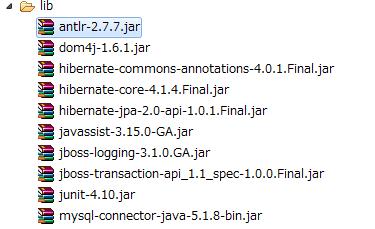
2, 之前使用的数据库连接驱动包是:

3, 总结:
总之遇到这种问题一般都是导入的数据库连接jar包存在问题导致的,可能版本或者其它什么原因。因此解决方案就是可以换其它版本的jar包试试。
org.hibernate.service.classloading.spi.ClassLoadingException: Specified JDBC Driver com.mysql.jdbc.Driver class not found的更多相关文章
- SSH项目过一段时间之后再访问会报一次Could not open Hibernate session for transaction 异常,Caused by: com.mysql.jdbc.CommunicationsException: Communications link failure due to underlyi,再重新方法即可访问成功(通常出现在过了一晚之后再去访问系统)
前端时间到客户那去进行项目的上线测试,将项目部署好之后,运行都是正常的,可是每到了第二天早上访问的时候,就会报一个Could not open Hibernate session for transa ...
- registered the JDBC driver [com.mysql.jdbc.Driver] but failed to unregister it when the web application was stopped.
最近在用maven整合SSH做个人主页时候,在eclipse里面使用tomcat7插件发布项目是没有问题的,但当打包成war之后,使用tomcat7单独发布项目,就出现了以下的错误. 严重: Cont ...
- 解决 01-Jul-2016 10:49:05.875 WARNING [localhost-startStop-2] org.apache.catalina.loader.WebappClassLoaderBase.clearReferencesJdbc The web application [ROOT] registered the JDBC driver [com.mysql.jdbc.D
01-Jul-2016 10:49:05.875 WARNING [localhost-startStop-2] org.apache.catalina.loader.WebappClassLoade ...
- 解决 Tomcat reload WARNING [localhost-startStop-2] org.apache.catalina.loader.WebappClassLoaderBase.clearReferencesJdbc The web application [] registered the JDBC driver [com.mysql.jdbc.Driver] but fail
转自:http://www.cnblogs.com/interdrp/p/5632529.html 我的错误如下: 06-Sep-2016 18:57:10.595 WARNING [localhos ...
- registered the JDBC driver [com.mysql.jdbc.Driver] but failed to unregister it when the web application was stopped. To prevent a memory leak, the JDBC Driver has been forcibly unregistered.
问题是tomcat的版本问题,tomcat新检测机制导致的这个问题,换版本可以解决问题,但不建议这么做,租用服务器不是你说换就换的.其实问题根源是BasicDataSource,BasicDataSo ...
- 报错:The specified datastore driver ("com.mysql.jdbc.Driver") was not found in the CLASSPATH. Please check your CLASSPATH specification, and the name of the driver.
报错背景: CDH中集成hive插件,启动报错. 报错现象: [main]: Metastore Thrift Server threw an exception... javax.jdo.JDOFa ...
- MBG逆向工程报错:generate failed: Exception getting JDBC Driver: com.mysql.jdbc.Driver
修改pom文件,逆向工程如下: <!-- 逆向工程 --> <plugin> <groupId>org.mybatis.generator</groupId& ...
- Execution default-cli of goal org.mybatis.generator:mybatis-generator-maven-plugin:1.3.2:generate failed: Exception getting JDBC Driver: com.mysql.jdbc.Driver (mybatis逆向工程)
springboot整合mybatis时出现的问题 解决方法:在pom.xml中plugin中加入单独依赖Mysql驱动包,问题便可解决 <plugin> <groupId>o ...
- [bigdata] 启动CM出现 “JDBC Driver class not found: com.mysql.jdbc.Driver” 以及“Error creating bean with name 'serverLogFetcherImpl'”问题的解决方法
问题:“JDBC Driver class not found: com.mysql.jdbc.Driver” 通过以下命令启动cm [root@hadoop1 ~]# /etc/init.d/cl ...
随机推荐
- Photoshop CS6的安装
Photoshop CS6的安装 文件的现在可以从百度软件中下载 安装方法见参考链接,window版的与之类似,亲测成功 参考链接 Mac版Adobe Photoshop CS6 破解过程 Adobe ...
- 【学习笔记】【C语言】常量
1. 什么是常量 常量,表示一些固定的数据 2. 常量的分类 1> 整型常量(int) 包括了所有的整数,比如6.27.109.256.-10.0.-289等 2> 浮点型常量(float ...
- 19款绚丽实用的jQuery/CSS3侧边栏菜单
jQuery作为一款主流的JavaScript前端开发框架,深受广告开发者的亲睐,同时jQuery有着不计其数的插件,特别是菜单插件更为丰富,本文将要为大家介绍20个绚丽而实用的jQuery侧边栏菜单 ...
- WebServiceException
在用cxf做webservice的时候,在写客户端程序的时候,出现以下异常: Could not find wsdl:binding operation info for web method tes ...
- 内核 current宏解析
Technorati 标签: current thread_info 在内核中,可以通过current宏来获得当前执行进程的task_struct指针.现在来简要分析以下: 最原始 ...
- java.util.TreeMap源码分析
TreeMap的实现基于红黑树,排列的顺序根据key的大小,或者在创建时提供的比较器,取决于使用哪个构造器. 对于,containsKey,get,put,remove操作,保证时间复杂度为log(n ...
- 在指定的DSN中,驱动程序和应用程序之间的体系结构不匹配
今天在使用plsql通过odbc导入excel数据时发生了一个错误,截图如下: 错误提示为:驱动程序和应用程序之间的体系结构不匹配. 后来百度了一下,得出答案.系统是win10 64位.excel驱动 ...
- jquery循环table中tbody的tr中input:text,将值进行拼接传入控制器并返回状态和描述
引用jquery $(function(){ $("#按钮id").click(function(){ var nums="";//变量 $("#ta ...
- 【转】 (C#)利用Aspose.Cells组件导入导出excel文件
Aspose.Cells组件可以不依赖excel来导入导出excel文件: 导入: public static System.Data.DataTable ReadExcel(String strFi ...
- 【原】ComboBoxety用户输入自动匹配
//在界面构造函数里加入下面两行代码 this.cbbDepartureAirport.AutoCompleteMode = System.Windows.Forms.AutoCompleteMode ...