
Can't create/write to file '/tmp/MLjnvU95' (Errcode: 13 - Permission denied)
今天一个同事反馈往一个MySQL数据库导入数据时,报“ERROR 1 (HY000): Can't create/write to file '/tmp/MLjnvU95' (Errcode: 13 - Permission denied)”这样的错误,如下所示:
uery OK, 0 rows affected (0.03 sec)
ERROR 1 (HY000): Can't create/write to file '/tmp/MLjnvU95' (Errcode: 13 - Permission denied)
ERROR 1 (HY000): Can't create/write to file '/tmp/MLPzmIbJ' (Errcode: 13 - Permission denied)
ERROR 1 (HY000): Can't create/write to file '/tmp/MLdpJwKm' (Errcode: 13 - Permission denied)
ERROR 1 (HY000): Can't create/write to file '/tmp/MLB7FTT0' (Errcode: 13 - Permission denied)
ERROR 1 (HY000): Can't create/write to file '/tmp/ML1wcUAF' (Errcode: 13 - Permission denied)
ERROR 1 (HY000): Can't create/write to file '/tmp/MLYjOzPk' (Errcode: 13 - Permission denied)
ERROR 1 (HY000): Can't create/write to file '/tmp/ML7gi9z0' (Errcode: 13 - Permission denied)
ERROR 1 (HY000): Can't create/write to file '/tmp/ML6nezQG' (Errcode: 13 - Permission denied)
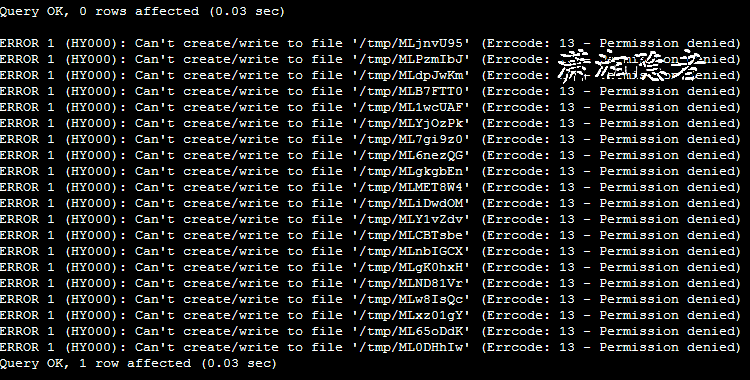
个人使用source script.sql导入数据时,也是遇到这个错误,如上截图所示。从这个错误提示,可以明显看出是MySQL没有权限对/tmp进行操作,
查看系统变量tmpdir,如下所示,tmpdir变量指定路径为/tmp
mysql> show variables like 'tmpdir';
+---------------+-------+
| Variable_name | Value |
+---------------+-------+
| tmpdir | /tmp |
+---------------+-------+
1 row in set (0.00 sec)
[root@mylx01 ~]# ls -lh /tmp
total 20M
-rw-rw-r--. 1 root root 20M Nov 7 12:04 cccc_user.sql
-rw-r--r--. 1 root root 57 Nov 7 02:00 percona-version-check
-rw-------. 1 root root 2.0K Nov 2 21:38 tmpP4BN3H
-rw-------. 1 root root 2.0K Oct 31 21:40 tmpusdOhs
-rw-------. 1 root root 2.0K Oct 30 21:36 tmp_WBZNO
-rw-------. 1 root root 2.1K Oct 29 21:38 tmpXcXptG
-rw-------. 1 root root 2.0K Nov 5 21:40 tmpyqSR0U
-rw-------. 1 root root 2.1K Oct 28 21:42 tmpZjNjtu
我们可以修改/tmp目录的权限; 或者修改数据库的临时目录来解决这个问题:
1:在配置文件my.cnf中修改数据库的临时目录,然后需要重启MySQL数据库
tmpdir = /var/lib/mysql
2:修改/tmp目录权限
chmod 1777 /tmp
或
chmod 777 /tmp
那么MySQL使用tmpdir来做什么呢?tmpdir是MySQL存临时文件的目录的路径名。如果未设置变量tmpdir,MySQL将使用系统的默认值,通常为/tmp、/var/tmp或/usr/tmp。更多详细信息,可以参考官方文档Where MySQL Stores Temporary Files的详细介绍:
MySQL arranges that temporary files are removed if mysqld is terminated. On platforms that support it (such as Unix), this is done by unlinking the file after opening it. The disadvantage of this is that the name does not appear in directory listings and you do not see a big temporary file that fills up the file system in which the temporary file directory is located. (In such cases, lsof +L1 may be helpful in identifying large files associated with mysqld.)
When sorting (ORDER BY or GROUP BY), MySQL normally uses one or two temporary files. The maximum disk space required is determined by the following expression:
(length of what is sorted + sizeof(row pointer))* number of matched rows
* 2
The row pointer size is usually four bytes, but may grow in the future for really big tables.
For some SELECT queries, MySQL also creates temporary SQL tables. These are not hidden and have names of the form SQL_*.
DDL operations that rebuild the table and are not performed online using the ALGORITHM=INPLACE technique create a temporary copy of the original table in the same directory as the original table.
Online DDL operations may use temporary log files for recording concurrent DML, temporary sort files when creating an index, and temporary intermediate tables files when rebuilding the table. For more information, see Section 15.12.3, “Online DDL Space Requirements”.
InnoDB user-created temporary tables and on-disk internal temporary tables are created in a temporary tablespace file named ibtmp1 in the MySQL data directory. For more information, see Section 15.6.3.5, “Temporary Tablespaces”.
MySQL会以隐含方式创建所有的临时文件。这样,就能确保中止mysqld时会删除所有临时文件。使用隐含文件的缺点在于,在临时文件目录所在的位置中,看不到占用了文件系统的大临时文件。
进行排序时(ORDER BY或GROUP BY),MySQL通常会使用1个或多个临时文件。所需的最大磁盘空间由下述表达式决定:
(length of what is sorted + sizeof(row pointer))
* number of matched rows
* 2
“row pointer”(行指针)的大小通常是4字节,但在以后,对于大的表,该值可能会增加。
对于某些SELECT查询,MySQL还会创建临时SQL表。它们不是隐含表,并具有SQL_*形式的名称。
ALTER TABLE会在与原始表目录相同的目录下创建临时表。
如果内存临时表超出了限制,MySQL就会自动地把它转化为基于磁盘的MyISAM表,存储在指定的tmpdir目录下。
参考资料:
https://dev.mysql.com/doc/refman/8.0/en/temporary-files.html
Can't create/write to file '/tmp/MLjnvU95' (Errcode: 13 - Permission denied)的更多相关文章
- Mysql 错误 ERROR 1 (HY000) at line 1: Can't create/write to file '/home/kaizenly/cfg_dict.csv' (Errcode: 13 - Permission denied)
[1]问题描述 (1)执行SQL语句: use billing; select * from cfg_dict into outfile '/home/kaizenly/cfg_dict.csv' f ...
- 【docker】python: can't open file 'helloworld.py': [Errno 13] Permission denied
运行容器提示权限问题 docker run -v $PWD/myapp:/usr/src/myapp -w /usr/src/myapp python:3.5 python helloworld. ...
- Can't create/write to file '/tmp/#sql_887d_0.MYD' (Errcode: 17)
lsof |grep "#sql_887d_0.MYD" 如果没有被占用就可以删掉 . https://wordpress.org/support/topic/cant-creat ...
- ERROR 1 (HY000): Can't create/write to file '/tmp/#sql_909_0.MYI' (Errcode: 13)
mysql> desc tablename; ERROR 1 (HY000): Can't create/write to file '/tmp/#sql_909_0.MYI' (Errcode ...
- Can't create/write to file '/tmp/#sql_3105_0.MYI' (Errcode: 13)
最近的项目中由于临时存储空间太大了.索性把tmp目录删除了.结果访问出现 Can't create/write to file '/tmp/#sql_3105_0.MYI' (Errcode: 13) ...
- mysql执行SQL语句时报错:[Err] 3 - Error writing file '/tmp/MYP0G1B8' (Errcode: 28 - No space left on device)
问题描述: 今天一同事在mysql中执行SQL语句的时候,报了/tmp空间不足的问题,报错如下: [SQL] SELECT f.prov as 字段1, MAX( CASE f.flag_name W ...
- docker pull报错failed to register layer: Error processing tar file(exit status 1): open permission denied
近来在一个云主机上操作docker pull,报错如下: failed to register layer: Error processing ): open /etc/init.d/hwclock. ...
- 报错:/usr/sbin/mysqld: Can't find file: './performance_schema/events_waits_summary_by_account_by_event_name.frm' (errno: 13 - Permission denied)
报错背景: Linux环境下安装MySQL数据库. 安装完成,数据库初始化,启动数据库时报错. 报错现象: -- :: [ERROR] Native table 'performance_schema ...
- Jupyter运行时出现下面的错误:Unexpected error while saving file: arma/Untitled.ipynb [Errno 13] Permission denied:
运行环境:Ubuntu16.04+Python2.7执行如下代码修改Jupyter的一部分文件的权限(执行完之后重新启动即可): sudo chmod ~/.local/share/jupyter/ ...
随机推荐
- [Swift]LeetCode443. 压缩字符串 | String Compression
Given an array of characters, compress it in-place. The length after compression must always be smal ...
- [Swift]LeetCode996. 正方形数组的数目 | Number of Squareful Arrays
Given an array A of non-negative integers, the array is squareful if for every pair of adjacent elem ...
- Dockerfile指令介绍
FROM:指定基础镜像 在Dockerfile中FROM是必备的指令,用于指定基础的镜像. FROM centos:latest LABEL:指定镜像标签 LABEL指令用来指定镜像的标签. 格式: ...
- C#版 - Leetcode 65. 有效数字 - 题解
版权声明: 本文为博主Bravo Yeung(知乎UserName同名)的原创文章,欲转载请先私信获博主允许,转载时请附上网址 http://blog.csdn.net/lzuacm. Leetcod ...
- Java-线程池专题 (美团面试题)
去美团面试,问到了什么是线程池,如何使用,为什么要用,以下做个总结 1.什么是线程池: java.util.concurrent.Executors提供了一个 java.util.concurren ...
- 大数据技术之_19_Spark学习_01_Spark 基础解析 + Spark 概述 + Spark 集群安装 + 执行 Spark 程序
第1章 Spark 概述1.1 什么是 Spark1.2 Spark 特点1.3 Spark 的用户和用途第2章 Spark 集群安装2.1 集群角色2.2 机器准备2.3 下载 Spark 安装包2 ...
- IDEA搭建Spring Boot项目
所需工具 新建项目 创建一个login控制器 写入两个注释 import导入项会自动添加@RestController@RequestMapping(value = "/login" ...
- Android事件机制之二:onTouch详解
<Android事件机制之一:事件传递和消费>一文总结了Android中的事件传递和消费机制. 在其中对OntachEvent中的总结中,不是很具体.本文将主要对onTach进行总结. o ...
- [十二]基础数据类型之String
在正式介绍String之前,我们先介绍下CharSequence char + sequence 就是字符的序列的意思 Java中万事万物都是对象类型 而对于字符的序列,也就是多个char, 这么一种 ...
- pycharm安装破解go插件
pycharm 2018以前版本安装go插件可以直接在plugins中搜索 go 插件,然后安装.若是2018以后的版本,go 变成了收费插件,plugins 搜不到.然后Google了一下,有人提供 ...