
Google Colab 免费GPU服务器使用教程
今天突然看到一篇推文,里面讲解了如何薅资本主义羊毛,即如何免费使用Google免费提供的GPU使用权。
可以免费使用的方式就是通过Google Colab,全名Colaboratory。我们可以用它来提高Python技能,也可以用Keras、TensorFlow、PyTorch、OpenCV等等流行的深度学习库来练习开发深度学习的应用。
现在我们介绍如何免费的使用这个非常非常给力的应用!!!
一 项目建立与配置
(1)在Google Drive上创建文件夹:这项功能的使用主要是通过Google Drive,首先需要在Google Drive里面创建新的文件夹,因为我们所有的操作都是通过Google Drive文件的方式进行的,这里我们创建了一个名为gpu的文件夹,然后打开文件夹;
(2)创建新的Colaboratory:右键更多选择Colaboratory, 如果更多没有的话,可以点击关联更多应用搜索添加即可!
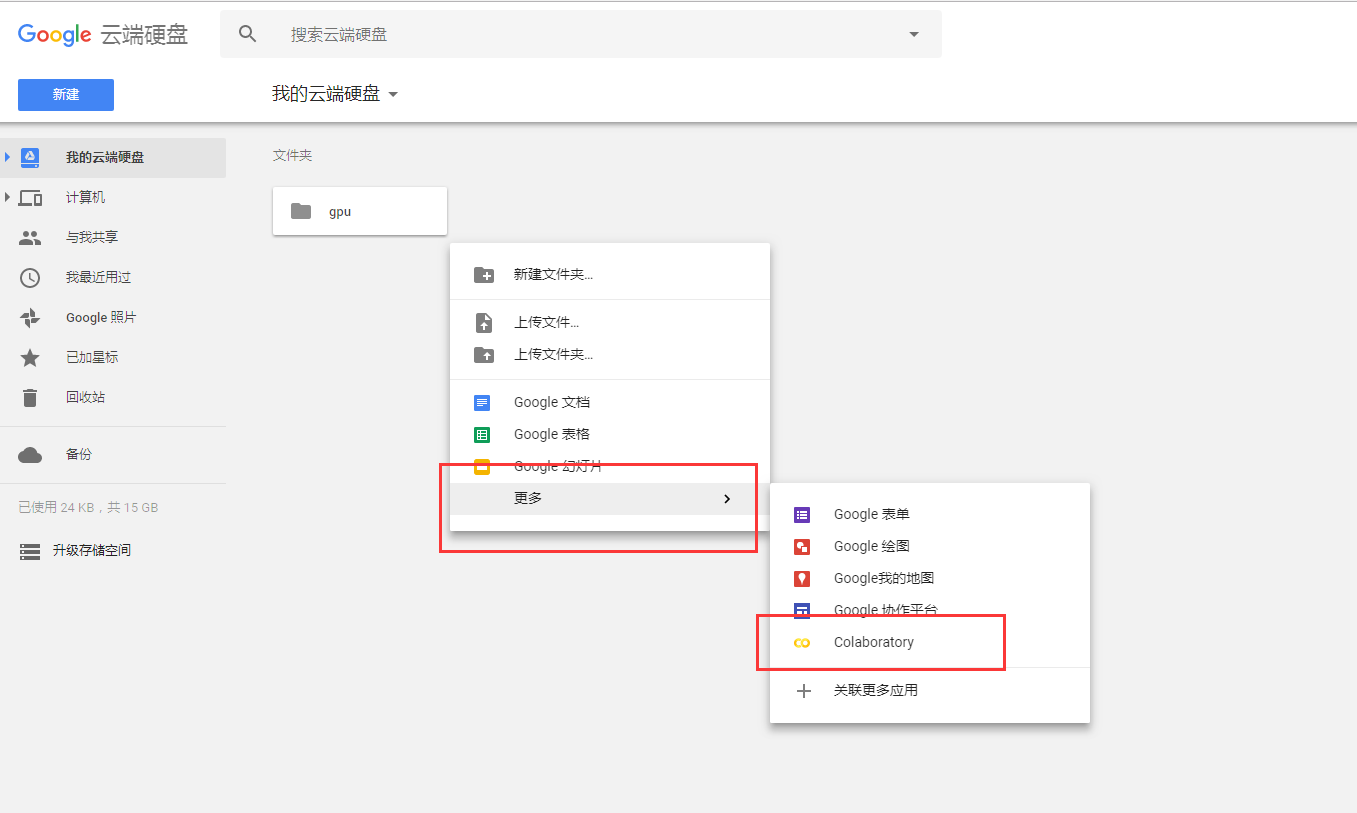
并且这里可以随意修改文件名

(3)点击修改,设置后端Python版本和免费的GPU使用:然后就可以进行代码编写了~~~
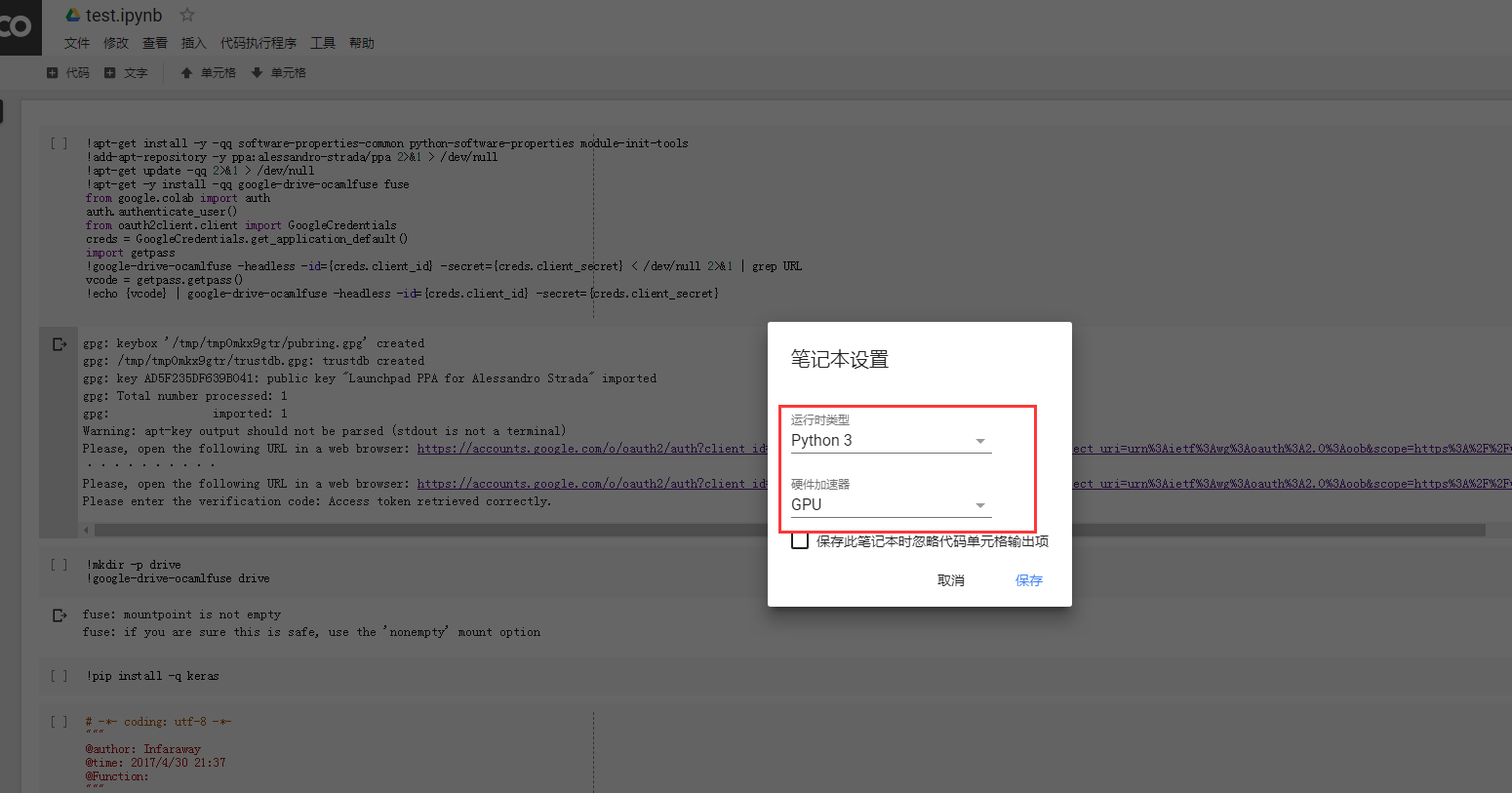
二 授权与挂载
(4)当完成基本的文件建立和配置后,就需要先运行下面这些代码,来安装必要的库、执
!apt-get install -y -qq software-properties-common python-software-properties module-init-tools

!add-apt-repository -y ppa:alessandro-strada/ppa 2>&1 > /dev/null

!apt-get update -qq 2>&1 > /dev/null

!apt-get -y install -qq google-drive-ocamlfuse fuse

from google.colab import auth

auth.authenticate_user()

from oauth2client.client import GoogleCredentials

creds = GoogleCredentials.get_application_default()

import getpass

!google-drive-ocamlfuse -headless -id={creds.client_id} -secret={creds.client_secret} < /dev/null 2>&1 | grep URL

vcode = getpass.getpass()

!echo {vcode} | google-drive-ocamlfuse -headless -id={creds.client_id} -secret={creds.client_secret}
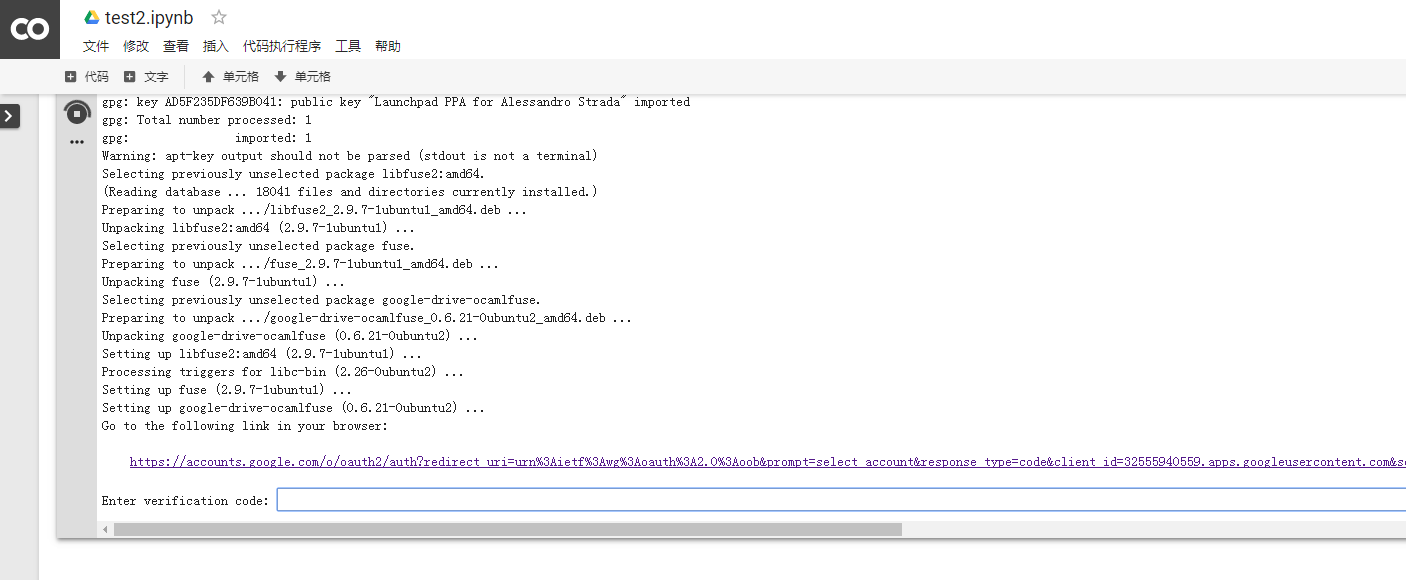
点击链接地址,获取验证码。
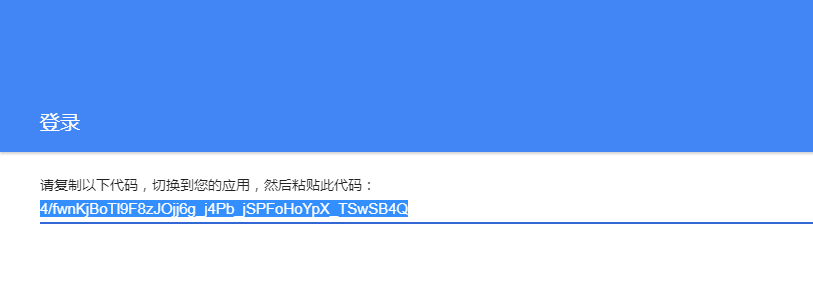
提示成功!
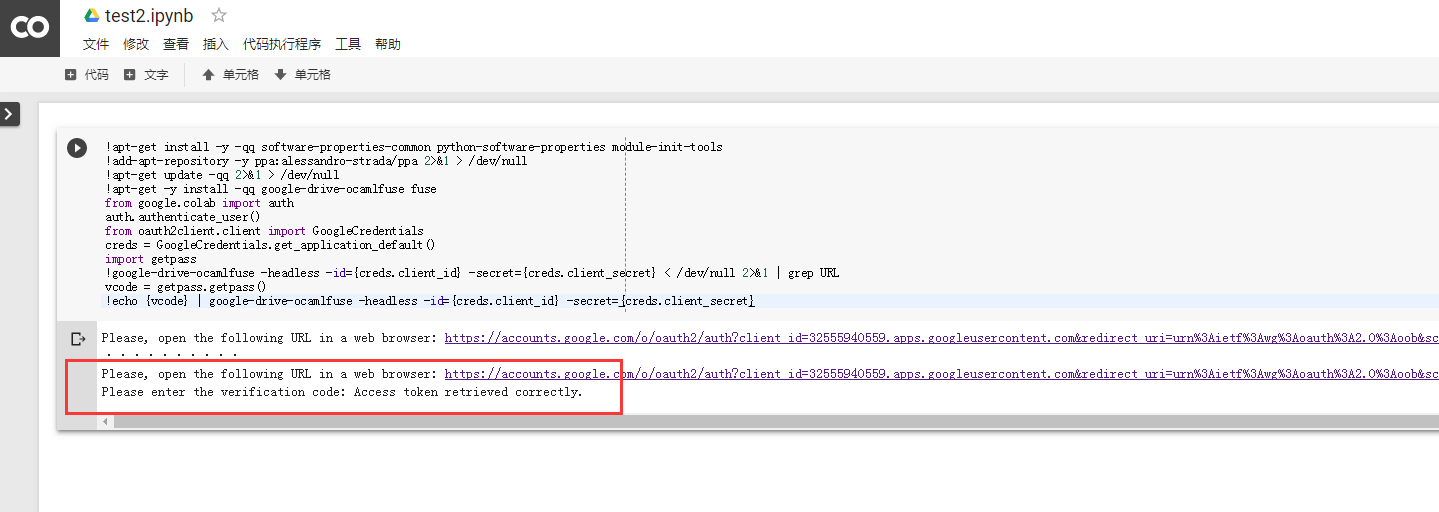
(5)授权完成后,就可以挂载Google Drive了
 !mkdir -p drive

 !google-drive-ocamlfuse drive
三 测试阶段
我们使用安装Keras中的测试样例代码进行效果的测试:
 1 # -*- coding: utf-8 -*-

 2

 3

 4 '''Trains a simple convnet on the MNIST dataset.

 5 Gets to 99.25% test accuracy after 12 epochs

 6 (there is still a lot of margin for parameter tuning).

 7 16 seconds per epoch on a GRID K520 GPU.

 8 '''

 9

10 from __future__ import print_function

11 import keras

12 from keras.datasets import mnist

13 from keras.models import Sequential

14 from keras.layers import Dense, Dropout, Flatten

15 from keras.layers import Conv2D, MaxPooling2D

16 from keras import backend as K

17

18 batch_size = 128

19 num_classes = 10

20 epochs = 12

21

22 # input image dimensions

23 img_rows, img_cols = 28, 28

24

25 # the data, shuffled and split between train and test sets

26 (x_train, y_train), (x_test, y_test) = mnist.load_data()

27

28 if K.image_data_format() == 'channels_first':

29     x_train = x_train.reshape(x_train.shape[0], 1, img_rows, img_cols)

30     x_test = x_test.reshape(x_test.shape[0], 1, img_rows, img_cols)

31     input_shape = (1, img_rows, img_cols)

32 else:

33     x_train = x_train.reshape(x_train.shape[0], img_rows, img_cols, 1)

34     x_test = x_test.reshape(x_test.shape[0], img_rows, img_cols, 1)

35     input_shape = (img_rows, img_cols, 1)

36

37 x_train = x_train.astype('float32')

38 x_test = x_test.astype('float32')

39 x_train /= 255

40 x_test /= 255

41 print('x_train shape:', x_train.shape)

42 print(x_train.shape[0], 'train samples')

43 print(x_test.shape[0], 'test samples')

44

45 # convert class vectors to binary class matrices

46 y_train = keras.utils.to_categorical(y_train, num_classes)

47 y_test = keras.utils.to_categorical(y_test, num_classes)

48

49 model = Sequential()

50 model.add(Conv2D(32, kernel_size=(3, 3),

51                  activation='relu',

52                  input_shape=input_shape))

53 model.add(Conv2D(64, (3, 3), activation='relu'))

54 model.add(MaxPooling2D(pool_size=(2, 2)))

55 model.add(Dropout(0.25))

56 model.add(Flatten())

57 model.add(Dense(128, activation='relu'))

58 model.add(Dropout(0.5))

59 model.add(Dense(num_classes, activation='softmax'))

60

61 model.compile(loss=keras.losses.categorical_crossentropy,

62               optimizer=keras.optimizers.Adadelta(),

63               metrics=['accuracy'])

64

65 model.fit(x_train, y_train,

66           batch_size=batch_size,

67           epochs=epochs,

68           verbose=1,

69           validation_data=(x_test, y_test))

70 score = model.evaluate(x_test, y_test, verbose=0)

71 print('Test loss:', score[0])

72 print('Test accuracy:', score[1])
这里使用Google GPU的效率每个Epoch大概需要11s左右即可完成
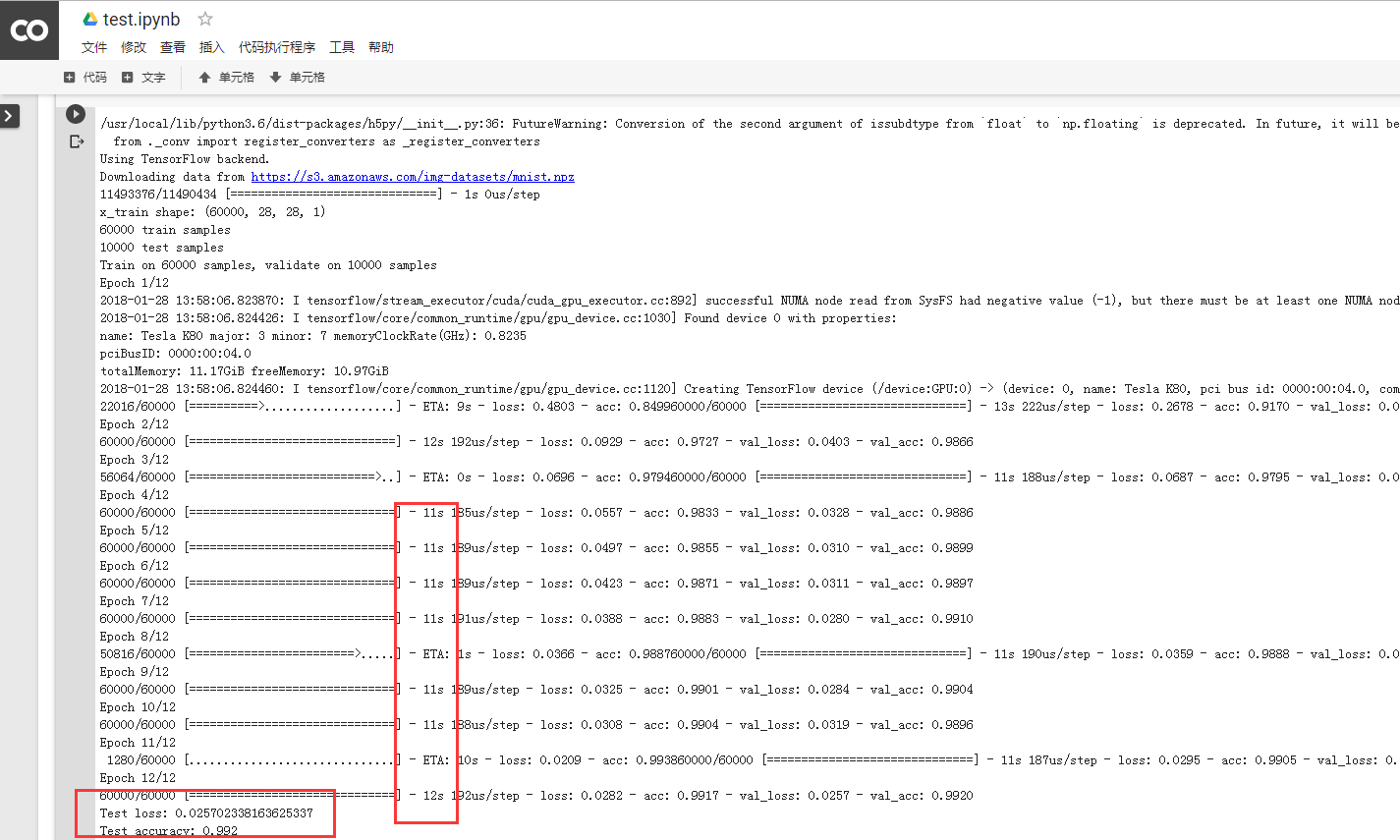
而我们使用实验室的工作站
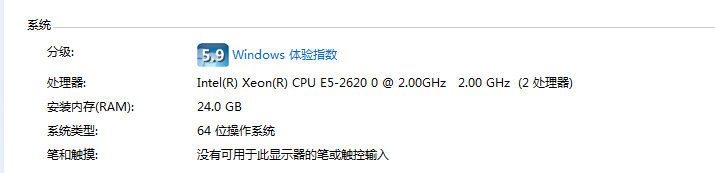
每个率每个Epoch大概需要130s+完成

四 相关命令
(1)查看是否使用GPU:
1 import tensorflow as tf

2 tf.test.gpu_device_name()
(2)在使用哪个GPU:
1 from tensorflow.python.client import device_lib

2 device_lib.list_local_devices()
(3)RAM大小:
1 !cat /proc/meminfo
当然Google的使用需要自备FQ工具!
重点:
授权:可能是google为了防止机器人,所以每次连接都需要验证一下。
挂载:因为我们连接的gpu服务器与google云盘是两个独立的机器,因此需要通过挂载操作将云盘上的文件夹连接到gpu服务器上。
因为我们连接的机器安装的是linux系统,我们可以使用linux命令行。(在命令行前面添加!即可)
查看当前路径:
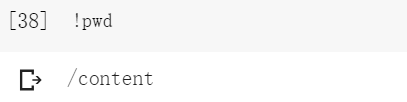
查看当前目录下的文件:
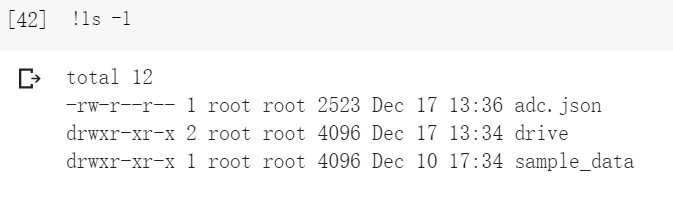
在这里我们可以看到drive目录,而这个drive目录保存的是云盘上的所有信息。
进入drive目录:

这里无法使用cd命令行。
运行的时候最好不要关闭页面。
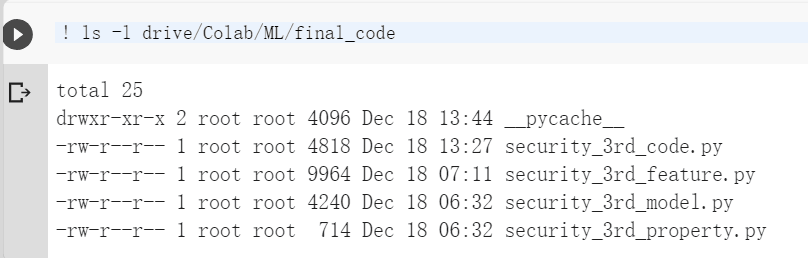

大家可以看到google云盘与Colab的服务器存在时差
云盘上文件即使上传上去了,但很可能早不到文件,这一般是网络延时的原因。多刷新几次,最好用ls命令看一下
云盘文件上传上去之后,可能会出现名字发生改变,用引号括起来。还多了一窜不知道什么的数字,这个要注意一下。
https://github.com/astrada/google-drive-ocamlfuse
原文链接:https://medium.com/deep-learning-turkey/google-colab-free-gpu-tutorial-e113627b9f5d
Google Colab 免费GPU服务器使用教程的更多相关文章
- Google Colab 免费GPU服务器使用教程 挂载云端硬盘
一.前言二.Google Colab特征三.开始使用3.1在谷歌云盘上创建文件夹3.2创建Colaboratory3.3创建完成四.设置GPU运行五.运行.py文件5.1安装必要库5.2 挂载云端硬盘 ...
- Google Colab免费GPU使用教程(一)
一.前言 现在你可以开发Deep Learning Applications在Google Colaboratory,它自带免费的Tesla K80 GPU.重点是免费.免费!(国内可能需要tz) 这 ...
- Google Colab 免费的谷歌GPU for deep learning
Who wants to use a free GPU for deep learning?Google Colab is a free cloud service and now it suppor ...
- Google Colab Free GPU Tutorial【转载】
转自:https://medium.com/deep-learning-turkey/google-colab-free-gpu-tutorial-e113627b9f5d 1.Google Cola ...
- Google免费GPU使用教程(Google Colab Colaboratory)
参考: https://www.234du.com/1154.html https://mp.weixin.qq.com/s/TGTToLYSQJui94-bQC4HIQ 注册gmail时遇到手机号无 ...
- Google Colab——用谷歌免费GPU跑你的深度学习代码
Google Colab简介 Google Colaboratory是谷歌开放的一款研究工具,主要用于机器学习的开发和研究.这款工具现在可以免费使用,但是不是永久免费暂时还不确定.Google Col ...
- Google免费GPU使用教程
今天突然看到一篇推文,里面讲解了如何薅资本主义羊毛,即如何免费使用Google免费提供的GPU使用权. 可以免费使用的方式就是通过Google Colab,全名Colaboratory.我们可以用它来 ...
- Google Colab使用教程
简介Google Colaboratory是谷歌开放的云服务平台,提供免费的CPU.GPU和TPU服务器. 目前深度学习在图像和文本上的应用越来越多,不断有新的模型.新的算法获得更好的效果,然而,一方 ...
- 一幅图的知识科普--Google免费DNS服务器
学习源于问题的解决 前段时间在虚拟机上安装了一个oracle软件,虚拟机和宿主机器的网络连接方式是桥接模式的,手动设置了静态ip地址,网关地址,但是发现虚拟机的浏览器不能用. 于是通过ping测试了一 ...
随机推荐
- 碰到在Windows中访问局域网文件夹, 提示无法访问时的解决办法
运行:gpedit.msc 找到下图的位置, 启用即可
- 解决qt提示:qt.network.ssl: QSslSocket: cannot call unresolved function DH_free
方法一(解决):把C:\Qt\Qt5.8.0\Tools\QtCreator\bin下的libeay32.dll和ssleay32.dll库复制到C:\Qt\Qt5.8.0\5.8\msvc2015_ ...
- Android中AES256加密的实现
AES加密是我们在工作中常用到一种加密方式,并且在java中也已经实现好了其相应的接口. 但是Java自带的JDK默认最多实现128位及其以下的加密.如果使用java自带的api实现aes256将会报 ...
- oracle的start with connect by prior如何使用
oracle的start with connect by prior是根据条件递归查询"树",分为四种使用情况: 第一种:start with 子节点ID='...' connec ...
- [Android] 关于Android的问号?和@符号的用法
@表示引用资源,声明这是一个资源引用-随后的文本是以@[package:]type/name形式提供的资源名.@android:string表明引用的系统的(android.*)资源@string表示 ...
- 如何在Windows 10上访问NFS的share
大致过程是: 1. 开启名为"Services for NFS"的Windows Feature. 2. 如果需要拥有写权限,需要修改注册表. 3. Mount即可. 具体步骤详见 ...
- 【ZH奶酪】如何用textgenrnn处理中文
如何用textgenrnn处理中文 1. 什么是textgenrnn? textgenrnn是建立在Keras和TensorFlow之上的,可用于生成字级别和词级别文本.网络体系结构使用注意力加权来加 ...
- PL/SQL学习笔记之存储过程
一:PL/SQL的两种子程序 子程序:子程序是执行一个特定功能.任务的程序模块.PL/SQL中有两种子程序:函数 和 过程. 函数:主要用于计算并返回一个值. 过程:没有直接返回值,主要用于执行操 ...
- C++11 lambda表达式是如何实现的?
lambda表达式是如何实现的呢? 其实是编译器为我们了创建了一个类,这个类重载了(),让我们可以像调用函数一样使用.所以,你写的lambda表达式和真正的实现,是这个样子的: 而对于捕获变量的lam ...
- 关于select标签曾经踩过的几个坑!
1.情景展示 select标签,是前端开发界面展示,经常需要用到一个标签,看看下面的坑,你中招了吗? 2.坑区展示 踩坑一:option标签没有声明value属性: 没有声明value属性 < ...