
封装UIlabel 辨别用户名 ,话题 ,链接,电话,高亮文字等
概述
详细
 封装UIlabel辨别用户名,话题,链接,电话,高亮文字等,链接跳转网页,拨打电话

 完美封装UIlabel,适合绝大多数需求
一、准备工作
整体项目中,主要是自己自定义的一个GZLabel类
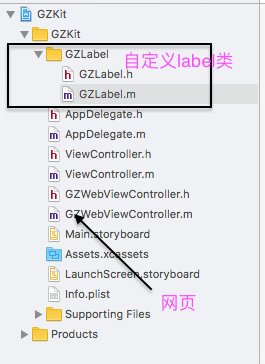
只需要依赖此自定义类,可以设置自己想要的所有效果。
二、程序实现
对UIlabel进行封装,让其识别一些Label不匹配的东西,我们就要利用
NSMutableAttributeString

来对其进行处理,我们用到的主要是它的子类

@property(nonatomic, strong)NSTextStorage *GZTextString;
主要就是对Label进行匹配,给其一个类型属性
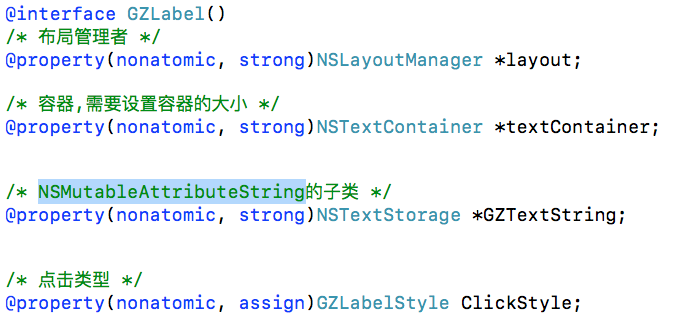
我们想要达到自己想要的效果的话,就必须要对label进行分类处理
typedef NS_ENUM(NSUInteger , GZLabelStyle){

    GZLabelStyleNone = 0,

    GZLabelStyleUser = 1,

    GZLabelStyleTopic = 2,

    GZLabelStyleLink = 3,

    GZLabelStyleAgreement = 4,

    GZLabelStyleUserDefine = 5,

    GZLabelStylePhoneNumber = 6

};
给label设置各种属性,(点击前后颜色,代理 ,点击事件等)
/* 普通文字颜色 */

@property(nonatomic , strong)UIColor *GZLabelNormalColor ;

/* 选中时高亮背景色 */

@property(nonatomic , strong)UIColor *GZLabelHightLightBackgroundColor ;

/* 字符串+显示颜色 字典数组, */

@property(nonatomic, strong)NSArray<NSDictionary *> *GZLabelMatchArr;

/* 高亮文字设置颜色*/

-(void)setHightLightLabelColor:(UIColor *)hightLightColor forGZLabelStyle:(GZLabelStyle)GZLabelStyle;

/* delegate */

@property(nonatomic, weak)id<GZLabelDelegate> delegate;

/* 点击事件block */

@property(nonatomic, strong)TapGZLabel GZTapOperation;
设置自己想要的文字颜色,范围 位置
/* 用于记录用户选中的range */

@property(nonatomic, assign)NSRange selectedRange;

/* 用户记录点击还是松开 */

@property(nonatomic, assign)BOOL isSelected;

/* 用户文字颜色 */

@property(nonatomic, strong)UIColor *userHightColor;

/* 话题文字颜色 */

@property(nonatomic, strong)UIColor *topicHightColor;

/* 链接文字颜色 */

@property(nonatomic, strong)UIColor *linkHightColor;

/* 协议/政策文字颜色 */

@property(nonatomic, strong)UIColor *agreementHightColor;

/* 电话号码文字颜色 */

@property(nonatomic, strong)UIColor *PhoneNumberHightColor;

/* 链接范围 */

@property(nonatomic, strong)NSArray *linkRangesArr;

/* 用户名范围 */

@property(nonatomic, strong)NSArray *userRangesArr;

/* 话题范围 */

@property(nonatomic, strong)NSArray *topicRangesArr;

/* 协议/政策范围 */

@property(nonatomic, strong)NSArray *agreementRangesArr;

/* 电话号码范围 */

@property(nonatomic, strong)NSArray *PhoneNumberRangesArr;

/* 自定义要查找的范围 */

@property(nonatomic, strong)NSArray *userDefineRangesArr;
再者我们需要重写系统的属性
#pragma mark 重写系统的属性

-(void)setText:(NSString *)text{

    [super setText:text];

    [self prepareText];

}

-(void)setFont:(UIFont *)font{

    [super setFont:font];

    [self prepareText];

}

-(void)setTextColor:(UIColor *)textColor{

    [super setTextColor:textColor];

    [self prepareText];

}
系统回调
#pragma mark 系统回调

// 布局子控件

-(void)layoutSubviews{

    [super layoutSubviews];

    // 设置容器的大小为Label的尺寸

    self.textContainer.size = self.frame.size;

}
字符串匹配封装
#pragma mark 字符串匹配封装

// 查找用户给定的字符串的range

-(NSArray<NSDictionary*> *)getUserDefineStringsRange{

    if (self.GZLabelMatchArr.count == 0) return nil;

    NSMutableArray<NSDictionary*> *arrM = [NSMutableArray array];

    NSString *str = [self.GZTextString string];

    for (NSDictionary *dict in self.GZLabelMatchArr) {

        NSString *subStr = dict[@"string"];

        UIColor *color = dict[@"color"];

        // 没传入字符串

        if (!subStr) return nil;

        NSRange range = [str rangeOfString:subStr];

        // 没找到

        if (range.length == 0) continue;

        NSValue *value = [NSValue valueWithBytes:&range objCType:@encode(NSRange)];

        NSMutableDictionary *aDictM = [NSMutableDictionary dictionary];

        aDictM[GZRange] = value;

        aDictM[GZColor] = color;

        [arrM addObject:[aDictM copy]];

    }

    return [arrM copy];

}
创建正则表达式对象
-(NSArray *)getRanges:(NSString *)pattern{

    // 创建正则表达式对象

    NSError *error;

    NSRegularExpression *regex = [[NSRegularExpression alloc]initWithPattern:pattern options:0 error:&error];

    return [self getRangesFromResult:regex];

}
三、运行效果
这些只是我能用到的一些属性,如果你们需要其他的可以自己试着写或者联系我,我根据你们的需求来定义!
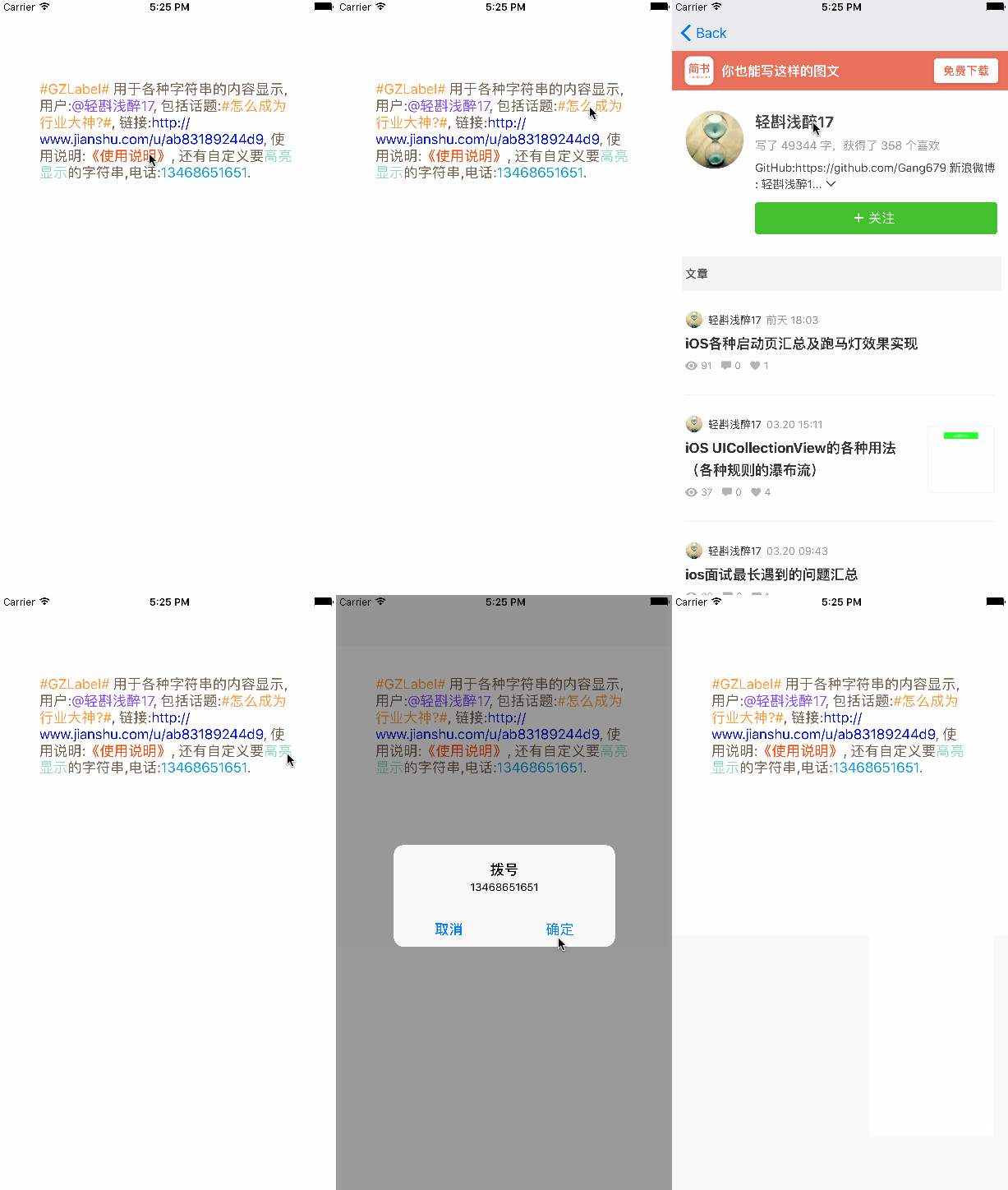
运行效果如下:
注:本文著作权归作者,由demo大师发表,拒绝转载,转载需要作者授权
封装UIlabel 辨别用户名 ,话题 ,链接,电话,高亮文字等的更多相关文章
- Laya和白鹭的高亮文字 (textFlow)
版本2.1.1.1 游戏中用的高亮文字,例如下图 "使用 2钻石 可获得金币",2钻石是不同颜色高亮的. 白鹭的高亮文字有文本样式 txt.textFlow = <Array ...
- 【Android车载系统 News | Tech 4】知乎--车载话题链接
知乎--车联网话题http://www.zhihu.com/topic/19646713
- 封装MongoDB的 asp.net 链接类
using System;using System.Collections.Generic;using System.Linq;using MongoDB; /// <summary>// ...
- NGUI-使用UILabel呈现图片和不同格式的文字
1.可以使用BBCode标记 [b]Bold[/b] 粗体[i]italic[/i] 斜体[u]underli ...
- 【Swift】获取UILabel中点击的某个功能标签文字并作出响应动作
1.需求 首先.针对UILabel中显示的多个功能标签,作出颜色标记提示. 其次.对关键字作出点击响应动作. 如图所示: 解决: 1.使用正则匹配到关键字 public static var hash ...
- UILabel图文混排显示图片和文字
//传入文字 自动图片放在左边文字紧接着后排排布 -(void)setAttrDetailLabelWithTitle:(NSString *)title { NSMutableAttributedS ...
- Android-滑动解锁高亮文字自定义TextView
public class HightLightTextView extends TextView { // 存储view的宽度 private int mTextViewWidth = 0; // 画 ...
- 谈CSS模块化【封装-继承-多态】
第一次听到“CSS模块化”这个词是在WebReBuild的第四届“重构人生”年会上,当时我还想,“哈,CSS也有模块化,我没听错吧?”事实上,我没听错,你也没看错,早就有CSS模块化这个概念了.之所以 ...
- springboot-18-springboot的参数封装
springboot的参数封装, 和springmvc相识 简单参数的封装 1.直接把表单的参数写在Controller相应的方法的形参中,适用于get方式提交,不适用于post方式提交. /** * ...
随机推荐
- 【IDEA】【maven】idea使用maven插件 打包提示找不到符号找不到类,但是却没有错误
[本篇方法如果无效,请使用终极解决方法] [终极解决方法]:https://www.cnblogs.com/sxdcgaq8080/p/10117852.html 如下,在右侧maven工具中进行打包 ...
- easyui 排序实现
1.对easyui datagrid 返回的数据,进行排序处理,便于搜索到我们的有用的信息. 例如: 2.datagrid 需要设置 sortable : true { field : 'crtTi ...
- Objective-C:深复制(拷贝)
深复制:复制对象时,如果对象中包含对象类型的实例变量,要对对象类型的实例变量也要做对象复制.新对象中的对象类型实例变量和旧对象中的对象类型实例变量指的是不同的对象.不管任何一方实例变量对对象做修改,都 ...
- find-k-pairs-with-smallest-sums
// https://discuss.leetcode.com/topic/50527/java-10ms-solution-no-priority-queue class Solution { pu ...
- eclipse maven 报错Could not get the value for parameter encoding for plugin execution default
问题描述:更改默认的maven仓库路径完成后.即存maven项目或者新建maven项目的时候出现如下错误 Could not get the value for parameter encoding ...
- Visual Studio 调试方法
1:命令窗口 CTRL + D + I,可以在立即窗口中写一些临时的代码 2:编辑并继续 选中下面的选项,可以让你在调试暂停中,修改代码,而不用重新启动, 3:执行 单步执行:F10 跳进方法:F11 ...
- C#全屏截图
Image baseImage = new Bitmap(Screen.PrimaryScreen.Bounds.Width, Screen.PrimaryScreen.Bounds.Height); ...
- Div+Css实现段落首行缩进两个字符(text-indent标签)
段落前面空两个字的距离,不要再使用空格了,用CSS实现段落首缩进两个字符.应该使用首行缩进text-indent.text-indent可以使得容器内首行缩进一定单位.比如中文段落一般每段前空两个汉字 ...
- 【Django】Django如何保证并发操作数据一致性问题
代码示例: 使用 select for update 数据库查询 select ... for update 是数据库层面上专门用来解决并发取数据后再修改的场景的,主流的关系数据库 比如mysql.p ...
- 如何在MVC的ActionLink中应用Resource文件
项目中建立Resources文件夹. 添加Resource文件,必须添加一个默认的,其他语言可以添加很多个.我这里只添加了一个中文的. 双击每个资源文件,将Access Modifier 设置成pub ...