
[Training Video - 6] [File Reading] [Java] Read Excel File Using Apache POI API
读取以下两种格式的Excel : *.xls and *.xlsx
用Apache POI API来实现,需要用到 HSSF 和 XSSF 的类库
HSSF is the POI Project's pure Java implementation of the Excel '97(-2007) (.xls) file format.
XSSF is the POI Project's pure Java implementation of the Excel 2007 OOXML (.xlsx) file format.

These 4 JARs are needed to read excel:
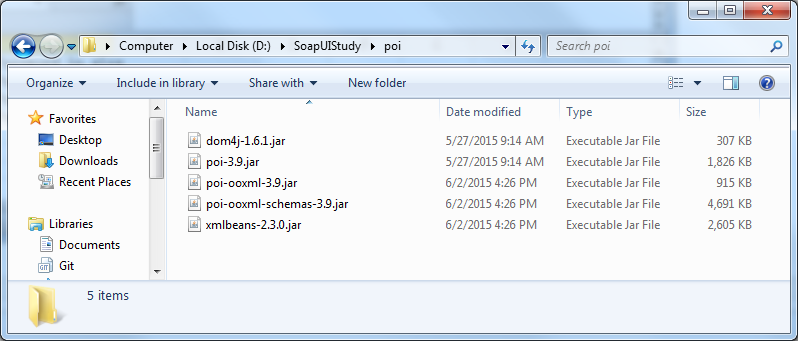
将这四个JAR包加入到Java Build Path里面去

Java code to read Excel :
package com.file.properties;

import java.io.*;

import java.util.Iterator;

import org.apache.poi.hssf.usermodel.HSSFSheet;

import org.apache.poi.hssf.usermodel.HSSFWorkbook;

import org.apache.poi.ss.usermodel.Cell;

import org.apache.poi.ss.usermodel.Row;

import org.apache.poi.xssf.usermodel.XSSFSheet;

import org.apache.poi.xssf.usermodel.XSSFWorkbook;

class ReadExcel

{

static void readXlsx(File inputFile)

{

try

{

        // Get the workbook instance for XLSX file

        XSSFWorkbook wb = new XSSFWorkbook(new FileInputStream(inputFile));

        // Get first sheet from the workbook

        XSSFSheet sheet = wb.getSheetAt(0);

        Row row;

        Cell cell;

        // Iterate through each rows from first sheet

        Iterator<Row> rowIterator = sheet.iterator();

        while (rowIterator.hasNext())

        {

                row = rowIterator.next();

                // For each row, iterate through each columns

                Iterator<Cell> cellIterator = row.cellIterator();

                while (cellIterator.hasNext())

                {

                cell = cellIterator.next();

                switch (cell.getCellType())

                {

                case Cell.CELL_TYPE_BOOLEAN:

                        System.out.println(cell.getBooleanCellValue());

                        break;

                case Cell.CELL_TYPE_NUMERIC:

                        System.out.println(cell.getNumericCellValue());

                        break;

                case Cell.CELL_TYPE_STRING:

                        System.out.println(cell.getStringCellValue());

                        break;

                case Cell.CELL_TYPE_BLANK:

                        System.out.println(" ");

                        break;

                default:

                        System.out.println(cell);

                }

                }

        }

}

catch (Exception e)

{

        System.err.println("Exception :" + e.getMessage());

}

}

static void readXls(File inputFile)

{

try

{

        // Get the workbook instance for XLS file

        HSSFWorkbook workbook = new HSSFWorkbook(new FileInputStream(inputFile));

        // Get first sheet from the workbook

        HSSFSheet sheet = workbook.getSheetAt(0);

        Cell cell;

        Row row;

        // Iterate through each rows from first sheet

        Iterator<Row> rowIterator = sheet.iterator();

        while (rowIterator.hasNext())

        {

                row = rowIterator.next();

                // For each row, iterate through each columns

                Iterator<Cell> cellIterator = row.cellIterator();

                while (cellIterator.hasNext())

                {

                cell = cellIterator.next();

                switch (cell.getCellType())

                {

                case Cell.CELL_TYPE_BOOLEAN:

                        System.out.println(cell.getBooleanCellValue());

                        break;

                case Cell.CELL_TYPE_NUMERIC:

                        System.out.println(cell.getNumericCellValue());

                        break;

                case Cell.CELL_TYPE_STRING:

                        System.out.println(cell.getStringCellValue());

                        break;

                case Cell.CELL_TYPE_BLANK:

                        System.out.println(" ");

                        break;

                default:

                        System.out.println(cell);

                }

                }

        }

}

catch (FileNotFoundException e)

{

        System.err.println("Exception" + e.getMessage());

}

catch (IOException e)

{

        System.err.println("Exception" + e.getMessage());

}

}

public static void main(String[] args)

{

        File inputFile = new File("D:\\SoapUIStudy\\input.xls");

        File inputFile2 = new File("D:\\SoapUIStudy\\input.xlsx");

        readXls(inputFile);

        readXlsx(inputFile2);

}

}
Result :
User in xls
Password in xls
U1
P1
U2
P2
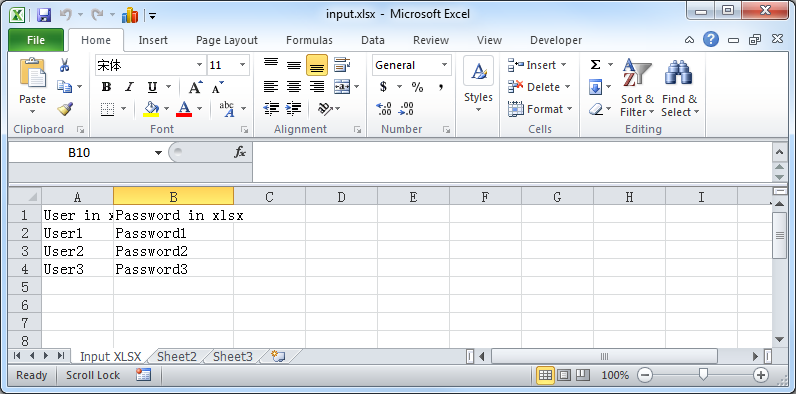
User in xlsx
Password in xlsx
User1
Password1
User2
Password2
User3
Password3
[Training Video - 6] [File Reading] [Java] Read Excel File Using Apache POI API的更多相关文章
- [Training Video - 6] [File Reading] [Java] Read Properties file
package com.file.properties; import java.io.FileInputStream; import java.util.Properties; public cla ...
- [Training Video - 6] [File Reading] [Java] Create and Write Excel File Using Apache POI API
package com.file.properties; import java.io.File; import java.io.FileNotFoundException; import java. ...
- Apache POI – Reading and Writing Excel file in Java
来源于:https://www.mkyong.com/java/apache-poi-reading-and-writing-excel-file-in-java/ In this article, ...
- java 读取excel 2007 .xlsx文件 poi实现
工作需要读取excel里面的行内容,使用java实现较为简单. 在最开始,尝试使用 jxl-2.6.12 来实现读取excel 的行内容.但是按照网上的方法,程序根本无法正确处理文件流.经过谷姐的一番 ...
- Java对Excel数据处理(利用POI解析Excel)
前言 研究生复试结束我在学校官网上看到了全校按姓氏排列的拟录取名单,但是官网并没有给出每个人的专业,只有学号,另外还知道本专业的复试名单,所以我想知道对于本专业的拟录取名单.具体做法就是,扫描复试名单 ...
- java 在Excel中插入图片 POI实现
一.POI简介 Jakarta POI 是apache的子项目,目标是处理ole2对象.它提供了一组操纵Windows文档的Java API 目前比较成熟的是HSSF接口,处理MS Excel(97- ...
- Java读写Excel文件,利用POI
直接看工具类代码吧, package com.example.demo.util; import com.example.demo.entity.ExcelDataVO; import org.apa ...
- Java操作Excel工具类(poi)
分享一个自己做的poi工具类,写不是很完全,足够我自己当前使用,有兴趣的可以自行扩展 1 import org.apache.commons.lang3.exception.ExceptionUtil ...
- [转]How to insert a row between two rows in an existing excel with HSSF (Apache POI)
本文转自:http://stackoverflow.com/questions/5785724/how-to-insert-a-row-between-two-rows-in-an-existing- ...
随机推荐
- 一段四表联查外加字符拼接的sql,留存备查
select DISTINCT [P_ID],[P_CODE],[P_CODE_OLD],[P_NAME],[NATIVE_PLACE],[GENDER],[EDUCATION],[EMPLOY_DA ...
- mysql索引之一:索引基础(B-Tree索引、哈希索引、聚簇索引、全文(Full-text)索引区别)(唯一索引、最左前缀索引、前缀索引、多列索引)
没有索引时mysql是如何查询到数据的 索引对查询的速度有着至关重要的影响,理解索引也是进行数据库性能调优的起点.考虑如下情况,假设数据库中一个表有10^6条记录,DBMS的页面大小为4K,并存储10 ...
- select函数源码阅读
fd_set结构体 #undef __NFDBITS /* It's easier to assume 8-bit bytes than to get CHAR_BIT. */ #define __N ...
- SpringMVC+Spring+Mybatis -- 集成之旅
准备 首先介绍一下,我的工具使用的是STS, 需要的童鞋可以到官网下载:http://spring.io/tools/sts/all 使用STS是因为她集成了Maven进行 “包“ 管理以及自带 We ...
- 阶段性总结(PHP-JSON)
PHP JSON 本节我们将为大家介绍如何使用 PHP 语言来编码和解码 JSON 对象. 在没有json编码和解码之前,我们 html前台 和 PHP后台 之间的数据传输只能用字符串的方式传输. 但 ...
- 深入浅出 Java Concurrency (12): 锁机制 part 7 信号量(Semaphore)
Semaphore 是一个计数信号量.从概念上讲,信号量维护了一个许可集.如有必要,在许可可用前会阻塞每一个 acquire(),然后再获取该许可.每个 release() 添加一个许可,从而可能 ...
- Tkinter Menu(菜单)
Tkinter Menu: 这个小工具的目标是,让我们来创建我们的应用程序,可以通过使用各种菜单.核心功能,提供的方式来创建三个菜单类型:弹出式,顶层,和下拉 这个小工具的目标是,让我们来创建 ...
- PHP编译安装系列
徐亮伟, 江湖人称标杆徐.多年互联网运维工作经验,曾负责过大规模集群架构自动化运维管理工作.擅长Web集群架构与自动化运维,曾负责国内某大型电商运维工作. 个人博客"徐亮伟架构师之路&quo ...
- 4、数据类型二:Lists
1.关于list的组织形式 列表数据类型(Lists)可以存储一个有序的字符串列表,常用的操作时向列表两段添加元素,或者获取列表的某一个片段.列表类型的底层实现是一个双向链表(double linke ...
- leetcode747
public class Solution { public int DominantIndex(int[] nums) { var list = new List<KeyValuePair&l ...