
salesforce lightning零基础学习(十五) 公用组件之 获取表字段的Picklist(多语言)
此篇参考:salesforce 零基础学习(六十二)获取sObject中类型为Picklist的field values(含record type)
我们在lightning中在前台会经常碰到获取picklist的values然后使用select option进行渲染成下拉列表,此篇用于实现针对指定的sObject以及fieldName(Picklist类型)获取此字段对应的所有可用的values的公用组件。因为不同的record type可能设置不同的picklist values,所以还有另外的参数设置针对指定的record type developer name去获取指定的record type对应的Picklist values.
一. PicklistService公用组件声明实现
Common_PicklistController.cls:有三个形参,其中objectName以及fieldName是必填参数,recordTypeDeveloperName为可选参数。
 public without sharing class Common_PicklistController {

     @AuraEnabled(cacheable=true)

     public static List<Map<String,String>> getPicklistValues(String objectName, String fieldName,String recordTypeDeveloperName) {

         //1. use object and field name get DescribeFieldResult and also get all the picklist values

         List<Schema.PicklistEntry> allPicklistValuesByField;

         try {

             List<Schema.DescribeSobjectResult> objDescriptions = Schema.describeSObjects(new List<String>{objectName});

             Schema.SObjectField field = objDescriptions[0].fields.getMap().get(fieldName);

             Schema.DescribeFieldResult fieldDescribeResult = field.getDescribe();

             allPicklistValuesByField = fieldDescribeResult.getPicklistValues();

         } catch (Exception e) {

             throw new AuraHandledException('Failed to retrieve values : '+ objectName +'.'+ fieldName +': '+ e.getMessage());

         }

         //2. get all active field name -> label map

         List<Map<String,String>> activeOptionMapList = new List<Map<String,String>>();

         Map<String,String> optionValue2LabelMap = new Map<String,String>();

         List<String> optionValueList;

         for(Schema.PicklistEntry entry : allPicklistValuesByField) {

             if (entry.isActive()) {

                 System.debug(LoggingLevel.INFO, '*** entry: ' + JSON.serialize(entry));

                 optionValue2LabelMap.put(entry.getValue(), entry.getLabel());

             }

         }

         //3. generate list with option value(with/without record type)

         if(String.isNotBlank(recordTypeDeveloperName)) {

             optionValueList = PicklistDescriber.describe(objectName,recordTypeDeveloperName,fieldName);

         } else {

             optionValueList = new List<String>(optionValue2LabelMap.keySet());

         }

         //4. generate and format result

         if(optionValueList != null) {

             for(String option : optionValueList) {

                 String optionLabel = optionValue2LabelMap.get(option);

                 Map<String,String> optionDataMap = new Map<String,String>();

                 optionDataMap.put('value',option);

                 optionDataMap.put('label', optionLabel);

                 activeOptionMapList.add(optionDataMap);

             }

         }

         return activeOptionMapList;

     }

 }
Common_PicklistService.cmp:声明了getPicklistInfo方法,有以下三个主要参数.objectName对应sObject的API名字,fieldName对应的此sObject中的Picklist类型的字段,recordTypeDeveloperName对应这个sObject的record type的developer name
 <aura:component access="global" controller="Common_PicklistController">

     <aura:method access="global" name="getPicklistInfo"  description="Retrieve active picklist values and labels mapping with(without) record type" action="{!c.getPicklistInfoAction}">

         <aura:attribute type="String" name="objectName" required="true" description="Object name"/>

         <aura:attribute type="String" name="fieldName" required="true" description="Field name"/>

         <aura:attribute type="String" name="recordTypeDeveloperName" description="record type developer name"/>

         <aura:attribute type="Function" name="callback" required="true" description="Callback function that returns the picklist values and labels mapping as [{value: String, label: String}]"/>

     </aura:method>

 </aura:component>
Common_PicklistServiceController.js: 获取传递过来的参数,调用后台方法并对结果放在callback中。
 ({

     getPicklistInfoAction : function(component, event, helper) {

         const params = event.getParam('arguments');

         const action = component.get('c.getPicklistValueList');

         action.setParams({

             objectName : params.objectName,

             fieldName : params.fieldName,

             recordTypeDeveloperName : params.recordTypeDeveloperName

         });

         action.setCallback(this, function(response) {

             const state = response.getState();

             if (state === 'SUCCESS') {

                 params.callback(response.getReturnValue());

             } else if (state === 'ERROR') {

                 console.error('failed to retrieve picklist values for '+ params.objectName +'.'+ params.fieldName);

                 const errors = response.getError();

                 if (errors) {

                     console.error(JSON.stringify(errors));

                 } else {

                     console.error('Unknown error');

                 }

             }

         });

         $A.enqueueAction(action);

     }

 })
二. 公用组件调用
上面介绍了公用组件以后,下面的demo是如何调用。
SimplePicklistDemo引入Common_PicklistService,设置aura:id用于后期获取到此component,从而调用方法
 <aura:component implements="flexipage:availableForAllPageTypes">

     <!-- include common picklist service component -->

     <c:Common_PicklistService aura:id="service"/>

     <aura:handler name="init" value="{!this}" action="{!c.doInit}"/>

     <aura:attribute name="accountTypeList" type="List"/>

     <aura:attribute name="accountTypeListByRecordType" type="List"/>

     <lightning:layout verticalAlign="center" class="x-large">

         <lightning:layoutItem flexibility="auto" padding="around-small">

             <lightning:select label="account type">

                 <aura:iteration items="{!v.accountTypeList}" var="type">

                     <option value="{!type.value}" text="{!type.label}"></option>

                 </aura:iteration>

             </lightning:select>

         </lightning:layoutItem>

         <lightning:layoutItem flexibility="auto" padding="around-small">

             <lightning:select label="account type with record type">

                 <aura:iteration items="{!v.accountTypeListByRecordType}" var="type">

                     <option value="{!type.value}" text="{!type.label}"></option>

                 </aura:iteration>

             </lightning:select>

         </lightning:layoutItem>

     </lightning:layout>

 </aura:component>
SimplePicklistDemoController.js:初始化方法用于获取到公用组件component然后获取Account的type的values,第一个是获取所有的values/labels,第二个是获取指定record type的values/labels。
 ({

     doInit : function(component, event, helper) {

         const service = component.find('service');

         service.getPicklistInfo('Account','type','',function(result) {

             component.set('v.accountTypeList', result);

         });

         service.getPicklistInfo('Account','type','Business_Account',function(result) {

             component.set('v.accountTypeListByRecordType',result);

         });

     }

 })
三.效果展示:
1. account type的展示方式
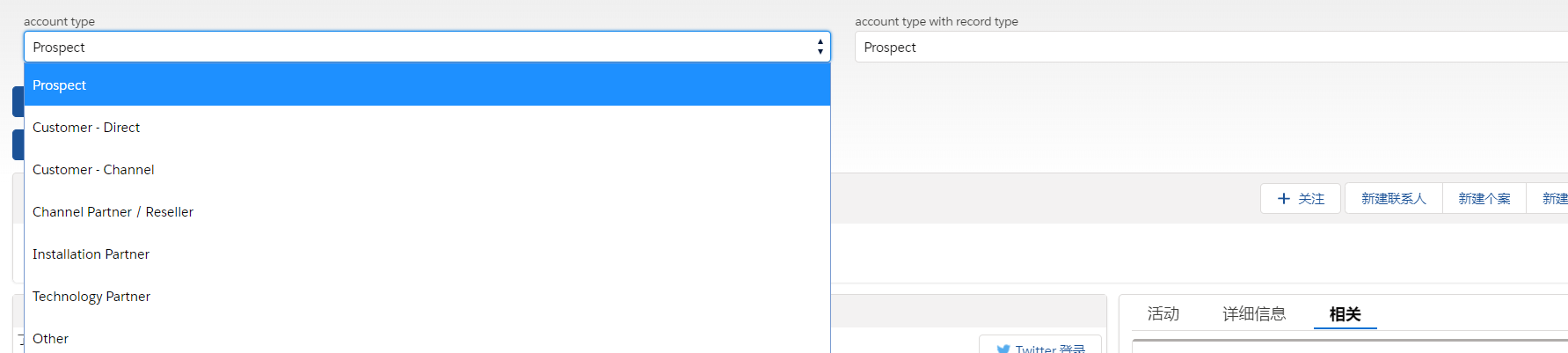
2. account type with record type的展示方式。

总结:篇中介绍了Picklist values针对with/without record type的公用组件的使用,感兴趣的可以进行优化,篇中有错误的欢迎指出,有不懂的欢迎留言。
salesforce lightning零基础学习(十五) 公用组件之 获取表字段的Picklist(多语言)的更多相关文章
- salesforce lightning零基础学习(十六) 公用组件之 获取字段label信息
我们做的项目好多都是多语言的项目,针对不同国家需要展示不同的语言的标题.我们在classic中的VF page可谓是得心应手,因为系统中已经封装好了我们可以直接在VF获取label/api name等 ...
- salesforce lightning零基础学习(十四) Toast 浅入浅出
本篇参考: https://developer.salesforce.com/docs/component-library/bundle/force:showToast/specification h ...
- salesforce lightning零基础学习(十二) 自定义Lookup组件的实现
本篇参考:http://sfdcmonkey.com/2017/01/07/custom-lookup-lightning-component/,在参考的demo中进行了简单的改动和优化. 我们在ht ...
- salesforce lightning零基础学习(十三) 自定义Lookup组件(Single & Multiple)
上一篇简单的介绍了自定义的Lookup单选的组件,功能为通过引用组件Attribute传递相关的sObject Name,捕捉用户输入的信息,从而实现搜索的功能. 我们做项目的时候,可能要从多个表中获 ...
- salesforce lightning零基础学习(十) Aura Js 浅谈三: $A、Action、Util篇
前两篇分别介绍了Component类以及Event类,此篇将会说一下 $A , Action以及 Util. 一. Action Action类通常用于和apex后台交互,设置参数,调用后台以及对结 ...
- salesforce lightning零基础学习(十七) 实现上传 Excel解析其内容
本篇参考: https://developer.mozilla.org/zh-CN/docs/Web/API/FileReader https://github.com/SheetJS/sheetjs ...
- salesforce lightning零基础学习(二) lightning 知识简单介绍----lightning事件驱动模型
看此篇博客前或者后,看一下trailhead可以加深印象以及理解的更好:https://trailhead.salesforce.com/modules/lex_dev_lc_basics 做过cla ...
- salesforce lightning零基础学习(一) lightning简单介绍以及org开启lightning
lightning对于开发salesforce人员来说并不陌生,即使没有做过lightning开发,这个名字肯定也是耳熟能详.原来的博客基本都是基于classic基于配置以及开发,后期博客会以ligh ...
- salesforce lightning零基础学习(五) 事件阶段(component events phase)
上一篇介绍了lightning component events的简单介绍.此篇针对上一篇进行深入,主要讲的内容为component event中的阶段(Phase). 一. 阶段(Phase)的概念 ...
随机推荐
- Qualcomm-Atheros-QCA9377-Wifi-Linux驱动
资源来自:https://download.csdn.net/download/ichdy/10331646 已经下载好了,发现无法使用,本人系统Centos7.2,如果有安装成功,并且可以正常使用的 ...
- 百万年薪python之路 -- MySQL数据库之 MySQL行(记录)的操作(二) -- 多表查询
MySQL行(记录)的操作(二) -- 多表查询 数据的准备 #建表 create table department( id int, name varchar(20) ); create table ...
- 解决js计算0.1+0.2 !==0.3
经常做用js数据运算的同学应该了解,在js中,0.1+0.2不会等于0.3,而是等于: 我一开始发现这个bug的时候也觉得很奇怪,那怎么去解决这个bug,让0.1+0.2 最后能得到0.3呢? 方法一 ...
- Java 异常(二) 自定义异常
上篇文章介绍了java中异常机制,本文来演示一下自定义异常 上篇文章讲到非运行时异常和运行时异常,下面我们来看一下简单实现代码. 首先,先来看下演示目录 非运行时异常 也称 检查时异常 public ...
- Solr分片机制以及Solrcloud搭建及分片操作
Solr分片描述 分片是集合的逻辑分区,包含集合中文档的子集,这样集合中的每个文档都正好包含在一个分片中.集合中包含每个文档的分片取决于集合的整体"分片"策略. 当您的集合对于一个 ...
- Spring中@Resource注解报错
描述:Spring框架中,@Resource注解报错,在书写时没有自动提示 解决方法:因为maven配置文件的pom.xml文件中缺少javax.annotation的依赖,在pom.项目路中加入依赖 ...
- MIT线性代数:4.A的LU分解
- 学习笔记30_ORM框架
*在以往DAL层中,操作数据库使用DataTable,如果使得数据表DataTable转为List<>的话,写错属性名,在编译阶段是查不出来的,而ORM框架能解决此问题. *ORM是指面向 ...
- [知识图谱]Neo4j知识图谱构建(neo4j-python-pandas-py2neo-v3)
neo4j-python-pandas-py2neo-v3 利用pandas将excel中数据抽取,以三元组形式加载到neo4j数据库中构建相关知识图谱 Neo4j知识图谱构建 1.运行环境: pyt ...
- Laravel用户认证
前期准备 Laravel的权限配置文件位于 config/auth.php,Laravel的认证组件由"guards"和"providers"组成, Guard ...